

Key takeaways
- Five 2.5-inch SATA SSDs that revive an aging laptop or desktop, with the DRAM, endurance and cloning details that matter before you swap the old drive.
A laptop or desktop that still boots from a spinning hard drive is not necessarily obsolete. In most aging machines the processor and memory remain serviceable, and the mechanical drive is the single part slowing down every boot, launch and file copy. Replacing it with a 2.5-inch SATA SSD is the cheapest meaningful revival available, because the SATA interface tops out at speeds any modern flash drive can saturate, and the swap needs no other new hardware. The five drives below are all 1TB models in the standard 7mm 2.5-inch shell, chosen for upgrade duty: proven controllers, published endurance ratings, and cloning software or migration support that makes moving an existing Windows install painless.
As an Amazon Associate, we earn from qualifying purchases.
Quick answer
For most upgrade jobs, the Crucial MX500 1TB is the safest pick: a DRAM cache, 560 MB/s reads and a five-year warranty. The SK hynix Gold S31 matches it on speed with a higher 600 TBW endurance rating. The Samsung 870 QVO trades endurance class for Samsung’s migration tools, while the Crucial BX500 covers tight budgets.
Crucial MX500 1TB

The MX500 is the default recommendation for reviving an older machine because it behaves like a premium drive in the areas an upgrade exposes. Key specs: 1TB capacity, SATA III 6 Gb/s interface, 2.5-inch 7mm shell with a 9.5mm spacer for older bays, sequential reads up to 560 MB/s and writes up to 510 MB/s, Micron 3D TLC NAND, a dedicated DRAM cache, endurance rated at 360 TBW, and a five-year limited warranty. The DRAM cache matters more than the headline speeds here. During a long clone or a big photo-library copy, DRAM-equipped drives hold their write pace instead of collapsing once the fast cache fills, and everyday responsiveness stays consistent as the drive fills up. The MX500 also supports 256-bit AES hardware encryption and ships with access to Acronis cloning software, so an existing system can be copied over without a reinstall. One honest caveat belongs with every Crucial pick right now: Micron has been winding down the Crucial consumer brand, and earlier program notes flagged that remaining warranty support may be handled through refunds rather than replacement stock. The drive itself is a mature, well-documented design; buyers who want the longest support runway should weigh the Samsung and SK hynix options below.
Samsung 870 QVO 1TB

The 870 QVO is Samsung’s capacity-first SATA line, and the 1TB model (MZ-77Q1T0B/AM) suits upgraders whose old drive is full as much as slow. Key specs: 1TB of Samsung V-NAND 4-bit QLC flash, Samsung MKX controller, 1GB of LPDDR4 DRAM cache, sequential reads up to 560 MB/s and writes up to 530 MB/s through its Intelligent TurboWrite SLC cache, endurance rated at 360 TBW, a three-year limited warranty, and a slim 6.8mm shell. QLC flash stores four bits per cell, which lowers cost per gigabyte but means sustained writes slow more noticeably once the TurboWrite cache is exhausted during very large transfers. For the typical upgrade workload — an operating system, applications and a document library — that trade rarely shows. What does show is Samsung’s software: the Data Migration tool clones an existing Windows installation with minimal steps, and Magician handles firmware updates and health checks afterward. Buyers sometimes confuse this line with Samsung’s NVMe models that had a widely reported early firmware health issue; that problem involved the 980 PRO and 990 PRO PCIe drives, not this SATA family, and it is not a reason to avoid the QVO.
SK hynix Gold S31 1TB
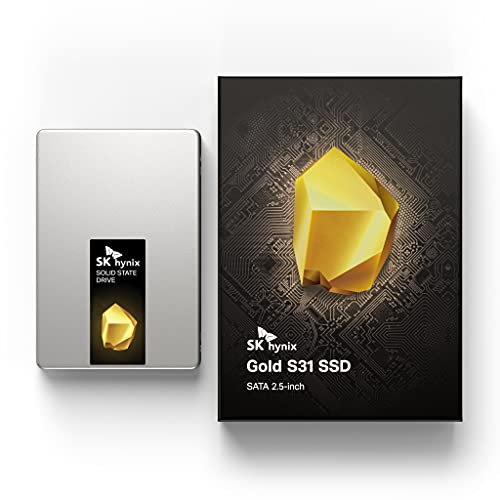
SK hynix makes its own NAND, its own controller and its own DRAM, and the Gold S31 is the result of that vertical integration aimed squarely at SATA upgrades. Key specs: 1TB capacity, SATA III 6 Gb/s, standard 2.5-inch 7mm aluminum shell, sequential reads up to 560 MB/s and writes up to 525 MB/s, a DRAM cache, endurance rated at 600 TBW, a 1.5 million hour MTBF figure, and a five-year warranty. The 600 TBW rating is the headline: it is the highest endurance figure in this roundup, roughly two-thirds higher than the MX500 and QVO, which makes the S31 the natural pick for a machine that will keep working hard after its revival — a family PC that records and deletes large video files, or a small-office desktop handling daily backups. Sustained-write behavior is the other strength; the drive was designed to hold its pace through long transfers rather than post a strong burst number. The trade-offs are practical rather than technical. SK hynix’s consumer software and support presence in the US is thinner than Samsung’s or Crucial’s, and the listing does not bundle cloning software, so upgraders should plan on a separate cloning tool or a fresh install.
SanDisk Ultra 3D 1TB

The Ultra 3D (model SDSSDH3-1T00-G25) is Western Digital’s mainstream SATA upgrade drive under the SanDisk brand, and its hardware is a close sibling of the WD Blue 3D. Key specs: 1TB capacity, SATA III 6 Gb/s, 2.5-inch 7mm shell, Marvell 88SS1074 controller with a DRAM cache, sequential reads up to 560 MB/s and writes up to 530 MB/s, random reads up to 95,000 IOPS, endurance rated at 400 TBW, nCache 2.0 SLC caching, and a three-year limited warranty. That spec sheet sits comfortably in the middle of this group: a real DRAM cache, endurance a step above the QVO and BX500, and random-read performance that keeps an old operating system feeling responsive. The drive has been on the market for years, which cuts both ways — the design is thoroughly proven, but listings can be inconsistent about which retail revision is shipping, so check the model number on arrival. One caution specific to this brand: the sudden-failure reports that hit SanDisk portable SSDs in 2023 involved the Extreme and Extreme Pro portable lines, not this internal SATA drive, and none of those portable models appears here. For a straightforward laptop revival at the middle of the group, the Ultra 3D remains a sound, unglamorous choice.
Crucial BX500 1TB

The BX500 is the budget route into this upgrade, and it gets there by leaving out the DRAM cache. Key specs: 1TB capacity, SATA III 6 Gb/s, 2.5-inch 7mm shell, Micron 3D NAND, sequential reads up to 540 MB/s and writes up to 500 MB/s, endurance rated at 360 TBW, a three-year limited warranty, and Dynamic Write Acceleration, which uses part of the flash as a fast SLC write cache. It also includes access to Acronis True Image for Crucial for cloning. For the job most of these drives actually do — replacing a hard drive in a laptop used for browsing, documents and streaming — the missing DRAM is hard to notice, and the BX500 still feels dramatically faster than any spinning disk. The compromise appears during long, heavy writes: copying a huge game library or a full system image can slow once the SLC cache fills, and random performance under load trails the DRAM models above. That is an acceptable trade when the alternative is keeping a failing hard drive, and the endurance rating matches the MX500 despite the lower positioning. The same Crucial brand wind-down caveat applies here, so weigh the shorter three-year warranty and the refund-based support picture before choosing it over the S31.
How to choose
Start with fit. Every drive here is a 7mm 2.5-inch SATA model, which covers nearly all laptops and desktop bays; a few very old laptops need the 9.5mm spacer the MX500 includes. Confirm the machine actually has a SATA bay — some thin laptops from the last decade use M.2 drives instead, and no 2.5-inch drive will fit those. Next, decide on DRAM. A DRAM cache (MX500, 870 QVO, Gold S31, Ultra 3D) keeps write speeds steadier during cloning and large copies; a DRAM-less drive like the BX500 is fine for light duty. Then look at endurance: TBW ratings here run from 360 to 600, and the Gold S31’s 600 TBW suits write-heavy second lives. Plan the migration before ordering — Samsung bundles its own cloning tool, Crucial offers Acronis access, and the S31 needs a third-party tool. Finally, two honest distinctions: the Samsung NVMe firmware issue and the SanDisk portable SSD failures both involved different product lines, not these SATA drives; and Micron’s Crucial wind-down means Crucial warranty claims may resolve as refunds. No CPSC recall covers any of these five drives.
Who should skip
Skip this whole category if your computer has no 2.5-inch SATA bay — ultrabooks with soldered storage or M.2-only slots need a different part entirely. Skip it if the machine’s problem is a failing motherboard, a swollen battery or too little memory; an SSD cannot fix those, and the money is better held for a replacement computer. Skip the QLC 870 QVO if the revived machine will write very large files daily, and skip the DRAM-less BX500 if you regularly clone or image full drives. Finally, skip any SSD upgrade as a data-recovery strategy: if the old hard drive holds the only copy of important files and is already clicking or disappearing from the BIOS, image it first or consult a recovery professional before swapping anything.
FAQ
Will a SATA SSD fit my ten-year-old laptop?
Almost certainly, if the laptop has a removable 2.5-inch hard drive. All five drives here use the standard 7mm thickness and SATA connectors, and the MX500 even includes a spacer for taller 9.5mm bays. The exceptions are ultrabooks with M.2 slots or soldered storage, so check the service manual or the existing drive’s shape before ordering.
Do I need to reinstall Windows after the swap?
No. Cloning copies your existing installation, files and settings to the new drive, and the computer boots from the SSD as if only the storage changed. Samsung includes a Data Migration tool, Crucial provides Acronis access with the MX500 and BX500, and free third-party cloning tools cover the SK hynix and SanDisk drives. A fresh install also works if you prefer one.
How much faster will an old computer actually feel?
Boot times typically fall from over a minute to well under twenty seconds, and programs that took several seconds to open launch almost immediately, because an SSD reads small files hundreds of times faster than a spinning drive. Games and large applications still load at SATA speeds, not NVMe speeds, so expect a dramatic everyday improvement rather than a new-machine transformation.
What happens to my old hard drive after upgrading?
Keep it as a backup for at least a few weeks until the new drive proves reliable, then reuse it in an inexpensive USB enclosure as portable storage or a backup target. If it holds sensitive data you no longer need, wipe it before disposal. Do not throw it away immediately; it is your only rollback if the clone missed something.
Final verdict
Every drive here will transform a hard-drive computer; the differences are in endurance, write behavior and migration support. The Crucial MX500 is the balanced default, the SK hynix Gold S31 is the endurance pick, the Samsung 870 QVO brings the smoothest cloning software, the SanDisk Ultra 3D is the proven middle option, and the Crucial BX500 covers the tightest budgets. Match the drive to the machine’s next job, clone carefully, and keep the old drive as a backup until the upgrade has earned your trust.
Product and ASIN Reference
| Product | ASIN |
|---|---|
| Crucial MX500 1TB 3D NAND SATA 2.5 Inch Internal SSD | B077SF8KMG |
| Samsung 870 QVO 1TB SATA III 2.5 Inch SSD | B089C73T72 |
| SK hynix Gold S31 1TB SATA 2.5 Inch Internal SSD | B07SNHB4RC |
| SanDisk Ultra 3D 1TB Internal SSD SATA III 2.5 Inch | B071KGRXRG |
| Crucial BX500 1TB 3D NAND SATA 2.5 Inch Internal SSD | B07YD579WM |
More from Amazon
Programs that pair well with the guide above. Offers and eligibility are set by Amazon and may change.
A free business account with business pricing and bulk-buying tools for work, shop or home office.
Create a business accountFree shipping on eligible items, Prime Video and more. Eligible new members can start with a free trial.
Start a Prime free trialAudiobooks and podcasts to listen to on the go. Eligible new members can start with a free trial.
Try Audible freeAd-free music streaming. Eligible new subscribers can start with a free trial.
Try Music Unlimited freeAs an Amazon Associate we earn from qualifying purchases.
Write Your Review
No reviews yet. Be the first to share your experience!