

Key takeaways
- Compare the best PCIe SATA expansion cards by port count, chipset and slot fit, from a simple 2-port card to a 16-port model for large drive arrays.
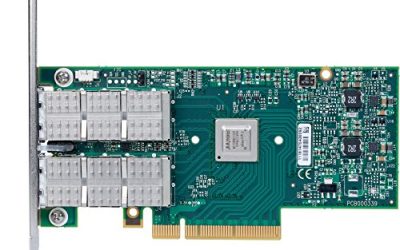
Running out of SATA ports is one of the most common walls a storage build hits. The motherboard may offer six headers, yet a data recovery workstation, a home server, or a backup machine can easily need eight, twelve, or more connections once boot drives, archive drives, and docking drives are counted. A PCIe SATA expansion card solves that problem with a single slot: drop the card in, connect the cables, and the operating system sees a fresh set of standard SATA ports for hard drives and SATA SSDs.
The cards in this guide are simple consumer add-in controllers. They present each drive to the system as an ordinary SATA device, they do not build hardware RAID arrays, and they do not pretend to be enterprise host bus adapters. What separates one from another is port count, the controller chip behind those ports, the width and generation of the PCIe link feeding the card, and the small practical details such as included cables and bracket height. The five picks below cover the realistic range, from a two-port card for a single extra drive pair up to a sixteen-port card for a full tower of archive disks.
As an Amazon Associate, we earn from qualifying purchases.
Quick answer
For most desktops, the Syba SI-PEX40064 is the safest pick: four SATA III ports on a proven Marvell controller, a low-profile bracket included, and listed support from Windows XP through Windows 11 plus Linux. Anyone building a many-drive archive box should look at the ACTIMED 16-port card instead, while the IO CREST SI-PEX40156 suits buyers who want the ASMedia ASM1064 chip on a PCIe 3.0 link.
Syba SI-PEX40064 4-Port SATA III Card

The SI-PEX40064, sold under Syba’s IO CREST brand, is the reference design for this whole category. It uses the Marvell 88SE9215 controller, a single-chip design that drives four SATA III ports directly with no port multipliers in the path. Each port is a genuine 6Gbps link, and because the chip speaks standard AHCI, modern Windows and Linux versions pick the card up with inbox drivers in most cases.
Specs (from the listing):
- Ports: 4 internal SATA III (6Gbps)
- Chipset: Marvell 88SE9215
- Host interface: PCI Express 2.0 x1
- RAID: non-RAID, drives presented individually
- Brackets: full-height fitted, low-profile bracket included
- Listed OS support: Windows 11, 10, 8, 7, XP, Vista, and Linux
The honest limitation is the host link. A PCIe 2.0 x1 slot is the narrowest doorway any card in this roundup uses, so the four ports share a modest upstream pipe. Four hard drives will never notice, since a spinning disk cannot fill even one SATA III link on its own. Four SATA SSDs copying at once will share rather than sprint, which is the trade this older, cheaper design makes. For a recovery bench or a media server that mostly reads one or two drives at a time, that trade is usually invisible.
BEYIMEI 8-Port SATA III Card

Eight ports is where port multipliers enter the picture. The BEYIMEI card pairs a Marvell 88SE9215 controller with a JMicron JMB575 multiplier chip, so four native controller ports fan out into eight physical connectors. The listing is explicit about the supporting features: AHCI 1.0 and IDE modes, native command queuing, hot swap support, and FIS-based port multiplier switching, which is the mode that lets the controller interleave traffic to drives sharing a channel.
Specs (from the listing):
- Ports: 8 internal SATA III (6Gbps)
- Chipset: Marvell 88SE9215 plus JMB575 port multiplier
- Host interface: PCI Express x1, following the PCI-Express 2.0 specification
- RAID: non-RAID
- In the box: 8 SATA cables, a 15-pin SATA power splitter cable, low-profile bracket
- Listed OS support: Windows 8.x and 10, Windows Server 2008 R2, 2012, 2016 and 2019, Linux 2.6.x to 4.x
The bundled cables matter more than they sound. Eight loose SATA leads and a power splitter are exactly the parts a builder forgets to order, and BEYIMEI includes both. The bandwidth story is the same as every multiplier design: drives hanging off the same multiplier share one controller port, so this card is built for capacity, not for running eight SSD benchmarks in parallel. As a way to hang a wall of archive hard drives off one slot, it is a sensible, complete package.
ACTIMED 16-Port SATA III Card

Sixteen ports on a single x1 card sounds like a misprint until the design is clear. The ACTIMED card runs one ASMedia ASM1064 controller and three JMB575 port multipliers, a tree that turns four native ports into sixteen connectors. The listing presents the card for Windows, Mac, and Linux systems, and the package leans into the bulk-storage role with sixteen SATA cables and a power splitter included.
Specs (from the listing):
- Ports: 16 internal SATA III (6Gbps)
- Chipset: ASMedia ASM1064 plus three JMB575 port multipliers
- Host interface: PCI Express x1, fits x1, x4, x8, and x16 slots
- RAID: non-RAID
- In the box: 16 SATA cables, power splitter, low-profile bracket
- Listed OS support: Windows, Mac, and Linux
This is the card for a drive archive, a backup target, or a media vault where the question is how many spindles one chassis can hold. Sixteen hard drives pulling data one or two at a time will behave perfectly well. Sixteen drives in a software array resilvering at full tilt will queue up behind the shared upstream link and the multiplier stages, and no honest reading of the design should expect otherwise. Buy it for density, and it delivers exactly that.
MZHOU 2-Port SATA III Card ( PCE2PCIE A01 )

At the other end of the scale, sometimes a build needs exactly two more ports: one system SSD and one bulk hard drive, or a pair of optical and archive drives in a compact case. The MZHOU card, model PCE2PCIE A01, is the budget answer. It is built on the JMicron JMB582, a small two-port controller with a PCIe 3.0 x1 host link, so each of its two drives gets a comparatively wide path to the system.
Specs (from the listing and manual):
- Ports: 2 internal SATA III (6Gbps, also 3Gbps and 1.5Gbps)
- Chipset: JMicron JMB582
- Host interface: PCI Express 3.0 x1 card, fits x1, x2, x4, x8, and x16 slots
- RAID: non-RAID
- In the box: card and low-profile bracket
- Listed OS support: Windows XP, Server 2003, Vista, 7, 8, 10, 11, and Linux
Because only two drives share the link, this is the one card in the roundup where a pair of SATA SSDs can stretch close to their individual pace during ordinary transfers. It is also the natural fit for small-form-factor machines that have a single short slot free. The documentation describes plug-and-play behavior on supported systems, which matches the JMB582’s standard AHCI profile.
IO CREST SI-PEX40156 4-Port Card with ASM1064

The ASM1064 is ASMedia’s newer four-port controller, and the SI-PEX40156 is the card to look at when the chipset itself is the buying reason. Syba’s IO CREST listing puts the chip on a PCI Express 3.0 x1 interface, a generation newer than the Marvell cards above, which roughly doubles the raw upstream room each port can draw from when several drives are busy at once.
Specs (from the listing):
- Ports: 4 internal SATA III (6Gbps)
- Chipset: ASMedia ASM1064
- Host interface: PCI Express 3.0 x1
- RAID: non-RAID
- Brackets: low-profile bracket included
- Listed OS support: Windows 10, 8, 7, XP, and Vista
Home server and NAS builders tend to like this controller family because the ASM1064 behaves well under Linux and the BSD-derived storage systems, passing drives through cleanly for software-managed pools. Within this roundup it is the performance-minded four-port choice: same port count as the Syba 9215 card, but a newer chip on a faster link. Buyers who need more than four ports should step up to the BEYIMEI or ACTIMED rather than stacking two small cards in precious slots.
How to choose
Port count is the easy part: count the drives, add one spare header for the drive you will inevitably add later, and buy the next size up. The harder part is understanding what those ports share. Every card here funnels all of its drives through one controller and one PCIe link. A single hard drive tops out far below a 6Gbps SATA link, so a shared doorway is no problem for spinning disks. SATA SSDs are different: one SSD can nearly fill its own link, so four SSDs on a PCIe 2.0 x1 card will divide a modest pipe between them. That is the shared-bandwidth reality of this category, and it is why the PCIe generation matters. A PCIe 3.0 x1 link carries close to twice the raw data of a PCIe 2.0 x1 link, and the multiplier cards spread their ports even thinner, with groups of drives sharing a single controller channel through a JMB575 chip.
Chipset choice shapes the software side. Marvell 88SE9215 and ASMedia ASM1064 cards both present standard AHCI devices, which is what you want for recovery work, since the operating system and its tools see plain drives with full access to their health data. Check the listing’s operating system list against your machine before ordering, especially for older Windows Server installs or newer kernels. Confirm the bracket too: small-form-factor cases need the low-profile bracket that most of these cards include, and confirm whether cables are bundled, because the multiplier cards need a full set of leads plus power splitters that the two-port card does not. Finally, decide whether the card must boot the machine. Some listings describe AHCI boot support and some are silent on the point, so a card destined to hold an operating system drive deserves a closer read of its listing than a card that only carries archive disks.
Who should skip
Skip this entire category if you need hardware RAID with a battery-backed cache, if your drives are SAS rather than SATA, or if the goal is NVMe-class speed; those jobs belong to RAID controllers, host bus adapters, and NVMe adapters covered elsewhere on this site. Skip the multiplier cards if the plan is a high-throughput SSD array, because the shared channels will hold the drives back. Anyone with no free PCIe slot, or with a laptop and no dock, has nothing to install a card into. And if the motherboard already has enough headers for the drives on hand, an expansion card adds cost and a failure point for no benefit.
Frequently Asked Questions
Can I boot my operating system from a drive on one of these cards?
Often, yes, but it depends on the card and the motherboard firmware. Cards whose listings describe AHCI boot support, such as the Syba 16-port sibling designs and several ASM1064 models, are the safer bets. If booting matters, confirm the listing language and be ready to set the card’s drive as the boot device in the system firmware.
Will every drive on a 16-port card run at full 6Gbps at the same time?
No. The 6Gbps figure is the speed of each individual SATA link. All sixteen drives share one controller tree and one PCIe x1 link back to the motherboard, so heavy simultaneous transfers divide that shared capacity. Hard drives in normal service rarely collide; banks of SSDs under full load will.
Do these cards need special drivers?
In most cases the controllers use the standard AHCI driver built into Windows and Linux, so the drives appear after a reboot with no extra software. The listings still publish supported operating system lists, and older server versions or unusual distributions are worth checking against those lists before ordering.
Can I mix hard drives and SSDs on the same card?
Yes. Each port negotiates its own link speed with whatever is plugged into it, so a 6Gbps SSD and an older 3Gbps hard drive can sit side by side on the same card. The SSD keeps its faster link; the slower drive does not drag its neighbors down.
Final verdict
The best PCIe SATA expansion cards are unglamorous in the right way: standard AHCI behavior, honest port counts, and brackets and cables in the box. The Syba SI-PEX40064 remains the default four-port recommendation for general desktops, and the IO CREST SI-PEX40156 is the pick when the newer ASM1064 chip and a PCIe 3.0 link matter. The BEYIMEI eight-port card is the balanced capacity step, the ACTIMED sixteen-port card is the density play for archive towers, and the little MZHOU two-port card proves that sometimes the right expansion is the smallest one. Match the card to the number of drives and the speed they genuinely need, and any of these five will quietly do its job.
Product and ASIN Reference
| Product | ASIN |
|---|---|
| Syba SI-PEX40064 4-Port SATA III Card | B00AZ9T3OU |
| BEYIMEI 8-Port SATA III Card | B08DFMTP44 |
| ACTIMED 16-Port SATA III Card | B09L184W57 |
| MZHOU 2-Port SATA III Card ( PCE2PCIE A01 ) | B099ZCXJLQ |
| IO CREST SI-PEX40156 4-Port ASM1064 Card | B08J2PK1HF |
More from Amazon
Programs that pair well with the guide above. Offers and eligibility are set by Amazon and may change.
A free business account with business pricing and bulk-buying tools for work, shop or home office.
Create a business accountFree shipping on eligible items, Prime Video and more. Eligible new members can start with a free trial.
Start a Prime free trialAudiobooks and podcasts to listen to on the go. Eligible new members can start with a free trial.
Try Audible freeAd-free music streaming. Eligible new subscribers can start with a free trial.
Try Music Unlimited freeAs an Amazon Associate we earn from qualifying purchases.
Write Your Review
No reviews yet. Be the first to share your experience!