

Key takeaways
- Looking for the best internal SSDs for gaming PCs? Compare five fast NVMe drives for shorter load times, smooth open worlds, and room for a growing library
- Top Pick: Samsung 990 PRO 2TB
- Runner-up: WD Black SN850X 2TB
- Also consider: Crucial T705 2TB
A slow drive is the quiet bottleneck in many gaming PCs. You can pair a strong graphics card with plenty of memory, yet still sit through long loading screens and slow level transitions. Modern games pull huge amounts of data from storage while you play, so the drive you choose shapes how a game feels from the first boot to the final boss fight.
The good news is that internal NVMe drives have never been faster or easier to install. A single M.2 stick slots straight onto most modern motherboards, needs no cables, and moves game data many times faster than an older SATA drive. This guide compares five internal SSDs for gaming PCs, from a flagship Gen5 drive to a dependable value pick, so you can match speed, capacity, and endurance to the way you play.
As an Amazon Associate, we earn from qualifying purchases.
Quick answer
For most gamers, the Samsung 990 PRO 2TB is the safest all-round pick, with fast Gen4 speeds, a DRAM cache, and strong endurance. The WD Black SN850X 2TB is a close second for pure gaming, while the Crucial T705 2TB suits new Gen5 builds. Budget buyers should look at the WD Black SN770 2TB, and the SK hynix Platinum P41 2TB offers excellent efficiency for compact rigs.
Samsung 990 PRO 2TB

The Samsung 990 PRO 2TB is the drive to beat for a high-end gaming PC. It runs on the PCIe Gen4 interface and reaches sequential read speeds up to 7,450 MB per second, close to the practical ceiling of the Gen4 standard. Games install quickly, large open worlds load in a hurry, and moving a game library takes far less time than on a slower drive.
A 2GB DRAM cache keeps random access snappy when a game streams textures and loads new areas. The drive also carries a high endurance rating, so it can absorb years of installs and updates, and Samsung backs it with a five-year warranty.
Two things to know. First, this is a bare drive with no heatsink in the box, so use the heatsink built into your motherboard or add one yourself. Second, the 990 PRO is a Gen4 drive, so owners of the newest Gen5 motherboards will not see the peak speeds a Gen5 drive can reach. For most gamers that hardly matters, because game loading is rarely limited by raw sequential speed once you pass Gen4 levels.
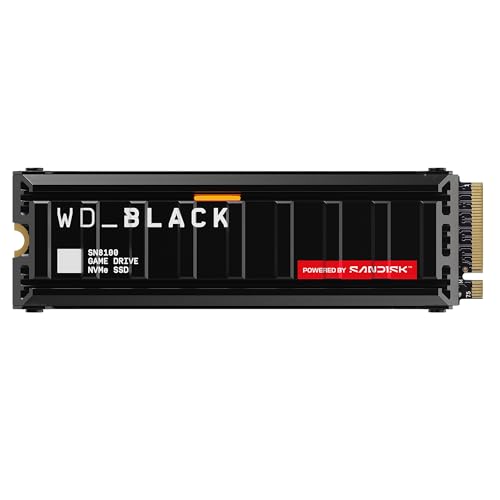
WD Black SN850X 2TB

The WD Black SN850X 2TB is built with gamers in mind. It is a Gen4 NVMe drive with sequential read speeds up to 7,300 MB per second, putting it beside the fastest Gen4 drives on the market. Western Digital adds a gaming mode that tunes the drive for low latency during game loads, plus a dashboard utility that monitors drive health, temperature, and firmware from Windows.
Endurance is another strength. The 2TB model is rated for 1,200 TBW, so it can handle a very large amount of written data over its lifetime. That matters for gamers who reinstall titles often or record gameplay to the same drive.
The standard model ships without a heatsink, while a separate heatsink version exists for consoles and boards without their own cooling, so pick the version that matches your setup.
Crucial T705 2TB

The Crucial T705 2TB is the fastest drive in this guide, and the only Gen5 model here. It reaches sequential read speeds up to 14,500 MB per second, roughly double what the best Gen4 drives can manage. That bandwidth is overkill for most current games, but it shines when you move huge files, install large titles, or run a machine that also handles video editing alongside gaming.
Because Gen5 drives generate more heat, cooling matters more here than with the Gen4 picks. The bare version of the T705 has no heatsink, so you will want a motherboard with a good M.2 heatsink or a well-ventilated case, and a heatsink version is also available. The drive uses TLC NAND and a DRAM cache, and it carries a five-year warranty.
The main question is whether your system can use Gen5 speed at all. You need a motherboard and processor with a Gen5 M.2 slot to reach the headline numbers; on a Gen4 board the drive still works, but it runs at Gen4 speeds.
SK hynix Platinum P41 2TB

The SK hynix Platinum P41 2TB is the efficiency champion of this group. It is a Gen4 NVMe drive with sequential read speeds up to 7,000 MB per second, more than enough for fast game loads and smooth texture streaming. Where it stands out is power use: it draws less power than most rivals at the same speed, which keeps it cooler in compact cases and small form factor builds where airflow is limited.
The drive uses 176-layer TLC NAND paired with SK hynix’s own controller, and it includes a DRAM cache to keep random performance strong. Its endurance rating is generous for a 2TB gaming drive, and the five-year warranty matches the rest of this group. In everyday gaming the P41 feels as quick as the bigger names, with snappy level loads.
The P41 is also a strong choice for a laptop upgrade or a slim desktop, thanks to its single-sided design and low heat output. The one drawback is availability: it has been in and out of stock more often than the Samsung and WD drives, so check that the listing is live before ordering.
WD Black SN770 2TB

The WD Black SN770 2TB is the value pick in this guide, and it proves you do not need a flagship drive to enjoy fast game loads. It is a Gen4 NVMe drive with sequential read speeds up to 5,150 MB per second, well above what any SATA drive can offer and fast enough that most games load in nearly the same time as on drives costing far more. For gaming, the difference between this drive and a flagship is usually measured in fractions of a second.
The SN770 keeps costs down by skipping the DRAM cache and using host memory buffer technology instead, which borrows a small amount of system memory for mapping data. In gaming workloads this works well, because game loading is mostly sequential reads. The 2TB model carries a 1,200 TBW endurance rating and a five-year warranty.
There are trade-offs. Sustained write speeds fall behind the flagship drives, and the drive tops out at 2TB, with no 4TB option if your library keeps growing. But for a gaming PC where the drive mostly reads game data, the SN770 2TB delivers the best balance of capacity, speed, and value in this guide.
How to choose
Start with your motherboard. Check whether it has a free M.2 slot, which length it accepts, and whether that slot runs at Gen4 or Gen5 speed. Most modern gaming boards have at least two M.2 slots, and the top slot is usually the fastest. If your board only supports Gen4, a Gen5 drive will still work but will run at Gen4 speed, so save your money and buy a Gen4 model.
Capacity matters more than most buyers expect. Modern games routinely take up 100 GB or more each, and a 1TB drive fills up fast once you add the operating system, a few big titles, and regular updates. A 2TB drive is the sweet spot for most gaming PCs, giving you room for a solid library without constant uninstalling. If you play many large games at once, consider a 4TB model or a second drive later.
Look at endurance, listed as TBW, alongside speed. A higher TBW rating means the drive is rated to handle more written data over its life. A DRAM cache helps with random access, though DRAM-less designs like the SN770 still perform well for pure gaming.
Cooling is easy to overlook. Fast NVMe drives slow down when they overheat, a behavior known as thermal throttling. Most gaming motherboards include an M.2 heatsink, and using it is the simplest way to keep speeds high. If your board has none, choose a drive version that includes one. Five years is the norm for a quality gaming drive warranty.
Who should skip
Not every gamer needs a new internal SSD. If your current drive is already a fast NVMe model and your games load quickly, a new drive will not make a noticeable difference. The jump from a slow hard drive or an older SATA SSD to any NVMe drive is dramatic, but the jump between two fast NVMe drives is small in real gameplay.
Laptop owners should check compatibility carefully. Some slim laptops use shorter M.2 2230 drives or have only one slot that already holds the system drive, and some do not allow user upgrades at all. Console-only players should also pause: the drives in this guide are built for PCs, and only some models are rated for console storage expansion.
If your motherboard is older and has no M.2 slot at all, an internal NVMe drive will not fit, and a SATA SSD or a full platform upgrade is the better path. If your budget is tight, put the money toward the graphics card or memory first, since those parts affect frame rates far more than storage speed.
Frequently Asked Questions
Is a Gen5 SSD worth it for gaming?
For most gamers, no. Current games rarely use enough bandwidth to show a difference between a fast Gen4 drive and a Gen5 drive. A Gen5 drive makes sense if you are building a new high-end PC and want the fastest storage available. For pure gaming, a good Gen4 drive delivers nearly the same experience for less money.
How much storage do I need for a gaming PC?
A 2TB drive suits most gamers, with room for the operating system, a dozen or more large games, and regular updates. A 1TB drive works if you play only a few titles at a time and do not mind uninstalling older games. Players with very large libraries, or those who record gameplay, should look at 4TB or add a second drive.
Do I need a heatsink for an NVMe gaming SSD?
In most cases, yes. Fast NVMe drives generate heat under sustained loads, and a heatsink keeps them from slowing down during long sessions. Many motherboards include one for the main M.2 slot, so use it. If your board has none, buy a drive version with a heatsink.
Can I install an internal SSD myself?
Yes, in most desktop PCs it is a simple job. Power down, open the case, insert the drive into the M.2 slot at a slight angle, press it flat, and secure it with the small screw or latch provided. Then format the drive in your operating system and you are ready to install games. If you are unsure, your motherboard manual shows the exact steps for your board.
Final verdict
The best internal SSD for a gaming PC depends on your build, but the Samsung 990 PRO 2TB is the pick that fits the most gamers. It combines near-top Gen4 speed, a DRAM cache, strong endurance, and wide availability in one proven package. The WD Black SN850X 2TB is the best alternative for dedicated gaming rigs, with excellent endurance and useful software, while the Crucial T705 2TB is the flagship for new Gen5 builds.
Value hunters should not overlook the WD Black SN770 2TB, which delivers fast game loads for far less money, and the SK hynix Platinum P41 2TB is the right call for compact builds where cool running matters.
More from Amazon
Programs that pair well with the guide above. Offers and eligibility are set by Amazon and may change.
A free business account with business pricing and bulk-buying tools for work, shop or home office.
Create a business accountFree shipping on eligible items, Prime Video and more. Eligible new members can start with a free trial.
Start a Prime free trialAudiobooks and podcasts to listen to on the go. Eligible new members can start with a free trial.
Try Audible freeAd-free music streaming. Eligible new subscribers can start with a free trial.
Try Music Unlimited freeAs an Amazon Associate we earn from qualifying purchases.







Write Your Review
No reviews yet. Be the first to share your experience!