

Key takeaways
- Find the best keyboard for office work and everyday typing. We compare wired and wireless models, ergonomic split layouts, and multi-device boards.
- Top Pick: Specs
- Runner-up: Specs
- Also consider: Microsoft Ergonomic Keyboard
The best keyboard for most people is the Logitech MX Keys, because it pairs a quiet, comfortable typing feel with backlit keys and the ability to switch between three devices. If you want to spend less, the Logitech K120 covers the basics well as a wired board, the Logitech K780 adds wireless multi-device typing at a mid-range tier, and the two Microsoft ergonomic boards suit long typing sessions where wrist comfort matters most. This guide compares five boards across switch type, connectivity, layout, battery life, and build quality so you can match one to your desk.
Table of Contents
- How to Choose a Keyboard
- Logitech K120
- Logitech K780
- Logitech MX Keys
- Microsoft Ergonomic Keyboard
- Microsoft Sculpt Ergonomic Keyboard for Business
- Frequently Asked Questions
- Conclusion
- Product and ASIN Reference
How to Choose a Keyboard
Start with switch type, because it decides how typing feels and sounds. Membrane boards use a rubber layer under the keys, which keeps them quiet and affordable. Scissor switches, common in slim boards, use a short, stable key travel that feels precise without much noise. Mechanical switches give a distinct tactile bump or click and a longer key travel, and they usually cost more.
Connectivity comes next. A wired USB board never needs charging and works the moment you plug it in, which makes it a safe choice for a fixed desk. Bluetooth boards cut the cable and pair with laptops, tablets, and phones, while boards with a 2.4 GHz receiver use a small USB dongle for a dedicated wireless link. Multi-device boards let you switch between a computer, a tablet, and a phone with a key press, which suits people who work across screens.
Layout decides how much desk space the board takes. A full-size layout includes a number pad, which helps with spreadsheets and data entry. A tenkeyless layout drops the number pad for a smaller footprint, and compact layouts go further by trimming navigation keys. Ergonomic split layouts angle each half of the board outward so your wrists stay straighter, which can help during long typing sessions.
Battery life matters only for wireless boards. Some run on replaceable batteries that last months or longer, while rechargeable boards top up over USB-C. Finally, look at build quality: a board with a solid frame and stable keys stays put while you type and holds up to daily use.
Logitech K120
The Logitech K120 is the budget pick in this guide, and it is the simplest board here. It connects over wired USB, so there is nothing to charge and nothing to pair. You plug it in and type. That simplicity is the point: it is a dependable board for a home office, a shared family computer, or a spare desk where you want a full-size layout without fuss.
The layout is full-size with a number pad, and the keys use a quiet membrane design with a low profile. Typing feels soft and muted rather than clicky, which keeps noise down in shared rooms. The board also has a spill-resistant design, so a knocked-over drink is less likely to end the board on the spot. It is a plain, sturdy board that does its job without extras.
Choose the K120 if you want the lowest-cost way to get a full-size keyboard, if you prefer a wired connection, or if you need a reliable spare. It is not the board for people who want backlighting, wireless freedom, or a mechanical feel, but as a budget wired board it covers the essentials well.
Specs
| Feature | Detail |
|---|---|
| Brand | Logitech |
| Model | K120 |
| Connectivity | Wired USB |
| Layout | Full-size with number pad |
| Switch type | Membrane |
| Battery | None, wired |
| Special features | Spill-resistant design, plug-and-play |
| ASIN | B003ELVLKU |

Logitech K780
The Logitech K780 is the mid-range multi-device pick, and it is built for people who type on more than one device. It connects over Bluetooth or the included Logitech Unifying receiver, and it can pair with up to three devices at once. A row of device keys lets you switch between a computer, a tablet, and a phone, so you can answer a message on your phone without moving to another board.
The layout is full-size with a number pad, and the keys are quiet with a rounded, comfortable shape. A built-in cradle along the top edge holds a phone or tablet upright, which keeps your second screen visible while you type. The board runs on two AAA batteries rated for up to two years, so battery changes are rare. It is a solid, weighty board that stays in place on the desk.
One caution: listings for this board show two model numbers in the same family, 920-008149 and 920-008025. Check that the listing matches the multi-device K780 with the device cradle before ordering.
Choose the K780 if you work across a computer and a mobile device, if you want wireless typing with a long battery life, or if you like a full-size board with a built-in stand for your phone. It is a strong mid-range choice for a mixed-device desk.
Specs
| Feature | Detail |
|---|---|
| Brand | Logitech |
| Model | K780 |
| Connectivity | Bluetooth and Logitech Unifying receiver |
| Layout | Full-size with number pad |
| Switch type | Quiet membrane |
| Battery | 2 AAA batteries, rated up to two years |
| Special features | Integrated device cradle, multi-device switching |
| ASIN |
Logitech MX Keys
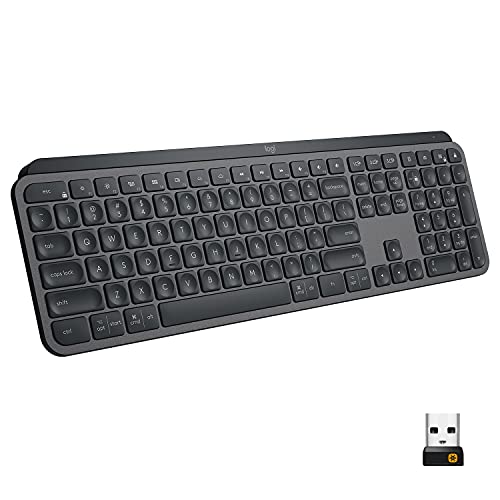
The Logitech MX Keys is the premium pick and the best keyboard in this guide for most people. It is a full-size wireless board with scissor switches that Logitech calls Perfect Stroke keys. Typing feels stable and precise, with a short, confident key travel and a matte finish on the keycaps that resists fingerprints. The keys are backlit, and a proximity sensor lights them when your hands approach, then dims them when you move away to save charge.
Connectivity covers Bluetooth and the Logitech Unifying receiver, and the board pairs with up to three devices, switching between them with a key press. It charges over USB-C, and it works with both Windows and macOS, with key legends that cover both systems. The frame is a single piece of metal, which gives the board a firm, premium feel and keeps it from flexing while you type.
Choose the MX Keys if you type for hours every day and want the most comfortable board here, if you want backlighting for dim rooms, or if you switch between a work computer and a personal laptop. It sits at the premium tier, but it is the board that best combines typing feel, wireless flexibility, and build quality.
Specs
| Feature | Detail |
|---|---|
| Brand | Logitech |
| Model | MX Keys |
| Connectivity | Bluetooth and Logitech Unifying receiver |
| Layout | Full-size with number pad |
| Switch type | Scissor, Perfect Stroke keys |
| Battery | Rechargeable via USB-C |
| Special features | Smart backlighting with proximity sensor, multi-device switching |
| ASIN | B07S92QBCJ |
Microsoft Ergonomic Keyboard

The Microsoft Ergonomic Keyboard, model LXM-00001, is the mid-range ergonomic pick for people who want a split layout without going wireless. The board splits the key field into two angled halves with a raised center, which keeps your wrists in a straighter, more natural position. A cushioned palm rest runs along the front edge and supports your wrists during long sessions.
It connects over wired USB, so it needs no batteries and no pairing. The layout is full-size with a number pad, and the keys use a quiet membrane design. Dedicated shortcut keys cover the Office suite, emoji, search, and media controls, which saves time if you live in documents and email all day. The board is wide, so it needs a desk with room to spare, but the trade-off is a layout that is built around comfort.
Choose this board if your wrists tire on a straight board, if you want ergonomic design at a mid-range tier, or if you prefer a wired connection with no charging to think about. It is the most direct way to try a split ergonomic layout.
Specs
| Feature | Detail |
|---|---|
| Brand | Microsoft |
| Model | LXM-00001 |
| Connectivity | Wired USB |
| Layout | Full-size split ergonomic |
| Switch type | Membrane |
| Battery | None, wired |
| Special features | Cushioned palm rest, dedicated Office key |
| ASIN | B07Y414QXJ |
Microsoft Sculpt Ergonomic Keyboard for Business

The Microsoft Sculpt Ergonomic Keyboard for Business is the premium ergonomic pick, and it is the most sculpted board in this guide. The split layout curves each half outward, the center is domed to reduce wrist pronation, and a cushioned palm rest supports your hands. The number pad is a separate unit, so you can place it on either side of the board or leave it off the desk entirely when you do not need it.
It connects wirelessly over a proprietary 2.4 GHz USB dongle, with no Bluetooth and no wired option. That dongle is factory-paired to the board, so keep it safe: if you lose it, the keyboard cannot connect. The keys are low-profile scissor switches with short travel, similar in feel to a laptop keyboard, and the board runs on included batteries. Note also that Microsoft stopped making keyboards, and Incase now manufactures the Sculpt, so check the seller and listing carefully before ordering.
Choose the Sculpt if you want the strongest ergonomic design here, if you like a split layout with a detachable number pad, or if you type long hours and want a wireless board built around wrist comfort. It takes a few days to adjust to the split layout, but for many typists the comfort is worth it.
Specs
| Feature | Detail |
|---|---|
| Brand | Microsoft |
| Model | 5KV-00001 |
| Connectivity | 2.4 GHz wireless, USB dongle |
| Layout | Full-size split ergonomic, separate number pad |
| Switch type | Scissor |
| Battery | Batteries included, keyboard and number pad |
| Special features | Cushioned palm rest, domed shape |
| ASIN | B00CYX26BC |
Frequently Asked Questions
What is the difference between membrane and mechanical switches?
Membrane switches use a rubber layer under the keys, which makes them quiet and affordable. Mechanical switches use an individual switch under each key, which gives a more distinct tactile feel and a longer key travel. Scissor switches sit between the two: they are slim, stable, and quiet, and they are common in premium wireless boards like the MX Keys and the Sculpt.
Is a wireless keyboard as reliable as a wired one?
For everyday office work, yes. A Bluetooth or 2.4 GHz wireless board handles typing, shortcuts, and navigation without noticeable lag. A wired board still has two advantages: it never needs charging, and it works the moment you plug it in. If your desk never moves, wired is simpler. If you switch devices or hate cables, wireless is the better fit.
Should I choose a full-size layout or a tenkeyless layout?
Choose full-size if you enter numbers often, work in spreadsheets, or want a dedicated number pad. Choose tenkeyless if you want more desk space for your mouse or a smaller board for a compact desk. The boards in this guide are full-size, with the Sculpt offering a separate number pad you can move or remove.
Are ergonomic split keyboards worth it?
They can be, if your wrists tire on a straight board. A split layout angles each hand outward and keeps your wrists straighter, and a cushioned palm rest adds support. The trade-off is size and adjustment time: split boards are wider, and most people need a few days to get used to the layout. If you type for hours every day, the comfort is often worth the adjustment.
Conclusion
The best keyboard depends on how you type and where you work. The Logitech MX Keys is the best all-round choice, with a comfortable typing feel, backlit keys, and multi-device wireless. The Logitech K120 is the budget pick for a simple wired desk, and the Logitech K780 adds wireless multi-device typing at a mid-range tier. If wrist comfort matters most, the Microsoft Ergonomic Keyboard offers a split layout over wired USB, while the Microsoft Sculpt Ergonomic Keyboard for Business adds a sculpted wireless design with a separate number pad. Pick the board that matches your layout, your connectivity, and how long you type each day.
As an Amazon Associate, we earn from qualifying purchases.
More from Amazon
Programs that pair well with the guide above. Offers and eligibility are set by Amazon and may change.
A free business account with business pricing and bulk-buying tools for work, shop or home office.
Create a business accountFree shipping on eligible items, Prime Video and more. Eligible new members can start with a free trial.
Start a Prime free trialAudiobooks and podcasts to listen to on the go. Eligible new members can start with a free trial.
Try Audible freeAd-free music streaming. Eligible new subscribers can start with a free trial.
Try Music Unlimited freeAs an Amazon Associate we earn from qualifying purchases.





Write Your Review
No reviews yet. Be the first to share your experience!