

Key takeaways
- Compare the best webcams for work calls, streaming, and recording: 4K and 1080p picks with autofocus, privacy shutters, AI tracking, and USB-C.
- Top Pick: Logitech C920s Pro HD Webcam — Best Budget Pick
- Runner-up: Logitech Brio 4K Webcam — Best Mid-Range Pick
- Also consider: Logitech MX Brio Ultra HD 4K Webcam — Best Premium Pick
The best webcam for most people is the Logitech MX Brio: it records 4K at 30 frames per second or 1080p at 60, uses Logitech’s largest webcam sensor, and adds a built-in privacy shutter and USB-C. If the budget is tighter, the Logitech C920s Pro HD is the proven 1080p pick for everyday calls, while the Elgato Facecam 4K is the choice for streamers who want true 4K at 60 frames per second, and the OBSBOT Tiny 2 is the pick for anyone who moves around on camera. The Logitech Brio 4K sits between them as the mid-range 4K option, and it is the only pick here with Windows Hello face login.
As an Amazon Associate, we earn from qualifying purchases.
Table of Contents
- How to Choose a Webcam
- Logitech C920s Pro HD Webcam — Best Budget Pick
- Logitech Brio 4K Webcam — Best Mid-Range Pick
- Logitech MX Brio Ultra HD 4K Webcam — Best Premium Pick
- Elgato Facecam 4K — Best Premium Pick for Streamers
- OBSBOT Tiny 2 Webcam — Best Premium Pick for AI Tracking
- Who Should Skip a Webcam
- Frequently Asked Questions
- Conclusion
- Product and ASIN Reference
How to Choose a Webcam
Start with resolution and frame rate. A 1080p camera at 30 frames per second is enough for ordinary video calls and is the cheapest way to look clearly better than a built-in laptop camera. A 4K camera at 30 frames per second adds detail for recording and cropping, while 1080p at 60 frames per second gives smoother motion for streaming. Only the Elgato Facecam 4K records 4K at 60 frames per second, needing a USB 3.0 port to do it. Do not buy 4K for its own sake: on a small call window, good light and a larger sensor matter more than the resolution number.
Next, weigh sensor size and focus. A larger sensor gathers more light, which keeps the picture clean in a dim room or against a bright window. The OBSBOT Tiny 2 uses a 1/1.5-inch sensor, the largest here, and the Elgato Facecam 4K uses a 1/1.8-inch Sony sensor, while the Logitech models do not publish sensor dimensions and rely on light correction instead. Autofocus keeps a face sharp when leaning in or back, and four of the five picks here have it; the Facecam 4K is the exception, with fixed focus set for a desk distance. Field of view is measured diagonally: 58 to 65 degrees frames one person tightly, 78 degrees fits one person plus some of the room, and 90 degrees suits two people or a whiteboard.
Microphones and privacy are easy to overlook and hard to fix later. Four picks have built-in microphones, but the Elgato Facecam 4K deliberately has none, so it needs a separate microphone or headset. A privacy shutter matters if the camera stays clipped to a monitor all day: the C920s and both Logitech 4K models have one, while the OBSBOT Tiny 2 handles privacy through its app instead of a physical shutter. Finally, check the connection: USB-C fits modern laptops without an adapter, USB-A suits older desktops and docks, and the Brio 4K is the only pick that ships with both.
Logitech C920s Pro HD Webcam — Best Budget Pick

The Logitech C920s Pro HD Webcam is the budget pick because it has been the default recommendation for years and still covers the basics well. It records Full HD 1080p at 30 frames per second through a five-element glass lens, with autofocus, a fixed 78-degree diagonal field of view, and two stereo microphones. RightLight 2 adjusts the image for dim lighting, and a privacy shutter flips over the lens when the camera is not in use. It connects over USB-A with an attached five-foot cable and works on Windows, macOS, and many Linux systems without extra drivers.
The trade-offs are all about age: the image processing is older than in the Brio models, there is no 4K and no 60-frame-per-second mode, and the field of view cannot be changed. One guide calls it fixed-focus, but Logitech’s spec page and the Amazon listing say autofocus, and autofocus is the figure used here. For one person at a desk who wants a reliable camera for calls and classes, none of those limits matter.
Specs: Resolution: 1080p at 30 fps; Focus: autofocus; Field of view: 78 degrees diagonal; Lens: five-element glass; Microphones: dual stereo; Light correction: RightLight 2; Privacy shutter: yes; Connection: USB-A, attached 5 ft cable; Model number: 960-001257; Operating systems: Windows, macOS, Linux; ASIN: B07K986YLL
Logitech Brio 4K Webcam — Best Mid-Range Pick

The Logitech Brio 4K Webcam is the mid-range pick, and its case rests on being the most affordable route to 4K with Windows Hello. It records 4K at 30 frames per second, 1080p at 60, and 720p at 90, with 5x digital zoom and three field-of-view settings at 65, 78, and 90 degrees. RightLight 3 with HDR adjusts for difficult lighting, and two noise-cancelling microphones capture sound from up to a metre away. Optical and infrared sensors support Windows Hello face login, which none of the other picks here offers.
The connection is the most flexible in this roundup: the camera ships with both USB-A and USB-C cables on a 7.2-foot lead, so it fits old and new computers alike. The 2022 version, model 960-001419, is the listing used here, and buyers should confirm the model number. The design is older than the MX Brio and its light correction is a generation behind.
Specs: Resolution: 4K at 30 fps, 1080p at 60 fps, 720p at 90 fps; Zoom: 5x digital; Field of view: 65, 78, or 90 degrees diagonal; Sensor: 13 MP; Microphones: dual noise-cancelling; Light correction: RightLight 3 with HDR; Windows Hello: yes, optical and infrared sensors; Privacy shutter: yes; Connection: USB-A and USB-C, 7.2 ft cable; Model number: 960-001419; Version: 2022 version; ASIN: B09NBWWP79
Logitech MX Brio Ultra HD 4K Webcam — Best Premium Pick

The Logitech MX Brio Ultra HD 4K Webcam is the best premium pick and the best all-round camera in this roundup. It records 4K at 30 frames per second or 1080p at 60 through a custom f/4 lens, with Logitech’s largest webcam sensor yet and pixels 70 percent larger than the Brio 4K. RightLight 5 with HDR and AI image enhancement handle backlight and dim rooms better than any other Logitech pick here, and dual beamforming microphones keep the voice clear. Show Mode tilts the camera down to share notes and sketches on the desk, and a built-in privacy shutter rotates closed on a dial around the lens.
Three field-of-view presets at 65, 78, and 90 degrees diagonal are offered, and the USB-C cable is detachable at 1.5 metres. The Graphite model, model number 960-001545, is the listing used here. Two limits need stating: the MX Brio does not support Windows Hello face login, so buyers who unlock with their face should choose the Brio 4K instead, and 4K needs a good USB port and a bright room to show its advantage.
Specs: Resolution: 4K at 30 fps, 1080p at 60 fps; Lens: custom f/4; Sensor: largest Logitech webcam sensor, pixels 70 percent larger than Brio 4K; Field of view: 65, 78, or 90 degrees diagonal; Microphones: dual beamforming with noise reduction; Light correction: RightLight 5 with HDR, AI image enhancement; Feature: Show Mode; Privacy shutter: yes, rotating dial; Windows Hello: no; Connection: USB-C, detachable 1.5 m cable; Model number: 960-001545; Color: Graphite; ASIN: B0BFJ4CRKD
Elgato Facecam 4K — Best Premium Pick for Streamers

The Elgato Facecam 4K is the premium pick for streamers because it is the only camera here that records 4K at 60 frames per second. It uses a Sony STARVIS 2 1/1.8-inch CMOS sensor behind a fixed-focus f/4.0 lens, with a 21 mm full-frame equivalent focal length and 90-degree field of view. Focus is fixed, with a range of 30 to 120 cm at 4K, and the camera supports HDR, uncompressed video, and standard 49 mm lens filters, which no other pick offers. It connects over USB-C and needs a USB 3.0 port for its highest modes.
One fact must be stated plainly: the Facecam 4K has no microphone at all, and the omission is deliberate, aimed at creators who already own a dedicated microphone. Anyone buying it for work calls needs a separate microphone or headset, or should choose the MX Brio. The listing’s summary line quotes an f/2.8 aperture, but Elgato’s own tech specs say f/4.0, and f/4.0 is the figure used here. Elgato’s support documentation dated November 2026 says the Camera Hub companion app has moved to legacy, end-of-life status, so buyers should expect no new app features.
Specs: Resolution: 4K at 60 fps (2160p60 MJPG only), 1080p at 60 fps; Sensor: Sony STARVIS 2 CMOS, 1/1.8 inch; Lens: fixed focus, f/4.0, 21 mm full-frame equivalent; Field of view: 90 degrees; Focus range: 30 to 120 cm at 4K; Filter support: 49 mm lens filters; HDR: yes; Microphone: none; Connection: USB-C, USB 3.0; Model number: 20WAF9901; Weight: 112 g; ASIN: B0DVZG36J8
OBSBOT Tiny 2 Webcam — Best Premium Pick for AI Tracking
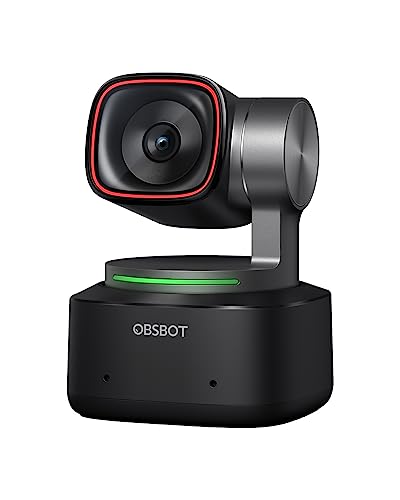
The OBSBOT Tiny 2 Webcam is the premium pick for AI tracking, and it is the most different camera in this roundup. It sits on a two-axis motorised gimbal that follows the speaker, with four tracking modes for upper body, close-up, hand, and zone framing, plus voice control and gesture control in version 2.0. The 1/1.5-inch CMOS sensor is the largest here, with 50 million effective pixels, and the camera records 4K at 30 frames per second or 1080p at 60. All-pixel autofocus locks on in 0.3 seconds according to the maker, with dual omni-directional microphones and HDR light correction.
The tracking is the reason to buy it: teachers, presenters, and streamers who move around the room stay in frame without touching the camera, with desktop, whiteboard, portrait, and group modes. The limits are practical. The body runs hot during use, which OBSBOT says is normal and does not damage the camera. Owner reports mention firmware updates that sometimes fail. The remote, tripod, and HDMI adapter are sold separately, and there is no physical lens shutter: privacy is handled through the OBSBOT Center app rather than a cover.
Specs: Resolution: 4K at 30 fps, 1080p at 60 fps; Sensor: 1/1.5 inch CMOS, 50 MP; Focus: all-pixel autofocus, 0.3 seconds; Tracking: two-axis gimbal, upper body, close-up, hand, and zone modes; Controls: voice control and gesture control 2.0; Microphones: dual omni-directional; Light correction: HDR; Connection: USB 3.0; Operating systems: Windows 10 or later, macOS 11 or later; Model number: TINY 2; ASIN: B0C3B6ZR1V
Who Should Skip a Webcam
Skip this category entirely if the built-in laptop camera already looks fine on calls and nothing is being recorded: a webcam only earns its place when the picture is part of the work. Skip the 4K models if the computer is old or the internet connection is slow, because 4K needs a good USB port and enough bandwidth. Streamers who already own a mirrorless camera and a capture card should also pause, since that setup outclasses any webcam here. Finally, buyers who need a microphone and have no separate audio gear should avoid the Elgato Facecam 4K; every other pick here includes one.
Frequently Asked Questions
Do I need a 4K webcam for video calls?
No, not for ordinary calls. A 1080p camera at 30 frames per second is enough when the call window is small, and good light matters more than resolution. A 4K camera earns its place when recording video, cropping into the frame, or presenting to a large audience.
Why does the Elgato Facecam 4K have no microphone?
Elgato left the microphone out on purpose, aiming the camera at creators who already own a dedicated microphone or headset. A built-in microphone would have added size and cost for buyers who never use it. Anyone who needs a microphone and has no separate audio gear should choose a different pick.
What is the difference between the Logitech Brio 4K and the MX Brio?
The MX Brio is the newer model and the direct successor to the Brio 4K. It has a larger sensor, newer RightLight 5 light correction, AI image enhancement, Show Mode, and USB-C, but it does not support Windows Hello face login. The Brio 4K is the older design, with 5x digital zoom, both USB-A and USB-C cables, and Windows Hello, at a lower tier. Choose the MX Brio for image quality and the Brio 4K for face login and value.
Do these webcams work on Mac and ChromeOS?
Most of them do. The Logitech models work on Windows, macOS, and ChromeOS as standard USB video devices, and the C920s also works on many Linux systems. The OBSBOT Tiny 2 needs Windows 10 or later, or macOS 11 or later, for its full feature set, and its virtual background does not work on Intel-based Macs. The Elgato Facecam 4K works on Windows and Mac over USB-C, but its companion app is no longer developed.
Conclusion
For most buyers, the Logitech MX Brio is the right webcam: 4K at 30 frames per second or 1080p at 60, the largest sensor in the Logitech line, a privacy shutter, and USB-C cover the widest range of uses. The Logitech C920s Pro HD is the budget pick for everyday calls, the Logitech Brio 4K is the mid-range route to 4K with Windows Hello, the Elgato Facecam 4K is the streamer pick for true 4K at 60 frames per second, and the OBSBOT Tiny 2 is the pick for presenters who move. Three of the five picks are Logitech models, but they are distinct generations and tiers. Before ordering, confirm stock, since several of these cameras have been on the market for years, and remember that the Facecam 4K needs a separate microphone.
More from Amazon
Programs that pair well with the guide above. Offers and eligibility are set by Amazon and may change.
A free business account with business pricing and bulk-buying tools for work, shop or home office.
Create a business accountFree shipping on eligible items, Prime Video and more. Eligible new members can start with a free trial.
Start a Prime free trialAudiobooks and podcasts to listen to on the go. Eligible new members can start with a free trial.
Try Audible freeAd-free music streaming. Eligible new subscribers can start with a free trial.
Try Music Unlimited freeAs an Amazon Associate we earn from qualifying purchases.







Write Your Review
No reviews yet. Be the first to share your experience!