

Key takeaways
- Compare the best gen5 nvme ssds for gaming pcs with factory heatsinks, covering peak speeds, cooling, capacity, endurance, and Gen5 motherboard fit.
- Top Pick: WD Black SN8100 2TB with Heatsink
- Runner-up: Samsung 9100 PRO 2TB with Heatsink
- Also consider: Crucial T705 2TB with Heatsink
A PCIe 5.0 NVMe drive is the first storage upgrade in years that doubles the headline bandwidth of the part it replaces. Where a fast Gen4 drive tops out near 7,400 MB/s, the current Gen5 flagships read at close to 14,900 MB/s, and that extra headroom shows up in DirectStorage game loading, huge file transfers, and level streaming. The catch is heat: every drive in this roundup ships with, or plainly needs, a serious heatsink to hold those speeds.
This guide covers five Gen5 drives that suit a gaming desktop, from the fastest flagship models to a first-wave drive that costs less than the current leaders. All five are M.2 2280 sticks from established brands, all carry five-year warranties, and all are limited to PCIe 5.0 x4 interfaces, so the comparison comes down to cooling design, sustained speed, capacity options, and how much power each one draws while it works.
As an Amazon Associate, we earn from qualifying purchases.
Quick answer
The WD Black SN8100 with heatsink is the top pick for most gaming builds, pairing near-peak Gen5 speeds with the lowest power draw in this group. The Samsung 9100 PRO is the closest rival, the Crucial T705 is a proven flagship with a copper-core heatsink, Corsair’s MP700 PRO XT chases raw throughput, and the Seagate FireCuda 540 is the value route into Gen5.
WD Black SN8100 2TB with Heatsink
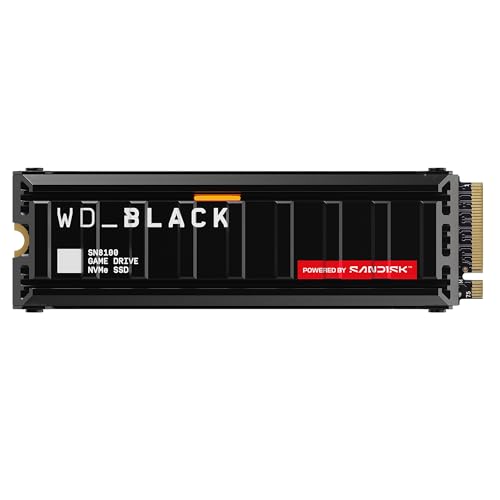
The SN8100 is the drive that reset expectations for Gen5 efficiency. It reads at up to 14,900 MB/s and writes at up to 11,000 MB/s in this 2TB heatsink configuration, figures that put it at the front of the class, yet it sips power compared with the first wave of Gen5 controllers. That matters in a gaming PC because a cooler-running drive leaves more thermal headroom for the graphics card sitting beside it.
The factory heatsink is a low-profile aluminum block that fits under most graphics cards and inside a PlayStation 5 bay, and it keeps the drive composed through long install and copy sessions. SanDisk builds the SN8100 on its own controller and advanced TLC 3D CBA NAND, and the 2TB model carries a 1,200 TBW endurance figure with a five-year warranty behind it.
Choose the SN8100 if you want one drive that does everything well: fast game loads, quick transfers, modest power draw, and cooling that is already handled. It is the easiest recommendation in this list for a new AM5 or Intel Gen5 build.
Samsung 9100 PRO 2TB with Heatsink

Samsung’s 9100 PRO is the company’s first Gen5 flagship, and it arrives with the polish you would expect from the brand that defined the Gen4 era. Sequential reads reach up to 14,700 MB/s and writes up to 13,400 MB/s on the 2TB model, and its random performance is a step ahead of most rivals, which is the part of the spec sheet that day-to-day responsiveness actually comes from.
The in-house controller is built on a 5nm process, and Samsung credits it with much better power efficiency than the 990 PRO it replaces. The heatsink version wears a slim profile, about 8.9 mm tall, so it clears tight motherboard layouts and fits the PS5 expansion bay. Capacities run from 1TB up to a cavernous 8TB, the largest ceiling in this roundup, and the 2TB drive is rated for 1,200 TBW under a five-year warranty.
Pick the 9100 PRO if you value Samsung’s firmware maturity, its Magician software for cloning and health checks, and the option to scale to very large capacities later.
Crucial T705 2TB with Heatsink

The T705 has been the Gen5 benchmark for a while, and it still earns its place. The 2TB heatsink model reads at up to 14,500 MB/s and writes at up to 12,700 MB/s, using Micron 232-layer TLC NAND. It supports Microsoft DirectStorage, so games built on that API can stream assets from the drive with far less CPU overhead.
Cooling is the T705’s signature. The premium heatsink combines aluminum with a copper core to pull heat away from the controller without fans or liquid cooling, and it holds up well in sustained write sessions where thinner coolers start to fade. Crucial also sells a bare version for boards with their own armor, but the heatsink model is the one to buy for a gaming rig with a plain M.2 slot.
Endurance matches the other flagships at 1,200 TBW for the 2TB size, with a five-year warranty. If your motherboard’s built-in heatsink is flimsy, the T705 brings its own serious cooling and flagship speed in one package.
Corsair MP700 PRO XT 1TB
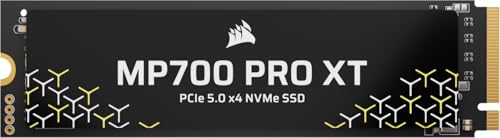
Corsair’s MP700 PRO XT is the newest design in this group and the one aimed squarely at gaming PCs, with DirectStorage readiness called out in its own product name. It pushes sequential reads to up to 14,900 MB/s and writes to up to 14,500 MB/s, the strongest write figure here, which suits players who record gameplay, move large captures, or install huge titles often.
Unlike the three drives above, the XT ships as a bare M.2 2280 stick with no cooler attached. That is a deliberate split in Corsair’s line: the company sells actively cooled and water-block variants of its Gen5 drives separately, and expects the XT to live under a motherboard heatsink. Most current AM5 and Intel boards with Gen5 slots include a chunky M.2 plate, so for a new build this is rarely a problem, but it makes the XT a poor match for older boards with naked slots.
Capacities span 1TB, 2TB, and 4TB. Choose the XT if your board already provides good M.2 cooling and you want the freshest controller generation and the highest sustained writes in this roundup.
Seagate FireCuda 540 2TB

The FireCuda 540 is the first-generation Gen5 drive in this list, and that is exactly its appeal. Built on the Phison E26 platform, it reads and writes at up to 10,000 MB/s, which is well beyond any Gen4 drive, and it undercuts the newer flagships while still delivering a genuine PCIe 5.0 interface and DirectStorage support.
Endurance is a genuine strength. The 2TB model is rated for 2,000 TBW, the highest figure in this roundup, and Seagate backs it with a five-year warranty plus its Rescue data recovery services, a fitting extra for a drive bought through a data recovery site. A graphene heat spreader helps move warmth into whatever cooling sits above it.
That cooling point matters: the FireCuda 540 ships bare, so it must sit under a motherboard heatsink. Seagate also sells a heatsink edition with swappable faceplates if your board lacks one. For a builder with a good board heatsink who wants Gen5 speed and top-tier endurance without flagship money, the 540 remains a smart buy.
How to choose
Start with the slot, because Gen5 is a motherboard feature before it is a drive feature. A Gen5 drive needs an M.2 slot wired for PCIe 5.0 x4, which today means most AMD AM5 boards and many Intel LGA 1700 and newer boards. The drive still works in a Gen4 slot, but it runs at Gen4 speeds, so paying the Gen5 premium for a Gen4 board buys you nothing today.
Bandwidth doubles on paper, from about 8 GB/s of usable throughput on Gen4 to about 16 GB/s on Gen5, and the drives here read between 10,000 and 14,900 MB/s. In games, that gap shows up less as raw frame rate and more as faster loading, quicker texture streaming in DirectStorage titles, and shorter waits when installing or verifying large game files. For big sequential work such as copying a game library or moving video captures, the difference is obvious and immediate.
Cooling is the deciding factor most buyers underestimate. Gen5 controllers run hot under sustained load, and an uncooled drive will throttle back toward Gen4 speeds during a long write. Every pick here either ships with a substantial heatsink or is designed to sit under one. Check that your case feeds the M.2 area some airflow, keep the drive out from under a heat-soaked graphics card backplate where you can, and never peel the factory heatsink off a model that ships with one.
Finally, match capacity and endurance to the job. A 1TB drive fills quickly with modern game installs, so 2TB is the sensible default for a gaming PC, and the endurance figures quoted for these models, from 1,200 TBW upward, are far beyond what game storage normally demands.
Who should skip
Skip Gen5 entirely if your motherboard only offers Gen4 slots and you are not planning a platform upgrade, because the drive will run at Gen4 speeds while costing more than a native Gen4 model. Laptop owners should also pass, since these heatsink designs do not fit thin chassis and Gen5 power draw works against battery life.
Players whose libraries live on a hard drive or a SATA SSD will feel a bigger jump from a good Gen4 drive than from the step between Gen4 and Gen5, so budget builders should start there. And if your PC time is mostly web, office work, and older games, the loading gains shrink to the point where the premium is hard to justify.
Frequently Asked Questions
Will a Gen5 SSD work in a Gen4 motherboard slot?
Yes. PCIe is backward compatible, so any of these drives will install and run in a Gen4 or even Gen3 slot. The trade-off is speed: the slot sets the ceiling, and a Gen5 drive in a Gen4 slot performs like a fast Gen4 drive until you move it to a board with a Gen5 slot.
Do I really need a heatsink on a Gen5 SSD?
For gaming loads, a heatsink is close to mandatory. Gen5 controllers throttle when they overheat, and throttling can cut sustained speeds dramatically during installs and long copies. Use the factory heatsink where one is fitted, or a solid motherboard heatsink for bare drives such as the Corsair and Seagate models here.
Does a Gen5 SSD make games run faster?
It does not raise frame rates, because the graphics card and CPU set those. What it improves is everything around the frames: shorter loading screens, faster fast-travel, quicker texture streaming in DirectStorage games, and much faster installs, updates, and file copies than any Gen4 drive can manage.
Which capacity should I buy for a gaming PC?
Two terabytes is the sweet spot for most players. Modern AAA installs regularly pass 100 GB each, and a 2TB drive holds a healthy library alongside Windows and applications. Step up to 4TB if you keep many large titles installed at once or record a lot of gameplay footage.
Final verdict
For a new gaming build with a Gen5 slot, the WD Black SN8100 with heatsink is the most complete package: flagship speed, the best power efficiency here, and cooling already fitted. The Samsung 9100 PRO is the pick for buyers who want Samsung’s software and a path to 8TB, while the Crucial T705 remains the safe flagship with the strongest bundled heatsink. Choose the Corsair MP700 PRO XT for maximum write throughput under your board’s own cooler, and the Seagate FireCuda 540 when endurance and value matter more than the last slice of speed.
More from Amazon
Programs that pair well with the guide above. Offers and eligibility are set by Amazon and may change.
A free business account with business pricing and bulk-buying tools for work, shop or home office.
Create a business accountFree shipping on eligible items, Prime Video and more. Eligible new members can start with a free trial.
Start a Prime free trialAudiobooks and podcasts to listen to on the go. Eligible new members can start with a free trial.
Try Audible freeAd-free music streaming. Eligible new subscribers can start with a free trial.
Try Music Unlimited freeAs an Amazon Associate we earn from qualifying purchases.






Write Your Review
No reviews yet. Be the first to share your experience!