

Key takeaways
- Looking for the best NVMe SSDs for laptops? Compare five fast M.2 drives for quicker boots, smoother multitasking, and roomy storage upgrades.
- Top Pick: Samsung 990 PRO 1TB
- Runner-up: WD Black SN770 1TB
- Also consider: Crucial P3 Plus 1TB
A slow laptop rarely needs a new processor. More often, the old spinning hard drive or a tired SATA solid state drive is the part holding everything back. Swapping in a modern NVMe SSD can turn a machine that takes minutes to wake up into one that is ready before you have finished sitting down. Boot times shrink, apps launch in a snap, and large files move without the long wait that used to come with them.
The good news is that most laptops built in the last several years already have an M.2 slot waiting for an NVMe drive. This guide compares five NVMe SSDs for laptops that suit different budgets and needs, from a top-tier flagship to a quiet value pick, so you can find the right match for your machine.
As an Amazon Associate, we earn from qualifying purchases.
Quick answer
For most laptop owners, the Samsung 990 PRO 1TB is the best all-around NVMe SSD upgrade, with flagship Gen4 speed and strong endurance. The WD Black SN770 1TB is the best value Gen4 pick for everyday use and gaming. Budget shoppers should look at the Crucial P3 Plus 1TB, while the Samsung 980 PRO 1TB suits older Gen4 laptops and the WD Blue SN580 1TB fits light, everyday workloads.
Samsung 990 PRO 1TB

The Samsung 990 PRO 1TB is the fastest drive in this roundup on paper, with sequential reads rated up to 7,450 MB/s and writes up to 6,900 MB/s over a PCIe Gen4 interface. In a laptop with a Gen4 slot, that speed shows up as near-instant app launches, quick file copies, and a system that feels responsive even with many browser tabs and programs open at once.
Endurance is another strong point. The 1TB model carries a 600 TBW endurance rating and a five-year warranty, which gives it plenty of headroom for heavy daily use over many years. Samsung Magician software handles firmware updates and drive health checks, which makes long-term maintenance simple for owners who like to keep an eye on their hardware.
Heat is worth a thought in thin laptops. The 990 PRO is a single-sided M.2 2280 drive, so it fits most laptop slots, but it can run warm under sustained heavy writes. If your laptop is very thin and you often write huge files, a cooler-running drive may suit you better.
This is the pick for owners who want the quickest drive available and plan to keep their laptop for several more years.
WD Black SN770 1TB

The WD Black SN770 1TB is the best value drive in this group. It is a Gen4 drive rated up to 5,150 MB/s sequential reads, which is more than enough to make boot times, game loading, and app launches feel fast. It uses a DRAM-less design with host memory buffer support, which keeps the drive affordable and power-friendly while still delivering strong everyday performance.
For laptop owners, the SN770 has two practical advantages. First, it is single-sided and slim, so it fits the M.2 slots found in most notebooks, including many ultrabooks with tight clearances. Second, it sips power compared with flagship drives, which helps battery life when you are working away from a charger.
The trade-off is endurance and sustained write speed. The 1TB model is rated at 600 TBW with a five-year warranty, which is solid for normal use, but very long writes can slow down once the drive cache fills. This drive is the best pick for most laptop owners who want a clear speed jump without paying flagship money.
Crucial P3 Plus 1TB

The Crucial P3 Plus 1TB is the budget pick in this roundup, and it is the easiest way to bring an older laptop up to modern responsiveness. It is a Gen4 drive rated up to 5,000 MB/s sequential reads, which is a huge step up from any SATA drive and a clear improvement over older Gen3 NVMe models.
Crucial built this drive around QLC NAND, which keeps the cost down but means sustained write performance drops during very long transfers. The 1TB capacity hits the sweet spot for most people, with room for the operating system, a healthy app library, and a good amount of documents and media.
The P3 Plus is single-sided, so it fits most laptop M.2 slots, and it runs cool enough for thin machines. It carries a five-year warranty and a 220 TBW endurance rating, which is lower than the other drives here, so it suits everyday users more than heavy content creators. If your laptop still runs on a hard drive, this is the upgrade that delivers the biggest visible change for the least money.
Samsung 980 PRO 1TB
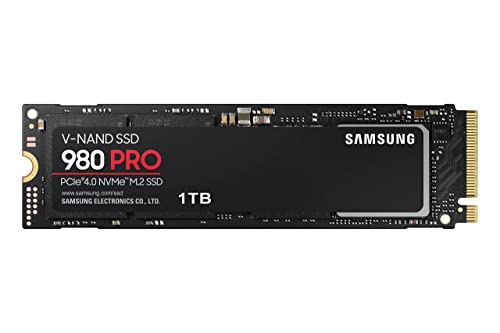
The Samsung 980 PRO 1TB is the older sibling of the 990 PRO, and it remains a strong choice for laptop upgrades. It is a Gen4 drive rated up to 7,000 MB/s sequential reads and 5,000 MB/s writes, which puts it close to the flagship in everyday use.
One reason to pick the 980 PRO is maturity. Firmware is stable, compatibility with laptop BIOS versions is well established, and Samsung Magician software supports it fully. The 1TB model carries a 600 TBW endurance rating and a five-year warranty, matching the 990 PRO on paper for long-term durability.
The main difference from the newer drive is efficiency. The 980 PRO draws a little more power under load and can run a touch warmer, which matters in very thin laptops. For most machines with a Gen4 slot, though, the real-world difference between the two Samsung drives is small. Choose the 980 PRO when you want proven Gen4 speed and it is the better value of the two on the day you buy.
WD Blue SN580 1TB

The WD Blue SN580 1TB is the quiet, efficient pick for light laptop use. It is a Gen4 drive rated up to 4,150 MB/s sequential reads, which is far faster than any SATA drive and plenty for web browsing, office work, streaming, and study. Its DRAM-less design and modest power draw make it a natural fit for thin and light laptops where battery life matters.
This drive is single-sided and runs cool, which is exactly what you want in a cramped laptop chassis. It also carries a five-year warranty and a 600 TBW endurance rating, which is generous for a value drive and gives it a long service life in everyday machines.
The SN580 is not the drive for heavy video editing or constant large file transfers, since its write speed trails the faster models here. But for a student laptop, a family machine, or a work notebook that mostly handles documents and browser tabs, it is more than fast enough.
How to choose
Start with the slot in your laptop. Most laptops from the last several years use an M.2 2280 slot, which fits all five drives in this guide. A few ultrabooks use the shorter 2242 size, so check your manual or the existing drive before ordering. Also confirm whether your slot supports NVMe and whether it runs at Gen3 or Gen4 speed, since a Gen4 drive in a Gen3 slot still works but runs at Gen3 speed.
Capacity is the next decision. A 1TB drive is the right starting point for most laptop owners: it leaves room for the operating system, apps, and a reasonable amount of files without constant cleanup. If your laptop holds your whole photo library or a large game collection, consider a 2TB model from the same family instead.
Endurance, listed as TBW, tells you how much data the drive is rated to write over its life. Everyday users rarely approach these limits, but creators who write large video files daily should favor drives with higher TBW numbers.
Power and heat deserve attention in laptops. DRAM-less drives and Gen3 models tend to run cooler and sip less battery, which suits thin machines. Flagship Gen4 drives are faster but can run warmer under sustained load, so they suit laptops with decent airflow. Finally, check whether your laptop needs a single-sided drive, since most do, and confirm that the drive you pick is single-sided before you buy.
Who should skip
Not every laptop benefits from an NVMe upgrade. If your machine has no M.2 slot and only a 2.5-inch SATA bay, none of these drives will fit, and a SATA SSD is the right upgrade instead. The same applies to very old laptops with an M.2 slot that only accepts SATA drives.
Owners of laptops with soldered storage should also skip this guide, since the drive cannot be removed at all. Many thin ultrabooks and some Chromebooks fall into this group, so check your model before ordering.
If your laptop already has a fast Gen4 NVMe drive and feels quick, a new drive will not change much. The money is better spent on more memory or a larger battery.
Frequently Asked Questions
Will an NVMe SSD work in any laptop?
No. Your laptop needs an M.2 slot that supports NVMe drives. Most laptops from the last several years have one, but some older models only accept SATA M.2 drives, and some thin laptops have storage soldered to the board. Check your laptop manual or the existing drive label before ordering.
Do I need to reinstall Windows after swapping the drive?
You have two options. You can clone the old drive to the new one with cloning software, which keeps everything as it is, or you can do a fresh install of Windows and then copy your files back. Cloning is faster and keeps your apps and settings, while a fresh install can feel cleaner on an old machine.
Is 1TB enough for a laptop?
For most people, yes. A 1TB drive holds the operating system, a full set of apps, and plenty of documents, photos, and games. If you store large video files or a big game library, a 2TB drive gives more breathing room, but 1TB is the right starting point for most laptop owners.
Does a Gen4 drive work in a Gen3 laptop slot?
Yes. NVMe drives are backward compatible, so a Gen4 drive will work in a Gen3 slot and run at Gen3 speed. You still get a large speed boost over a SATA drive.
Final verdict
The Samsung 990 PRO 1TB is the best NVMe SSD for laptops overall, with the highest speeds and strong endurance for owners who want the fastest upgrade available. The WD Black SN770 1TB is the best value Gen4 pick, offering most of the real-world speed for less money and with lower power draw.
Budget shoppers should choose the Crucial P3 Plus 1TB, which delivers the biggest jump from a hard drive for the least money. The Samsung 980 PRO 1TB is the proven Gen4 alternative with a long track record, and the WD Blue SN580 1TB is the cool, efficient pick for light everyday laptops.
More from Amazon
Programs that pair well with the guide above. Offers and eligibility are set by Amazon and may change.
A free business account with business pricing and bulk-buying tools for work, shop or home office.
Create a business accountFree shipping on eligible items, Prime Video and more. Eligible new members can start with a free trial.
Start a Prime free trialAudiobooks and podcasts to listen to on the go. Eligible new members can start with a free trial.
Try Audible freeAd-free music streaming. Eligible new subscribers can start with a free trial.
Try Music Unlimited freeAs an Amazon Associate we earn from qualifying purchases.







Write Your Review
No reviews yet. Be the first to share your experience!