

Key takeaways
- Find the best SSDs for MacBook Pro upgrades that fit your model, from direct-fit internal kits to fast external drives for newer Macs in 2026.
- Top Pick: OWC Aura Pro X2 480GB Complete Upgrade Solution
- Runner-up: Samsung 980 PRO 1TB
- Also consider: Samsung 990 PRO 1TB
A MacBook Pro that once felt fast can start to feel cramped when the drive fills up with photos, video projects, and years of files. A nearly full drive can slow down everyday work and leave little room for the scratch space that editing tools need. The right SSD upgrade restores that breathing room and can extend the useful life of a machine by years.
The catch is that not every SSD fits every MacBook Pro. Models from late 2013 through mid 2015 use a removable blade-style drive with a proprietary connector, while every MacBook Pro from 2016 onward has storage soldered to the logic board. This guide covers both situations: direct-fit internal kits for the older Retina models, adapter-based NVMe drives, and fast external SSDs for newer Macs.
As an Amazon Associate, we earn from qualifying purchases.
Quick answer
If you own a Retina MacBook Pro from late 2013 to mid 2015, the OWC Aura Pro X2 complete upgrade kit is the most straightforward internal choice because it is built for that connector and includes the tools and enclosure. For newer Macs with soldered storage, the Samsung T7 adds fast external space, while the SanDisk Extreme is the tougher pick for field work.
OWC Aura Pro X2 480GB Complete Upgrade Solution

The OWC Aura Pro X2 complete upgrade solution is the closest thing to a purpose-built answer for Retina MacBook Pro owners. It is designed for MacBook Pro Retina models from late 2013 through mid 2015, and it also fits MacBook Air models from mid 2013 through 2017. Because the drive uses the correct blade form factor and connector, there is no adapter to source and no guesswork about physical fit.
Performance is a clear step up from the factory drive. OWC lists sequential read speeds up to 3,200 MB/s and write speeds up to 2,400 MB/s for the line, roughly double the speed of the original Apple-supplied drives in many configurations. In everyday use that means quicker boots and faster app launches.
The kit part is what makes this pick stand out. It ships with the small screwdrivers needed to open the bottom case, plus an Envoy Pro enclosure that turns the old Apple SSD into a portable external drive. The 480GB version doubles the storage of a base 256GB machine, and the same kit is also sold in capacities up to 2TB. The main limitation is compatibility: this drive fits only the 2013 to 2015 Retina generation.
Samsung 980 PRO 1TB
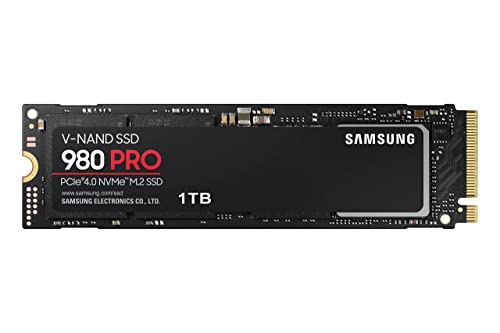
The Samsung 980 PRO is a standard M.2 2280 NVMe drive, and it earns its place here as the adapter-based internal option. In a 2013 to 2015 Retina MacBook Pro it fits only with a third-party M.2 to Apple-connector adapter, and the drive then runs at PCIe 3.0 speeds because that is what the older slot supports. Even capped in that way, it is a fast and reliable drive.
The 1TB model is rated for sequential read speeds up to 7,000 MB/s and write speeds up to 5,000 MB/s over PCIe 4.0, far beyond what the older Mac slot can use. That headroom matters because if the drive is later moved into a modern enclosure, it still has plenty of speed in reserve. Samsung backs it with a five-year limited warranty and a 600 TBW endurance rating for the 1TB model.
The 1TB capacity suits owners who want to stop managing storage so carefully. It holds a large photo library or a serious video project alongside the operating system and apps, with room left over. The honest trade-off is the adapter: the drive will never reach its rated PCIe 4.0 speed inside a 2013 to 2015 Mac.
Samsung 990 PRO 1TB
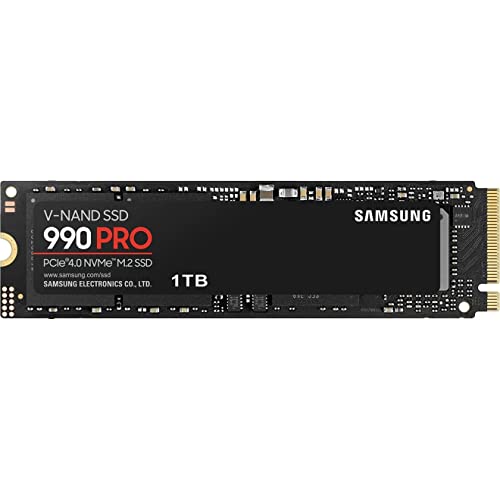
The Samsung 990 PRO is the fastest internal drive in this roundup on paper, and it follows the same adapter-based path as the 980 PRO in a Retina MacBook Pro. It is a standard M.2 2280 NVMe drive, so in a 2013 to 2015 model it needs a compatible M.2 adapter, and its speed is capped by the older PCIe 3.0 slot. Outside that machine it is one of the quickest PCIe 4.0 drives available, which makes it a smart choice for owners who may reuse the drive later.
Samsung rates the 1TB model at sequential read speeds up to 7,450 MB/s and write speeds up to 6,900 MB/s, near the practical ceiling of the PCIe 4.0 interface. Random performance is strong too, which matters for launching apps and opening project files. The drive carries a 600 TBW endurance rating and a five-year limited warranty.
Power efficiency is another strength, which helps in a laptop where heat and battery life matter. Capacity options run from 1TB to 4TB. The 1TB model is the sweet spot for most MacBook Pro owners: large enough for a working photo or video library, small enough to keep the upgrade sensible.
Samsung T7 Portable SSD 1TB

For MacBook Pro models from 2016 onward, where the internal drive is soldered and cannot be replaced, an external SSD is the upgrade path. The Samsung T7 Portable SSD is the simplest and most versatile option in this guide. It connects over USB 3.2 Gen 2 and delivers read speeds up to 1,050 MB/s and write speeds up to 1,000 MB/s, fast enough to edit video directly from the drive, run a photo library, or keep a full Time Machine backup without long waits.
The T7 is small enough to disappear into a laptop bag. It measures roughly the size of a credit card, weighs very little, and draws its power from the USB-C connection, so there is no extra power brick to carry. It ships with both a USB-C to USB-C cable and a USB-C to USB-A cable.
The drive works with macOS out of the box, and it can be formatted for APFS or exFAT. Samsung includes optional password protection and AES 256-bit hardware encryption through its portable SSD software. The T7 is available in capacities from 500GB to 4TB, and the 1TB model is a practical balance of space and value. It is not a ruggedized drive, so owners who work outdoors may prefer the tougher SanDisk below.
SanDisk Extreme Portable SSD 1TB
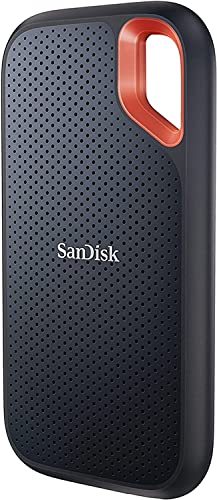
The SanDisk Extreme Portable SSD is the rugged pick of the group, built for MacBook Pro owners who take their work outside the office. It delivers the same class of speed as the T7, with read speeds up to 1,050 MB/s and write speeds up to 1,000 MB/s over USB 3.2 Gen 2, so it handles photo libraries, video editing, and large backups with ease.
Toughness is where it pulls ahead. The drive carries an IP65 rating for water and dust resistance, and SanDisk rates it for drops from up to three metres. A carabiner loop on the corner lets it clip to a bag or a belt loop, which matters on a shoot or a hike. The rubberized housing absorbs bumps that would dent a bare metal enclosure.
Like the T7, it connects over USB-C and works with macOS, and it can be formatted for APFS or exFAT. SanDisk backs it with a five-year limited warranty. It is available in capacities from 500GB to 4TB, and the 1TB model gives most owners room for a working library plus a backup. The trade-off is modest: the rugged housing is slightly larger and heavier than the slim T7, but for field work that extra bulk buys real protection.
How to choose
Start by identifying the exact MacBook Pro model. Click the Apple menu, choose About This Mac, and note the year and screen size. If the machine is a Retina model from late 2013 through mid 2015, an internal upgrade is possible. If it is a 2016 or later model, the storage is soldered and an external SSD is the only practical path.
For the older Retina models, decide how much work you want to do. The OWC Aura Pro X2 kit is the direct-fit choice: it is made for the connector, it includes the tools, and the Envoy Pro enclosure gives the old drive a second life. The Samsung 980 PRO and 990 PRO are faster on paper, but they need a third-party adapter and will run at PCIe 3.0 speeds in that slot. Choose the OWC kit for certainty, or a Samsung drive plus adapter if you are comfortable with the conversion.
For newer Macs, the choice is between the Samsung T7 and the SanDisk Extreme Portable. Both deliver the same headline speeds over USB-C. Pick the T7 for the smallest and lightest drive, and pick the SanDisk Extreme Portable if the drive will travel in a camera bag or get used outdoors. A 1TB drive is the safer choice for photo and video work. Finally, make a backup before any upgrade.
Who should skip
Owners of MacBook Pro models from 2016 onward should skip the internal drives in this guide entirely. The storage in those machines is soldered to the logic board, so no internal SSD will fit.
Owners who are not comfortable opening a laptop should skip the internal options too, even if their model supports them. If the idea of removing the bottom case causes worry, an external SSD gives most of the benefit with none of the risk. Anyone whose Mac is still under AppleCare or another warranty should check the terms before an internal swap, since opening the machine can affect coverage.
FAQ
Can I upgrade the SSD in a MacBook Pro from 2016 or later?
No, not internally. MacBook Pro models from 2016 onward have their storage soldered to the logic board, so there is no slot to swap a drive into. An external SSD over USB-C, such as the Samsung T7 or the SanDisk Extreme Portable, is the practical way to add fast storage.
Which SSD fits a Retina MacBook Pro from 2013 to 2015?
The OWC Aura Pro X2 is made for those models and fits the proprietary connector directly. Standard M.2 NVMe drives such as the Samsung 980 PRO and 990 PRO also work, but only with a third-party adapter, and they run at PCIe 3.0 speeds in that slot.
Do I need an adapter for the Samsung 980 PRO or 990 PRO in a MacBook Pro?
Yes, in a 2013 to 2015 Retina MacBook Pro. Those machines use a proprietary blade connector rather than the standard M.2 slot these drives are built for. A small adapter bridges the difference, and it is a separate purchase.
Can I use an external SSD as my main drive?
Yes, and many Mac owners do. A fast external SSD over USB-C can hold a photo library, a video project, or even a bootable macOS installation. Format the drive for APFS if it will be used only with Macs, and keep a backup of anything important.
Final verdict
The best SSD for a MacBook Pro depends entirely on which MacBook Pro it is. Owners of a Retina model from late 2013 to mid 2015 have a genuine internal upgrade path, and the OWC Aura Pro X2 kit is the simplest way to take it. The Samsung 980 PRO and 990 PRO are excellent drives for owners who are happy to use an adapter. Owners of newer Macs with soldered storage are not left out: the Samsung T7 adds fast, pocket-sized space with no tools required, and the SanDisk Extreme Portable adds the toughness that field work demands.
More from Amazon
Programs that pair well with the guide above. Offers and eligibility are set by Amazon and may change.
A free business account with business pricing and bulk-buying tools for work, shop or home office.
Create a business accountFree shipping on eligible items, Prime Video and more. Eligible new members can start with a free trial.
Start a Prime free trialAudiobooks and podcasts to listen to on the go. Eligible new members can start with a free trial.
Try Audible freeAd-free music streaming. Eligible new subscribers can start with a free trial.
Try Music Unlimited freeAs an Amazon Associate we earn from qualifying purchases.






Write Your Review
No reviews yet. Be the first to share your experience!