

Key takeaways
- The best SATA SSDs for laptops revive an older notebook without a new machine. Compare five 2.5-inch drives on capacity, speed, endurance and warranty.
An older laptop that still runs well can feel slow for one simple reason: it boots from a spinning hard drive. Every launch, every file search, every update queues behind a mechanical disk that reads data one track at a time. Swapping that drive for a 2.5-inch SATA SSD is the single most noticeable upgrade most older notebooks can receive, and it costs far less than replacing the machine. The laptop keeps its keyboard, its screen, and its software, while everyday tasks stop stalling.
This guide covers 2.5-inch SATA SSDs only, because that is the form factor most laptops sold before the M.2 era accept. Each pick below is a 2.5-inch drive that drops into a standard SATA bay, and every capacity, speed, and endurance figure comes from the drive’s own listing. The goal is a straight comparison of the drives that make sense as a laptop upgrade, from a dependable flagship to a budget rescue and a two-drive bundle.
As an Amazon Associate, we earn from qualifying purchases.
Quick answer
The SK hynix Gold S31 1TB is the best SATA SSD for most older laptops, pairing a DRAM cache with a 600 TBW endurance rating and a five-year warranty. Budget buyers should look at the PNY CS900 1TB, while the WD Blue SA510 2TB suits laptops that need room for a large photo or media library.
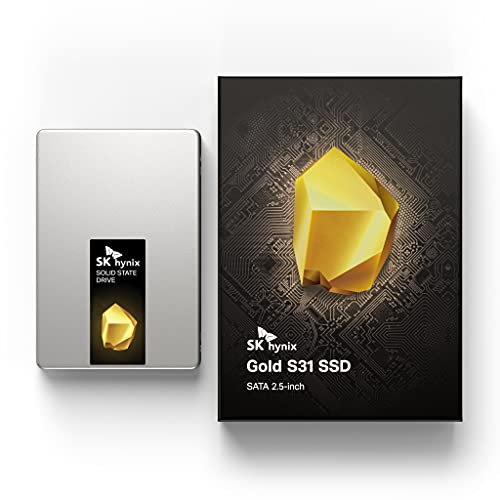
SK hynix Gold S31 1TB
Specs
- 2.5-inch form factor, SATA III 6 Gb/s interface, up to 560 MB/s sequential read, 600 TBW endurance rating, DRAM cache, 5-year warranty, model SHGS31-1000GS-2.
The Gold S31 earns the top spot because it pairs the two traits that matter most in a laptop boot drive: a DRAM cache and a high endurance rating. The DRAM cache keeps the drive responsive when the operating system writes many small files at once, which is exactly what happens during boot, updates, and application launches. The 600 TBW endurance rating for the 1TB model means the drive is rated to absorb a large volume of writes over its life, so a laptop that gets daily use for years is well within its design envelope.
Sequential read speed reaches up to 560 MB/s, effectively the ceiling of the SATA III interface, and the drive’s controller and firmware have been refined across several years on the market. The 1TB capacity suits most revivals: room for the operating system, applications, and a working set of documents and photos, without paying for capacity that goes unused.
It uses the standard 2.5-inch, 7mm form factor, so it slides into the bay most laptops from the last decade already have, and it runs cool and silent compared with the spinning disk it replaces.
PNY CS900 1TB

Specs
- 2.5-inch form factor, SATA III 6 Gb/s interface, up to 535 MB/s sequential read and 515 MB/s sequential write, 320 TBW endurance rating, 3-year warranty, model SSD7CS900-1TB-RB.
The PNY CS900 1TB is the budget pick for a laptop that needs a working drive rather than a showcase one. Its sequential read speed of up to 535 MB/s is close enough to the SATA ceiling that everyday use feels the same as on a faster drive, and its write speed of up to 515 MB/s keeps large file copies moving. For a machine that mostly browses, streams, and runs office software, those numbers are more than enough.
Endurance is rated at 320 TBW for the 1TB model, lower than the flagship drives here but still generous for light and moderate use: a laptop writing a few gigabytes a day would take many years to approach that figure. The three-year warranty is shorter than the five-year coverage on the premium picks, which is the honest trade for the lower cost.
What the CS900 does best is rescue a laptop on a tight budget. It is a straightforward 2.5-inch SATA drive with no extra features to pay for, and it turns a machine that takes minutes to become usable into one that is ready in well under a minute.
WD Blue SA510 2TB

Specs
- 2.5-inch, 7mm form factor, SATA III 6 Gb/s interface, up to 560 MB/s sequential read and 520 MB/s sequential write, 600 TBW endurance rating, 5-year warranty, includes Acronis True Image for WD, model WDS200T3B0A.
The WD Blue SA510 2TB is the high-capacity pick for laptops whose owners have outgrown a 1TB drive. Two terabytes holds an operating system, a full application suite, and a large photo or media library with room to spare, which matters when the laptop is the household’s main computer and its only storage. The drive reads at up to 560 MB/s and writes at up to 520 MB/s, so it performs at the same level as the best 1TB drives in this guide while offering twice the room.
Endurance is rated at 600 TBW, and the five-year warranty matches the flagship drives. One practical advantage is the included Acronis True Image for WD software, which clones the old hard drive onto the new SSD in one step, so the laptop comes back up exactly as it was, only faster.
The SA510 also suits laptops that serve as media machines. A large library of photos, music, and video benefits from the extra capacity, and the drive’s low power draw and silent operation suit a notebook that spends hours on a desk.
ADATA Ultimate SU800 1TB

Specs
- 2.5-inch form factor, SATA III 6 Gb/s interface, up to 560 MB/s sequential read and 520 MB/s sequential write, 800 TBW endurance rating, 3D TLC NAND, SMI controller, 3-year warranty, model ASU800SS-1TT-C.
The ADATA Ultimate SU800 1TB is the endurance pick, and its headline figure is an 800 TBW endurance rating, the highest in this guide. That rating comes from the drive’s 3D TLC NAND paired with an SMI controller, a combination that has been in production for years. For a laptop that writes heavily, whether from video work, large downloads, or constant syncing, a higher endurance rating is a real cushion against wear.
Sequential speeds reach up to 560 MB/s read and 520 MB/s write, so the SU800 keeps pace with the flagship drives on ordinary tasks, and it draws less energy than a spinning drive. The three-year warranty is the one place it trails the premium picks, so buyers should weigh the endurance advantage against the shorter coverage.
One note of caution: this is an older model, and some retailers have listed it as discontinued or out of stock at various times. Readers should confirm the listing is live and the model number ASU800SS-1TT-C matches the 1TB version before ordering.
PNY CS900 1TB and 500GB Bundle

Specs
- Two 2.5-inch SATA III drives in one bundle, 1TB and 500GB capacities, up to 535 MB/s sequential read and 515 MB/s sequential write, 3-year warranty, model CS900.
The PNY CS900 bundle is the value kit pick, pairing a 1TB drive with a 500GB drive in a single purchase. The idea is simple: put the 1TB drive in the laptop as the main drive, and use the 500GB drive as a second upgrade, a spare, or a fast drive in an external enclosure. Households with two aging laptops get both machines revived from one order, and anyone who keeps a backup drive on hand gets a ready spare.
Both drives share the CS900 design, with sequential read speeds up to 535 MB/s and write speeds up to 515 MB/s, so the second drive performs the same as the budget pick in this guide. This is a practical buy for a family or a small office that has more than one older machine to upgrade.
The bundle also makes sense for a single owner who wants a matching spare. It can sit on a shelf until needed, or live in an inexpensive USB enclosure as a fast external drive for backups, and either way the second drive costs less per gigabyte than buying it separately.
How to choose
Start with the laptop itself, not the drive. Check that the machine has a 2.5-inch SATA bay, which most laptops sold before the M.2 era do, and confirm the bay accepts a 7mm drive, since every pick in this guide uses that height. A quick look at the service manual will settle the question and avoids the frustration of a drive that does not fit.
Next, decide how much capacity the laptop needs. A 1TB drive suits most revivals, holding the operating system, applications, and a working set of files with room to grow. Choose 2TB when the laptop holds a large photo library, a media collection, or several big applications, because running a drive nearly full slows it down and leaves no room for updates. A 500GB drive is enough only for a machine that stores almost everything elsewhere.
Then weigh endurance against warranty. Endurance, measured in TBW, describes how much data the drive is rated to write over its life, and a higher figure suits laptops that write heavily every day. Five years of coverage is a meaningful advantage over three when the laptop is expected to serve for several more years. Finally, plan the move itself. A cloning tool, such as the one included with the WD Blue SA510, copies the old drive to the new one, while a fresh install takes longer but starts clean. Back up important files before opening the laptop.
Who should skip
Skip a 2.5-inch SATA SSD when the laptop has no 2.5-inch bay. Many thin and light notebooks from recent years use only M.2 slots, and a 2.5-inch drive simply has nowhere to go in those machines. A laptop with an NVMe-capable M.2 slot is better served by an NVMe drive, which is several times faster than SATA.
Skip the upgrade as well when the laptop’s real problem is not storage. A machine with a failing battery, a cracked screen, or too little memory for its workload will still struggle after a drive swap, and the money is better spent on the actual fault or on a replacement machine. A SATA SSD also cannot fix a laptop whose processor is too slow for the software it must run.
Finally, skip the high-capacity and endurance picks when the laptop is a secondary machine that sees light use. A spare laptop that only handles occasional browsing does not need 2TB of space or an 800 TBW rating, and the budget drive here will revive it just as well.
Frequently Asked Questions
Will a 2.5-inch SATA SSD fit my older laptop?
Most laptops sold before the M.2 era have a 2.5-inch SATA bay that accepts a 7mm drive, which is the form factor every pick in this guide uses. Check the laptop’s service manual before ordering, and confirm whether the bay uses a standard SATA connector or a proprietary caddy.
Do I need to reinstall Windows after swapping in an SSD?
No, a reinstall is not required. Cloning software copies the old hard drive onto the new SSD, including the operating system, settings, and files, so the laptop starts up as before, only faster. A fresh install starts clean, but it takes longer and needs the installation media and a license key.
Is 1TB enough for a laptop revival?
For most owners, yes. A 1TB drive holds the operating system, applications, and a working set of documents and photos with room to grow. Choose 2TB when the laptop stores a large photo or media library, or when several large applications are installed, since a nearly full drive leaves no room for updates.
How long will a SATA SSD last in daily use?
Endurance is rated in TBW, and the drives in this guide range from 320 TBW to 800 TBW. A laptop that writes a few gigabytes a day would take many years to approach even the lowest of those figures, and most drives outlast the laptop they are installed in.
Final verdict
For most older laptops, the SK hynix Gold S31 1TB is the drive to buy: a DRAM cache, a 600 TBW endurance rating, and a five-year warranty make it the safest all-round revival. The PNY CS900 1TB is the right budget rescue, the WD Blue SA510 2TB removes capacity worries and includes cloning software, the ADATA SU800 1TB leads on endurance, and the PNY CS900 bundle revives two machines at once. Any of the five will make an old laptop feel new again, and the choice comes down to capacity, endurance, and how many machines need help.
Product and ASIN Reference
| Product | ASIN |
|---|---|
| SK hynix Gold S31 1TB | B07SNHB4RC |
| PNY CS900 1TB | B07Y5VDNT9 |
| WD Blue SA510 2TB | B0C14TF467 |
| ADATA Ultimate SU800 1TB | B01K8A29E6 |
| PNY CS900 1TB and 500GB Bundle | B0CYZJQWQ7 |
More from Amazon
Programs that pair well with the guide above. Offers and eligibility are set by Amazon and may change.
A free business account with business pricing and bulk-buying tools for work, shop or home office.
Create a business accountFree shipping on eligible items, Prime Video and more. Eligible new members can start with a free trial.
Start a Prime free trialAudiobooks and podcasts to listen to on the go. Eligible new members can start with a free trial.
Try Audible freeAd-free music streaming. Eligible new subscribers can start with a free trial.
Try Music Unlimited freeAs an Amazon Associate we earn from qualifying purchases.

Write Your Review
No reviews yet. Be the first to share your experience!