

Key takeaways
- We compare five keyboard and mouse combos for home offices and work desks, from budget wireless sets to a premium multi-device pick for busy desks.
A keyboard and mouse combo is the simplest way to set up a desk: one box, one receiver, and a keyboard and mouse designed to work together. The short answer is that the Logitech MK540 is the best all-round pick here, with a full-size keyboard, a palm rest, and a long battery life. The Logitech MK270 is the pick for the tightest budgets, the Dell KM3322W and the HP 230 are solid budget alternatives, and the Logitech MK850 is the premium choice if you switch between several devices.
As an Amazon Associate, we earn from qualifying purchases.
Table of Contents
- How to Choose a Keyboard and Mouse Combo
- 1. Logitech MK270 Wireless Keyboard and Mouse Combo
- 2. Dell Wireless Keyboard and Mouse KM3322W
- 3. HP 230 Wireless Mouse and Keyboard Combo
- 4. Logitech MK540 Advanced Wireless Keyboard and Mouse Combo
- 5. Logitech MK850 Performance Wireless Keyboard and Mouse Combo
- Which Combo Fits Your Desk
- Frequently Asked Questions
- Conclusion
How to Choose a Keyboard and Mouse Combo
Start with the keyboard layout. A full-size keyboard includes a number pad, which matters if you type numbers often. All five combos here use full-size keyboards, so the choice comes down to key feel, palm rests, and shortcut keys.
Next, look at the connection. Every combo here connects over a 2.4 GHz wireless link with a small USB receiver. The premium pick also adds Bluetooth, which lets it pair with up to three devices.
Battery life is the third thing to check. The combos here are rated from 12 months to 36 months for the keyboard and from 12 to 24 months for the mouse. Long battery life matters most on a shared family computer.
Then consider the mouse. A compact mouse suits smaller hands, while a contoured right-handed mouse suits long work sessions. Mouse sensitivity is measured in DPI: 1000 DPI is fine for office work, while an adjustable sensor up to 1600 DPI gives you more control on larger screens.
1. Logitech MK270 Wireless Keyboard and Mouse Combo

The Logitech MK270 is the budget pick in this roundup. It pairs a full-size keyboard with a compact mouse, and both share a single tiny USB receiver, so setup takes seconds: plug the receiver in and start typing. The keyboard has 104 keys, including eight multimedia and shortcut keys, and the layout follows the familiar full-size pattern.
The keyboard is spill-resistant, a useful safety net on a home desk, and it is made with recycled plastic. Battery life is rated at 36 months for the keyboard and 12 months for the mouse. The mouse is compact and ambidextrous, which suits smaller hands and left-handed users.
This combo fits a family computer, a student desk, or a second workstation. It is not the pick for multi-device use, and the mouse is small for very large hands. But for everyday typing and office work, the MK270 covers the basics well.
Logitech sells the MK270 under more than one model number. This roundup uses the current listing, model 920-008813, first available in April 2018. Confirm the model number before you buy.
Specs
- Model: 920-008813
- Keyboard: full-size, 104 keys, 8 multimedia and shortcut keys
- Mouse: compact, ambidextrous
- Connection: 2.4 GHz wireless, one shared nano receiver
- Battery life: 36 months keyboard, 12 months mouse
- Features: spill-resistant keyboard, recycled plastic
- Compatibility: Windows
2. Dell Wireless Keyboard and Mouse KM3322W
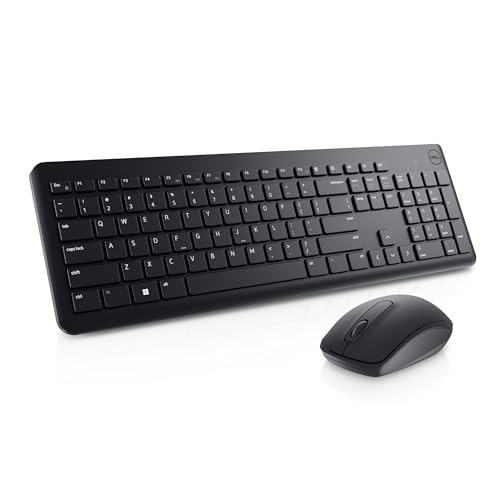
The Dell KM3322W is the budget pick for buyers who want a non-Logitech combo with a strong warranty behind it. It is a full-size wireless set built for office work, and Dell backs it with a three-year Advanced Exchange Service.
The keyboard uses anti-fade, spill-resistant plunger keys, so the legends stay readable and a spilled drink is less likely to end the keyboard. Six multimedia keys sit along the top, and tilt legs let you set the typing angle. The mouse is a straightforward 1000 DPI optical mouse with three buttons.
Battery life is rated at 36 months for the keyboard and 18 months for the mouse, and the set uses 128-bit AES encryption on the wireless link. The keyboard and mouse both run from the same 2.4 GHz receiver, so you only need one USB port.
This combo suits an office desk or anyone who values the Dell warranty and a plain, business-like design. It does not offer Bluetooth or multi-device switching. But for typing, spreadsheets, and general computer use, the KM3322W is a dependable budget choice.
Dell also sells the KM3322W in other regions under a different listing code. This roundup uses the US listing, model KM3322W, first available in February 2023. Confirm the model number before you buy.
Specs
- Model: KM3322W
- Keyboard: full-size, anti-fade spill-resistant plunger keys, 6 multimedia keys, tilt legs
- Mouse: 1000 DPI optical, 3 buttons
- Connection: 2.4 GHz wireless, one shared receiver
- Battery life: 36 months keyboard, 18 months mouse
- Features: 128-bit AES encryption, 3-year Advanced Exchange Service
- Compatibility: Windows
3. HP 230 Wireless Mouse and Keyboard Combo

The HP 230 is the third budget pick, and it stands out for its low-profile chiclet keyboard. If you like the feel of a laptop keyboard, with short, quiet key travel, this is the combo that matches it best. The full-size layout keeps the numeric keypad and adds 12 shortcut keys.
The mouse has an adjustable sensor up to 1600 DPI, the most flexible sensor among the budget picks here. You can set it lower for precise work or higher for fast movement across a large monitor.
Battery life is rated at 16 months for the keyboard and 12 months for the mouse, shorter than the Logitech and Dell budget picks but still less than one battery change a year for most users. The set connects through a single 2.4 GHz receiver, and HP covers it with a two-year limited warranty.
This combo fits a home office where you prefer laptop-style keys, or a desk where a quieter keyboard matters. It is not the pick for the longest battery life or for multi-device switching. If you already like typing on a laptop, the HP 230 will feel familiar.
Specs
- Model: 18H24AA#ABA
- Keyboard: full-size, low-profile chiclet keys, numeric keypad, 12 shortcuts
- Mouse: adjustable up to 1600 DPI
- Connection: 2.4 GHz wireless, one shared receiver
- Battery life: 16 months keyboard, 12 months mouse
- Features: 2-year limited warranty
- Compatibility: Windows
4. Logitech MK540 Advanced Wireless Keyboard and Mouse Combo

The Logitech MK540 is the mid-range pick and the best all-round combo in this roundup. It takes the familiar MK270 formula and adds the comfort features that matter when you type for hours: a palm rest, hotkeys, and a larger mouse.
The full-size keyboard has a built-in palm rest that supports your wrists during long sessions, with dedicated hotkeys for media and common tasks. The keyboard is spill-resistant, and battery life is rated at 36 months for the keyboard and 18 months for the mouse.
The mouse is the M310, an ambidextrous shape that is larger and more hand-filling than the compact mouse on the MK270. The set connects through a Unifying receiver with a range of about 33 feet, which is useful if the computer sits under or beside the desk.
This combo is the right choice for a main work desk where you type most of the day. It does not add Bluetooth, so it is a single-computer combo. But the palm rest and the better mouse make a real difference over a long workday, which is why it leads this roundup.
Specs
- Model: 920-012585
- Keyboard: full-size, palm rest, multimedia hotkeys, spill-resistant
- Mouse: M310, ambidextrous
- Connection: 2.4 GHz wireless, Unifying receiver, 33 ft range
- Battery life: 36 months keyboard, 18 months mouse
- Features: spill-resistant keyboard
- Compatibility: Windows
5. Logitech MK850 Performance Wireless Keyboard and Mouse Combo

The Logitech MK850 is the premium pick, and it is the combo for people who work across more than one device. It connects by Bluetooth or through the included Unifying receiver, and it can pair with up to three devices at once, so you can switch between a desktop, a laptop, and a tablet with a keystroke.
The keyboard is a full-size ergonomic design with a cushioned palm rest and a curved keyframe. It works with Windows, macOS, ChromeOS, and Linux. The mouse is contoured for the right hand and has a hyper-fast scroll wheel that spins freely for long documents and clicks into a precise mode for line-by-line work. A feature called DuoLink lets the mouse and keyboard work together.
Battery life is rated at 36 months for the keyboard and 24 months for the mouse, the longest mouse battery life in this roundup, and the wireless range reaches about 10 metres. This is the most expensive combo here, and it is overkill for a single-computer desk. But if you juggle devices, the multi-device switching alone justifies the step up.
One thing to watch: Logitech has sold the MK850 under more than one model number. This roundup uses the current listing, model 920-013269, first available in July 2024. Confirm the model number on the listing before you buy.
Specs
- Model: 920-013269
- Keyboard: full-size ergonomic, cushioned palm rest, curved keyframe
- Mouse: contoured right-handed, hyper-fast scroll wheel
- Connection: Bluetooth and 2.4 GHz Unifying receiver, up to 3 devices, 10 m range
- Battery life: 36 months keyboard, 24 months mouse
- Features: DuoLink, multi-device switching
- Compatibility: Windows, macOS, ChromeOS, Linux
Which Combo Fits Your Desk
If budget is the priority, the MK270 is the cheapest reliable full-size wireless combo here, with the longest track record of the five. The Dell KM3322W is the budget alternative if you want the three-year exchange service, while the HP 230 is the budget pick if you prefer laptop-style chiclet keys.
If you type for a living, step up to the MK540. The palm rest and the larger mouse pay off most over a long day, and the mid-range tier keeps the cost reasonable. If you work across a desktop and a laptop, the MK850 is the premium pick and the only one here with Bluetooth and multi-device switching.
Three of the five picks are Logitech, which reflects the market: Logitech dominates the wireless combo category on Amazon. The Dell and HP picks give you two non-Logitech options at the budget tier.
Frequently Asked Questions
Do I need a separate receiver for the keyboard and the mouse?
No. Every combo here shares a single USB receiver between the keyboard and the mouse, so you only need one free USB port. The premium MK850 can also connect by Bluetooth, which frees the USB port entirely.
Can I use these combos with a laptop?
Yes. All five combos work with laptops that have a free USB-A port for the receiver, and the MK850 also works over Bluetooth. The compact mouse on the MK270 suits a laptop bag, while the full-size keyboards suit a laptop at a desk with an external monitor.
How long do the batteries last in a wireless keyboard and mouse combo?
It depends on the model. The keyboards here are rated from 16 to 36 months, and the mice from 12 to 24 months. Battery life varies with how much you type and click.
Are these combos good for gaming?
They are built for office and everyday use, not for competitive gaming. The mice have standard office sensors and the keyboards use membrane or plunger keys rather than mechanical switches. For casual games they work fine, but a dedicated gaming keyboard and mouse will respond faster.
Conclusion
A keyboard and mouse combo shapes every hour you spend at a desk, so choose on fit rather than looks alone. The Logitech MK540 is the best all-round pick here, with a palm rest, a comfortable mouse, and a long battery life at a mid-range tier. The Logitech MK270 is the budget pick with the longest track record, the Dell KM3322W adds a three-year exchange service, and the HP 230 suits anyone who prefers laptop-style keys. The Logitech MK850 is the premium pick for multi-device desks, with Bluetooth and three-device switching. Pick the tier that matches how many hours you type and how many devices you use, and confirm the model number on the listing before you buy.
Product and ASIN Reference
| Keyboard and Mouse Combo | ASIN |
|---|---|
| Logitech MK270 Wireless Keyboard and Mouse Combo | B079JLY5M5 |
| Dell Wireless Keyboard and Mouse KM3322W | B0BWNBYWJZ |
| HP 230 Wireless Mouse and Keyboard Combo | B093KTJ7FH |
| Logitech MK540 Advanced Wireless Keyboard and Mouse Combo | B0CBPNWCVS |
| Logitech MK850 Performance Wireless Keyboard and Mouse Combo | B0D2X9NM1V |
More from Amazon
Programs that pair well with the guide above. Offers and eligibility are set by Amazon and may change.
A free business account with business pricing and bulk-buying tools for work, shop or home office.
Create a business accountFree shipping on eligible items, Prime Video and more. Eligible new members can start with a free trial.
Start a Prime free trialAudiobooks and podcasts to listen to on the go. Eligible new members can start with a free trial.
Try Audible freeAd-free music streaming. Eligible new subscribers can start with a free trial.
Try Music Unlimited freeAs an Amazon Associate we earn from qualifying purchases.




Write Your Review
No reviews yet. Be the first to share your experience!