

Key takeaways
- Compare the best ECC memory for servers, NAS and workstations, from DDR4 RDIMMs to a DDR5 module, with speed, rank and platform fit explained.
Memory is the one component a storage server cannot afford to get wrong quietly. A single flipped bit in a file server’s RAM can corrupt data before it ever reaches the drives, and it can do so without any visible error. ECC memory guards against that by detecting and correcting single-bit errors in hardware, which is why servers, NAS units and workstations that hold important data use it instead of the non-ECC modules sold for desktop PCs.
The five modules below cover the main buying paths: genuine Samsung DDR4 and DDR5 registered DIMMs, two A-Tech registered modules at the two common DDR4 speeds, and a smaller 16GB registered module built on Hynix chips for capacity top-ups. All five are registered ECC DIMMs, so they suit server and workstation boards that call for RDIMM memory specifically.
As an Amazon Associate, we earn from qualifying purchases.
Quick answer
For a DDR4 server, the Samsung 32GB DDR4-2666 RDIMM is the safe default: an original manufacturer module with standard 2Rx4 organisation. The A-Tech DDR4-2666 module covers the same ground with a lifetime warranty, and its DDR4-2933 sibling suits newer Xeon Scalable and EPYC boards. The Timetec 16GB module handles smaller top-ups, while the Samsung DDR5-4800 RDIMM is the pick for current-generation platforms.
Samsung 32GB DDR4-2666 ECC RDIMM (M393A4K40CB2-CTD)

This is the genuine Samsung module that sits behind a large share of the DDR4 server fleet: a single 32GB registered DIMM running at DDR4-2666, listed under Samsung’s own part number M393A4K40CB2-CTD. It uses a 2Rx4 dual-rank organisation, CL19 timings and the standard 1.2V DDR4 operating voltage on a 288-pin DIMM, which makes it a like-for-like replacement or expansion module for servers already populated with Samsung memory.
Choosing the original manufacturer’s part matters in this class because server vendors qualify specific module part numbers, and a Samsung-labelled RDIMM is the closest possible match to what many Dell, HPE, Lenovo and Supermicro systems shipped with. Matching the existing population avoids the rank and chip-organisation mismatches that can force a whole bank to downclock or fail training at boot.
The limits are generational. DDR4-2666 is the ceiling for first-generation Xeon Scalable and EPYC 7001 platforms, and faster boards will simply run this module at 2666. It is also a registered module, so it cannot be mixed with unbuffered ECC or load-reduced DIMMs in the same system. The listing is sold new with a three-year warranty noted, which is shorter than the lifetime cover on the aftermarket modules below but typical for an OEM part.
A-Tech 32GB DDR4-2666 ECC RDIMM

A-Tech’s Enterprise Series module covers the same DDR4-2666 ground as the Samsung part, but as an aftermarket module sold and supported by A-Tech Components directly. It is a single 32GB registered ECC DIMM at PC4-21300 speed, built to the JEDEC DDR4 standard at 1.2V on a 288-pin DIMM, and intended strictly for servers and workstations rather than desktop boards.
The practical draw is the support behind it. A-Tech backs its server memory with a limited lifetime warranty, which changes the maths on a module that may sit in a 24/7 NAS or backup server for a decade: a failed stick is a replacement claim rather than a new purchase. Aftermarket modules like this one are also the realistic route when the exact OEM part number for an older server has become scarce or is only listed by resellers of pulled stock.
The trade-off is qualification. A-Tech builds to the standard specification, but the module will not appear on a server vendor’s certified list under its own name, so regulated environments that audit part numbers should stay with an OEM module. Chip sourcing can also vary between production runs, since A-Tech assembles modules from major-brand DRAM rather than one fixed supplier.
A-Tech 32GB DDR4-2933 ECC RDIMM
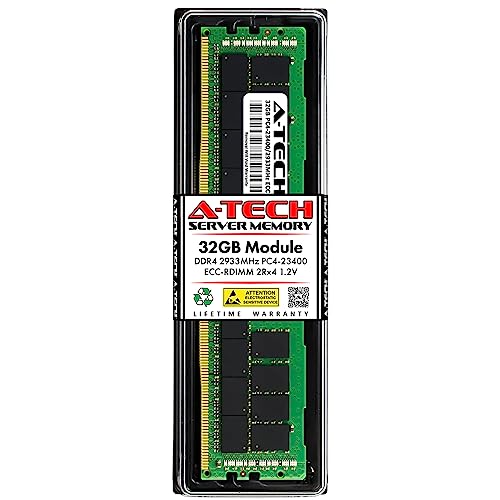
This A-Tech module is the step up for DDR4 platforms whose memory controllers run faster than 2666. It is a single 32GB registered ECC DIMM rated at DDR4-2933, or PC4-23400, with a 2Rx4 dual-rank layout, 1.2V operation and the same 288-pin registered form factor as the rest of the DDR4 picks here. A-Tech lists it for Intel Xeon Scalable processors from the first through third generations and AMD EPYC 7001, 7002 and 7003 series chips, which is exactly the installed base of DDR4-2933 servers.
That speed step is worth taking when the platform supports it, because memory bandwidth feeds everything a storage server does, from ZFS cache behaviour to virtual machine density. Populating every channel with 2933-rated modules lets a second or third-generation Xeon Scalable or EPYC 7002 host run its memory at full rated speed instead of dropping to the 2666 fallback that a slower module in the bank would impose.
The caution is the usual one: a single 2666 module anywhere in the population pulls the whole bank down, so this module only pays off as part of a matched set. Like the DDR4-2666 A-Tech module, it carries the brand’s limited lifetime warranty and sits outside vendor certified lists.
Timetec Hynix Original 16GB DDR4-2666 ECC RDIMM

Not every upgrade needs 32GB sticks. This Timetec module is a 16GB registered ECC DIMM at DDR4-2666, built on original Hynix chips, and it suits smaller servers, entry NAS units and top-up jobs where the goal is to fill empty slots or balance channels rather than maximise capacity per slot. Its specification is standard server fare: PC4-21300 speed, CL19 timings, a 2Rx8 dual-rank layout, 1.2V operation and a 288-pin registered DIMM format.
The 2Rx8 organisation is the detail to check before ordering. Many 32GB modules use x4 chips, and while most server boards accept either, some platforms restrict which organisations can be mixed in a bank. Where the existing population is already x8-based, this module drops in cleanly, and its Hynix DRAM matches the chips under a large share of factory-fitted server memory.
Capacity is the obvious ceiling: at 16GB per slot, a board with eight slots tops out well below what 32GB modules allow, so this is a poor foundation for a new high-density build. Treat it as the right tool for extending an existing DDR4-2666 system, balancing a partially populated board, or giving a small TrueNAS or backup box ECC protection on a modest scale.
Samsung 32GB DDR5-4800 ECC RDIMM (M321R4GA0BB0-CQK)

Current-generation servers have moved to DDR5, and this Samsung module is the DDR5 counterpart to the DDR4 original above. It is a single 32GB registered ECC DIMM rated at DDR5-4800, or PC5-38400, under Samsung part number M321R4GA0BB0-CQK. The layout is 1Rx4 single rank, it runs at the DDR5 standard 1.1V, and it uses the 288-pin DDR5 DIMM format, which is keyed differently from DDR4 and cannot be interchanged with it.
Samsung lists the module for servers built on fourth-generation AMD EPYC and fourth-generation Intel Xeon platforms, which covers the current PowerEdge, ProLiant, ThinkSystem and Supermicro ranges. DDR5 registered DIMMs also move the register and power management onto the module itself, so matching the platform’s qualified list matters even more than it did with DDR4; an original Samsung part number is the lowest-risk way to do that.
There is no upgrade path shared with the DDR4 picks: a DDR5 board takes only DDR5, and a DDR4 board can never use this module. Buy it for a new DDR5 build or to expand a DDR5 server with matching Samsung sticks, and confirm the exact part number against the server’s memory guide first.
How to choose
Start with the three checks that decide compatibility before brand or speed. First, the DDR generation: DDR4 and DDR5 modules are keyed differently and are not interchangeable, so the board decides this for you. Second, the module type. Registered RDIMMs, unbuffered ECC UDIMMs and load-reduced LRDIMMs are three different things, and a board that takes one will usually refuse the others; every pick in this guide is a registered DIMM. Third, the existing population. Memory speed is set by the slowest module in the bank, and many boards restrict mixing ranks or chip organisations, so match what is already fitted or replace the set outright.
After that, work through capacity per slot, since slot count is fixed: 32GB modules are the sensible default for virtualisation hosts and ZFS storage servers, where RAM doubles as cache, while 16GB modules suit smaller boxes. Finally, check the processor’s supported speed, because the CPU, not the sticker on the module, sets the ceiling: a DDR4-2933 module in a 2666 platform simply runs at 2666. Vendor qualification lists are worth consulting for production systems, and a full memory test pass after installation is cheap insurance before the machine goes back into service.
Who should skip
Desktop and laptop owners should skip this entire category: consumer boards almost never accept registered DIMMs, and these modules will not fit or will not train. Owners of small NAS units and mini servers that call for ECC UDIMM or SO-DIMM memory should also look elsewhere, because the registered modules here are a different electrical design despite sharing the ECC name. Anyone whose server is under a vendor support contract that requires certified part numbers should buy the exact listed OEM module for their system rather than an aftermarket equivalent. And if a system is showing errors on existing memory, replace the failing module like-for-like instead of using the fault as a reason to change speed or organisation mid-bank.
FAQ
Can I mix ECC RDIMM and ECC UDIMM modules in one server?
No. Registered and unbuffered modules are electrically different designs, and servers are built for one type or the other. The board’s specification decides which type it takes, and mixing them will prevent the system from booting rather than simply running more slowly. Always match the module type already installed.
Will a DDR4-2933 module work in a DDR4-2666 server?
Yes, in almost all cases. Memory modules run at the fastest speed that the processor, the board and every installed module all support, so a 2933-rated RDIMM downclocks to 2666 in an older platform. The reverse is the problem: one 2666 module in a 2933 bank pulls the whole bank down to its speed.
Does a NAS or file server really need ECC memory?
It is strongly recommended for systems that store data long term, and it is close to essential for ZFS-based storage, where the filesystem’s integrity checks assume the data in RAM is correct. ECC corrects the single-bit errors that ordinary memory passes silently, and on a machine that runs around the clock those errors are a matter of time.
Can I mix 16GB and 32GB RDIMMs in the same server?
Usually, yes, provided the module type, speed grade and organisation stay compatible and the board maker’s population rules are followed. Channels should be populated in the order the manual specifies, and unbalanced layouts can cost bandwidth. For a production host, matched modules in every channel remain the cleaner configuration.
Final verdict
For the large installed base of DDR4 servers, the Samsung 32GB DDR4-2666 RDIMM is the default buy: an original part number with standard organisation and no surprises. The A-Tech DDR4-2666 module is the value alternative with lifetime warranty cover, its DDR4-2933 sibling serves faster Xeon Scalable and EPYC platforms, and the Timetec 16GB module handles smaller top-ups on Hynix chips. New DDR5 builds should go straight to the Samsung DDR5-4800 RDIMM. Whichever route applies, match the module type and speed to the existing population, and let the board’s specification make the final call.
Product and ASIN Reference
| Product | ASIN |
|---|---|
| Samsung 32GB DDR4-2666 ECC RDIMM (M393A4K40CB2-CTD) | B07STXGTQC |
| A-Tech 32GB DDR4-2666 ECC RDIMM | B0BPN4FLDX |
| A-Tech 32GB DDR4-2933 ECC RDIMM | B0BPN4L74H |
| Timetec Hynix Original 16GB DDR4-2666 ECC RDIMM | B07SD9F6RD |
| Samsung 32GB DDR5-4800 ECC RDIMM (M321R4GA0BB0-CQK) | B0C35566S9 |
More from Amazon
Programs that pair well with the guide above. Offers and eligibility are set by Amazon and may change.
A free business account with business pricing and bulk-buying tools for work, shop or home office.
Create a business accountFree shipping on eligible items, Prime Video and more. Eligible new members can start with a free trial.
Start a Prime free trialAudiobooks and podcasts to listen to on the go. Eligible new members can start with a free trial.
Try Audible freeAd-free music streaming. Eligible new subscribers can start with a free trial.
Try Music Unlimited freeAs an Amazon Associate we earn from qualifying purchases.

Write Your Review
No reviews yet. Be the first to share your experience!