

Key takeaways
- Keypad drives let you type a PIN on the device itself. Nothing is installed on the host computer, so they work on locked-down work machines, on Linux, on smart TVs and on devices where you cannot run software. Brute-force protection (the drive wipes or locks after a set number of wrong tries) runs inside the hardware.
- Software-unlock drives ask for the password through a program stored on the drive. They are usually cheaper and offer richer features such as virtual keyboards and remote management, but they depend on the host operating system and any restrictions on running software.
The best encrypted USB drive for most security-conscious buyers in 2026 is the Apricorn Aegis Secure Key 3NXC, a PIN-pad drive with FIPS 140-2 Level 3 validation that needs no software and works on any computer. The iStorage datAshur PRO2 is the strongest all-round alternative, Kingston’s IronKey D500S is the pick when you need the newer FIPS 140-3 standard, and the IronKey Locker+ 50 is the affordable software-based option. Which one is right depends on whether you need on-device PIN entry, certified hardware, or just a reasonably secure everyday stick.
Our top picks


As an Amazon Associate we earn from qualifying purchases at no extra cost to you.
Quick comparison of encrypted USB drives
| Pick | Best for | Authentication | Encryption and certification | Interface | Price tier |
|---|---|---|---|---|---|
| Apricorn Aegis Secure Key 3NXC | Best overall, no software needed | Onboard keypad PIN | 256-bit AES XTS, FIPS 140-2 Level 3 | USB-C, USB 3.2 Gen 1 | Upper-mid to premium |
| iStorage datAshur PRO2 | Highest hardware assurance | Onboard keypad PIN | 256-bit AES XTS, FIPS 140-2 Level 3, Common Criteria EAL5+ secure microprocessor | USB-A, USB 3.2 Gen 1 | Premium |
| Kingston IronKey D500S | FIPS 140-3 compliance and managed fleets | Password via software | 256-bit AES XTS, FIPS 140-3 Level 3 | USB-A, USB 3.2 Gen 1 | Premium |
| Kingston IronKey Keypad 200 | Keypad drive with Kingston support | Onboard alphanumeric keypad | 256-bit AES XTS, FIPS 140-3 Level 3 | USB-A or USB-C models | Upper-mid to premium |
| Kingston IronKey Locker+ 50 | Budget software encryption | Password via software | 256-bit AES XTS, FIPS 197 certified | USB-A or USB-C | Mid-range |
| Apricorn Aegis Secure Key 3 NX | Admin and user roles | Onboard keypad PIN | 256-bit AES XTS, FIPS 140-2 Level 3 | USB-A, USB 3.2 Gen 1 | Upper-mid |
Certifications and specs are as stated by each manufacturer and the NIST validation program. Check the vendor’s current certificate number if compliance paperwork matters for your organization.
Keypad drives versus software drives
This is the choice that matters most.
- Keypad drives let you type a PIN on the device itself. Nothing is installed on the host computer, so they work on locked-down work machines, on Linux, on smart TVs and on devices where you cannot run software. Brute-force protection (the drive wipes or locks after a set number of wrong tries) runs inside the hardware.
- Software-unlock drives ask for the password through a program stored on the drive. They are usually cheaper and offer richer features such as virtual keyboards and remote management, but they depend on the host operating system and any restrictions on running software.
If you often use public or managed computers, a keypad drive is much easier. If you only plug into your own laptop, a software drive can be perfectly adequate.
Best overall: Apricorn Aegis Secure Key 3NXC
Apricorn’s Aegis range has long been popular with government and business buyers. The 3NXC uses a USB-C connector, an onboard keypad with an alphanumeric PIN of 7 to 16 digits, and hardware-based 256-bit AES XTS encryption. Apricorn lists FIPS 140-2 Level 3 validation, and the drive has a self-destruct and brute-force limit.
Who it suits: consultants, healthcare and legal staff, and anyone carrying sensitive client data across different machines.
Main trade-off: capacity options and speeds are modest compared with encrypted SSDs, and FIPS 140-2 is being phased toward 140-3 in procurement rules, which may matter to some organizations.
Best hardware assurance: iStorage datAshur PRO2
The datAshur PRO2 uses a Common Criteria EAL5+ secure microprocessor and an epoxy-coated, tamper-evident design. iStorage specifies IP68 dust and water resistance and FIPS 140-2 Level 3 validation. It also offers separate admin and user PINs and a read-only mode.
Who it suits: buyers who want the most physical protection, especially in the UK and EU where iStorage is based.
Main trade-off: it is one of the more expensive USB sticks, and the small keypad takes practice.
Best for FIPS 140-3: Kingston IronKey D500S
The D500S carries FIPS 140-3 Level 3 validation, the newer standard, along with XTS-AES 256-bit hardware encryption and signed firmware. It is aimed at enterprise and government fleets, with management features available through Kingston’s tools.
Main trade-off: password entry happens through software on the host, so it will not work where you cannot run programs, and it costs more than consumer encrypted drives.
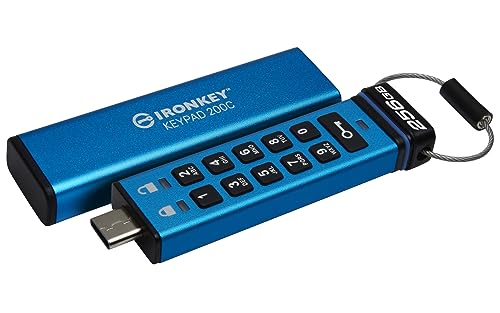
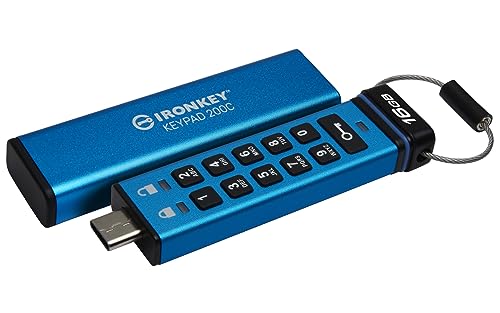
Best Kingston keypad: IronKey Keypad 200
The Keypad 200 brings Kingston’s brand, support and FIPS-level certification to a PIN-pad design with an alphanumeric keypad. USB-C versions are available.
Main trade-off: keypad drives in general are slower and larger than a basic flash drive, and pricing sits well above unencrypted sticks.
Best budget: Kingston IronKey Locker+ 50
For personal documents, tax records and family photos, the Locker+ 50 provides hardware-based AES-256 XTS encryption with a password and a self-wipe after ten failed attempts. It is certified to FIPS 197, which is the AES algorithm standard rather than the full module validation of the premium drives.
Main trade-off: lower certification level, and you must run the unlock program on the host.
How to choose with numbers
- Decide on compliance. If a regulation asks for FIPS 140-2 or 140-3 Level 3, pick from the certified drives above. If not, a quality software-encrypted drive may be enough.
- Pick the authentication method. Choose keypad drives for shared and managed computers, software drives for personal use.
- Size the capacity. Most people need 16GB to 64GB for documents. Photo libraries and project folders push you to 128GB to 512GB, and encrypted SSDs cover larger needs.
- Check the interface. USB-C for new laptops and phones, USB-A for older equipment, or an adapter if you need both.
- Plan for recovery. Admin PINs, recovery codes or a second copy prevent a locked drive from becoming a permanent loss.
Worked example: how brute-force protection works
A PIN of 8 digits has 100 million possible combinations. If an attacker could try 10 guesses per second against an unprotected system, that would take roughly 115 days to exhaust. With hardware protection that locks or wipes after 10 failed attempts, the attacker’s odds of success shrink to about 10 in 100 million, or one in ten million. That is the practical reason encrypted drives with attempt limits are valuable: the weakness is the PIN you choose, not the AES algorithm. Use a long alphanumeric PIN or passphrase where the drive allows it.
Ownership realities
- Lost PIN means lost data. A well-designed drive cannot be broken into. Store a recovery PIN offline.
- Batteries wear. Keypad drives hold small rechargeable batteries that charge over USB. Plug them in occasionally to keep them healthy.
- Do not rely on one copy. Flash memory can fail like any other. Keep an encrypted backup elsewhere.
- Beware cheap lookalikes. Fake secure drives with weak encryption exist. Buy from the vendor or an authorized reseller.
- Recovery is limited. If an encrypted drive fails mechanically, even professional labs usually cannot decrypt the data without the key.
Decision matrix
| Your situation | Choose |
|---|---|
| Work across many unmanaged PCs | Apricorn Aegis Secure Key 3NXC |
| Maximum tamper resistance | iStorage datAshur PRO2 |
| Enterprise needing FIPS 140-3 | Kingston IronKey D500S or Keypad 200 |
| Personal documents, low budget | Kingston IronKey Locker+ 50 |
| Separate admin and user control | Apricorn Aegis Secure Key 3 NX |
Frequently Asked Questions
Is a hardware-encrypted USB drive better than software encryption?
Usually yes. Hardware encryption runs in the drive’s own chip and does not rely on the host computer. Software encryption such as BitLocker is also strong, but the drive depends on the operating system and your configuration.
What does FIPS 140-2 Level 3 mean?
It is a US and Canadian government validation for cryptographic modules. Level 3 adds tamper-resistance and identity-based authentication. FIPS 140-3 is the newer version of the standard.
Can I recover data if I forget the PIN?
Generally no. Quality drives wipe or lock after repeated failures and have no backdoor. Some models support an admin PIN or recovery PIN that you can set in advance.
Do encrypted USB drives work on Mac and Linux?
Keypad drives work on any system that reads USB storage, because the PIN is entered on the device. Software-unlock drives may support only Windows and macOS, so check the spec sheet.
Are encrypted flash drives slower?
Most are slower than the fastest consumer flash drives, because the encryption chip and security features cost throughput. Typical speeds are in the range of tens to a couple of hundred megabytes per second.






Write Your Review
No reviews yet. Be the first to share your experience!