

Key takeaways
- Capacity range reaches 1TB, which is rare for V60 cards
- Measured write speeds sit comfortably above the 60 MB/s minimum
- Strong environmental protection ratings
The best V60 SD card for most photographers and videographers in 2026 is the Kingston Canvas React Plus V60, because it pairs a 280 MB/s read rating with sustained write speeds that independent reviewers have measured well above the 60 MB/s V60 floor. If you want a rugged option, the Sony Tough-M is the pick, and if you want predictable behavior for long clips, the Angelbird AV PRO SD V60 and the ProGrade Digital Gold V60 are the cards to compare first.
A V60 card guarantees a minimum sustained write speed of 60 MB/s on the SD Association’s Video Speed Class scale. That is double the V30 minimum and enough for most 4K 60p, 6K and high-bitrate 10-bit video, which is why the class sits in the sweet spot for hybrid cameras. The sections below explain what V60 really means, compare seven real models by the figures their makers and independent reviewers publish, and help you choose by camera, bitrate and risk tolerance.
Our top picks


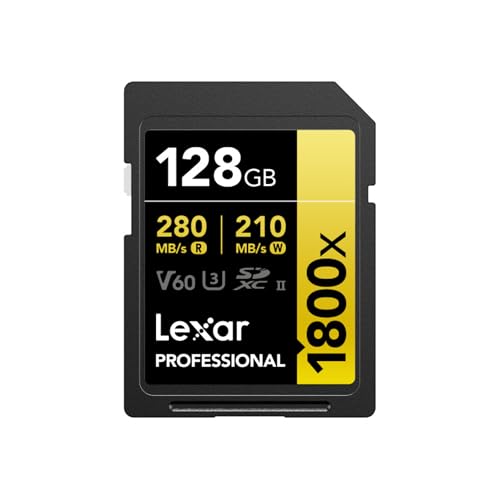
As an Amazon Associate we earn from qualifying purchases at no extra cost to you.
Quick comparison of the best V60 SD cards
| Pick | Best for | Rated read speed | Write speed note | Capacities | Price tier |
|---|---|---|---|---|---|
| Kingston Canvas React Plus V60 | Best overall | Up to 280 MB/s | About 150 MB/s measured on 256GB | 128GB to 1TB | Mid-range |
| Sony Tough-M (SF-M series) | Best rugged card | Up to 277 MB/s | 150 MB/s rated on 128GB | 32GB to 256GB | Premium |
| ProGrade Digital Gold V60 | Best for a pro workflow | Up to 250 MB/s | 130 MB/s rated | 128GB to 1TB | Mid-range to premium |
| Angelbird AV PRO SD V60 | Best for long recording | Up to 280 MB/s | Guaranteed sustained minimum published by maker | 64GB to 512GB | Premium |
| Lexar Professional Silver Pro V60 | Best value | Up to 280 MB/s | 120 MB/s rated on 128GB | 64GB to 512GB | Budget to mid-range |
| Lexar Armor Gold V60 | Fastest write in class | Up to 280 MB/s | About 191 MB/s measured on 256GB and up | 256GB and up | Mid-range |
| PNY EliteX-PRO60 | Best budget large card | Up to 280 MB/s | 180 MB/s rated on 256GB | 128GB to 512GB | Budget |
Read and write figures are the manufacturers’ headline numbers, or the independent measurements named in the table. Write speed is the number that matters for video, and it often varies by capacity and by production batch, so treat the listed values as a guide rather than a promise.
What V60 actually means
The V in V60 stands for Video Speed Class. The number is the minimum sustained write speed in megabytes per second, defined by the SD Association’s test method. A V30 card must hold 30 MB/s, a V60 card 60 MB/s and a V90 card 90 MB/s. Brands print much higher peak numbers on the label, but peak speed is a short burst, not what keeps a video recording alive.
Two other logos often appear beside the V mark. The U3 mark is the older UHS Speed Class and guarantees 30 MB/s, while the numeral II in a U-shaped icon signals a UHS-II interface with a second row of pins. Almost every V60 card is UHS-II, because the UHS-I bus tops out near 104 MB/s, which cannot honestly guarantee 60 MB/s sustained across the whole card under all conditions. Keep this in mind: a UHS-II card in a UHS-I-only camera still works, but it falls back to UHS-I speed and may no longer deliver the video class you paid for.
Best overall: Kingston Canvas React Plus V60
The Canvas React Plus V60 is a UHS-II SDXC card rated up to 280 MB/s read, with capacities from 128GB to 1TB according to Kingston’s product page. It carries U3 and V60 marks, and Kingston describes it as shockproof, vibration proof, waterproof and X-ray proof, which covers the incidents that usually kill cards on location. A Macworld roundup measured it at about 150 MB/s write on a 256GB sample.
Who it suits: hybrid shooters who record 4K 60p or 6K video and also shoot bursts of RAW stills. The read speed makes offloading quick when you use a UHS-II reader.
Pros:
- Capacity range reaches 1TB, which is rare for V60 cards
- Measured write speeds sit comfortably above the 60 MB/s minimum
- Strong environmental protection ratings
Cons:
- Peak write is lower than the fastest V60 cards
- Larger capacities sit in the upper part of the mid-range tier
Best rugged pick: Sony Tough-M
Sony’s Tough-M line, sold under SF-M model numbers, is the V60 sibling of the Tough-G V90 card. Sony lists up to 277 MB/s read and 150 MB/s write on the 128GB model, and the housing is a one-piece molded design without a write-protect switch, which removes the plastic hinge that commonly snaps on ordinary SD cards. The card is rated IPX8 waterproof and dust resistant, and Sony says it resists far more bending force than the SD standard requires.
Who it suits: documentary, outdoor, wedding and event shooters who swap cards constantly and fear a cracked case more than they fear a slightly lower sustained write number.
Pros:
- Class-leading physical durability for an SD card
- Good 150 MB/s write rating for a V60 card
- Waterproof and dust resistant housing
Cons:
- Capacities stop at 256GB
- No physical lock switch, so you rely on camera-level protection against accidental deletion
Best for a professional workflow: ProGrade Digital Gold V60
ProGrade Digital builds cards for working photographers, and the Gold V60 series lists up to 250 MB/s read and 130 MB/s write in capacities from 128GB to 1TB. Independent measurements show write speeds that vary by model number, with some 128GB examples landing a little above 100 MB/s, which still clears the V60 requirement. The brand also sells matching card readers and card management software, which suits studios that standardize on one ecosystem.
Who it suits: professionals who want a vendor focused on working photographers and a clear path to matching readers.
Pros:
- Capacities up to 1TB
- Professional-oriented brand with matching accessories
- Well matched to fast UHS-II offloading
Cons:
- Rated write speed trails newer V60 competitors
- Retail availability varies by region, so check stock before you plan a shoot around it
Best for long recording sessions: Angelbird AV PRO SD V60
Angelbird, an Austrian company, designs the AV PRO SD line around stable sustained throughput instead of headline peaks. The V60 version targets 4K, 5K and 6K recording and still photography with burst shooting. The manufacturer publishes a guaranteed minimum sustained write figure for each card, which makes it easier to match against your camera’s bitrate than a card sold only on peak speed.
Who it suits: interview, livestream and event videographers who record clips for 30 minutes or more and cannot risk a dropped frame warning.
Pros:
- Designed around steady write performance
- Published minimum write figures are easy to compare with your bitrate
- Reinforced build aimed at professional use
Cons:
- Premium tier cost for a V60 card
- Maximum capacity is lower than the 1TB V60 options
Best value: Lexar Professional Silver Pro V60
Lexar’s Silver Pro line is one of the cheapest ways to get a name-brand UHS-II V60 card. Lexar lists 280 MB/s read and 120 MB/s write on the 128GB model, and the card is sold with a limited lifetime warranty. Reviewers have noted the operating temperature range starts at 0 degrees Celsius, so it is not the card for sub-freezing winter shoots.
Who it suits: enthusiasts moving up from V30 cards who want more headroom for 4K 60p without paying professional-line prices.
Pros:
- Lower cost than most UHS-II V60 competitors
- Limited lifetime warranty
- Widely sold, so easy to replace on the road
Cons:
- Narrower operating temperature range
- Lowest rated write speed in this lineup at 120 MB/s
Fastest write in class: Lexar Armor Gold V60
The Armor Gold V60 pairs a tougher case with higher write speeds. In one independent comparison it was the top V60 card in measured write speed at roughly 191 MB/s for capacities of 256GB and larger, which puts it near V90 territory for cameras that do not need a V90 label. Larger capacities write faster than small ones, a pattern seen across the whole category.
Who it suits: photographers who shoot long RAW bursts and need the buffer to clear quickly but do not need a V90 certification.
Pros:
- Fast sustained write for a V60 card
- Stronger casing than the Silver Pro
- Quick buffer clearing during burst photography
Cons:
- Sold in larger capacities only, so the entry cost is higher
- Not as widely stocked as the Silver Pro line
Best budget large card: PNY EliteX-PRO60
PNY’s EliteX-PRO60 lists 280 MB/s read and 180 MB/s write on the 256GB model, with V60 and U3 marks and UHS-II connectivity. It is aimed at buyers who want plenty of storage at a low cost per gigabyte in the V60 class.
Who it suits: travelers and hobby filmmakers who want a large card without spending professional-line money.
Pros:
- Strong rated write speed for its price tier
- Large capacity options
- Simple, no-frills design
Cons:
- Less proven in professional field use than Sony, Kingston, Lexar or ProGrade
- Fewer accessories and support tools around it
How to choose a V60 card by camera and bitrate
The right card depends on the bitrate your camera writes. Bitrate is shown in megabits per second, and you divide by eight to get megabytes per second. A 200 Mbps clip needs 25 MB/s sustained, a 400 Mbps clip needs 50 MB/s and a 600 Mbps clip needs 75 MB/s. A V60 card handles the first two with room to spare, and the third only with a small margin, which is why professionals pick V90 for the highest bitrates.
| Recording mode | Typical bitrate | Required sustained write | Recommended class |
|---|---|---|---|
| 1080p 60 H.264 | 100 Mbps | 12.5 MB/s | V30 is plenty |
| 4K 30 H.265 10-bit | 200 Mbps | 25 MB/s | V30 or V60 |
| 4K 60 All-Intra | 400 to 600 Mbps | 50 to 75 MB/s | V60 minimum, V90 safer |
| 6K RAW or 8K intraframe | 800 Mbps and up | 100 MB/s and up | V90 or CFexpress |
Worked example: how much recording time you get
Take a 256GB card, which has about 238GB of usable space after formatting. A camera writing at 400 Mbps uses 50 MB/s, so 238,000 MB divided by 50 MB/s gives 4,760 seconds, or about 79 minutes of footage. At 600 Mbps the same card holds roughly 53 minutes. Buying a 512GB card doubles those figures, and that is often more useful than buying a faster card when the camera bitrate is fixed.
Decision matrix by situation
| Your situation | Choose | Reason |
|---|---|---|
| Mixed photo and 4K video, medium budget | Kingston Canvas React Plus V60 | Balanced speed, capacity and protection |
| Rough outdoor environments | Sony Tough-M | One-piece molded case, waterproof |
| Long interviews and events | Angelbird AV PRO SD V60 | Designed for stable sustained writes |
| Tight budget, 4K 30 video | Lexar Silver Pro or PNY EliteX-PRO60 | Lowest cost for the V60 class |
| RAW burst photography | Lexar Armor Gold V60 | Fast write clears the buffer sooner |
| Need 1TB on one card | Kingston or ProGrade | Only brands in this list reaching 1TB |
V60 or V90: which class do you need?
Choose V90 when your camera records above roughly 600 Mbps, when you shoot high-resolution RAW stills in long bursts, or when your camera manual names V90 for a recording mode. Choose V60 when your highest bitrate stays below 500 Mbps, because V60 cards cost less and many write well above the 60 MB/s minimum in real use. A practical rule is to find your camera’s highest bitrate, convert it to megabytes per second, and leave at least 30 percent headroom.
The same rule helps you avoid overbuying. A V90 card in a camera that never writes faster than 50 MB/s gives you no visible recording benefit, only quicker offloading, and a good card reader influences offload time just as much.
Card care and failure realities
SD cards are consumables. Flash memory wears with every write cycle, and the controller inside has to remap worn blocks over time. Most failures people describe as a card going bad actually start with one of a few habits.
- Removing the card mid-write: pulling the card while the camera’s write light is on corrupts the file system and often the last clip.
- Formatting on a computer: a camera formats the card with its own file structure. Use the camera’s format command, not the computer’s.
- Running the card to 100 percent: a nearly full card writes slower and has less room to remap blocks. Leave about 10 percent free on long shoots.
- Heat: sustained 4K recording heats both the camera and the card. Heat shortens card life and can throttle writes.
- Skipping backups: copy files to two destinations before you reformat the card.
If a card suddenly shows as empty or unreadable, stop using it immediately. Writing new files to the card can overwrite the data you want back. Use a reputable recovery tool with the card connected through a reader, and send badly damaged cards to a professional lab rather than reformatting them.
Why capacity changes speed and cost per gigabyte
Two cards with the same name can behave differently because of capacity. A 64GB card often uses fewer NAND chips than a 256GB card, so it has fewer parallel channels to write with. That is why reviewers see the same product line post a modest write number at small sizes and a much higher one at large sizes. If you are buying for sustained video, skip the smallest capacity of any line and compare the figure for the size you will actually buy.
Cost per gigabyte works the other way. Mid-sized cards, usually 128GB and 256GB, tend to carry the best value because they avoid the premium attached to 1TB cards and the poor ratio of tiny cards. For a typical hybrid shooter, two 256GB cards cost less than one 512GB card in most markets and give you built-in redundancy, which is the more important benefit.
Buying checklist before you pay
- Check your camera manual for the bitrate of its highest mode and the card class it names.
- Confirm whether your camera slot is UHS-II. If it is UHS-I only, a V30 card is usually enough.
- Pick a capacity that holds a full shoot day, using the recording time calculation above.
- Buy two smaller cards rather than one large card for important jobs, so one failure cannot take the whole day.
- Pair the card with a UHS-II reader so offloading uses the speed you paid for.
- Buy from an authorized seller, because counterfeit cards with inflated capacity are a known problem in flash storage.
Frequently Asked Questions
Is a V60 SD card good enough for 4K video?
Yes. A V60 card guarantees 60 MB/s sustained writing, which covers 4K at 30p and 60p at the bitrates used by most mirrorless and hybrid cameras. Only the highest-bitrate intraframe and RAW modes call for V90 cards.
Can I use a V60 card in a camera that only supports UHS-I?
You can, but the card will run at UHS-I bus speed, generally around 104 MB/s at best. You lose the V60 guarantee and the speed advantage. If the camera supports only UHS-I, a good V30 card is usually the more economical choice.
Do larger V60 cards write faster?
Often, yes. Larger cards have more NAND chips working in parallel, which raises sustained write speed. Independent roundups regularly find 256GB and 512GB versions writing noticeably faster than the 64GB or 128GB version of the same card.
What is the difference between V60 and U3?
U3 is the older UHS Speed Class and guarantees 30 MB/s minimum write. V60 is the newer Video Speed Class and guarantees 60 MB/s. Most V60 cards also carry the U3 mark, but a U3 card is not necessarily a V60 card.
How long does a V60 SD card last?
Quality cards usually survive years of regular use, but there is no fixed lifespan because wear depends on how much data you write and how you handle the card. Replace cards that show slowdowns, file errors or repeated camera warnings, and always keep a backup of important footage.
Is the Sony Tough-M worth it over cheaper V60 cards?
It is worth it if physical damage is your main concern, because the one-piece case removes the weak points of an ordinary SD card. If you handle cards carefully and mostly shoot in controlled conditions, a Kingston or Lexar card gives similar video performance for less.




Write Your Review
No reviews yet. Be the first to share your experience!