

Key takeaways
- Interface: PCIe Gen 4 x4 NVMe with an M-key connector. SATA M.2 drives are not supported.
- Speed: Sony recommends sequential reads of at least 5,500 MB/s.
- Capacity: 250GB to 8TB.
- Form factors: 2230, 2242, 2260, 2280 and 22110 are accepted.
- Size with cooler: no more than 25 mm wide and 11.25 mm thick, which means at most 8.0 mm above the board and 2.45 mm below it.
- Cooling: a heatsink or comparable thermal structure is required.
The best PS5 SSD upgrade in 2026 is a PCIe Gen 4 x4 NVMe drive with a heatsink that fits Sony’s 11.25 mm height limit. The WD Black SN850P is the safest choice because it is officially licensed for the console, the Samsung 990 Pro with heatsink is the best all-round performer, and the Crucial T500 with heatsink is the easiest value buy. Pick 2TB if you can: it holds roughly 30 to 40 large modern games and avoids shuffling installs.
Our top picks


As an Amazon Associate we earn from qualifying purchases at no extra cost to you.
Quick comparison of the seven picks
| Pick | Best for | Rated read / write | Capacities | Heatsink |
|---|---|---|---|---|
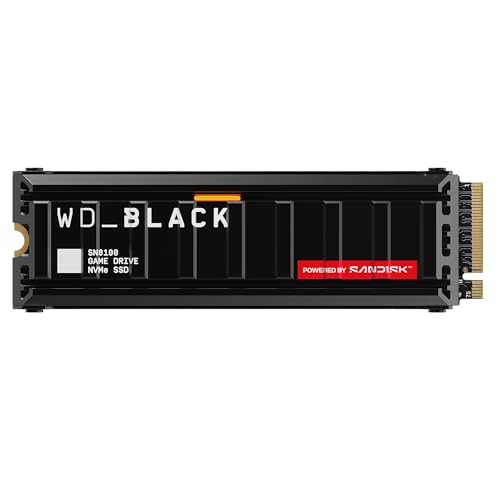
| WD Black SN850P | Officially licensed peace of mind | 7,300 / 6,600 MB/s (2TB, 4TB) | 1TB, 2TB, 4TB, 8TB | PS5-designed, included |
| Samsung 990 Pro with heatsink | Best all-round performance | 7,450 / 6,900 MB/s (2TB) | 1TB, 2TB, 4TB | Included, low profile |
| Crucial T500 with heatsink | Value and easy install | 7,400 / 7,000 MB/s (2TB) | 1TB, 2TB | Included, low profile |
| Corsair MP600 Pro LPX | Plug-and-play fit | 7,100 / 6,800 MB/s | 500GB to 4TB | Pre-installed aluminum |
| Kingston Fury Renegade with heatsink | Fast writes | 7,300 / 7,000 MB/s | 500GB to 4TB | Two-sided cover, screws |
| Seagate FireCuda 530 with heatsink | High endurance | 7,300 / 6,900 MB/s (2TB) | 500GB to 4TB | Low-profile heatsink version |
| Sabrent Rocket 4 Plus (PS5 cooler) | Large capacity with a robust cooler | Up to about 7,000 / 6,000 MB/s | 500GB to 4TB | Larger passive cooler |
Speeds come from manufacturer pages and major retail listings and vary by capacity. The PS5 itself can use only Gen 4 speeds, so differences between these drives are small in real game loading.
What the PS5 actually requires
Sony’s published requirements for the M.2 expansion slot are specific, and drives that miss them can fail to install or overheat:
- Interface: PCIe Gen 4 x4 NVMe with an M-key connector. SATA M.2 drives are not supported.
- Speed: Sony recommends sequential reads of at least 5,500 MB/s.
- Capacity: 250GB to 8TB.
- Form factors: 2230, 2242, 2260, 2280 and 22110 are accepted.
- Size with cooler: no more than 25 mm wide and 11.25 mm thick, which means at most 8.0 mm above the board and 2.45 mm below it.
- Cooling: a heatsink or comparable thermal structure is required.
Gen 5 drives work in a PS5 but run at Gen 4 speeds, so paying more for them gains nothing. This applies to the original console, the slim redesign and the PS5 Pro, all of which have a Gen 4 expansion slot.
Best licensed choice: WD Black SN850P
The SN850P is the only drive officially licensed by Sony for the PS5. It is an M.2 2280 PCIe Gen 4 x4 drive with a heatsink designed to fit the console’s expansion bay. The 2TB and 4TB versions are rated at up to 7,300 MB/s read and 6,600 MB/s write, and the 8TB at about 7,200 MB/s read. Tom’s Hardware lists the 2TB at 1.2 million random read IOPS and 1,200 TBW endurance, with a five-year limited warranty.
Who it suits: buyers who want a guaranteed fit and do not want to measure heatsink height. Notably, reviewers point out that its performance matches the PC-oriented SN850X, so the licence costs a small premium and adds peace of mind more than speed.
Trade-off: it usually sells for 15 to 25 percent more than an equivalent drive, and the heatsink is designed for the PS5 rather than a desktop motherboard.
Best overall performance: Samsung 990 Pro with heatsink
The Samsung 990 Pro with heatsink is rated at up to 7,450 MB/s read and 6,900 MB/s write on the 2TB model. The heatsink version is listed as compatible with the PS5, and Samsung’s design is low enough to pass Sony’s thickness limit. The controller has a nickel coating that helps with thermal control, and the drive offers strong random performance and efficiency.
Who it suits: anyone who also wants to reuse the drive in a PC later, since the heatsink works in desktop slots with enough clearance.
Trade-off: the heatsinked version is not suited to most external enclosures or laptops, and prices fluctuate widely. Compare capacities carefully because the 4TB version costs much more per terabyte.
Best value: Crucial T500 with heatsink
The T500 comes in 500GB, 1TB and 2TB sizes, with heatsink models of the 1TB and 2TB. The 2TB is rated at up to 7,400 MB/s read and 7,000 MB/s write, and the 1TB at up to 7,300 and 6,800. Crucial states the heatsink version will not fit standard laptops. Reviewers describe the install as simple because of the single-sided PCB and low-profile cooler. Tom’s Hardware calls it a strong all-round Gen 4 drive.
Who it suits: first-time upgraders who want fast, cool operation and good pricing.
Trade-off: the line stops at 2TB, so owners who want 4TB or more need a different drive.
Best plug-and-play fit: Corsair MP600 Pro LPX
The MP600 Pro LPX has a pre-installed low-profile aluminum heatsink designed for the console. It reads up to 7,100 MB/s and writes up to 6,800 MB/s, uses PCIe Gen 4 x4 NVMe 1.4 and carries a five-year warranty. Capacities run from 500GB to 4TB.
Who it suits: buyers who want no loose parts at all. One reviewer notes it is a relatively tight fit, though still within Sony’s limits.
Trade-off: the NAND is not the newest, so endurance and efficiency trail the Samsung and Crucial. Ensure the cover seats properly when you close the console panel.
Best for fast writes: Kingston Fury Renegade with heatsink
The Fury Renegade reads at up to 7,300 MB/s and writes at up to 7,000 MB/s on its Gen 4 x4 controller, and the 1TB version is rated for 1,000 TBW with a five-year warranty. The standard drive uses a thin graphene spreader, while Kingston also sells a version with a full two-sided heatsink designed for the PS5, held together by screws and thermal pads.
Who it suits: users who copy large game files and clips often and appreciate high write speeds.
Trade-off: the screw-together heatsink adds a few steps, and you must buy the heatsink version rather than the bare drive for the PS5.
Best high-endurance pick: Seagate FireCuda 530 with heatsink
The FireCuda 530 reads at up to 7,300 MB/s and writes at up to 6,900 MB/s on the 2TB model, with a heatsink version built to a low-profile design that reportedly came out of a collaboration with a cooling specialist. It comes in 500GB to 4TB sizes and carries a high endurance rating.
Who it suits: heavy users who record and edit clips on the same drive and care about total bytes written.
Trade-off: it is an older design now, and its price has to be competitive to be worth buying over newer drives. Seagate’s newer FireCuda 540 is mostly marketed as a PC drive, so the 530 with heatsink is the model to look for in a PS5 context.
Best large-capacity cooler: Sabrent Rocket 4 Plus for PS5
The Sabrent Rocket 4 Plus PS5 edition ships with a larger passive cooler that replaces the console’s M.2 cover rather than a standard thin heatsink. Rated speeds are up to about 7,000 MB/s read and 6,000 MB/s write (some sources list slightly higher), and capacities run from 500GB to 4TB with a five-year warranty. The drive is also sold up to 8TB without the console cooler, but the PS5 does not need more than that.
Who it suits: owners in warm rooms or those who play long sessions and want maximum cooling headroom.
Trade-off: the bigger cooler means more installation care, and it only suits the console design it was made for. Check that the version you buy matches your console model.
How to choose: a decision matrix
| Your situation | Choose | Reason |
|---|---|---|
| Want guaranteed fit, no research | WD Black SN850P | Officially licensed |
| Want top performance and possible PC reuse | Samsung 990 Pro with heatsink | Fast, efficient, PS5 compatible |
| Tight budget, 1TB or 2TB | Crucial T500 with heatsink | Value with easy fit |
| Hate assembling parts | Corsair MP600 Pro LPX | Pre-fitted heatsink |
| Need 4TB | Samsung 990 Pro, SN850P, Corsair or Kingston | Offered in 4TB |
| Hot room or marathon sessions | Sabrent Rocket 4 Plus PS5 edition | Largest cooler |
The numbers that matter
How much capacity
The PS5 console has about 667GB of usable internal space on the original model and about 850GB on the slim 1TB models, so a modern game library fills it quickly. Large titles often run 80 to 150 GB each. A 1TB expansion holds about 8 to 10 big games, a 2TB drive about 15 to 25, and a 4TB drive more than 30. Because you can only play PS5 games from internal or M.2 storage, capacity is worth more than headline speed.
Cost per terabyte
Divide the price by the capacity. If a 1TB drive is 80 and a 2TB drive from the same series is 130, the 2TB works out to 65 per terabyte, which is better value and saves a future upgrade. Use this check for every pick above.
Height budget
Sony allows 11.25 mm in total. A bare double-sided drive is about 2.2 mm thick, which leaves under 9 mm for a heatsink. Many PC heatsinks are 12 to 40 mm tall and will not close the cover. This is why choosing a heatsink model made for the console is safer than adding your own.
Game loading
The practical difference between a 5,500 MB/s drive and a 7,300 MB/s drive in PS5 load times is typically a fraction of a second, because game loading is limited by the console’s decompression hardware and the game, not by raw drive speed. Pick based on fit, capacity and reliability, not marginal speed.
Durability and ownership realities
- Heat is the main enemy: an unheatsinked drive can throttle during long installs. Always use a cooler.
- Endurance: game storage is mostly reads, so even modest TBW ratings last for years. Heavy video capture is the main write load.
- Firmware: check the manufacturer’s tool for updates before installing, since new firmware sometimes fixes compatibility issues.
- Warranty: five years is common among these drives. Keep proof of purchase.
- Static: touch a grounded metal object before handling the drive.
Installing the drive step by step
- Power the console fully off and unplug it. Rest mode keeps power flowing to some parts.
- Lay it flat on a soft surface and remove the base cover according to your model’s instructions.
- Remove the expansion bay cover and unscrew the spacer screw. Move the screw to the notch that matches your drive length, usually 2280.
- Insert the drive at an angle into the slot, press it flat, and secure it with the screw. Do not overtighten.
- Close the covers, reconnect power and turn the console on.
- Follow the on-screen format prompt. The PS5 tests the drive’s speed and tells you whether it meets requirements.
- Move games from internal storage to the new drive through Settings, then Storage.
Common mistakes
Buyers frequently choose a bare PC drive and a bulky aftermarket heatsink, then discover the cover will not close. Others buy a SATA M.2 drive that the console does not support, or rely on a drive’s first-party speed claim without checking the Sony minimum. A smaller number forget that PS4 games can run from external USB drives but PS5 games cannot be played from them. Take a photo of the console bay before you start, and keep your screws in a labeled dish.
PS5, PS5 Slim and PS5 Pro: does the model matter?
All three console generations share the same expansion-slot rules, but the access method differs. The original PS5 hides the slot beneath a side panel and requires removing the stand and a cover. The slim models use a similar bay with a different cover design and a slightly roomier layout, and the PS5 Pro keeps the same Gen 4 x4 limit despite its faster processor. In every case the maximum combined drive and heatsink thickness is the same 11.25 mm, so the drives in this guide fit all variants as long as the heatsink version is the one made for the console. Follow the official guide for your exact model rather than a video made for a different version, since screw positions and cover clips are not identical.
External USB storage as a complement
An internal M.2 drive is the only way to play PS5 games from expansion storage, but an external USB drive still helps. Keep older PS4 games on a portable drive, and archive PS5 games you are not playing so you can transfer them back later instead of downloading them again. A portable hard drive is slow but cheap for this job, and a portable SSD is faster for moving a large game back to the internal drive. This combination keeps the expensive internal NVMe space for the titles you play most often.
How to size your library in practice
List the games you play at least monthly and add up their install sizes in the console’s storage menu. Add 20 percent headroom for updates, which can temporarily need extra space when patches are applied. Include space for captured gameplay clips if you save them locally, since high-quality video adds up quickly. If the total is under 700GB, a 1TB drive is enough. If it is between 700GB and 1.6TB, buy 2TB. Above that, consider 4TB or plan to rotate titles. Because larger drives usually cost less per terabyte, the cheapest long-term option is often the biggest drive you can afford today.
After installation: checking the drive is healthy
Once the console formats the drive, open the storage settings and run the built-in speed check, which reports whether the drive meets the recommended read speed. Install one large game directly to the new drive and watch the download complete without errors. Over the following weeks, keep an eye on any freezes or slow loads that appear only with games stored on the expansion drive, since those can point to a loose seating or a heat problem. Reopen the bay, reseat the drive and confirm the heatsink contacts the chip. Keep the console in a ventilated spot with several centimetres of clearance on every side, because a well-cooled console keeps both the processor and the new drive within their comfortable temperature range during long sessions.
Frequently Asked Questions
Do I need a heatsink for a PS5 SSD?
Yes. Sony requires a heatsink or equivalent cooling structure. Without one, the drive can throttle or the console may refuse to use it. Buying a drive sold with a PS5-compatible heatsink is the simplest solution.
Is a Gen 5 SSD worth it for the PS5?
No. A Gen 5 drive works, but the console only runs it at Gen 4 speeds, so you would pay more for no gain. Spend the difference on extra capacity.
Can I use my old PC SSD in the PS5?
If it is a PCIe Gen 4 x4 NVMe drive that reads at 5,500 MB/s or faster and fits within the height limit with a suitable heatsink, yes. SATA and slower Gen 3 drives do not meet the requirements.
Do the games run better on a faster SSD?
Only marginally. Games meet Sony’s minimum speed baseline, and the console’s hardware decompression handles the rest, so differences between drives above the minimum are tiny.
Can I install an 8TB drive?
Sony’s published range runs to 8TB, and the WD Black SN850P is offered in that size, though the cost per terabyte is usually highest on the largest drives.
Will opening the console void my warranty?
Sony’s documentation lets users open the expansion bay cover to install a compatible drive. Check your console’s current warranty terms and follow the official steps for your model.


Write Your Review
No reviews yet. Be the first to share your experience!