

Key takeaways
- Plug two or three bus-powered hard drives into an unpowered hub and the symptoms are familiar: drives that click, disconnect mid-copy.
Plug two or three bus-powered hard drives into an unpowered hub and the symptoms are familiar: drives that click, disconnect mid-copy, or never show up at all. A spinning portable drive needs a steady current at startup, and an unpowered hub splits one port’s limited supply among everything attached. A powered USB hub solves that by feeding each port from its own wall adapter, which is why people with multiple backup drives, archive docks, or recovery projects choose them over simple splitters.
This guide is for desk-bound users who connect several external drives at once, such as photographers rotating backups, technicians copying data from multiple disks, or home users with a drive for every household member. It compares eight powered hubs using their published listings, focusing on port count, adapter rating, individual switches, and connector types. Most are USB 3.0 designs, and in 2026 the practical difference between hubs is power headroom and port layout far more than raw speed.
Quick Picks
Our top picks



As an Amazon Associate we earn from qualifying purchases at no extra cost to you.
| Product | Best for | Key feature |
|---|---|---|
| Atolla 8-Port USB 3.0 Hub | Mac-focused desks with many drives | Individual switches, 5V/4A adapter |
| SABRENT 4-Port HB-UMP3 | Small setups with clear status | LED-lit power switches, 5V/2.5A |
| TP-Link UH720 7-Port | Cross-platform use plus charging | 7 data ports and 2 charging ports, 12V/4A |
| Wenter 11-Port Hub | Maximum port count | 10 data ports plus charging, LED switches |
| SABRENT 10-Port HB-BU10 | High-load drive banks | 60W 12V/5A adapter, switches and LEDs |
| ONFINIO 10-Port Hub | Many ports on a modest adapter | Individual switches, 12V/2A |
| Rosonway 7-Port USB-C Hub | Modern laptops and fast SSDs | 10Gbps, 4 USB-C and 3 USB-A ports |
| atolla 4-Port Hub | Compact travel and desk use | Individual switches, 18-month warranty |
How to Choose
Compare Adapter Output With Port Count
The power adapter is the heart of a powered hub. Divide the adapter’s wattage by the number of ports to estimate how much each can supply. A 5V/2.5A supply across four ports is fine for light devices, while ten ports on a 12V/2A supply leave far less headroom per drive. Hubs that include larger adapters, such as 60W models, are better for banks of spinning disks.
Individual Switches and Status Lights
Per-port power switches let you turn off a single drive without unplugging it, which helps when you rotate backups or want to spin a disk down. LED indicators show at a glance which ports are active. They are conveniences rather than necessities, but they make a big hub far easier to manage.
Port Types and Speed Ratings
Most hubs share a single upstream connection, so all drives divide the bandwidth. A 5Gbps hub is plenty for hard drives, but SSDs benefit from a 10Gbps design. Look for the connector mix you need: all USB-A for older drives, or some USB-C for newer ones, and a cable long enough to place the hub conveniently.
What to Ignore and Where Budget Hubs Cut Corners
Ignore giant port counts if you will only use three or four. Budget hubs often include weak adapters, short cables, and thin plastic housings. Check that the listing states the adapter’s voltage and amperage and look for a warranty period.
A quick rule of thumb helps with sizing. Portable hard drives are commonly designed around the 5V, 0.9A level of USB 3.0, so a hub with four such drives needs several amps of real capacity at the adapter, with some margin for startup surges. Use the adapter’s rating printed on the listing, not the hub’s marketing language, to judge it. Also think about where the hub will live: a unit tucked behind a monitor with a short cable is harder to reach for the power switches, so a hub with individual switches is most useful when it sits within arm’s length. Finally, keep the hub plugged into a surge-protected outlet, since a power blip can interrupt a copy in progress.
The 8 Best Options
Atolla 8-Port USB 3.0 Hub
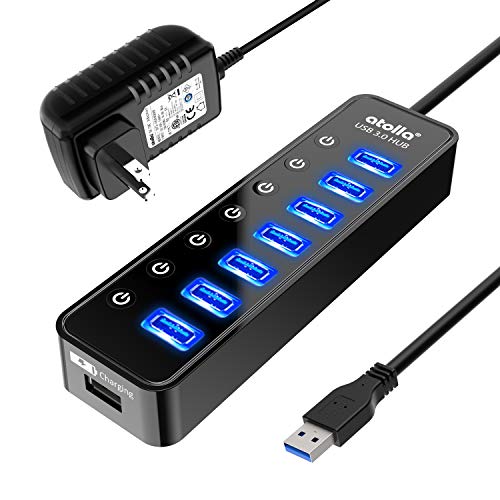
An eight-port powered hub with one smart charging port, individual on/off switches, and a 5V/4A adapter. The title mentions MacBook and Mac Pro compatibility, so it suits Mac users who need more drive connections than their laptop provides and who want to switch drives off individually when a backup finishes.
- Individual switches on each port
- 5V/4A power adapter plus a charging port
- Trade-off: 4A shared across eight ports is limited for many spinning drives
Skip it if you plan to run eight hard drives at once.
SABRENT 4-Port HB-UMP3
A four-port USB 3.0 hub with LED-lit power switches and a 5V/2.5A adapter, described for PC and Mac. It is a tidy choice for a small backup station with two or three drives, where a glance at the lit switches tells you which drive is on before you start a copy.
- LED-lit switches for each port
- Compatible with PC and Mac
- Trade-off: only four ports and a modest adapter
Skip it if you need to expand to a large drive bank later.
TP-Link UH720 7-Port
A seven-port hub with two smart charging ports, a power on/off button, and a 12V/4A adapter, compatible with Windows, Mac, Chrome, and Linux. It is the most platform-flexible listing here and suits mixed-device households where a Chromebook, a Mac, and a PC all share the same drive collection.
- Seven data ports plus two charging ports
- Works across several operating systems
- Trade-off: no per-port switches mentioned in the listing
Skip it if you want individual port switching.
Wenter 11-Port Hub
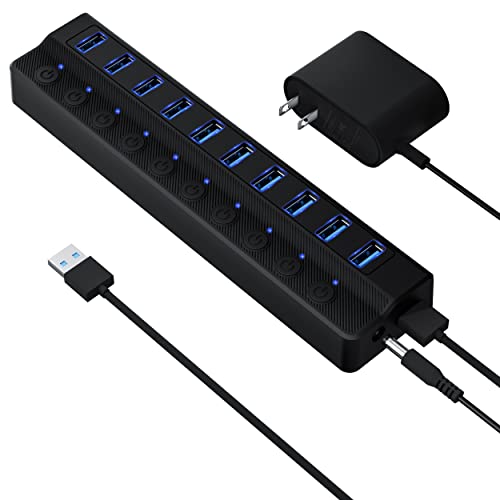
An eleven-port design with ten data ports, one charging port, and individual LED switches. It is the biggest hub in the group, aimed at people running many devices from one station, such as a shared office desk with drives, card readers, and accessories all attached together.
- Ten data ports plus a charging port
- Individual LED on/off switches
- Trade-off: the title does not state the adapter rating
Skip it if you want clear, published power specifications.
SABRENT 10-Port HB-BU10
A ten-port hub with a 60W 12V/5A adapter and individual switches with LEDs. The large adapter makes it the strongest listed option for running several spinning drives together, which is the scenario where weaker hubs tend to cause disconnects and stalled copies.
- 60W adapter with generous power headroom
- Switches and LEDs on each port
- Trade-off: a large footprint on a crowded desk
Skip it if you only need three or four ports.
ONFINIO 10-Port Hub
A ten-port hub with individual on/off switches and a 12V/2A adapter. It offers many ports at an approachable tier, but the modest adapter limits how many hungry drives it can power at once, so it is better suited to flash drives, card readers, and a couple of hard drives.
- Ten ports with individual switches
- Budget-tier layout
- Trade-off: 12V/2A is light for ten ports of drives
Skip it if you plan to connect many bus-powered hard drives.
Rosonway 7-Port USB-C Hub
A seven-port USB 3.2 hub with four USB-C and three USB-A ports, 10Gbps, a 3.3-foot cable, and a 36W 12V/3A adapter. The aluminum body and faster link suit modern laptops and portable SSDs, particularly where most new drives already use USB-C connectors.
- 10Gbps link with a USB-C-heavy layout
- 36W adapter for steadier power
- Trade-off: fewer ports than the larger hubs
Skip it if most of your drives use older USB-A cables.
atolla 4-Port Hub
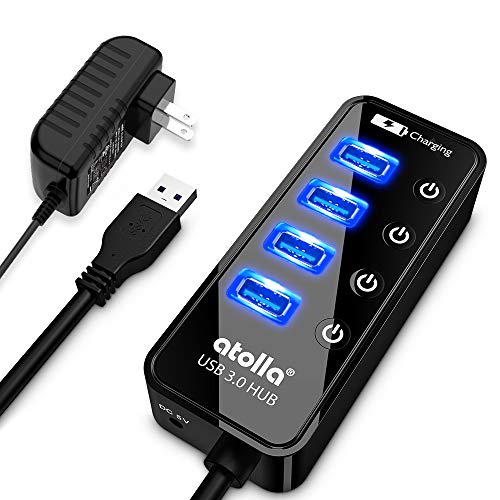
A compact four-port 5Gbps hub with a charging port, individual switches, a 65cm cable, a 5V/3A adapter, and an 18-month warranty. It fits a small desk or a travel bag, and the stated warranty is more reassuring than the nothing offered by many budget hubs.
- Compact with individual switches
- 18-month warranty stated in the listing
- Trade-off: only four ports and a short cable
Skip it if you need to connect many drives.
Which One Fits Your Situation
A Backup Station With Several Spinning Drives
The SABRENT 10-Port HB-BU10 has the strongest adapter in the group, and the TP-Link UH720 is a solid step down with a 12V/4A supply.
A Laptop With USB-C and Fast SSDs
The Rosonway 7-Port USB-C Hub pairs a 10Gbps link with USB-C ports, which suits drives that can use the extra speed.
A Small Desk With Two or Three Drives
The SABRENT 4-Port HB-UMP3 or the atolla 4-Port Hub covers it with switches and a compact footprint.
Common Mistakes
- Buying by port count alone and ignoring the adapter rating.
- Plugging the power adapter into a loose power strip that cuts out.
- Using a long, thin cable that adds voltage drop.
- Expecting all drives to run at full speed at once on a shared link.
- Hot-unplugging drives without ejecting them first.
Related guides
- How To Connect An Old Ide Hard Drive To A Modern Computer
- Signs Your Hard Drive Is Failing And How To Back Up Fast
- How To Securely Erase An Old Hard Drive Before Selling
Frequently Asked Questions
Why use a powered hub instead of plugging drives directly?
Direct ports on a laptop supply limited current. A powered hub provides separate power so multiple drives start and run steadily.
Will a hub slow down my drives?
Drives share the hub’s upstream bandwidth. A hard drive rarely saturates it, but several active SSDs might.
Can I charge phones from the hub?
Some hubs include a charging port, but charging draws from the same adapter, so heavy charging reduces what is available for drives.
Do I need USB 3.0 for hard drives?
It is recommended since USB 2.0 would bottleneck transfers, though older drives will still work.
More from Amazon
Programs that pair well with the guide above. Offers and eligibility are set by Amazon and may change.
A free business account with business pricing and bulk-buying tools for work, shop or home office.
Create a business accountFree shipping on eligible items, Prime Video and more. Eligible new members can start with a free trial.
Start a Prime free trialAudiobooks and podcasts to listen to on the go. Eligible new members can start with a free trial.
Try Audible freeAd-free music streaming. Eligible new subscribers can start with a free trial.
Try Music Unlimited freeAs an Amazon Associate we earn from qualifying purchases.

Write Your Review
No reviews yet. Be the first to share your experience!