

Key takeaways
- Back up anything irreplaceable to a third location.
- Confirm the target drive is at least as large as the used data.
- Label the source and target drives clearly.
- Use the dock power adapter and a stable power source.
- Do not unplug the dock while cloning is in progress.
The best dual-bay dock for cloning is one with an offline clone button, USB 3 speeds, and support for both 2.5-inch and 3.5-inch SATA drives. Offline cloning copies one drive to another without a computer, which is handy for upgrades and backups. Always confirm the destination drive is the same size or larger than the data on the source.
This list is based on specifications and reviewer feedback, not lab benchmarks. Features vary by revision, so verify details on the listing.
Quick Comparison
| Pick | Best for | Key feature |
|---|---|---|
| Sabrent Dual Bay Docking Station | Reliable everyday cloning | Offline clone with USB 3 connection |
| Inateck Dual Bay Docking Station | Large drive support | Offline clone and large-capacity compatibility |
| Orico Dual Bay Docking Station | Budget cloning | Simple design with clone function |
| UGREEN Dual Bay Docking Station | Compact desk setups | Tidy build with offline clone |
| StarTech.com Dual-Bay SATA Dock | Professional and IT use | Established brand with stable behavior |
| Plugable USB 3.0 Dual Bay Dock | Straightforward use | Easy plug-in design with UASP support |
1. Sabrent Dual Bay Docking Station
The Sabrent dual bay docking station is a common choice for people moving data between drives. It handles 2.5-inch and 3.5-inch SATA drives and supports offline cloning. Reviewers appreciate the stable operation, though a few mention the clone process is slow on very large drives. It suits home users upgrading to an SSD. Compare it with the Inateck for similar features, and make sure the power adapter is included in your version.
2. Inateck Dual Bay Docking Station
The Inateck dual bay docking station is often chosen by those working with big drives. It advertises support for large capacities and an offline clone button. Reviewers generally find it dependable, though cloning is not a replacement for a separate backup. It fits photographers and creators migrating archives. Compare it with the Sabrent and check the maximum supported drive size on the listing before you buy.
3. Orico Dual Bay Docking Station
The Orico dual bay docking station offers a lower-cost route to cloning. It supports common SATA drives and includes a clone function. Reviews suggest it works well for occasional use, but build materials and fan-free heat management are basic. It suits people who clone a few times a year. Compare it with the UGREEN if you want a tidier build, and let drives cool before removal.
4. UGREEN Dual Bay Docking Station
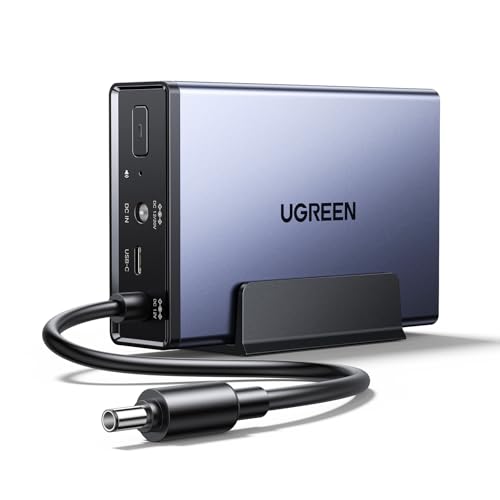
The UGREEN dual bay docking station has a compact body that suits crowded desks. It supports 2.5-inch and 3.5-inch drives and offers offline clone. Buyers like the ease of use, although cloning speed depends on the drives involved and some users report quirks with specific disks. It suits anyone who wants a clean, simple dock. Compare it with the Orico, and check compatibility notes for your drives.
5. StarTech.com Dual-Bay SATA Dock
The StarTech.com dual-bay SATA dock is aimed at IT workers and anyone who prefers an established brand. It is known for dependable behavior and clear documentation. It usually costs more than budget docks and may not add extras. It suits people who handle drives often. Compare it with the Sabrent if cost matters, and read the manual for clone requirements such as matching capacities.
6. Plugable USB 3.0 Dual Bay Dock
The Plugable USB 3.0 dual bay dock focuses on straightforward operation with UASP support, which can improve speed with compatible hosts. It is a good fit for those who want to plug in drives and move files. Some versions may lack an offline clone feature, so check the listing. It suits recovery tasks and quick access. Compare it with the Inateck if offline cloning is the main goal.
How to Choose a Dual-Bay Dock
Start with your goal. If you want to clone a drive to a bigger one, you need offline clone support or reliable cloning software. If you mostly read data from old drives, a basic dock without clone is fine and often cheaper.
Next, check compatibility. Confirm the dock supports both 2.5-inch and 3.5-inch SATA drives and the maximum capacity you plan to use. Docks for SATA do not accept NVMe drives, so those need a different enclosure.
Then consider the connection. USB 3 or faster ports give better throughput than USB 2. Make sure your computer has a matching port and cable. UASP support can help with performance on compatible systems.
Finally, think about power and cooling. A drive in a dock runs warm during long jobs. Choose a model with ventilation and use its included power adapter.
Safe Cloning Practices
Cloning overwrites the target drive, so label both drives and double-check which is the source. Back up important data separately before you start. If a source drive shows signs of failure, such as clicking noises or repeated read errors, stop and consider professional recovery rather than stressing the drive further. Eject drives properly after use and keep the dock on a stable surface away from liquids.
Cloning Versus Copying Files
A clone duplicates everything on a drive, including the operating system, partitions and hidden data, so the new drive can boot like the old one when the hardware matches. Copying files moves only selected data and leaves system files behind. If you are upgrading a system drive to a larger SSD, cloning is the faster path. If you are archiving photos or documents, copying is simpler and lets you organize the data.
Whichever route you choose, verify the result. Open several files on the new drive, compare folder sizes, and keep the original untouched until you are sure the copy is complete. For irreplaceable data, keep the old drive in a safe place for a while after the move.
Pre-Clone Checklist
A few checks before pressing the clone button can save hours and protect your data.
- Back up anything irreplaceable to a third location.
- Confirm the target drive is at least as large as the used data.
- Label the source and target drives clearly.
- Use the dock power adapter and a stable power source.
- Do not unplug the dock while cloning is in progress.
Common Mistakes
- Cloning to a smaller drive. The target must have enough capacity.
- Mixing up source and target. This can erase the wrong drive.
- Using a failing drive repeatedly. More use can worsen damage.
- Ignoring NVMe vs SATA. Docks differ by interface.
- Treating a clone as a backup. Keep a separate copy.
Frequently Asked Questions
Can a dock clone a drive without a computer?
Yes, if it has an offline clone function. Follow the instructions and make sure the target is the same size or larger.
Does a dock work with SSDs?
Most SATA docks work with 2.5-inch SATA SSDs. NVMe drives need a different dock or enclosure.
Is cloning the same as backing up?
No. A clone is a copy at one point in time. Keep proper backups too.
What if my drive is failing?
Stop heavy use and consider a professional recovery service for important data.
Conclusion
For general cloning the Sabrent and Inateck are strong picks, the Orico and UGREEN offer simple value, and StarTech and Plugable suit those who want established brands. Confirm offline clone support, capacity limits and interface type before ordering.
As an Amazon Associate we earn from qualifying purchases.
More from Amazon
Programs that pair well with the guide above. Offers and eligibility are set by Amazon and may change.
A free business account with business pricing and bulk-buying tools for work, shop or home office.
Create a business accountFree shipping on eligible items, Prime Video and more. Eligible new members can start with a free trial.
Start a Prime free trialAudiobooks and podcasts to listen to on the go. Eligible new members can start with a free trial.
Try Audible freeAd-free music streaming. Eligible new subscribers can start with a free trial.
Try Music Unlimited freeAs an Amazon Associate we earn from qualifying purchases.





Write Your Review
No reviews yet. Be the first to share your experience!