

Key takeaways
- Hard drives fail, cloud accounts get closed, and flash media loses charge over the years.
Hard drives fail, cloud accounts get closed, and flash media loses charge over the years, which is why a small group of people still burn important files to optical discs. If you are shopping for the best M-Disc Blu-ray burners for archival backup, the real question is not simply which drive writes Blu-ray, but which one explicitly supports M-Disc, the inorganic recordable disc format that manufacturers market for long-term retention, and whether it can write the larger disc capacities you need.
This guide is for photographers, small offices, genealogists, and anyone keeping a cold-storage copy of records that rarely change. It compares seven external burners using their published listings. One point deserves attention up front: only one listing here names MDisc support outright. For the rest, the listing shows Blu-ray writing but does not confirm M-Disc, so verify the manufacturer’s specifications before buying discs. Manufacturers describe M-Disc as long-lived, but no disc or drive can guarantee your data will last, so keep a second copy in another location, even in 2026.
Quick Picks
Our top picks




As an Amazon Associate we earn from qualifying purchases at no extra cost to you.
| Product | Best for | Key feature |
|---|---|---|
| ASUS SBW-06D5H-U | Archival use with M-Disc | BDXL and MDisc burner, USB 3.1 and USB-C |
| GOOBOX External Blu-ray Drive | Mixed laptop and desktop use | 6X BD-RE burner, USB-C and USB 3.0 |
| xconflux External Blu-ray Drive | Simple, compact burning | 6X BD-RE burner, USB-C and USB 3.0 |
| Aluminum USB-A and USB-C Blu-ray Burner | Burning plus playback | Aluminum body with USB A to C adapter |
| Multifunction Desktop Blu-ray Burner | Desk setups needing extra ports | 16x BD read, two USB 3.0 hub ports |
| Wbacon 7-in-1 Blu-ray Burner | Large-disc writing and 3D playback | Supports 100G disc RW, USB 3.0 and Type-C |
| archgon Aluminum Blu-ray Writer | PC and Mac users | USB 3.0, UHD 4K Blu-ray writer |
How to Choose
Look for Explicit M-Disc Support
Not every Blu-ray burner writes M-Disc media at the intended quality. A listing that names MDisc, as the ASUS one does, removes the guesswork. If the product page says only Blu-ray burner or BD-RE, contact the maker or read the technical specifications before buying M-Disc blanks.
Disc Capacity and Format
Standard Blu-ray holds 25GB per layer, and BDXL formats stretch capacity much further on drives that support them. An archival plan benefits from knowing how many discs a full backup takes. Terms like 100G disc support in a listing suggest BDXL-class writing, but confirm against the specifications.
Connection and Power
Slim drives powered over USB-C may need a stable port, and some include two cables or a Y-style power connection for extra current. Desktop-style units with their own power are steadier during long writes. A failed burn wastes expensive discs, so reliability beats speed.
Software and Operating Systems
Burning software, driver support, and verification features matter as much as the hardware. Prefer a drive that works with tools that can verify a disc after writing. Where budget drives cut corners is in documentation, software bundles, and long-term firmware support.
Think about the whole archive workflow before choosing hardware. Decide what actually belongs on disc: finished photo sets, tax and legal scans, completed project folders, and other files that no longer change. Burning a living working folder defeats the purpose. Label discs with the date and contents using a marker made for optical media, keep a text index of what is on each one, and store them upright in cases away from heat, light, and humidity. Plan to test a few discs every year by reading all the files back, and re-burn onto fresh media if any read errors appear. If your collection is large, estimate disc counts now, because buying a drive with a smaller capacity ceiling can mean dozens of extra discs and a slower, more error-prone process.
The 7 Best Options
ASUS SBW-06D5H-U
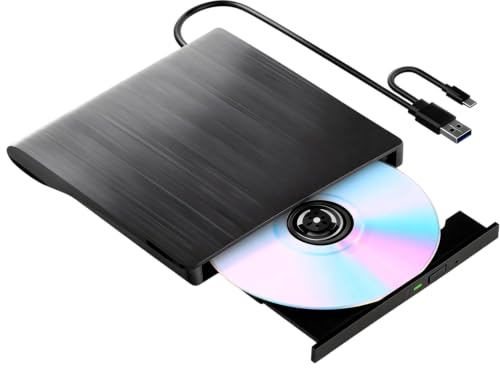
The clearest match for this keyword, described as a BDXL external ultra slim Blu-ray and MDisc burner with USB 3.1, USB-C, and two cables included. It suits someone building a long-term archive who wants documented M-Disc capability from a major computer brand, and who will burn discs from a laptop on a regular schedule.
- BDXL and MDisc support named in the title
- USB 3.1 and USB-C connections with two cables
- Trade-off: a slim bus-powered design can be fussy with weak ports
Skip it if you want a drive with its own power supply.
GOOBOX External Blu-ray Drive
A 6X BD-RE burner with USB-C and USB 3.0 connections that works on Windows, Mac, and Linux. It is a flexible all-rounder for someone who burns discs from several computers in the same household or office, though M-Disc support is not stated in the listing and would need confirming.
- USB-C and USB 3.0 connection options
- Windows, Mac, and Linux support listed
- Trade-off: no M-Disc mention in the title
Skip it if M-Disc writing is non-negotiable.
xconflux External Blu-ray Drive
A compact 6X BD-RE burner with USB-C and USB 3.0 connections. It is a straightforward choice for occasional burning of family photos, scanned documents, or home video onto standard Blu-ray discs, where the goal is a simple offline copy rather than a formally documented archive.
- Compact design with two connection types
- 6X write speed named in the title
- Trade-off: thin listing detail and no M-Disc statement
Skip it if you want documented archival features or brand support.
Aluminum USB-A and USB-C Blu-ray Burner
An aluminum portable drive described as both a burner and a player, with a USB-A connection and a USB-C-to-A adapter. It suits households that watch discs on a laptop and also want to burn the occasional backup, and the metal body reads as sturdier than plain plastic shells.
- Aluminum body
- Both USB-A and USB-C connectivity
- Trade-off: no M-Disc mention and a generic listing
Skip it if you want a recognizable brand with detailed specifications.
Multifunction Desktop Blu-ray Burner
A desktop unit listing up to 16x Blu-ray read speed, two USB 3.0 hub ports, and a fast-charging USB-A port. It fits a permanent desk where extra ports and steadier power matter more than portability, such as an office computer used for monthly archive burns.
- Built-in hub ports and a charging port
- Higher listed read speed
- Trade-off: bulkier than slim portables, with no M-Disc statement
Skip it if you need a drive that travels in a laptop bag.
Wbacon 7-in-1 Blu-ray Burner
A portable 3D Blu-ray burner and player with USB 3.0 and Type-C connections, listing support for 100G disc RW and several Windows versions. Large-disc support makes it interesting for bigger archives, but the listing does not say whether M-Disc media is supported.
- 100G disc support named
- USB 3.0 and Type-C connection
- Trade-off: brand-light listing and no M-Disc confirmation
Skip it if you need documented M-Disc compatibility.
archgon Aluminum Blu-ray Writer
An aluminum external USB 3.0 writer described for PC and Mac, with UHD 4K Blu-ray support in the title. It suits mixed-platform households that want solid playback and the ability to write discs for offline copies of photo and document folders.
- PC and Mac compatibility
- USB 3.0 interface and aluminum build
- Trade-off: the listing does not state M-Disc or BDXL writing
Skip it if archival-grade disc support is the main goal.
Which One Fits Your Situation
A Serious Long-Term Archive
The ASUS SBW-06D5H-U is the one listing that names MDisc and BDXL, so it should be the starting point for anyone buying M-Disc blanks. Pair it with burning software that can verify each disc, and keep a second copy off site. Choosing a drive whose listing says nothing about M-Disc and buying the special media anyway is the quickest way to waste both money and a weekend of burning.
A Desk With Limited Ports
The Multifunction Desktop Blu-ray Burner adds hub ports and a charging port, which cuts cable clutter for a permanent setup. Because a desktop unit stays in place, it also avoids the repeated plugging and unplugging that wears out portable cables, and it can keep a phone or accessory charged while discs burn. Confirm M-Disc compatibility with the seller first if archival media is the goal.
A Multi-Computer Household
The GOOBOX External Blu-ray Drive supports Windows, Mac, and Linux, and the archgon Aluminum Blu-ray Writer covers PC and Mac with a sturdy body.
Common Mistakes
- Buying M-Disc blanks before confirming the drive writes them.
- Skipping verification after burning, which is where bad discs get caught.
- Keeping the only archive copy in one location.
- Storing discs flat in sunlight or hot rooms.
- Assuming any Blu-ray writer handles BDXL capacities.
Related guides
- How To Connect An Old Ide Hard Drive To A Modern Computer
- Signs Your Hard Drive Is Failing And How To Back Up Fast
- How To Securely Erase An Old Hard Drive Before Selling
Frequently Asked Questions
What is M-Disc?
It is a recordable disc format marketed for long-term data retention. It requires a compatible burner, so confirm support before purchasing blanks.
Are optical discs still a good backup option?
They can be a useful offline copy that is immune to ransomware and account problems, but they work best alongside other copies rather than as the only backup.
Do I need special software to burn M-Disc?
Most standard burning programs work, but check the drive maker’s guidance and use verification after writing.
How long will a burned disc last?
No one can guarantee a lifespan. Manufacturers make long-retention claims for some media, but storage conditions and drive quality matter, so periodically verify and refresh important archives.
More from Amazon
Programs that pair well with the guide above. Offers and eligibility are set by Amazon and may change.
A free business account with business pricing and bulk-buying tools for work, shop or home office.
Create a business accountFree shipping on eligible items, Prime Video and more. Eligible new members can start with a free trial.
Start a Prime free trialAudiobooks and podcasts to listen to on the go. Eligible new members can start with a free trial.
Try Audible freeAd-free music streaming. Eligible new subscribers can start with a free trial.
Try Music Unlimited freeAs an Amazon Associate we earn from qualifying purchases.




Write Your Review
No reviews yet. Be the first to share your experience!