

Key takeaways
- Compare the best 512GB NVMe SSDs for PC and laptop upgrades, from Gen4 flagships to budget Gen3 picks, with speed, endurance and fit explained.
A 500GB NVMe drive is the smallest capacity worth buying as a boot drive, and it is also one of the thinnest capacity classes on the market. Several flagship lines skip 500GB entirely or quietly stop stocking it, so the drives that remain span two generations, two cache designs and a wide gap in endurance. Picking the wrong one means paying flagship money for speed your slot cannot use, or buying a drive whose write speed falls off a cliff once its cache fills.
This guide is for desktop owners adding a fast boot drive, laptop owners replacing a slow SATA drive or a cramped factory SSD, and anyone upgrading a machine whose slot is Gen3 only. Every drive below was chosen from the name and specifications printed on its Amazon listing, and each one is a 500GB or 512GB M.2 2280 NVMe drive sold on Amazon US.
Quick Picks
As an Amazon Associate we earn from qualifying purchases.
| Product | Best for | Key spec from title |
|---|---|---|
| SK hynix Platinum P41 500GB | Fastest Gen4 boot drive | Up to 7,000 MB/s read |
| WD Black SN770 500GB | Best value Gen4 upgrade | Up to 5,000 MB/s read |
| Crucial P3 Plus 500GB | Cheapest Gen4 laptop refresh | Up to 5,000 MB/s read |
| Samsung 980 500GB | Gen3-only machines | Up to 3,500 MB/s read |
| Crucial P3 500GB | Lowest-cost boot drive | Up to 3,500 MB/s read |
How to Choose
Gen4 or Gen3 — and what your slot actually allows
A Gen4 drive in a Gen3 slot runs at Gen3 speed, full stop. The slot caps sequential reads near 3,500 MB/s, so a 7,000 MB/s flagship gains you nothing in an older board beyond a faster random-access feel. Check your motherboard or laptop manual for the slot generation before you spend extra on Gen4: if the machine is Gen3 only, a cheaper Gen3 drive delivers the same real-world result. The reverse also matters — a Gen3 drive in a Gen4 slot still runs at Gen3 speed, so do not buy one expecting the board to lift it. Match the drive generation to the slot, then spend the difference on capacity or endurance.
DRAM cache vs DRAM-less with HMB
Drives with onboard DRAM keep a map of where every block lives, which keeps random reads and sustained writes steady when the drive is nearly full or juggling many small files. DRAM-less drives borrow a slice of system memory through Host Memory Buffer, and for everyday use — booting, launching apps, loading games — the difference is small. The gap shows up during long writes, such as copying a large video folder or cloning a drive, when a DRAM-less drive can slow sharply once its SLC cache fills. If the drive will hold an operating system and see heavy writes, DRAM is worth having; for a secondary game or media drive, a DRAM-less model is a fair trade.
Endurance: read the TBW rating before you buy
Every NVMe drive carries a TBW rating — terabytes written — that caps its warranty, and the spread at 500GB is wide. The two budget Crucial drives in this guide are rated at 110 TBW, while the Samsung 980 and WD Black SN770 are rated at 300 TBW and the SK hynix P41 at 500 TBW. A light user writing a few gigabytes a day will never approach 110 TBW, but a video editor or someone who clones drives regularly can burn through it in a few years. Compare the TBW figure on the listing, not just the headline speed, and remember that the warranty ends at whichever comes first: the year limit or the TBW limit.
Fit: single-sided boards, heatsinks and laptop slots
Nearly every 500GB NVMe drive is single-sided, which matters because many thin laptops and some PlayStation 5 installations only accept single-sided boards. Confirm the M.2 length is 2280, the standard 80 mm size, since shorter 2242 and longer 22110 drives will not fit most desktop and laptop slots. Heatsink versions of the same drive are sold under separate ASINs, so check that the listing you open is the bare drive if your motherboard already has a heatsink, or the heatsink version if it does not. A bare drive under a motherboard heatsink runs cooler than a bare drive left exposed in a cramped laptop.
The 5 Best Options
SK hynix Platinum P41 500GB

The Platinum P41 is the fastest 500GB drive in this guide and the only one here with both a DRAM cache and a 500 TBW endurance rating. SK hynix builds the drive around its own Aries controller and 176-layer TLC NAND, and the 500GB model reads at up to 7,000 MB/s, which is the practical ceiling of a Gen4 slot. It suits a builder who wants the quickest possible boot drive and will keep the machine for years, since the endurance rating is the highest in this group by a clear margin.
Specs
- Capacity: 500GB
- Interface: PCIe 4.0 x4 NVMe, M.2 2280, single-sided
- Sequential read: up to 7,000 MB/s
- Sequential write: up to 4,700 MB/s
- Controller: SK hynix Aries, with LPDDR4 DRAM cache
- NAND: SK hynix 176-layer 3D TLC
- Endurance: 500 TBW
- Warranty: 5-year limited
Best for: A Gen4 desktop where you want the fastest boot drive available at this capacity.
Watch out for: The 500GB model writes at up to 4,700 MB/s, well below the 6,500 MB/s of the 1TB and 2TB models, so do not expect the full flagship write figure. Listing records show the drive in stock on Amazon, but third-party sellers dominate some copies of the listing, so confirm a current seller before ordering.
WD Black SN770 500GB
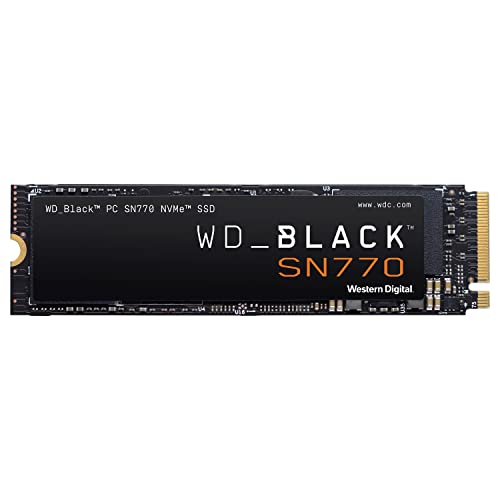
The SN770 is the value pick of the Gen4 drives here: it reads at up to 5,000 MB/s and writes at up to 4,000 MB/s, which is most of the way to flagship speed for everyday use. WD built it around an in-house SanDisk controller with BiCS5 TLC NAND and no onboard DRAM, using Host Memory Buffer instead, and it still carries a 300 TBW endurance rating with a five-year warranty. It fits a gamer or general user who wants a Gen4 boot drive without paying for a DRAM-equipped flagship.
Specs
- Capacity: 500GB
- Interface: PCIe 4.0 x4 NVMe, M.2 2280, single-sided
- Sequential read: up to 5,000 MB/s
- Sequential write: up to 4,000 MB/s
- Controller: SanDisk in-house controller, DRAM-less with HMB
- NAND: BiCS5 112-layer 3D TLC
- Endurance: 300 TBW
- Warranty: 5-year limited
Best for: A Gen4 gaming PC or desktop where you want strong speed at a mid-range position.
Watch out for: The listing is tagged as a previous-generation model in some listing records, so confirm the exact model number WDS500G3X0E before ordering. Because the drive is DRAM-less, sustained writes slow once the SLC cache fills, and some listing copies show only third-party sellers, so confirm a current seller.
Crucial P3 Plus 500GB

The P3 Plus is the cheapest way into Gen4 speeds in this guide, reading at up to 5,000 MB/s on a PCIe 4.0 slot. It is a DRAM-less drive built on QLC NAND, which keeps the cost down but also caps its endurance rating at 110 TBW, the lowest in this group. It makes sense as a laptop refresh or a secondary drive where the workload is mostly reads — booting, launching apps, loading games — rather than constant heavy writing. Its single-sided M.2 2280 board fits most laptops without a clearance problem.
Specs
- Capacity: 500GB
- Interface: PCIe 4.0 x4 NVMe, M.2 2280, single-sided
- Sequential read: up to 5,000 MB/s
- Controller: Phison E21T, DRAM-less with HMB
- NAND: Micron QLC 3D NAND
- Endurance: 110 TBW
- Warranty: 5-year limited
Best for: A budget laptop refresh or a secondary Gen4 drive where reads dominate the workload.
Watch out for: Micron is winding down its Crucial consumer business, so confirm a current seller before ordering and keep the receipt for warranty claims. The 500GB model’s write speed trails the larger capacities in the same line, and the 110 TBW rating is the lowest here, so this is not the drive for heavy daily writing.
Samsung 980 500GB

The Samsung 980 is the Gen3 pick in this guide, and it is the honest choice for any machine whose slot is Gen3 only. It reads at up to 3,500 MB/s and writes at up to 3,000 MB/s, which is the practical ceiling of a Gen3 slot, and it carries a 300 TBW endurance rating with a five-year warranty. Like the other budget drives here it is DRAM-less and uses Host Memory Buffer, but Samsung pairs that with its own controller and Intelligent TurboWrite, so everyday responsiveness stays strong for a boot drive in an older desktop or laptop.
Specs
- Capacity: 500GB
- Interface: PCIe 3.0 x4 NVMe, M.2 2280, single-sided
- Sequential read: up to 3,500 MB/s
- Sequential write: up to 3,000 MB/s
- Controller: Samsung Pablo, DRAM-less with HMB
- NAND: Samsung V-NAND 3-bit MLC
- Endurance: 300 TBW
- Warranty: 5-year limited
Best for: An older Gen3-only desktop or laptop where a Gen4 drive would gain nothing.
Watch out for: This is the plain 980, not the 980 PRO — the PRO is a Gen4 drive with DRAM, and its 500GB version has no verifiable Amazon US listing, so do not order the PRO expecting this drive. A Gen4 slot will not make this drive faster than 3,500 MB/s, so buy it only when the machine is Gen3.
Crucial P3 500GB

The Crucial P3 is the lowest-cost boot drive in this guide, a Gen3 drive that reads at up to 3,500 MB/s and writes at up to 3,000 MB/s. It shares the P3 Plus line’s DRAM-less design and QLC NAND, and its 110 TBW endurance rating is the lowest in this group, so it belongs in a light-use machine — a family PC, a media box, or a laptop that mostly browses and streams. For that job it is hard to fault: it is single-sided, fits standard M.2 2280 slots, and delivers the full Gen3 speed ceiling for very little outlay.
Specs
- Capacity: 500GB
- Interface: PCIe 3.0 x4 NVMe, M.2 2280, single-sided
- Sequential read: up to 3,500 MB/s
- Sequential write: up to 3,000 MB/s
- Controller: Phison E21T, DRAM-less with HMB
- NAND: Micron QLC 3D NAND
- Endurance: 110 TBW
- Warranty: 5-year limited
Best for: A light-use family PC or media machine where the lowest cost matters most.
Watch out for: Micron is winding down its Crucial consumer business, so confirm a current seller before ordering and keep the receipt for warranty claims. The 110 TBW rating and QLC NAND make this a poor fit for heavy writing, and its Gen3 interface means it gains nothing from a Gen4 slot.
Which One Fits Your Situation
You want the fastest boot drive in a Gen4 desktop
Pick the SK hynix Platinum P41. It is the only drive here that pairs a DRAM cache with 7,000 MB/s reads and a 500 TBW endurance rating, so it stays fast when the drive fills up and lasts the longest under heavy use. Accept the lower 4,700 MB/s write figure on the 500GB model and confirm a current seller before ordering.
You want Gen4 speed without the flagship outlay
Pick the WD Black SN770. Its 5,000 MB/s reads and 4,000 MB/s writes cover gaming and everyday work, and the 300 TBW rating is nearly triple the budget Crucial drives. Confirm the exact model WDS500G3X0E on the listing, since some copies of the listing are tagged as a previous-generation model.
You are refreshing a laptop on the tightest budget
Pick the Crucial P3 Plus if the laptop slot is Gen4, or the Crucial P3 if it is Gen3. Both are single-sided, DRAM-less and cheap, and both read at the ceiling of their generation. Check the slot generation first, and confirm a current seller, since Micron is winding down the Crucial consumer business.
Your machine only has a Gen3 slot
Pick the Samsung 980. A Gen4 drive in this machine would run at Gen3 speed anyway, so the 980 delivers the same 3,500 MB/s ceiling with a 300 TBW rating and Samsung’s own controller. Do not confuse it with the 980 PRO, whose 500GB version has no verifiable Amazon US listing.
Common Mistakes
- Buying a Gen4 flagship for a Gen3-only board, then wondering why reads stop near 3,500 MB/s.
- Judging a drive by its headline read speed alone while ignoring the TBW rating and the write speed of the 500GB model.
- Ordering a heatsink version for a board that already has a heatsink, or a bare drive for a laptop with no cooling.
- Assuming a 500GB drive holds 500GB of files — after formatting it holds roughly 465GB, so plan the partition accordingly.
- Cloning a failing drive onto the new SSD without checking the old drive’s health first, which copies the problem along with the data.
Frequently Asked Questions
Is 500GB enough for a boot drive?
Yes for most users, provided the operating system and main apps live on it and large media stays elsewhere. Windows plus common apps take roughly 100GB, leaving room for several games or projects. If the drive will also hold a photo or video library, step up to 1TB instead of juggling free space every month.
Will a Gen4 SSD work in a Gen3 slot?
Yes, NVMe drives are backward compatible, and a Gen4 drive will work in a Gen3 slot without any adapter. It simply runs at Gen3 speed, with sequential reads capped near 3,500 MB/s. That makes a budget Gen3 drive the better buy for a Gen3-only machine, since the extra Gen4 speed goes unused.
Does a DRAM-less SSD slow down over time?
It can, but only in specific workloads. DRAM-less drives borrow system memory through Host Memory Buffer, and they stay fast for booting, launching apps and loading games. Sustained writes, such as copying tens of gigabytes at once, can slow sharply once the SLC cache fills, so heavy writers should pick a DRAM-equipped drive like the Platinum P41.
Should I clone my old drive or install Windows fresh?
A fresh install is cleaner and avoids carrying over years of clutter and driver conflicts, but it means reinstalling every app. Cloning is faster and keeps everything as it is, yet it also copies any corruption on the old drive. Clone only after checking the old drive’s health, and keep a backup of anything irreplaceable before you start either way.
More from Amazon
Programs that pair well with the guide above. Offers and eligibility are set by Amazon and may change.
A free business account with business pricing and bulk-buying tools for work, shop or home office.
Create a business accountFree shipping on eligible items, Prime Video and more. Eligible new members can start with a free trial.
Start a Prime free trialAudiobooks and podcasts to listen to on the go. Eligible new members can start with a free trial.
Try Audible freeAd-free music streaming. Eligible new subscribers can start with a free trial.
Try Music Unlimited freeAs an Amazon Associate we earn from qualifying purchases.
Write Your Review
No reviews yet. Be the first to share your experience!