

Key takeaways
- Compare the best 20TB external hard drives for archives and NAS backup, from desktop drives to a RAID duo, with speed, noise, and warranty explained.
A 20TB external hard drive is a serious commitment, not a casual purchase. One desktop drive can hold an entire photo library, years of video projects, or a full copy of a home NAS, which means the choice matters more than it does at smaller sizes. The wrong pick leaves you with a noisy box on your desk, a slow USB connection, or a warranty that ends before the drive does. The right one quietly holds everything and stays out of the way for years.
This guide covers photographers archiving raw files, video editors who need a big working drive, home NAS owners who want a full off-device backup, and small offices consolidating scattered storage. Every drive below was picked from its Amazon listing, using the model number, interface, warranty, and included software printed there, so you can match the drive to the workload instead of guessing from the box.
Quick Picks
As an Amazon Associate we earn from qualifying purchases.
| Product | Best for | Key spec from title |
|---|---|---|
| WD Elements Desktop 20TB | The lowest cost per terabyte for a NAS backup | 20TB, USB 3.0, 2-year warranty |
| Seagate Expansion Desktop 20TB | Simple plug-and-play storage with recovery cover | 20TB, USB 3.0, Rescue Data Recovery Services |
| Seagate One Touch Hub 20TB | A desk drive that also charges your accessories | 20TB, USB-C and USB 3.0 hub ports |
| Seagate One Touch 20TB | A clean USB-C desktop drive for Mac and PC | 20TB, USB-C, Rescue Data Recovery Services |
| WD My Book Duo 20TB | Fast RAID storage for video and photo work | 20TB, RAID 0/1, up to 360 MB/s reads |
How to Choose
Capacity vs Use
Twenty terabytes sounds endless until you count what goes on it. A photographer with a decade of raw files, a video editor with 4K project timelines, or a NAS owner backing up four full bays can fill a 20TB drive faster than expected, so map the job before buying. If the drive holds a single archive that rarely changes, one big drive is enough. If it holds a live working library that grows every week, leave headroom of at least a quarter of the capacity, because a nearly full hard drive writes slower and leaves no room for a second copy.
Interface Speed
Most 20TB desktop drives connect over USB 3.0 or USB-C, and the interface on the box is rarely the real limit. A single spinning hard drive inside these enclosures moves data at roughly 200 to 250 MB/s in everyday use, which USB 3.0 handles with room to spare. USB-C matters more for convenience than speed here, since it plugs in either way and matches modern laptops without an adapter. The exception is the RAID duo in this guide, which pairs two drives to reach sequential reads of up to 360 MB/s, a gain you only see when moving very large files.
Desktop Power and Noise
Every 20TB external drive in this guide is a desktop drive, which means it needs wall power and stays in one place. That brings two practical questions: how loud is it, and how does it behave when idle. A fanless enclosure with a single drive runs quieter than a two-drive RAID box, and that difference matters if the drive sits on a desk in a bedroom or a small office. Check whether the drive spins down when idle, because a drive that hums all night will annoy you long before it fails. Also confirm the power brick is included in the box, since desktop drives are useless without their adapter.
Reliability and Warranty
A 20TB drive holds more data than most people have ever owned, so warranty length and recovery cover deserve real attention. The drives in this guide carry either a two-year or a three-year limited warranty, and that extra year is worth something when the drive stores irreplaceable work. Several Seagate models also include Rescue Data Recovery Services, which covers a lab recovery attempt if the drive fails mechanically. Beyond the warranty, look at what the listing actually discloses: WD and Seagate do not always state whether the drive inside uses CMR or SMR recording, which matters if you plan to remove the drive and install it in a NAS.
The 5 Best Options
WD Elements Desktop 20TB

The WD Elements Desktop 20TB is the plainest drive in this guide, and that is exactly why it leads the list. It is a single 20TB desktop drive with a USB 3.0 connection, no backup software bundle, and no hub ports, so nothing stands between you and a very large pile of storage. It suits NAS owners who want a full off-device backup copy, photographers archiving finished projects, and anyone who measures value in cost per terabyte. The enclosure is fanless and compact for its capacity, and the drive arrives preformatted for Windows, with a reformat needed for Mac use.
Specs
- Capacity: 20TB, single 3.5-inch desktop drive
- Model number: WDBWLG0200HBK-NESN
- Interface: USB 3.0
- Power: AC adapter included, desktop use
- Warranty: 2-year limited warranty
- Format: Preformatted NTFS for Windows
Best for: A NAS owner who wants the cheapest way to hold a full 20TB backup copy.
Watch out for: The 2-year warranty is shorter than the 3-year cover on the WD My Book Duo, and the drive inside is not specified on the listing, so confirm the recording type before removing it from the enclosure for NAS use.
Seagate Expansion Desktop 20TB
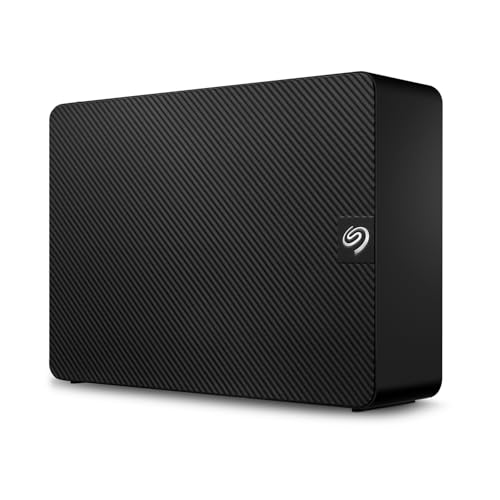
The Seagate Expansion Desktop 20TB is the no-fuss alternative to the WD Elements, with one meaningful extra: Rescue Data Recovery Services bundled in. It is a single 20TB desktop drive with a USB 3.0 connection and an AC adapter, ready to plug in and fill. It suits anyone who wants a straightforward archive drive without software to configure, including households consolidating old drives onto one big volume and small offices keeping a local copy of shared files. The enclosure is a simple vertical box that takes little desk space, and the drive works with Windows out of the box, with a reformat needed for Mac.
Specs
- Capacity: 20TB, single 3.5-inch desktop drive
- Model number: STKP20000400
- Interface: USB 3.0
- Power: AC adapter included, desktop use
- Recovery: Rescue Data Recovery Services included
- Compatibility: Windows, Mac after reformatting
Best for: A household that wants a simple 20TB archive drive with recovery cover included.
Watch out for: Some listings for this model show used or renewed units alongside new ones, so confirm the listing states a new drive from a current seller before ordering.
Seagate One Touch Hub 20TB

The Seagate One Touch Hub 20TB earns its place by doing two jobs at once. It is a 20TB desktop drive with a USB-C port, a USB 3.0 port, and two front-facing hub ports that charge phones and connect accessories, so it replaces a small desk hub as well as a storage box. It suits desk workers who want fewer cables, creators who plug in card readers and phones all day, and anyone whose laptop has too few ports. The drive includes backup software, a Dropbox backup plan, and Mylio Photos, plus Rescue Data Recovery Services, which makes it the most bundled drive in this guide.
Specs
- Capacity: 20TB, single 3.5-inch desktop drive
- Model number: STLC20000400
- Interface: USB-C and USB 3.0, with front USB-C and USB-A hub ports
- Power: AC adapter included, desktop use
- Software: Backup software, Dropbox backup plan, Mylio Photos
- Recovery: Rescue Data Recovery Services included
- Warranty: 3-year limited warranty
Best for: A desk worker who wants a 20TB drive that doubles as a USB charging hub.
Watch out for: This model has appeared at widely different prices across sellers, so confirm the listing shows a current seller and a new unit before ordering.
Seagate One Touch 20TB

The Seagate One Touch 20TB is the newest single-drive model in this guide, and it is also the cleanest. It is a 20TB desktop drive with a USB-C connection, Rescue Data Recovery Services, and no hub ports or extra bulk, which makes it the simplest pick for a modern Mac or Windows laptop. It suits users who want a current model with a USB-C cable in the box. The drive is a single 3.5-inch unit with an AC adapter, so it stays on the desk, but its USB-C port plugs straight into current machines without an adapter.
Specs
- Capacity: 20TB, single 3.5-inch desktop drive
- Model number: STNB20000400
- Interface: USB-C
- Power: AC adapter included, desktop use
- Recovery: Rescue Data Recovery Services included
- Compatibility: Windows and macOS
Best for: A laptop owner who wants a current 20TB desktop drive with a native USB-C connection.
Watch out for: Seagate reuses the One Touch name across many capacities and two different desktop models, so confirm the listing shows model STNB20000400 and 20TB before ordering.
WD My Book Duo 20TB

The WD My Book Duo 20TB is the only two-drive unit in this guide, and it is the fastest. Inside the enclosure sit two 10TB WD Red drives, configured in RAID 0 by default for sequential reads of up to 360 MB/s, with RAID 1 and JBOD available for redundancy or independent use. It suits video editors working from a desktop drive, photographers who need speed as well as capacity, and small offices that want one box for both working files and backup. The enclosure adds two USB 3.0 hub ports, password protection, 256-bit AES hardware encryption, and WD backup software, with a 3-year limited warranty behind it.
Specs
- Capacity: 20TB, two 10TB WD Red drives
- Model number: WDBFBE0200JBK-NESN
- Interface: USB 3.1 Type-C, plus two USB 3.0 Type-A hub ports
- RAID modes: RAID 0, RAID 1, JBOD
- Speed: Up to 360 MB/s sequential reads in RAID 0
- Security: Password protection, 256-bit AES hardware encryption
- Warranty: 3-year limited warranty
- Weight: 5.25 lb
Best for: A video editor who needs the fastest 20TB desktop drive in this guide.
Watch out for: The Duo ships in RAID 0, which has no redundancy, so one failed drive takes the whole volume with it; switch to RAID 1 or keep a second copy if the files matter.
Which One Fits Your Situation
You Want the Cheapest Terabyte for a NAS Backup
Pick the WD Elements Desktop 20TB. It holds a full 20TB copy of a NAS at the lowest cost per terabyte in this guide, and its fanless enclosure stays quiet on a shelf. The 2-year warranty is shorter than some rivals, and it has no bundled software, but for a pure backup copy that is a fair trade. Keep a second copy elsewhere, since one drive is still one copy.
You Edit Video From a Desktop Drive
Pick the WD My Book Duo 20TB. Its two-drive RAID 0 setup reaches sequential reads of up to 360 MB/s, which is the fastest in this guide and the most useful for scrubbing large video timelines. The 3-year warranty, encryption, and hub ports add to the case. Just remember to switch to RAID 1 or keep a separate backup, since RAID 0 has no redundancy.
You Want a Hub on Your Desk
Pick the Seagate One Touch Hub 20TB. Its front USB-C and USB-A ports charge a phone and connect a card reader while the drive itself holds 20TB of files, which cuts one gadget from your desk. The bundled backup software, Dropbox plan, and 3-year warranty make it a strong all-rounder. Confirm a current seller, since prices for this model vary widely across listings.
You Want the Simplest Plug-and-Play Drive
Pick the Seagate Expansion Desktop 20TB. It is a single 20TB drive with a USB 3.0 cable and an AC adapter, nothing to configure and nothing extra to learn. Rescue Data Recovery Services is included, which is a useful safety net for a drive that will hold years of files. Confirm the listing states a new unit, since used and renewed units appear alongside new ones.
Common Mistakes
- Treating one 20TB drive as a backup plan. A single drive is one copy, so a failure, theft, or flood takes everything; keep a second copy on another drive or in the cloud.
- Removing the drive from its enclosure without checking the warranty. Shucking can void the warranty, and some WD drives need a fix for the 3.3V power-disable pin before they spin up in a NAS.
- Buying a used or renewed listing by mistake. Several 20TB models have third-party and renewed units mixed in with new ones, so read the condition line on the listing before ordering.
- Leaving a RAID 0 Duo as the only copy of your files. RAID 0 is fast but has no redundancy, so one failed drive wipes the whole volume; use RAID 1 or a second backup.
- Forgetting to reformat for Mac. Most of these drives arrive formatted for Windows, so Mac users need to reformat before first use or the drive will not accept files as expected.
Frequently Asked Questions
Can a 20TB external drive back up a whole NAS?
Yes, if the NAS holds 20TB or less of actual data, since the drive mirrors used space rather than raw bay capacity. Connect the drive to a computer or directly to the NAS, if the NAS supports USB backup. Treat it as one layer of a backup plan, since it becomes the only copy unless you keep a second one.
Do 20TB external drives need a power adapter?
Yes, every drive in this guide is a 3.5-inch desktop drive that needs wall power through an included AC adapter. None of them run from USB power alone, which is why they stay on a desk rather than travelling in a bag. Check that the adapter is listed in the box contents and that the cable reaches your outlet, since a short cord can force an awkward desk layout.
Is a 20TB external drive fast enough for video editing?
A single-drive 20TB model moves data at roughly 200 to 250 MB/s, which handles 1080p and light 4K editing but can lag on heavy multi-stream 4K timelines. The WD My Book Duo in RAID 0 reaches up to 360 MB/s, which is the better pick for regular video work. Keep active projects on a fast SSD and use the 20TB drive for finished footage and archives.
Should I remove a 20TB external drive from its enclosure for my NAS?
You can, but weigh the trade-offs first. Shucking a WD Elements or Seagate Expansion drive is a common way to get a cheap NAS drive, yet it can void the warranty, and some WD drives need a fix for the 3.3V power-disable pin before they spin up in certain NAS bays. Also confirm the drive inside uses CMR recording, since SMR drives perform poorly in RAID arrays.
More from Amazon
Programs that pair well with the guide above. Offers and eligibility are set by Amazon and may change.
A free business account with business pricing and bulk-buying tools for work, shop or home office.
Create a business accountFree shipping on eligible items, Prime Video and more. Eligible new members can start with a free trial.
Start a Prime free trialAudiobooks and podcasts to listen to on the go. Eligible new members can start with a free trial.
Try Audible freeAd-free music streaming. Eligible new subscribers can start with a free trial.
Try Music Unlimited freeAs an Amazon Associate we earn from qualifying purchases.
Write Your Review
No reviews yet. Be the first to share your experience!