

Key takeaways
- Compare the best 3TB external hard drives for large backups, from pocketable portables to desktop drives, with speed, size, and software explained.
A 3TB external hard drive sits in an awkward middle ground, and that is exactly why it is worth choosing carefully. It holds far more than a 1TB or 2TB portable drive, yet it costs less and takes up less room than the 4TB and 5TB models that dominate store shelves today. The catch is that 3TB is now a thin capacity, so many of the listings you find are older generations, and the difference between a portable drive and a desktop drive matters more than it does at other sizes.
This guide covers home users backing up a full photo library, laptop owners who need a pocketable second copy of everything, and desktop users who want a large drive that stays plugged in beside the computer. Every drive below was picked from its Amazon listing, using the model number, interface, form factor, and bundled software printed there, so you can match the drive to the backup job instead of guessing from the box.
Quick Picks
As an Amazon Associate we earn from qualifying purchases.
| Product | Best for | Key spec from title |
|---|---|---|
| WD My Passport 3TB | A pocketable everyday backup drive | 3TB portable, USB 3.0, 256-bit AES encryption |
| Seagate Expansion Desktop 3TB | A large desktop drive for one PC | 3TB desktop, USB 3.0, external power adapter |
| Toshiba Canvio Advance 3TB | A simple red portable drive with backup software | 3TB portable, USB 3.0, password protection |
| Seagate Backup Plus Desktop 3TB | A desktop drive with dashboard backup software | 3TB desktop, USB 3.0, Seagate Dashboard software |
| WD My Book 3TB | A desktop backup hub with encryption | 3TB desktop, USB 3.0, WD SmartWare Pro software |
How to Choose
Capacity vs Use
Three terabytes sounds generous until you count what a modern household actually stores. A photo library with years of phone pictures and a few hours of 4K video can pass 1TB on its own, and a full system backup adds the operating system, applications, and documents on top. For a single laptop backup with room to grow, 3TB is a comfortable fit, and it leaves space for a second copy of the most important folders. For a household with two or three computers plus a media collection, it is a single-machine drive rather than a family archive, so plan on one drive per computer or a larger capacity.
Portability vs Desktop
The first fork in the road is whether the drive travels with you or stays on the desk. Portable 2.5-inch drives run on USB bus power, so they need no wall outlet and slip into a laptop bag, which makes them the right pick for backups you carry between home and office. Desktop 3.5-inch drives need an external power adapter and a permanent spot on the desk, but they cost less per terabyte and run cooler during long backup sessions. If you back up once a week at the same desk, choose desktop; if the drive leaves the house, choose portable.
Interface Speed
Every drive in this guide uses USB 3.0, which moves data at up to 5 gigabits per second, and that is fast enough for the mechanical hard drives inside them. The spinning disk, not the cable, sets the ceiling, so a USB 3.0 connection will not hold back a 3TB hard drive the way it would hold back a fast SSD. What matters more is the port on your computer: a USB 3.0 or later port delivers full speed, while an older USB 2.0 port slows every transfer to a crawl. Check the ports on the machine you will back up before you buy, and keep the included cable with the drive.
Compatibility and Backup Software
A drive that works on Windows may need reformatting before a Mac can write to it, and the bundled software is often Windows-only, so read the listing before you click buy. WD ships WD Backup and WD Security with its portable drives, Seagate ships its Dashboard software with Backup Plus models, and Toshiba includes its own backup utility with Canvio Advance. The software matters because a backup you have to remember to run is a backup that gets skipped, so pick a drive whose included software fits your routine. If you use Time Machine or another tool already, a plain drag-and-drop drive is fine.
The 5 Best Options
WD My Passport 3TB

The WD My Passport 3TB is the most straightforward pick in this guide, a pocketable portable drive with hardware encryption and WD’s own backup software. It suits laptop owners who want one drive that handles the whole backup job: plug it in, set a schedule in WD Backup, and let it copy new files in the background. The textured case grips well in the hand, the drive runs on USB bus power with no wall adapter to lose, and the 256-bit AES encryption keeps the contents locked if the drive is lost. It is the drive to buy when you want a backup you can carry in a jacket pocket.
Specs
- Capacity: 3TB
- Model number: WDBYFT0030BBK-WESN
- Interface: USB 3.0, backward compatible with USB 2.0
- Form factor: 2.5-inch portable, USB bus powered
- Encryption: 256-bit AES hardware encryption with password protection
- Software: WD Backup, WD Security, and WD Drive Utilities included
- Warranty: 3-year limited warranty
Best for: Laptop owners who want a pocketable, encrypted backup drive.
Watch out for: This is an older My Passport generation, so confirm the listing shows model WDBYFT0030BBK before ordering, and note the drive ships formatted for Windows and needs reformatting for a Mac.
Seagate Expansion Desktop 3TB

The Seagate Expansion Desktop 3TB is a plain, honest desktop drive for a computer that stays in one place. It suits home users who want a large backup target beside the desk and do not need to carry the drive anywhere: plug in the power adapter and the USB cable, and the drive appears ready for drag-and-drop file saving. There is no bundled backup software to configure and no encryption layer to manage, which keeps the setup simple, and the 3.5-inch mechanism inside runs steadily through long backup sessions. It is the drive to buy when a single Windows PC needs a big, cheap, always-connected backup.
Specs
- Capacity: 3TB
- Model number: STEB3000100
- Interface: USB 3.0, backward compatible with USB 2.0
- Form factor: 3.5-inch desktop, external power adapter included
- Cable: 18-inch USB 3.0 cable included
- Dimensions: 7.07 x 4.65 x 1.48 inches
- Weight: 2.06 pounds
Best for: A single Windows desktop that needs a large, always-connected backup drive.
Watch out for: The listing has at times shown no featured sellers, so confirm a current seller before ordering, and note the drive needs reformatting for Mac use.
Toshiba Canvio Advance 3TB

The Toshiba Canvio Advance 3TB is the friendliest portable drive in this guide, a compact red unit with backup software and password protection included. It suits people who want the backup software to do the thinking: the included utility can schedule automatic backups, and the password lock keeps family photos and documents private if the drive is misplaced. The 2.5-inch body runs on USB bus power, so it needs no wall outlet, and the red finish makes it easy to spot in a bag full of black cables. It is the drive to buy when you want a portable backup with software and security already handled.
Specs
- Capacity: 3TB
- Model number: HDTC930XR3CA
- Interface: USB 3.0, backward compatible with USB 2.0
- Form factor: 2.5-inch portable, USB bus powered
- Software: Toshiba backup software included
- Security: Password protection included
- Color: Red
Best for: Home users who want a portable drive with backup software and password protection in the box.
Watch out for: This listing covers the red color variant, so confirm the color and capacity on the listing before ordering, and check that the included software supports your version of Windows.
Seagate Backup Plus Desktop 3TB
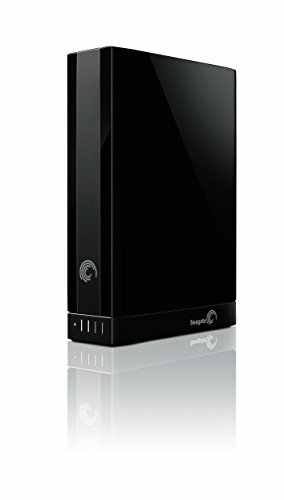
The Seagate Backup Plus Desktop 3TB pairs a large desktop drive with Seagate Dashboard software for scheduled backups and social media backup. It suits desktop users who want more than drag-and-drop: the Dashboard can run scheduled backups, back up mobile photos over Wi-Fi, and save copies of files from social accounts. The 3.5-inch drive sits beside the computer with its own power adapter, so it is always ready when the schedule runs, and the 3TB capacity holds a full system image plus a photo library with room to spare. It is the drive to buy when you want a desktop backup that runs itself.
Specs
- Capacity: 3TB
- Model number: STCA3000100
- Interface: USB 3.0, backward compatible with USB 2.0
- Form factor: 3.5-inch desktop, external power adapter included
- Software: Seagate Dashboard backup software included
- File system: NTFS, formatted for Windows
Best for: Desktop users who want scheduled backups and mobile photo backup from one drive.
Watch out for: This is an older Backup Plus generation, so confirm the listing shows model STCA3000100 and a current seller, and note the drive needs reformatting for Mac use.
WD My Book 3TB

The WD My Book 3TB is the most complete desktop backup package in this guide, with WD SmartWare Pro software, hardware encryption, and password protection. It suits a household computer that holds the family photo library and the documents nobody can afford to lose: SmartWare Pro can back up continuously or on a schedule, and the encryption locks the contents behind a password. The vertical desktop case takes up little desk space, the drive connects over USB 3.0, and the 3-year warranty covers the drive longer than most desktop models. It is the drive to buy when one desktop PC is the backup hub for the whole household.
Specs
- Capacity: 3TB
- Model number: WDBFJK0030HBK-NESN
- Interface: USB 3.0, backward compatible with USB 2.0
- Form factor: 3.5-inch desktop, external power adapter included
- Encryption: 256-bit AES hardware encryption with password protection
- Software: WD SmartWare Pro backup software included
- Dimensions: 6.7 x 1.9 x 5.5 inches
- Warranty: 3-year limited warranty
Best for: A household desktop that serves as the backup hub for photos and documents.
Watch out for: This is an older My Book generation, so confirm the listing shows model WDBFJK0030HBK before ordering, and note the drive ships formatted for Windows and needs reformatting for a Mac.
Which One Fits Your Situation
You Back Up One Laptop
Pick the WD My Passport 3TB. It is pocketable, bus powered, and encrypted, so it fits the laptop backup routine exactly: plug it in at the end of the day, let WD Backup run, and unplug it when you leave. The Toshiba Canvio Advance is the runner-up if you prefer its included backup utility and red finish, but the My Passport’s hardware encryption gives it the edge for a drive that travels.
You Back Up a Desktop That Never Moves
Pick the WD My Book 3TB. Its SmartWare Pro software can back up continuously or on a schedule, and the encryption protects the household photo library if the drive is ever taken. The Seagate Expansion Desktop is the simpler alternative if you only need drag-and-drop storage with no software layer, and it costs less per terabyte for the same 3TB.
You Want Scheduled Backups With Extras
Pick the Seagate Backup Plus Desktop 3TB. Its Dashboard software handles scheduled backups and can also pull in mobile photos and social media files, which the plain desktop drives cannot do. Keep the drive plugged in beside the computer so the schedule never misses a run, and confirm the listing shows the STCA3000100 model before ordering.
You Carry the Drive Between Home and Office
Pick the Toshiba Canvio Advance 3TB. It is light, bus powered, and easy to spot in a bag, and its password protection keeps the contents private on the move. The WD My Passport is the alternative if hardware encryption matters more to you than the included backup utility, since both drives fit the same pocketable role.
Common Mistakes
- Buying a desktop drive for a laptop you carry every day, then discovering it needs a wall outlet and a desk to work.
- Skipping the reformat step on a Mac and wondering why a Windows-formatted drive only reads files instead of writing them.
- Filling a 3TB drive with a single backup and leaving no room for the next version of the same files.
- Trusting one external drive as the only copy of irreplaceable photos instead of keeping a second copy elsewhere.
- Ordering an older-generation model without checking the model number on the listing, then receiving a different variant than expected.
Frequently Asked Questions
Is 3TB enough for a full computer backup?
For most single computers, yes. A 3TB drive holds the operating system, applications, documents, and a large photo library with room for several backup versions. It gets tight only when the household shares one drive across multiple computers or stores many hours of 4K video, in which case a larger capacity or one drive per computer is the safer plan.
Do these 3TB drives work with a Mac?
The drives themselves work with a Mac, but most ship formatted for Windows, so a Mac can read them and cannot write to them until they are reformatted. Reformatting erases everything on the drive, so do it before the first backup. If you plan to move the drive between Windows and Mac, check the file system options before you commit to one.
Should I choose a portable or desktop 3TB drive?
Choose portable if the drive leaves the house, since portable drives run on USB power and fit in a bag. Choose desktop if the drive stays beside one computer, since desktop drives cost less per terabyte and handle long backup sessions well. The wrong choice shows up fast: a desktop drive is useless on a train, and a portable drive is easy to knock off a desk.
Why are so many 3TB drives older models?
Because 3TB is no longer a mainstream capacity, so manufacturers focus on 2TB, 4TB, and 5TB instead. The 3TB listings that remain are often older generations, which is fine as long as the model number matches the listing and a current seller is shown. Always confirm the exact model number before ordering, and treat a listing with no featured sellers as a warning sign.
More from Amazon
Programs that pair well with the guide above. Offers and eligibility are set by Amazon and may change.
A free business account with business pricing and bulk-buying tools for work, shop or home office.
Create a business accountFree shipping on eligible items, Prime Video and more. Eligible new members can start with a free trial.
Start a Prime free trialAudiobooks and podcasts to listen to on the go. Eligible new members can start with a free trial.
Try Audible freeAd-free music streaming. Eligible new subscribers can start with a free trial.
Try Music Unlimited freeAs an Amazon Associate we earn from qualifying purchases.
Write Your Review
No reviews yet. Be the first to share your experience!