

Key takeaways
- The best hard drive power supplies for docks, bare drives and recovery work, from a universal 12V brick to dual-output and model-matched replacements.
A hard drive dock is only as reliable as the brick feeding it. When a dock loses power mid-clone or a 3.5-inch drive fails to spin up on a recovery bench, the cause is very often a tired, undersized or incorrect adapter rather than the dock itself. Desktop drives need a clean 12V rail with enough current behind it, older external drives often need 12V and 5V delivered together, and every one of these supplies uses a connector that has to match exactly before any data moves.
This guide covers the replacement and spare supplies that keep docks, bare-drive adapters and external drives running: a universal 12V brick that fits most docks, the dual-rail bricks that older hardware depends on, and a model-matched replacement for one of the most common desktop drive families. Two specialist forms round out the guide: a standalone dual-rail brick ending in a Molex plug for bare-drive adapter kits, and a wall brick whose cord ends in a SATA power plug.
As an Amazon Associate, we earn from qualifying purchases.
Quick answer
For most dock owners, the BOEEA 12V Adapter Charger is the buy: a 12V 2A brick with four interchangeable barrel tips that covers the power inputs used by common docks and desktop external drives from Seagate, Western Digital and Fantom Drives. Drives that need 12V and 5V together need a dual-output brick instead, and Seagate owners should look at the model-matched Lantisri replacement.
BOEEA 12V Adapter Charger

The BOEEA adapter is a straightforward 12V 2A wall brick, rated at 24W from a 100-240V input, and its useful trick is the set of four interchangeable DC connectors in the box. Dock makers have never fully agreed on barrel sizes, so a single fixed plug is a gamble when you run more than one brand of dock or desktop external drive. Swapping tips until one seats firmly is far better than forcing a loose barrel that arcs, heats up and drops the drive under load.
The listing positions it for Seagate FreeAgent GoFlex and Backup Plus units, WD Elements Desktop and other Western Digital externals, Fantom Drives models and the Avolusion PRO-5X, which is a fair map of the 12V barrel-input hardware on most benches. Output is fixed at 12V, and the supply can feed any device rated at or below its 2A ceiling, so it suits single-bay docks and most dual-bay units that ship with a 2A brick. Check polarity before ordering: like nearly every dock supply, it is center positive, and a center-negative device should never be connected to it.
As a spare for a working dock or a replacement for a lost original, this is the lowest-friction option in the guide. Keep one in the recovery kit and a dead brick stops being a reason to abandon a cloning session halfway through.
Coolerguys 12V and 5V 4-Pin Molex Power Adapter

Anyone who images loose drives with a USB-to-IDE/SATA adapter kit knows this brick’s bundled twin well: a wall adapter that delivers 12V and 5V together on a 4-pin Molex plug, feeding a bare 3.5-inch drive while the adapter cable handles data. The Coolerguys adapter is that same brick sold on its own, the direct replacement when a kit supply fails and the adapter cable is still good.
It takes a 100-240V input and delivers 12V at 2A and 5V at 2A through a single 4-pin Molex connector, the plug that IDE drives and older SATA drives draw both rails from, which is why a plain 12V barrel brick cannot substitute for it. That full 2A on the 12V side covers the spin-up surge of a desktop mechanism. Order the version without an inline on/off switch: one less failure point, and no switch to knock off mid-transfer. As a standalone brick rather than part of a kit, it also suits Molex-powered enclosures and bench gear expecting the same two rails.
Check the details before ordering any brick of this form. The Molex housing should be keyed so it cannot be inserted backwards, and both black ground leads should be wired; some bargain supplies leave one ground unconnected. A brick that quietly omits the 5V rail will leave IDE drives completely dead and SATA drives half-powered, so the dual output is the first line to confirm in any listing.
UpBright 4-Pin 12V 5V 3A AC/DC Adapter
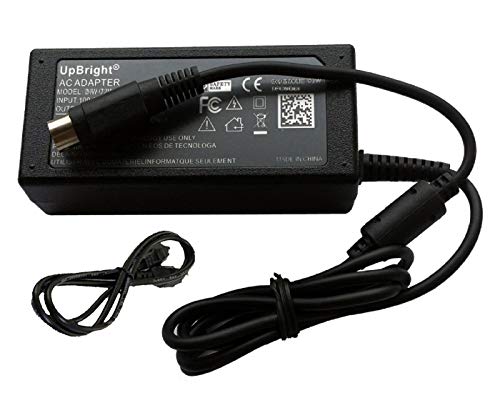
Some external drives take both power rails through a single round 4-pin DIN plug, and the UpBright adapter built for Fantom Drives is the cleanest example of that form. It delivers 12V and 5V at up to 3A per rail, 50W in total, from a worldwide 100-240V input, and it is made for the Fantom Drives GreenDrive line (GD1500EU, GD1500, GD2000EU), the Titanium II USB 2.0 drive and the GForce3 Megadisk dual-drive units.
That 3A headroom matters on dual-drive hardware, where two mechanisms spin up at once and a weak supply browns out exactly at the moment the array tries to mount. The adapter carries over-voltage, over-current and short-circuit protection, and the package includes a regional AC cord, which suits a bench that sees imported drives. The DIN plug is keyed by its pin layout, so it only seats one way; align it rather than forcing it, because bent pins inside these small DIN connectors are a common and avoidable failure.
If you keep an older Fantom Drives unit in service for archive access, this is the supply that matches its power inlet exactly, with current to spare over the original brick.
KINGWIN KW-2SA SATA Power Adapter

A smaller class of supply skips the barrel plug entirely and ends its output cord in a 15-pin SATA power connector, and the KINGWIN KW-2SA is the clean example of the form. It is a wall adapter that converts a 100-240V AC input into 12V and 5V DC at up to 2A, delivered through that SATA power plug, so a bare SATA drive can be powered outside a case while data runs over a separate SATA, eSATA or USB bridge cable. On a recovery bench, where the drive sits loose and needs only clean power for imaging, that single-plug arrangement is the whole appeal.
One caution: the same product page covers more than one connector variant, so confirm on the product page that the SATA-plug version of the KW-2SA is the one selected before ordering, rather than the Molex variant sold under the same model family.
Judge the unit you receive against a short checklist. The SATA plug should be a molded connector; the cheap crimped style is a documented weak point that can loosen, overheat and damage the drive it feeds. Both the 12V and 5V rails must be wired through, since 3.5-inch drives need 12V for the motor and 5V for the electronics, while the 3.3V rail found on internal supplies is not required by most drives. Rail order matters more than anything: a supply with the 12V and 5V lines swapped will destroy a drive board in seconds, so retire any unit whose plug feels loose in the drive socket.
Lantisri 12V AC Power Adapter for Seagate drives

When a specific desktop drive family needs a new brick, a model-matched replacement beats a universal one, and the Lantisri adapter is built for Seagate’s long-running desktop lines. It is a 12V 2A barrel supply listed for the Backup Plus range including the SRD0SD0, the Expansion SRD00F2, Seagate Central, FreeAgent GoFlex units and SimpleTech drives, with further coverage for BlackArmor WS 110 units and several Iomega and Verbatim desktop models that share the same power inlet.
The value of the model-matched route is certainty. The listing names the original adapter part numbers it replaces, among them KSAS0241200150HU, WA-24E12, DA-24B12 and the ADS-24S-12 family, so you can compare the print on your old brick line by line before ordering. That check takes a minute and removes the two classic replacement mistakes: right voltage with the wrong barrel, and right barrel with the wrong polarity.
For a Backup Plus or FreeAgent that stopped powering on, this is the first supply to try before concluding the drive itself has failed. A large share of dead external drives are simply dead bricks, and this one restores the original specification exactly.
How to choose
Match the connector before anything else. Docks and desktop external drives use barrel plugs in several diameters, dual-rail hardware uses a 4-pin DIN or a Molex plug, and a supply that almost fits is worse than one that clearly does not, because a loose barrel loses contact under vibration and load. Read the connector line of the listing, not just the headline.
Voltage must match exactly. A 12V device needs a 12V supply; feeding it 9V leaves drives unable to spin up, and feeding it a higher voltage risks the drive electronics. Current works the other way: the supply rating is a ceiling, not a dose, so a 3A brick safely feeds a drive that draws 1.5A, while a 1A brick on a 2A dock will run hot and may shut down mid-transfer. Dual-bay docks and dual-drive enclosures deserve the higher-current option because both mechanisms draw their spin-up surge together.
Polarity is the silent killer. Nearly every dock and external drive supply is center positive, and the symbol is printed on both the device label and the brick. If the two symbols do not match, do not connect them, whatever the barrel size says.
Finally, buy for the failure you are solving. A lost or humming original calls for a model-matched or universal replacement of equal or better current rating. Intermittent disconnects during cloning point at the brick as often as at the dock, and a known-good spare is the fastest way to separate the two.
Who should skip
Skip this entire category if your drives are 2.5-inch bus-powered units that run from USB alone; they have no power inlet to feed. Skip universal bricks if your hardware uses a proprietary multi-pin inlet that no tip set covers, and go straight to a model-matched supply. Anyone whose dock is still under warranty should ask the maker for a replacement brick first, since a third-party supply dispute helps nobody after a failure. And if your only symptom is a drive that clicks, grinds or never appears even on a known-good supply, the problem is the drive, not the brick; put the money toward recovery work instead.
Frequently Asked Questions
Can I use a 12V 3A supply on a dock that came with a 12V 2A brick?
Yes. The current figure on a supply is the maximum it can deliver, and the dock draws only what it needs. A 3A brick running a 2A load works less hard and usually runs cooler. Voltage and polarity are the figures that must match exactly, along with the barrel size.
My dock powers on but the drive keeps disconnecting. Is it the supply?
It is one of the first suspects. A tired brick can hold voltage at idle and sag the moment the drive seeks or a second bay spins up, which shows up as disconnects and stalled clones. Swapping in a known-good supply of the correct rating is the quickest way to confirm or clear it before blaming the dock or the drive.
Why do some drives need both 12V and 5V?
A 3.5-inch drive uses 12V for its spindle motor and head actuator, and 5V for its logic board. Docks deliver both rails internally from one 12V input, but older external drives and bare-drive adapter kits take the two rails in directly, through a DIN or Molex plug. Feed only one rail and the drive either stays silent or appears and vanishes under load.
How do I check polarity before connecting a replacement brick?
Look for the polarity diagram on the drive or dock label and on the brick itself: a dot inside a C shape shows which part of the plug is positive. Nearly all dock and external drive supplies are center positive. If the diagrams disagree, or one is missing entirely, do not connect the supply until you can confirm the requirement from the maker.
Final verdict
For a general spare that covers most docks and desktop external drives, the BOEEA 12V Adapter Charger earns the top spot on the strength of its tip set and honest 2A rating. Owners of dual-rail Fantom Drives hardware should go straight to the UpBright 4-pin supply, and Seagate desktop owners to the model-matched Lantisri. The Coolerguys brick replaces the supply bundled with bare-drive adapter kits, and the KINGWIN KW-2SA covers drives that need power through a SATA plug alone. Whichever route you take, match voltage and polarity exactly, give current some headroom, and a five-minute brick swap will settle most dock power mysteries.
Product and ASIN Reference
| Product | ASIN |
|---|---|
| BOEEA 12V Adapter Charger | B0F18KBPBS |
| Coolerguys 100-240V AC to 12V & 5V DC 4-Pin Molex Power Adapter | B000MGG6SC |
| UpBright 4-Pin 12V 5V 3A AC/DC Adapter | B01ASQFY3S |
| KINGWIN KW-2SA 100-240V AC to 12V & 5V DC SATA Power Adapter | B0FFQG9CQQ |
| Lantisri 12V AC Power Adapter for Seagate drives | B09MCXT5F7 |
More from Amazon
Programs that pair well with the guide above. Offers and eligibility are set by Amazon and may change.
A free business account with business pricing and bulk-buying tools for work, shop or home office.
Create a business accountFree shipping on eligible items, Prime Video and more. Eligible new members can start with a free trial.
Start a Prime free trialAudiobooks and podcasts to listen to on the go. Eligible new members can start with a free trial.
Try Audible freeAd-free music streaming. Eligible new subscribers can start with a free trial.
Try Music Unlimited freeAs an Amazon Associate we earn from qualifying purchases.


Write Your Review
No reviews yet. Be the first to share your experience!