

Key takeaways
- An M.2 NVMe drive is only useful if you have an M.2 slot to put it in, and plenty of older desktops, workstations.
An M.2 NVMe drive is only useful if you have an M.2 slot to put it in, and plenty of older desktops, workstations, and even some current boards have too few of them. A PCIe to NVMe adapter card turns a spare expansion slot into a place to mount an NVMe SSD, giving an older PC a fast boot drive or a data-recovery workstation another way to attach drives for cloning and imaging. The tricky part is that cards look similar but differ in lane count, cooling, how many drives they hold, and what the motherboard must support.
This guide is for desktop builders, upgraders, and technicians choosing between single-drive and multi-drive cards. It compares seven adapter cards using their published listings, with attention to slot width, PCIe generation, drive lengths, and notes about BIOS support or bifurcation. Be aware that in 2026 fast Gen 4 and Gen 5 drives only reach their rated speed in a slot of matching generation with enough lanes, so a card cannot make a slow slot fast.
Quick Picks
Our top picks


As an Amazon Associate we earn from qualifying purchases at no extra cost to you.
| Product | Best for | Key feature |
|---|---|---|
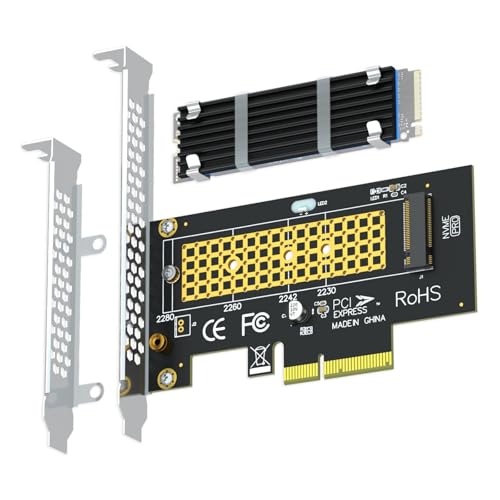
| GLOTRENDS PCIe 4.0 x4 Adapter | Single fast boot drive | Heatsink, 2230-2280, low-profile bracket |
| SABRENT NVMe to PCIe Adapter (x16/x8/x4) | Single drive in any large slot | Aluminum heatsink, fits 2230-2280 |
| SABRENT Gen5 x16 Adapter | Gen5 drives in Gen5 slots | Gen5 card, x4 electrical, heatsink |
| ECKDZMY SK1 Expansion Card | Older boards with small slots | Fits PCIe x1, x4, and x16 slots |
| MAIWO PCIe 4.0 Adapter | Straightforward single-drive upgrade | Supports 2230-2280, max 4TB |
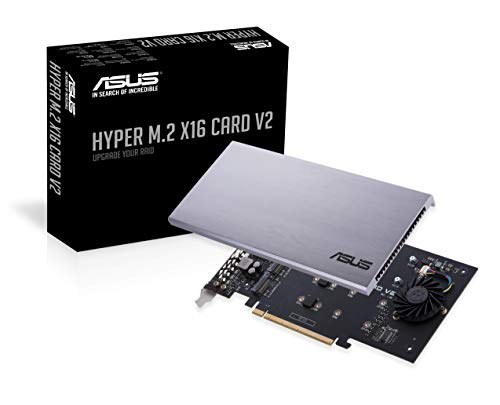
| ASUS Hyper M.2 X16 V2 | RAID and multi-drive storage | Holds four NVMe drives |
| RIITOP Quad NVMe Adapter | Four-drive setups with cooling | 4-port card, heatsink, bifurcation needed |
How to Choose
Match the Slot, Lanes, and PCIe Generation
A single-drive card typically uses four lanes, even when its connector is physically x16. The motherboard slot must provide those lanes electrically, not just have a long connector. A Gen 4 drive in a Gen 3 slot works but at lower speed. Check your board’s manual for lane sharing with graphics cards before planning.
Know Whether You Need BIOS NVMe or Bifurcation Support
Some older boards cannot boot from NVMe without BIOS support, a limitation noted on the Sabrent listing. Multi-drive cards depend on slot bifurcation, meaning the board can split an x16 slot into four x4 lanes. Without it, only the first drive appears. The RIITOP listing says this requirement plainly.
Cooling and Drive Length
Fast NVMe drives throttle when hot, and a bare drive in a closed case can run warm. Heatsinks help sustained transfers such as cloning a large disk. Confirm the card fits the drive length you own, usually 2280, and that the heatsink does not conflict with neighboring slots.
Where Budget Cards Cut Corners
Low-cost cards sometimes omit heatsinks, low-profile brackets, or detailed compatibility notes. Ignore lofty speed numbers in the listing, since actual performance depends on your drive and slot. Look for specific statements about supported lengths, operating systems, and what the card does not support.
A practical way to avoid disappointment is to work through three questions in order. First, what is the slot: look up its physical size, its electrical lane count, and its PCIe generation in the board manual, and note whether it shares lanes with another slot. Second, what is the drive: confirm it is an M-key NVMe model rather than an M.2 SATA one, and note its length. Third, what is the goal: a single fast boot drive, a recovery workstation that needs to image several disks, or a RAID array. Once those answers are written down, the choice between single-drive and multi-drive cards usually becomes obvious, and the price differences between cards seem small next to the cost of a drive that cannot run at its rated speed.
The 7 Best Options
GLOTRENDS PCIe 4.0 x4 Adapter
A single-drive adapter for NVMe SSDs on a PCIe 4.0 x4 connection, with a heatsink and a low-profile bracket in the listing. It supports 2230 to 2280 drive lengths and OS boot, which suits someone adding a boot drive to a desktop with no spare M.2 slot or using a compact case.
- Heatsink with a cooling claim in the listing
- Low-profile bracket included for small cases
- Trade-off: only one drive, and cooling numbers depend on case airflow
Skip it if you want to run multiple drives from one slot.
SABRENT NVMe to PCIe Adapter (x16/x8/x4)
A heatsink card that fits x16, x8, and x4 slots and accepts 2230, 2242, 2260, and 2280 NVMe drives. The listing candidly notes it is not for M.2 SATA or PCIe x1 slots and that BIOS NVMe support is needed, which is useful for avoiding a wrong purchase.
- Aluminum heatsink and a wide drive-length range
- Clear compatibility warnings in the listing
- Trade-off: not for M.2 SATA drives or x1 slots
Skip it if your board lacks BIOS NVMe support.
SABRENT Gen5 x16 Adapter
A Gen 5 version for M-key NVMe drives, with an aluminum heatsink and x4 electrical connection. The listing states that Gen 5 speeds need a Gen 5 slot, which makes it best for current high-end platforms and users with a Gen 5 drive.
- Gen 5 design with heatsink
- Honest notes about slot requirements
- Trade-off: wasted on older boards that only offer slower slots
Skip it if your motherboard slot is Gen 3 or Gen 4.
ECKDZMY SK1 Expansion Card
A PCIe 4.0 card for M.2 NVMe drives that works with PCIe x1, x4, and x16 slots and supports multiple PCIe generations and drive lengths. Fitting a small x1 slot is a rare convenience on older boards, though bandwidth drops accordingly.
- Fits x1, x4, and x16 slots
- Backward compatibility with older PCIe generations
- Trade-off: an x1 slot limits speed far below a drive’s rating
Skip it if you want guaranteed full-speed transfers.
MAIWO PCIe 4.0 Adapter
A single-drive PCIe 4.0 adapter for x4, x8, and x16 slots, supporting 2230 to 2280 drives up to 4TB and Windows, Linux, and Mac OS. It is a plain, flexible choice for an upgrade without extras.
- Works with three operating system families
- Supports multiple slot widths and drive lengths
- Trade-off: the listing mentions no heatsink
Skip it if cooling for sustained writes matters.
ASUS Hyper M.2 X16 V2
A PCIe 3.0 x4 per-drive expansion card that holds four NVMe drives in 2242, 2260, 2280, or 22110 lengths, aimed at Intel VROC and AMD Threadripper RAID. It suits workstations that need bulk fast storage from one slot.
- Four drive slots on one card
- RAID platform support named in the title
- Trade-off: PCIe 3.0 speeds and bifurcation-dependent
Skip it if you only need one drive or your board cannot bifurcate slots.
RIITOP Quad NVMe Adapter
A four-port card with a heatsink for 2230 through 2280 drives on PCIe 4.0 or 3.0 x16. It is a compact way to mount several NVMe drives for imaging or storage, with a clear note that bifurcation is required.
- Four drives and a heatsink on one card
- Supports PCIe 4.0 and 3.0
- Trade-off: it only works on boards with bifurcation
Skip it if your motherboard cannot split an x16 slot.
Which One Fits Your Situation
Adding One Fast Boot Drive to an Older Desktop
The SABRENT NVMe to PCIe Adapter (x16/x8/x4) or the GLOTRENDS PCIe 4.0 x4 Adapter handles one drive with a heatsink. Confirm BIOS support for NVMe boot before purchasing.
Building a Multi-Drive Workstation or RAID Array
The ASUS Hyper M.2 X16 V2 and RIITOP Quad NVMe Adapter hold four drives, but both need slot bifurcation, so read your motherboard manual first. A multi-drive card also suits a technician who images several disks at once, since each drive can be addressed separately once bifurcation is enabled in the BIOS.
A Small Case With Limited Slots
The ECKDZMY SK1 Expansion Card fits small slots, and the GLOTRENDS adapter adds a low-profile bracket for compact builds. In a small case, check how close the card sits to the graphics card and the power supply cables, because tight clearances can trap heat around the drive and make the heatsink less effective than the listing suggests.
Common Mistakes
- Buying a multi-drive card for a motherboard without bifurcation support.
- Expecting full Gen 4 or Gen 5 speed in an older or narrower slot.
- Choosing a card for M.2 SATA drives when it supports NVMe only.
- Ignoring heatsink clearance next to graphics cards.
- Assuming every board can boot from an NVMe drive without a BIOS update.
Related guides
- How To Connect An Old Ide Hard Drive To A Modern Computer
- Signs Your Hard Drive Is Failing And How To Back Up Fast
- How To Securely Erase An Old Hard Drive Before Selling
Frequently Asked Questions
Do I need a heatsink on an adapter card?
For short transfers a bare drive is often fine, but sustained workloads such as cloning can cause throttling. A heatsink gives more headroom.
Can I boot from an NVMe drive on an adapter?
Often yes on newer boards, but older systems may need a BIOS update or may not support it. Check your motherboard documentation.
What is bifurcation?
It is a BIOS setting that splits a slot’s lanes among several devices. Multi-drive cards rely on it to expose every drive.
Will a Gen 4 drive work in a Gen 3 slot?
Yes, usually at the slower Gen 3 speed, and the card does not change that.
More from Amazon
Programs that pair well with the guide above. Offers and eligibility are set by Amazon and may change.
A free business account with business pricing and bulk-buying tools for work, shop or home office.
Create a business accountFree shipping on eligible items, Prime Video and more. Eligible new members can start with a free trial.
Start a Prime free trialAudiobooks and podcasts to listen to on the go. Eligible new members can start with a free trial.
Try Audible freeAd-free music streaming. Eligible new subscribers can start with a free trial.
Try Music Unlimited freeAs an Amazon Associate we earn from qualifying purchases.

Write Your Review
No reviews yet. Be the first to share your experience!