

Key takeaways
- Compare the best wifi range extenders for large homes, from a dual-band WiFi 6 top pick to WiFi 6E, mesh-ready, outdoor and compact plug-in models.
A big home is hard on a single router. Long floor plans, brick or concrete walls, metal ductwork and a second floor all eat signal, so the rooms farthest from the router end up with slow speeds, dropped video calls and backups that crawl. A range extender fixes that one problem: placed partway between the router and the weak area, it picks up the existing network and rebroadcasts it into the dead zone, with no new wiring.
The five picks below cover the five jobs an extender is actually bought for: a dual-band WiFi 6 model for the typical single dead zone, a WiFi 6E model for newer devices, a mesh-ready model for seamless roaming, a weatherproof outdoor model for yards and outbuildings, and a compact plug-in for one stubborn room. Every figure quoted is the figure printed on the product listing, and each pick comes with its trade-offs stated plainly, because an extender placed badly or matched to the wrong router disappoints quickly.
As an Amazon Associate, we earn from qualifying purchases.
Quick answer
For most big homes, the TP-Link RE600X is the range extender to buy first. Its dual-band WiFi 6 radio, gigabit Ethernet port and listed coverage of up to 1,500 square feet suit a single dead zone well. Homes with WiFi 6E devices, mesh routers, a yard to cover or one stubborn room each get a dedicated pick below.
TP-Link RE600X AX1800 WiFi 6 Range Extender

The RE600X is the sensible default for a large home with one main dead zone, which is why it leads this list. It repeats both bands with WiFi 6, and its gigabit port means a desktop, a NAS enclosure or a TV in the far room can plug in with a cable instead of relying on the repeated wireless signal.
Key specs from the listing:
- WiFi standard: WiFi 6 (802.11ax), dual-band
- Listed speeds: 1,201 Mbps on 5 GHz and 574 Mbps on 2.4 GHz
- Listed coverage: up to 1,500 square feet, up to 30 devices
- Port: one gigabit Ethernet port, with access point mode
- Mesh support: OneMesh compatible
- Antennas: internal, with setup through the Tether app
The honest trade-offs are about scale. A 1,500 square foot coverage figure is a best case in open space, and in a sprawling two-floor home this unit will fix one area, not the whole house. The internal antennas cannot be aimed the way external ones can, and there is only the one Ethernet port, so a desk with several wired devices still needs a small switch behind it. There is no 6 GHz band, which matters only if your router and devices already speak WiFi 6E.
TP-Link RE813XE AXE5400 WiFi 6E Range Extender
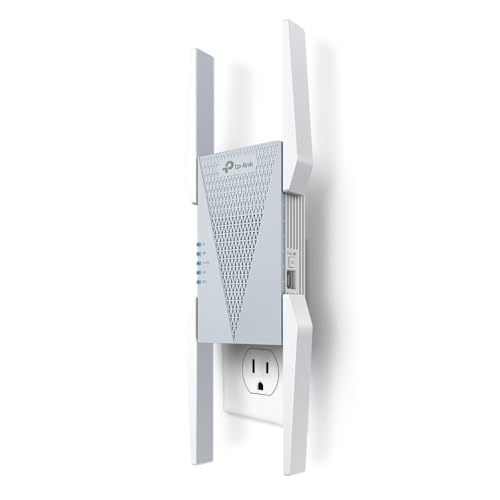
The RE813XE is the pick for homes that have already moved to a WiFi 6E router and own phones or laptops that can use the 6 GHz band. It is a tri-band extender, so it can talk to the router on one band while serving devices on the others, and the 6 GHz radio gives them a wide, quiet lane older bands cannot offer.
Key specs from the listing:
- WiFi standard: WiFi 6E (802.11ax), tri-band
- Listed speeds: 2,402 Mbps on 6 GHz, 2,402 Mbps on 5 GHz and 574 Mbps on 2.4 GHz
- Channels: 160 MHz channel width supported
- Listed coverage: up to 2,800 square feet, up to 96 devices
- Port: one gigabit Ethernet port, with access point mode
- Mesh support: OneMesh compatible, four external antennas
Without a WiFi 6E router feeding it and WiFi 6E devices connecting to it, the 6 GHz radio sits idle and the unit behaves like a pricier WiFi 6 extender. The 6 GHz band also fades faster through walls than 5 GHz, so it rewards placement a room or so from the router rather than at the far end of the house. It is a tall unit with four antennas, and it can crowd the neighboring outlet on a duplex socket. Buy it for the band, not for the headline coverage figure.
TP-Link RE715X AX3000 WiFi 6 Range Extender

The RE715X is the pick for anyone whose router supports a mesh ecosystem and who is tired of devices clinging to a weak signal. Paired with a OneMesh router it joins a single network with one name and hands devices between router and extender as you move. It also speaks EasyMesh, the cross-brand standard, which widens the list of routers it can roam with.
Key specs from the listing:
- WiFi standard: WiFi 6 (802.11ax), dual-band
- Listed speeds: 2,402 Mbps on 5 GHz and 574 Mbps on 2.4 GHz
- Listed coverage: up to 2,400 square feet, up to 64 devices
- Port: one gigabit Ethernet port, with access point mode
- Mesh support: OneMesh compatible and EasyMesh support
- Listed features: OFDMA and beamforming
The trade-off is that the mesh behavior is conditional. With a router that supports neither OneMesh nor EasyMesh, this is a conventional repeater that repeats under a separate network name unless you rename it yourself, and roaming is left to each device. It is also dual-band, so the link back to the router shares airtime with the devices it serves, and heavy traffic on both sides will show it. For a OneMesh or EasyMesh home that wants roaming without replacing the router, it is the natural fit; for everyone else, the RE600X above does the same repeating job for less.
WAVLINK WN573HX1 AX1800 Outdoor WiFi 6 Extender

Indoor extenders cannot help a workshop, a barn, a gate camera or a patio beyond the exterior wall, and they are not built to live outside. The WN573HX1 is a weatherproof outdoor unit that mounts on a pole or wall, draws its power over the Ethernet cable run, and pushes WiFi 6 across open ground where an indoor box would fail or cook.
Key specs from the listing:
- WiFi standard: WiFi 6 (802.11ax), dual-band
- Listed speeds: 1,201 Mbps on 5 GHz and 574 Mbps on 2.4 GHz
- Housing: IP67 weatherproof enclosure
- Power: Power over Ethernet, so one cable carries data and power
- Antennas: four detachable 8 dBi fiberglass antennas
- Modes listed: extender, access point, router and mesh modes
- Listed reach: up to 1,000 feet in open line of sight, up to 256 devices
The trade-offs are about installation rather than radio quality. You need to run an Ethernet cable to the mounting point and fix the unit to a pole or wall, a ladder-and-drill job rather than a plug-in one. Used as a wireless repeater it still needs a usable router signal at the mounting point, and the long reach figures assume open air, not trees and outbuildings in the way. The setup screens are plainer than the big brands’ phone apps. For covering ground rather than rooms, though, nothing indoor comes close.
TP-Link RE220 AC750 Compact Plug-In Extender
The RE220 is the small answer for one room: a hallway bedroom, a nursery camera, a printer in a study. It is an older WiFi 5 design in a compact wall-plug body, and for light duties that ceiling is not a problem. It still repeats both bands, still has a wired port for a single device, and still joins a OneMesh network.
Key specs from the listing:
- WiFi standard: WiFi 5 (802.11ac), dual-band
- Listed speeds: 433 Mbps on 5 GHz and 300 Mbps on 2.4 GHz
- Listed coverage: up to 1,200 square feet, up to 30 devices
- Port: one Ethernet port
- Mesh support: OneMesh compatible
- Setup: Tether app or WPS button, compact wall-plug body
The limits follow from the generation. WiFi 5 throughput is fine for browsing, music and one video stream, but it is the wrong tool for shifting large backup files to a NAS or for a busy home office, and there is no OFDMA, so many active devices in the room will queue rather than share cleanly. The coverage figure suits a room and its neighbors, not a floor. Treat it as a patch for a single weak spot and it does that job neatly; ask it to rescue a whole wing and it will not.
How to choose
Match the extender to the router first. A WiFi 6E extender only earns its keep behind a WiFi 6E router, and a mesh-ready extender only roams seamlessly behind a router from a matching ecosystem, so check your router’s generation and mesh support before anything else.
Placement matters more than headline numbers. Put the extender where the router’s signal is still decent, roughly halfway to the dead zone: too close and it adds little reach, too far and it faithfully repeats a weak, slow signal. Listed coverage figures are best cases measured in open space, so treat them as a ranking tool between models rather than a promise for your walls and floors.
Decide how the far end will connect. If a desk, a NAS or a TV sits in the weak area, a gigabit Ethernet port on the extender turns the repeated link into a wired one for that device, which is the biggest quality jump an extender offers. For outdoor areas, skip indoor hardware entirely and look for a weatherproof housing and Power over Ethernet. Finally, count your dead zones honestly: one zone is an extender’s job, while three or four scattered zones point to a different purchase, covered next.
Who should skip
Skip an extender if the router itself is the problem. An aging or entry-level router with weak radios will feed any extender a poor signal, and replacing the router, or moving to a mesh system, fixes the root cause instead.
Skip one if your home has dead zones on several floors in several directions. A multi-node mesh system places coverage where it is needed and manages roaming centrally, which is cleaner than stacking individual repeaters that know nothing about each other.
Skip one if Ethernet cable already runs to the weak area, or can be run easily. A wired access point delivers full speed with no repeating penalty, and every extender on this page is a compromise by comparison. And skip one if you expect full gigabit speed in the far room: a repeater spends airtime receiving and retransmitting, so lower far-room throughput is physics, not a defect.
Frequently Asked Questions
Will a range extender slow down my connection?
Some slowdown is normal. A repeater on a single band must receive and then retransmit every packet, which uses airtime twice and cuts throughput compared with standing near the router. Tri-band models reduce the penalty by dedicating a band to the router link, and wiring a device into the extender’s Ethernet port avoids the second wireless hop entirely.
Where should I place an extender in a big home?
Place it roughly halfway between the router and the dead zone, in a spot where the router’s signal is still solid, ideally in the open rather than inside a cabinet or behind a television. Most models have a signal indicator or app readout for this. If the extender can barely hear the router, everything it repeats will be slow, no matter how strong its own broadcast is.
Do I need a WiFi 6E extender if my router is WiFi 6?
No. The 6 GHz band on a WiFi 6E extender only works when the router can feed it a 6 GHz signal and your phones and laptops can connect on that band. Behind a WiFi 6 router, a WiFi 6E extender behaves like a WiFi 6 model, so the WiFi 6 picks on this page are the better match until the router is replaced.
Should I buy an extender or a mesh system for a large home?
Buy an extender for one defined dead zone, such as a back bedroom or a single office. Choose a mesh system when weak coverage is spread across floors and rooms, because its nodes are designed to work together under one network with managed roaming. A mesh-ready extender is the middle path for homes whose existing router already belongs to a mesh ecosystem.
Final verdict
For the typical big home with one dead zone, the TP-Link RE600X is the buy: current WiFi 6 speeds, a gigabit port for the far room and honest coverage. Step up to the RE813XE only when a WiFi 6E router and devices are already in the house, choose the RE715X when OneMesh or EasyMesh roaming is the point, take the WAVLINK WN573HX1 when the dead zone is outdoors, and use the little RE220 as a one-room patch. Match the class to the problem and any of the five will do its job.
Product and ASIN Reference
| Product | ASIN |
|---|---|
| TP-Link RE600X AX1800 WiFi 6 Range Extender | B09N6S5QJF |
| TP-Link RE813XE AXE5400 WiFi 6E Range Extender | B0DYS1DH7T |
| TP-Link RE715X AX3000 WiFi 6 Range Extender | B0B8BVY12V |
| WAVLINK WN573HX1 AX1800 Outdoor WiFi 6 Extender | B0BYMLT9HH |
| TP-Link RE220 AC750 WiFi Range Extender | B07N1WW638 |
More from Amazon
Programs that pair well with the guide above. Offers and eligibility are set by Amazon and may change.
A free business account with business pricing and bulk-buying tools for work, shop or home office.
Create a business accountFree shipping on eligible items, Prime Video and more. Eligible new members can start with a free trial.
Start a Prime free trialAudiobooks and podcasts to listen to on the go. Eligible new members can start with a free trial.
Try Audible freeAd-free music streaming. Eligible new subscribers can start with a free trial.
Try Music Unlimited freeAs an Amazon Associate we earn from qualifying purchases.
Write Your Review
No reviews yet. Be the first to share your experience!