

Key takeaways
- Five active VGA to HDMI converters linking an old laptop, desktop or projector to a modern HDMI monitor or TV. Compare audio, power and 1080p output.
A machine with only a VGA port and a display with only an HDMI port leave you with one real choice: an active converter that turns an analog signal into a digital one. A plain cable with a VGA plug on one end and an HDMI plug on the other cannot do that job, and buying the wrong direction is the most common mistake in this class. Every adapter in this guide converts VGA to HDMI only, and each one was picked from its Amazon listing record for a specific setup.
This guide serves owners of old desktops, laptops, and projectors, plus anyone wiring a spare machine into a modern monitor or TV. The five converters below cover a scaler box for an office desk, a minimal dongle for a laptop, a cable-style converter for a projector cart, a plain adapter for a DVD player or desktop, and a long-cable converter for a living-room TV. Audio, power, and resolution are the three things that separate them.
Quick Picks
As an Amazon Associate we earn from qualifying purchases.
| Product | Best for | Key spec from title |
|---|---|---|
| Cable Matters VGA to HDMI Adapter | A scaler converter for an office PC | VGA HD15 male to HDMI female |
| Benfei VGA to HDMI Adapter | A minimal dongle for a laptop | 1080p with USB audio |
| FOINNEX VGA to HDMI Converter Cable | A one-cable hookup for a projector | Attached VGA and HDMI ends |
| IOCrest VGA to HDMI Adapter | A plain converter for a desktop or DVD player | Active 1080p conversion |
| Tendak VGA to HDMI Adapter | A cable-style converter for a TV | 25 cm conversion cable |
How to Choose
Direction Comes First
Every adapter here is one-way, VGA source to HDMI display, and that direction is the first thing to confirm on the listing. The opposite direction, HDMI source to VGA display, is a far more common product, and the two look almost identical in a thumbnail. VGA is analog and HDMI is digital, so the conversion needs an active chip inside the adapter; a passive cable with different plugs on each end cannot turn one signal into the other. Check the listing title for the words VGA to HDMI in that order, and check the description for a line saying the adapter does not work in reverse. If the listing is vague about direction, pick a different adapter.
How Sound Reaches the Display
VGA carries video only, so sound has to travel by a second path, and the five adapters here handle that path in two different ways. Benfei and Cable Matters send audio through the USB cable that also powers the chip, which means the computer sees a USB audio device and the sound menu needs that device selected. FOINNEX, IOCrest, and Tendak use a separate 3.5mm audio cable from the computer headphone jack into the converter, which is simpler to understand but adds one more cable to manage. Either way, a VGA cable alone gives you a silent picture, so plan the audio hookup before you buy.
Resolution and the 1080p Ceiling
A VGA source is an old machine, and 1080p is the ceiling for nearly every converter in this class, so match the adapter to the display you actually own. Benfei, FOINNEX, IOCrest, and Tendak all print 1080p as their maximum output, and that is plenty for text, office work, and video on a full HD monitor or TV. A converter that prints no resolution figure is a guess, and you should confirm the figure on the exact listing before ordering. Do not expect 4K from a VGA port; the analog source cannot feed it, and no converter in this class changes that.
Power and Cable Count
An active converter needs power, and the source of that power decides how many cables sit on your desk. Benfei and Cable Matters draw power from a USB port on the source machine, so the USB cable is not optional; unplug it and the picture goes dark. FOINNEX, IOCrest, and Tendak also use a USB cable for power, with a separate 3.5mm line for audio. Count the cables before you buy: a dongle-style adapter needs your own HDMI cable to reach the display, while a cable-style converter has the VGA and HDMI ends attached. Measure the distance from the machine to the display first.
The 5 Best Options
Cable Matters VGA to HDMI Adapter

The Cable Matters adapter suits an office desk where an old desktop has to drive a modern monitor and the converter should stay out of the way. It is a scaler converter, which means it takes the analog VGA signal, scales it, and hands a digital HDMI signal to the display, with audio support built into the same unit. The listing prints a VGA HD15 15-pin male input and an HDMI 19-pin female output, so the layout is clear before you order. It fits a setup where the machine sits beside the monitor and one short HDMI cable closes the gap.
Specs
- Input: VGA HD15 15-pin male
- Output: HDMI 19-pin female
- Audio support built in
- USB powered
- Model number 103070-BLACK
- Not discontinued by the maker
Best for: An office PC driving a modern monitor through a scaler converter.
Watch out for: The listing record found prints no resolution figure, so confirm the maximum output on the exact listing before ordering.
Benfei VGA to HDMI Adapter

The Benfei adapter suits a laptop owner who wants the smallest possible converter and is happy to let a USB cable carry both power and sound. It is a compact dongle with a VGA male end, an HDMI female port, and a USB cable that embeds digital audio along with the video over HDMI, so no separate aux cable is needed on a Windows machine. The listing prints support up to 1080p at 60Hz and a long list of input resolutions up to 1920×1080, plus gold-plated connectors and an 18-month warranty. It fits a bag, a drawer, or a laptop sleeve without fuss.
Specs
- Input: VGA HD15 15-pin male
- Output: HDMI 19-pin female
- Audio output: USB 2.0 male
- Maximum resolution: 1920×1080 at 60Hz
- Gold-plated connectors
- 18-month warranty
Best for: A laptop owner who wants a minimal dongle with audio over USB.
Watch out for: An HDMI cable is sold separately, and the USB audio needs the Benfei device selected in the Windows sound menu.
FOINNEX VGA to HDMI Converter Cable

The FOINNEX converter suits a projector cart or a classroom setup where a cable, rather than a dongle, keeps the connection tidy. It is a converter cable with the VGA and HDMI ends attached, so there is no separate VGA cable to buy and no dongle hanging off the back of the machine. A USB cable powers the chip and a 3.5mm audio cable carries sound to the converter, which embeds it in the HDMI output. The listing prints one-way conversion only, VGA source to HDMI display, at up to 1080p. It fits a setup where the converter has to span the gap between machine and display.
Specs
- Input: VGA male
- Output: HDMI male
- Power: USB cable
- Audio input: 3.5mm cable
- Maximum resolution: 1080p
- One-way conversion only
Best for: A projector cart where a cable-style converter spans the gap.
Watch out for: Confirm the cable layout in the selector, since FOINNEX sells cable and block forms under near-identical names.
IOCrest VGA to HDMI Adapter

The IOCrest adapter suits a desktop or a DVD player that needs a plain, no-frills converter without a brand premium. It is an active output adapter, model SY-ADA31025, that converts a VGA signal and audio into an HDMI signal for an HDTV or monitor. The listing prints 1080p support and audio support, and names PCs, laptops, DVDs, and desktops as the intended sources. There is nothing extra to configure: plug the VGA end into the source, plug the USB cable in for power, and connect the HDMI end to the display. It fits a spare machine or a media player that just needs to work.
Specs
- Input: VGA male
- Output: HDMI female
- Maximum resolution: 1080p
- Audio support built in
- USB powered
- Model number SY-ADA31025
Best for: A desktop or DVD player that needs a plain active converter.
Watch out for: The listing record found prints no cable lengths, so confirm what ships in the box on the exact listing.
Tendak VGA to HDMI Adapter
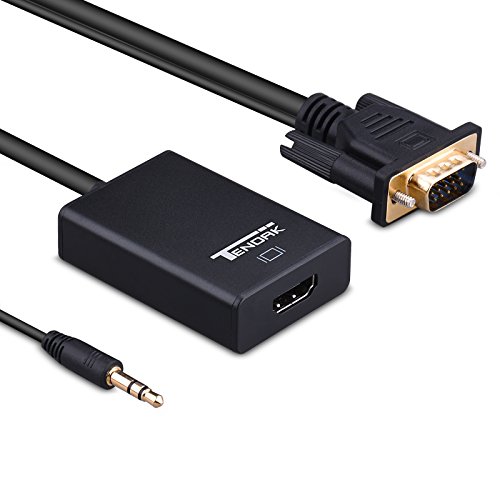
The Tendak adapter suits a living-room TV where the converter has to reach from a laptop on a table to a display across the room. It is a cable-style converter, model AV-047-BK, with a 25 cm conversion cable, a 100 cm USB cable for power, and a 60 cm audio cable, so the three lines are long enough to route without strain. The listing prints support for 720p, 1080p, and 1080i, a 5-volt 1-amp USB power draw, and a 1-year limited warranty. It fits a setup where cable length matters more than compactness, and where the audio has to travel from the laptop headphone jack to the TV.
Specs
- Input: VGA male, 3.5mm audio, USB
- Output: HDMI female
- Maximum resolution: 1080p
- Power: USB, 5 volts, 1 amp
- Conversion cable: 25 cm
- USB cable: 100 cm
- Audio cable: 60 cm
- Item weight: 85 grams
- Warranty: 1-year limited
Best for: A TV setup where long power and audio cables reach across a table.
Watch out for: Tendak also sells an HDMI-to-VGA adapter, model AV-107-BK, under a near-identical name, so confirm the AV-047-BK listing before ordering.
Which One Fits Your Situation
An Old Office Desktop to a New Monitor
Pick the Cable Matters adapter when the machine sits beside the monitor and the converter should stay fixed in place. Its scaler design and built-in audio support suit a desk where one HDMI cable closes the gap, and the VGA HD15 male input matches the port on nearly every old desktop. Confirm the resolution on the exact listing, since the record found prints no figure, and keep the USB cable plugged in for power.
A Laptop to a Living-Room TV
Pick the Tendak adapter when the laptop sits on a table and the TV is a few feet away. Its 100 cm USB cable and 60 cm audio cable give you room to route the lines without pulling, and the 1080p output suits a full HD television. Confirm the AV-047-BK model in the selector, because Tendak sells the reverse direction under a near-identical name.
A Classroom Projector on a Cart
Pick the FOINNEX converter cable when the projector moves from room to room and the hookup has to be quick. The attached VGA and HDMI ends mean no separate VGA cable to hunt for, and the USB power plus 3.5mm audio lines cover both picture and sound. Confirm the cable form in the selector, since FOINNEX also sells a block form under a similar name.
A Spare Machine in a Workshop or Server Closet
Pick the Benfei dongle when the machine is a spare and the converter lives in a drawer between uses. Its compact size and USB audio keep the cable count low, and the 1080p output is plenty for a monitor used for setup and maintenance. Bring your own HDMI cable, since none ships in the box, and select the USB audio device in the sound menu.
Common Mistakes
- Buying an HDMI-to-VGA adapter by mistake: the reverse direction is far more common, and the two look almost identical in a thumbnail, so confirm VGA to HDMI in that order on the listing title.
- Expecting sound from the VGA cable alone: VGA carries video only, so a silent picture means the USB audio or the 3.5mm aux line is missing, not that the converter is broken.
- Buying a passive VGA-to-HDMI cable: VGA is analog and HDMI is digital, so a cable with no chip cannot convert the signal, and the screen will stay dark.
- Skipping the USB power hookup: every converter here draws power from a USB port, and the picture goes dark when that cable is unplugged.
- Assuming 4K output from a VGA source: the analog port cannot feed a 4K signal, and no converter in this class changes that ceiling.
Frequently Asked Questions
Does a VGA to HDMI adapter carry sound?
VGA itself carries video only, so sound travels by a second path that the converter embeds in the HDMI output. Benfei and Cable Matters send audio through the USB cable that powers the chip, while FOINNEX, IOCrest, and Tendak use a separate 3.5mm audio cable from the computer headphone jack. Either way, connect the audio line or the picture will be silent.
Can I use the same adapter in reverse?
No. Every adapter in this guide converts VGA to HDMI only, and the reverse direction needs a different converter with its own chip. An HDMI-to-VGA adapter is a different product, and plugging a VGA-to-HDMI converter in backwards will not produce a picture. Check the listing title for VGA to HDMI in that order before you order.
Why does my adapter need a USB cable?
The chip inside the adapter converts an analog VGA signal into a digital HDMI signal, and that work needs power the VGA port cannot supply on its own. The USB cable draws that power from the source machine, and on Benfei and Cable Matters adapters it also carries the audio. If the picture goes dark, check the USB connection first.
Will a VGA to HDMI adapter give me 4K?
No. Four of the five adapters here print 1080p as their maximum output, and the fifth prints no resolution figure at all. A VGA source is an old machine with an analog port, and it cannot feed a 4K signal no matter which converter you attach. Buy a 1080p converter for a 1080p display, and plan a graphics card upgrade if you need higher resolution.
More from Amazon
Programs that pair well with the guide above. Offers and eligibility are set by Amazon and may change.
A free business account with business pricing and bulk-buying tools for work, shop or home office.
Create a business accountFree shipping on eligible items, Prime Video and more. Eligible new members can start with a free trial.
Start a Prime free trialAudiobooks and podcasts to listen to on the go. Eligible new members can start with a free trial.
Try Audible freeAd-free music streaming. Eligible new subscribers can start with a free trial.
Try Music Unlimited freeAs an Amazon Associate we earn from qualifying purchases.

Write Your Review
No reviews yet. Be the first to share your experience!