

Key takeaways
- Find the best USB flash drive for PS5 extended storage: fast USB-A sticks for PS4 games, media and backups, with the capacity and speed that matter.
A PlayStation 5 fills its drive fast, and a USB flash drive looks like the cheapest way to claw space back. The catch is that a flash drive on a PS5 is not a second game drive: it holds PS4 games, media files and backups, but PS5 games cannot live on it or run from it. Pick the wrong stick and you end up with a drive that is too small, too slow at writing, or too wide for the port beside it.
This guide is for PS5 owners who want cheap storage for their PS4 library, for players who shuttle media and backups between console and PC, and for anyone who wants one stick that works on both the rear USB-A ports and the front USB-C port. The five drives below were chosen from their Amazon listings: the SanDisk Ultra Flair 512GB, the Samsung BAR Plus 256GB, the PNY Attache X 256GB, the SanDisk Ultra Dual Drive Go 512GB and the Corsair Flash Voyager GTX 256GB.
Quick Picks
As an Amazon Associate we earn from qualifying purchases.
| Product | Best for | Key spec from title |
|---|---|---|
| SanDisk Ultra Flair 512GB | Largest PS4 library on one stick | 512GB, up to 150 MB/s read |
| Samsung BAR Plus 256GB | Fast everyday transfers in a metal body | 256GB, up to 400 MB/s read |
| PNY Attache X 256GB | Budget 256GB with a capless body | 256GB, up to 130 MB/s read |
| SanDisk Ultra Dual Drive Go 512GB | Moving files between PS5 and USB-C devices | 512GB, USB-C and USB-A, up to 400 MB/s read |
| Corsair Flash Voyager GTX 256GB | Fastest sustained transfers in this guide | 256GB, up to 440 MB/s read and write |
How to Choose
Capacity: 250 GB Is the Floor, 512 GB Is the Sweet Spot
Sony requires USB extended storage to hold at least 250 GB and no more than 8 TB, so the smallest sticks on the shelf simply do not qualify. A PS4 game commonly takes 40 to 100 GB, which means a 256GB drive holds roughly three to five games alongside some media, while a 512GB drive holds a comfortable library of eight to twelve. Buyers who only want to park two or three finished games should take 256GB; buyers who rotate through a large PS4 back catalogue should take 512GB. Capacity also matters because the PS5 formats the whole drive for its own use, so every gigabyte is committed to the console once setup is done.
Sustained Write Speed Matters More Than the Headline Read Speed
Flash-drive boxes shout about read speed, but copying a PS4 game onto the drive is a write job, and many fast-reading sticks write far more slowly than they read. A drive rated at 400 MB/s read can write at 30 to 90 MB/s in sustained use, which turns a 60 GB game copy into a long wait. The honest figure to compare is the sustained sequential write speed, and where a maker does not publish one, that silence is itself useful information. This guide calls out every pick whose write speed is unpublished or disputed, because a PS5 owner who buys on the read-speed headline alone is the buyer most likely to be disappointed.
Connector, Port Fit and the Second USB Port
The PS5 has two rear USB-A ports and one front USB-C port, and extended storage works through a direct connection, not through a hub. A wide or long stick can block the neighbouring port, which matters when a headset dongle or charging cable also needs a home. Low-profile drives that sit nearly flush with the port are the safest choice for the rear, while a dual-connector drive with USB-C and USB-A covers both the front port and a laptop. Measure the clearance around the rear ports before ordering, and confirm the listing shows the connector type printed on the drive, not just the word USB 3 in the title.
Format, One Drive at a Time and the PS5 Game Rule
The PS5 formats any extended-storage drive itself when you first connect it, wiping whatever was on the stick, so move your files off first. Only one USB extended-storage drive can be active at a time, so a second stick is a spare, not an expansion. The rule that shapes every buying decision here is simple: PS4 games can be stored and played from the USB drive, while PS5 games can only be stored on it and must be moved back to internal storage before they will run. A buyer who wants to play PS5 games from USB storage is shopping for the wrong product entirely.
The 5 Best Options
SanDisk Ultra Flair 512GB
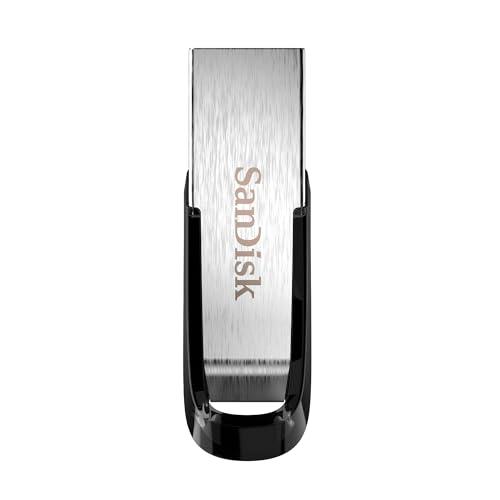
The Ultra Flair 512GB is the capacity pick in this guide, and its metal body and capless design suit a drive that lives permanently in the back of a console. At 512GB it holds a real PS4 library rather than a handful of games, and its read speed of up to 150 MB/s is enough to launch PS4 titles from the drive without long loading pauses. The stick is small enough to leave plugged in, and its keyring hole makes it easy to pull out and carry when it doubles as a PC backup drive.
Specs
- Capacity: 512GB
- Interface: USB 3.0, backward compatible with USB 2.0
- Read speed: up to 150 MB/s
- Body: metal casing, capless design with keyring hole
- Model number: SDCZ73-512G-G46
- Dimensions: 42.4 x 13.2 x 6.6 mm
- Warranty: 5-year limited warranty
Best for: PS5 owners who want the largest PS4 library on a single stick.
Watch out for: the Amazon listing prints a write-speed field of 4 MB/s, but that figure is the USB 2.0 baseline used for comparison, not this drive’s write speed; SanDisk does not publish a sustained write figure for this model, so expect game copies to run well below the read-speed headline.
Samsung BAR Plus 256GB

The BAR Plus 256GB is the fast everyday pick, pairing a rugged metal body with the highest read speed among the USB-A sticks in this guide. Its champagne-silver finish is the colourway to look for, and the integrated keyring means it survives life on a keychain between console sessions. At 256GB it holds a few PS4 games plus media, and its five-proof body shrugs off water, shock, magnets, X-rays and temperature swings that would worry a plastic stick.
Specs
- Capacity: 256GB
- Interface: USB 3.2 Gen 1, backward compatible with USB 3.0 and USB 2.0
- Read speed: up to 400 MB/s
- Body: metal unibody with integrated keyring
- Model number: MUF-256BE3/AM, Champagne Silver
- Dimensions: 40.05 x 15.46 x 12.02 mm
- Weight: about 10.9 g
- Warranty: 5-year limited warranty
Best for: players who want the fastest USB-A transfers in a tough metal stick.
Watch out for: Samsung does not publish a write speed for this drive, and independent measurements put sustained writes far below the read headline; also confirm the listing is the Champagne Silver MUF-256BE3 model, because the Titan Gray MUF-256BE4 version sells under a different listing.
PNY Attache X 256GB

The Attache X 256GB is the budget pick, a plain capless stick that does the core job without a premium body or a premium read-speed claim. Its 130 MB/s read speed is modest next to the Samsung and Corsair picks, but it is fast enough for PS4 games, which were designed around hard-drive speeds in the first place. The Type-A connector fits the rear PS5 ports directly, and the capless body means there is no cap to lose behind the entertainment unit.
Specs
- Capacity: 256GB
- Interface: USB 3.2 Gen 1
- Read speed: up to 130 MB/s
- Connector: USB Type-A
- Body: capless design
- Model number: P-FD256ATTX-GE
Best for: PS5 owners who want the cheapest 256GB stick that still meets the console’s speed floor.
Watch out for: the listing carries little beyond the headline read speed, so treat the 130 MB/s figure as a ceiling and expect slower sustained writes; do not confuse this model with the older PNY Turbo Attache 4, which is a different drive with a different speed rating.
SanDisk Ultra Dual Drive Go 512GB

The Ultra Dual Drive Go 512GB is the flexible pick, because its swivel design carries both a USB-C connector and a USB-A connector in one stick. That makes it the only drive here that can sit in the PS5 front USB-C port and then plug straight into a laptop, a tablet or a phone without an adapter. At 512GB it matches the Ultra Flair for capacity, and its 400 MB/s read speed makes moving a PS4 library between devices noticeably quicker than the budget sticks.
Specs
- Capacity: 512GB
- Interface: USB 3.2 Gen 1
- Read speed: up to 400 MB/s
- Connectors: reversible USB Type-C and USB Type-A, swivel design
- Model number: SDDDC3-512G-G46
- Dimensions: 1.75 x 0.48 x 0.34 in
- Warranty: 5-year limited warranty
Best for: players who move games and media between the PS5, a PC and USB-C devices.
Watch out for: this drive sells in two speed styles, up to 150 MB/s and up to 400 MB/s, under the same model name, so confirm the listing you order is the 400 MB/s style; the listing record also shows a third-party seller fulfilled by Amazon, so confirm the seller before ordering.
Corsair Flash Voyager GTX 256GB

The Flash Voyager GTX 256GB is the performance pick, built around SSD-style 3D NAND with read and write speeds up to 440 MB/s, the fastest sustained figures in this guide. That matters when copying large PS4 games back and forth, and the zinc-alloy housing with aluminium accents is the toughest body here. It also supports UASP and TRIM, and Corsair’s SSD Toolbox software can format, partition and optimise the drive, which is more control than any other pick offers.
Specs
- Capacity: 256GB
- Interface: USB 3.1 Gen 1, backward compatible with USB 3.0 and USB 2.0
- Read speed: up to 440 MB/s
- Write speed: up to 440 MB/s
- Memory: 3D NAND with UASP and TRIM support
- Body: zinc-alloy housing with aluminium accents
- Model number: CMFVYGTX3C-256GB
- Dimensions: 72 x 26 x 6 mm
- Weight: 19.5 g
- Warranty: 5-year warranty
Best for: players who copy large PS4 games often and want the fastest sustained transfers.
Watch out for: confirm a live United States offer on the exact listing before ordering, because Corsair’s own store shows this 256GB model out of stock; it is also the largest and heaviest stick here, and its speed drops when the drive gets hot during long sustained writes.
Which One Fits Your Situation
A Small PS4 Library on a Tight Budget
Take the PNY Attache X 256GB if you only need to park three or four PS4 games and want the lowest outlay that still clears the console’s 250 GB floor. Its read speed is enough for PS4 titles, and the money saved can go toward a second stick later. Do not expect fast game copies, and do not buy it hoping to store PS5 games on it, because no USB drive in this guide can do that.
The Biggest PS4 Back Catalogue You Can Keep Installed
Take the SanDisk Ultra Flair 512GB if your PS4 library is large and you want it all installed at once. At 512GB it holds roughly twice the games of the 256GB picks, and its metal body is built to stay plugged into the rear of the console for months. Accept that game copies will run below the read-speed headline, and keep the drive in the rear port so the front USB-C port stays free.
Moving Games and Media Between Console and Computer
Take the SanDisk Ultra Dual Drive Go 512GB if your files travel between the PS5, a laptop and a phone. Its USB-C and USB-A connectors in one swivel body remove the adapter from the chain, and its 400 MB/s read speed keeps large transfers short. Confirm the 400 MB/s style when ordering, and remember the PS5 still formats the drive for its own use, so it cannot hold console files and PC files at the same time.
The Fastest Copies and a Drive That Works Hard on PC Too
Take the Corsair Flash Voyager GTX 256GB if you copy large games often and want a stick that behaves like a small SSD on a PC as well. Its 440 MB/s read and write speeds are the best sustained figures here, and the metal housing handles heat better than plastic bodies. Confirm a live offer first, and give it room to breathe, because sustained writes warm it up and its speed falls as it heats.
Common Mistakes
- Buying a drive under 250GB, which the PS5 refuses to use as extended storage at all.
- Expecting PS5 games to run from a USB drive; they can only be stored there and must move back to internal storage to play.
- Shopping on the read-speed headline while ignoring sustained write speed, which is what actually decides how long a game copy takes.
- Plugging the drive into a USB hub, which Sony does not support for extended storage; connect it directly to the console.
- Forgetting the PS5 formats the drive on first use, wiping any files already on the stick.
Frequently Asked Questions
Can I play PS5 games from a USB flash drive?
No. PS5 games cannot run from USB extended storage, no matter how fast the drive is. You can store PS5 games on the drive to free internal space, then move them back to the console’s internal SSD when you want to play. Only PS4 games can be stored and played directly from the USB drive, which is why this guide is built around PS4 libraries, media and backups.
What capacity and speed does the PS5 require for extended storage?
The drive must hold between 250 GB and 8 TB and support USB 3.0 SuperSpeed at 5 Gbps or faster. Anything smaller is rejected by the console, and a USB 2.0 stick is too slow to qualify. All five drives in this guide clear both bars, but capacity and sustained write speed still vary widely between them, so compare those two figures before choosing.
Can I use a USB hub with my extended-storage drive?
No. Sony does not support USB hubs for extended storage, and a drive connected through a hub may not be recognised or may disconnect during a transfer. Plug the drive directly into one of the console’s own USB ports, and keep the neighbouring port clear if your stick is wide, since a blocked port can force you to unplug a headset dongle or charging cable.
Does the PS5 format the flash drive, and can I still use it on a PC?
Yes, the PS5 formats the drive when you set it up as extended storage, and that wipes everything already on the stick, so move your files off first. Once formatted for the console, the drive cannot hold PC files at the same time. You can reformat it on a PC later, but doing so erases the console data and means setting it up on the PS5 again from scratch.
More from Amazon
Programs that pair well with the guide above. Offers and eligibility are set by Amazon and may change.
A free business account with business pricing and bulk-buying tools for work, shop or home office.
Create a business accountFree shipping on eligible items, Prime Video and more. Eligible new members can start with a free trial.
Start a Prime free trialAudiobooks and podcasts to listen to on the go. Eligible new members can start with a free trial.
Try Audible freeAd-free music streaming. Eligible new subscribers can start with a free trial.
Try Music Unlimited freeAs an Amazon Associate we earn from qualifying purchases.

Write Your Review
No reviews yet. Be the first to share your experience!