

Key takeaways
- Compare the best DisplayPort to HDMI adapters for 4K60, 8K, office desks, and living-room TVs. Direction, active vs passive, and real specs explained.
A desktop or laptop with a DisplayPort output and a monitor or TV with only HDMI inputs leaves one awkward gap, and the adapter that fills it either works at once or leaves a black screen. The real decision is not which brand looks best on the box. It is which direction the signal travels, which resolution and refresh rate the adapter can actually carry, and whether the adapter converts the signal or only passes it along. Get any one of those wrong and the picture never appears, no matter how good the monitor is.
This guide is for office workers adding a second monitor, gamers feeding a 4K display, presenters plugging a laptop into a projector, and anyone wiring a desktop to a living-room TV. The five adapters below were chosen from names and figures printed on Amazon listings, with direction, resolution, and active-versus-passive design checked per pick.
Quick Picks
As an Amazon Associate we earn from qualifying purchases.
| Product | Best for | Key spec from title |
|---|---|---|
| Cable Matters Active 4K@60Hz | A 4K office monitor | 4K@60Hz, active, Eyefinity |
| Cable Matters 8K DP 1.4 to HDMI 2.1 | An 8K or high-refresh gaming display | 8K@60Hz, 4K@240Hz |
| BENFEI 4K DP to HDMI | A cheap second screen at 1080p or 4K30 | 4K@30Hz, gold-plated DP |
| Plugable Active DP to HDMI | A plug-and-play 4K setup with no drivers | 4K@60Hz SDR, driverless |
| UGREEN 2-Pack 4K DP to HDMI | Two monitors on a tight budget | Two adapters, 4K@30Hz |
How to Choose
Check the Direction Before Anything Else
Direction only as printed: DisplayPort to HDMI is a different product from HDMI to DisplayPort, and the two never swap. An adapter that prints no direction is a guess, so check the source port and the display port before buying. Look at the back of the computer first. If the port on the computer is DisplayPort and the port on the monitor is HDMI, the adapter must say DisplayPort to HDMI, with DisplayPort as the input and HDMI as the output. Every adapter in this guide is one-way in that direction, and none of them works in reverse. A buyer who plugs an HDMI source into a DisplayPort monitor with one of these adapters gets nothing at all.
Match Resolution and Refresh Rate to the Display
Resolution and refresh only as printed: a 4K60 adapter is a different product from a 4K30 adapter, and a listing that prints no resolution figure is a guess. A 4K picture at 60Hz needs real bandwidth, and a DP 1.4 link with HBR3 carries it. Check the numbers. A 4K monitor that only accepts 30Hz through its HDMI port gains nothing from a 60Hz adapter, and a 60Hz monitor fed by a 30Hz adapter shows a choppier picture than the panel can deliver. Buy by the printed figures against the display you own, never by the word “4K” alone, because 4K at 30Hz and 4K at 60Hz are different experiences.
Active or Passive Decides Whether It Works at All
Active versus passive is the split that causes most black screens. A passive adapter only works when the source outputs HDMI over DisplayPort, which the industry calls DP++ or DisplayPort++. If the source lacks that dual-mode output, a passive adapter shows nothing. An active adapter converts the signal itself, so it works from any DisplayPort output, including the ones on docking stations and graphics cards that do not carry DP++. An adapter that prints no conversion detail is a guess on this point. Two of the picks below are active and two are passive, and the guide says which is which per pick, so a buyer with an unknown source can simply choose an active one.
Cable Length, Latching, and Audio
Small physical details decide whether the adapter survives daily use. A short dongle that hangs from the back of a monitor puts strain on the port, while a latching DisplayPort connector locks in place until you press its release button. Check the printed length against the distance between computer and display, and remember an adapter is not a cable: most picks here need a separate HDMI cable. Every adapter in this guide carries audio over HDMI, but the channel count differs, so a home-theater buyer should check the printed figure. A 7.1-channel figure means surround sound reaches the TV, while a listing that prints no audio detail is a guess.
The 5 Best Options
Cable Matters Active DisplayPort to HDMI Adapter 4K@60Hz

This active adapter fits a buyer who owns a 4K monitor and wants the full 60Hz picture without wondering whether the source supports dual-mode output. It converts the signal itself, so it works from a graphics card, a laptop, or a docking station that lacks DP++. The latching DisplayPort connector locks into the source and stays put behind a desk, which matters when the cable gets tugged. It also carries up to 7.1-channel audio, so the same adapter feeds a TV with surround sound as well as a monitor with a picture.
Specs
- Up to 4K at 60Hz (3840×2160)
- 2K at 144Hz for high-refresh 1440p displays
- Active conversion, works without DP++ on the source
- AMD Eyefinity multi-display support
- Up to 7.1-channel audio over HDMI
- Latching DisplayPort connector
- DisplayPort male input to HDMI female output
- Model 102021
Best for: A 4K office or editing monitor at full 60Hz.
Watch out for: An HDMI cable is sold separately, so confirm the cable length before ordering.
ASIN: B00EDT0072
Cable Matters 8K DisplayPort 1.4 to HDMI 2.1 Adapter

This adapter fits a gamer or a home-theater buyer whose display runs past 4K60 and who needs the headroom a DP 1.4 link provides. It carries up to 8K at 60Hz or 4K at 240Hz, which is far beyond what a 4K30 adapter can move, and it supports HDR on a display that accepts it. The unidirectional design keeps the signal path simple: DisplayPort in, HDMI 2.1 out, with no drivers to install. It is the pick for a buyer who already owns a high-end graphics card and a display that can use the bandwidth.
Specs
- Up to 8K at 60Hz or 4K at 240Hz
- DisplayPort 1.4 input to HDMI 2.1 output
- 4K at 120Hz supported
- HDR support on compatible displays
- Unidirectional, DisplayPort source to HDMI display only
- Supports RTX 4080 and RX 7900 graphics cards
- Model 102101
Best for: An 8K TV or a high-refresh 4K gaming monitor.
Watch out for: It does not work with a PS5 or Xbox, and it prints no VRR support, so confirm both on the exact listing.
ASIN: B08XFSLWQF
BENFEI 4K DisplayPort to HDMI Adapter

This passive adapter fits a buyer who needs a cheap link to a second screen and whose source already outputs HDMI over DisplayPort. It carries up to 4K at 30Hz and 1080p at 60Hz, which covers office work, streaming, and presentations without fuss. The gold-plated DisplayPort connector resists corrosion, and the compact dongle body tucks behind a monitor without blocking the neighboring port. It is the simplest pick here, and its simplicity is the point: no drivers, no power, no settings.
Specs
- Up to 4K at 30Hz (3840×2160)
- 1080p at 60Hz, plus 720p, 1600×1200, and 1280×1024
- DisplayPort 1.2 input to HDMI 1.4 output
- Passive design, needs a DP++ source
- Gold-plated DisplayPort connector
- Built-in IC chip for signal conversion
- Uni-directional, does not work in reverse
- 18-month warranty
Best for: A budget second screen for office work or streaming.
Watch out for: One listing snapshot showed no featured offers, so confirm a current seller on the exact listing.
ASIN: B017Q8ZVWK
Plugable Active DisplayPort to HDMI Adapter
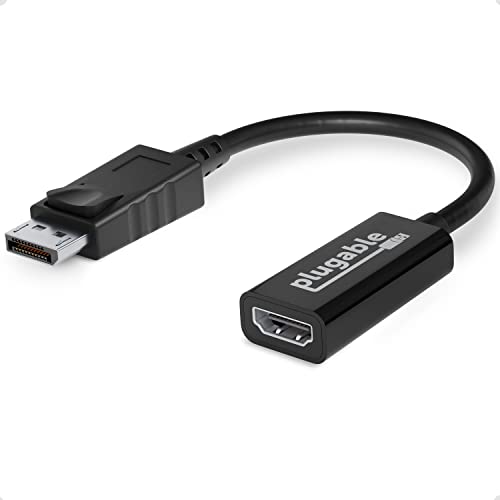
This active adapter fits a buyer who wants a 4K setup that simply works, with no drivers and no questions about the source. It is driverless, so it runs on any operating system that already drives the DisplayPort output, and its active design converts the signal from any full-sized DisplayPort port. It carries 4K at 60Hz on standard dynamic range displays, and drops to 4K at 30Hz when the display uses high dynamic range. That split is printed on the listing, not hidden, which is exactly the kind of detail a buyer needs before ordering.
Specs
- Up to 4K at 60Hz (3840×2160) with SDR displays
- 4K at 30Hz with HDR-capable displays
- Active conversion, uni-directional
- Driverless, no software to install
- Full-sized DisplayPort male input to HDMI female output
- Model DP-HDMI
Best for: A plug-and-play 4K monitor on any operating system.
Watch out for: HDR costs refresh rate here, so a buyer who wants 4K60 with HDR should pick the 8K adapter instead.
ASIN: B00S0C7QO8
UGREEN 2-Pack 4K DisplayPort to HDMI Adapter

This two-pack fits a buyer wiring two monitors at once, or a household that needs a spare adapter in a drawer. Each adapter carries up to 4K at 30Hz, 2K at 60Hz, and 1080p at 120Hz, which covers office screens and streaming TVs without fuss. The aluminum housing and nylon-braided cable hold up better than a bare plastic dongle when the adapter travels between desks. Buying two at once also means the second monitor costs nothing extra in adapters, which is the whole appeal of a pack.
Specs
- Two adapters in the pack
- Up to 4K at 30Hz, 2K at 60Hz, 1080p at 120Hz
- DisplayPort 1.2 input to HDMI 1.4 output
- Passive design, needs a DP++ source
- Aluminum housing with nylon-braided cable
- HDCP 1.2 and 1.4 support, HDMI HDR 1.4
- Uni-directional, DisplayPort source to HDMI display only
- Model 65982
Best for: Two office monitors, or one monitor plus a spare.
Watch out for: Both adapters are passive, so confirm the source supports DP++ before ordering.
ASIN: B0DZP2L6FB
Which One Fits Your Situation
A 4K Monitor on an Office Desk
Pick the Cable Matters Active 4K@60Hz adapter. It converts the signal itself, so it works from a docking station that lacks dual-mode output, and it carries the full 60Hz picture a 4K monitor deserves. The latching connector keeps it seated behind the desk, and the 7.1-channel audio is a bonus if the monitor has speakers. The Plugable active adapter is the runner-up here for a buyer who values a driverless setup above all else.
A Living-Room TV for Movies
Pick the Plugable Active adapter for a straightforward 4K TV setup, or the Cable Matters 8K adapter if the TV supports HDR and high refresh rates. Both carry audio over HDMI, and both are active, so either works from any DisplayPort output. The BENFEI passive adapter is the cheap alternative when the source is a desktop graphics card with dual-mode output, but check that detail first, because a passive adapter on a non-dual-mode source shows nothing.
A Gaming Display Past 4K60
Pick the Cable Matters 8K DP 1.4 to HDMI 2.1 adapter. It is the only pick here that carries 4K at 120Hz or 240Hz, over a DP 1.4 link with HBR3 bandwidth. A 4K60 adapter on a 144Hz or 240Hz panel wastes the panel, and a 4K30 adapter makes games feel sluggish. Confirm the display accepts HDMI 2.1 at the refresh rate you want, because the adapter cannot create a rate the display lacks.
Two Monitors on a Tight Budget
Pick the UGREEN 2-Pack. Two adapters cover two monitors, and the 4K30 ceiling is fine for office work, email, and streaming. The BENFEI adapter is the single-adapter alternative at the same ceiling. Either way, confirm the source supports DP++, because both are passive and both stay dark on a source that does not.
Common Mistakes
- Buying the reverse direction: an HDMI to DisplayPort adapter cannot carry a DisplayPort source to an HDMI display, and the two look nearly identical on a shelf.
- Trusting the word “4K” alone: 4K at 30Hz and 4K at 60Hz are different products, and a 30Hz adapter on a 60Hz monitor wastes the panel.
- Using a passive adapter on a source without DP++: a passive adapter shows a black screen when the source cannot output HDMI over DisplayPort.
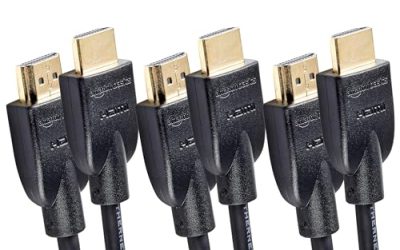
- Forgetting the HDMI cable: most adapters in this guide are dongles with an HDMI female port, so a separate HDMI cable is a second purchase.
- Ignoring the HDR trade-off: some active adapters drop from 4K60 to 4K30 when HDR is on, so check the printed figures before ordering.
Frequently Asked Questions
Does a DisplayPort to HDMI adapter work in reverse?
No. Every adapter in this guide is one-way, from a DisplayPort source to an HDMI display. An adapter that prints no direction is a guess, and plugging an HDMI source into a DisplayPort monitor with one of these adapters shows nothing. A buyer who needs the opposite direction must buy an HDMI to DisplayPort adapter, which is a different product with active conversion inside.
Why does my screen stay black with a new adapter?
The usual cause is direction or a passive adapter on a source without DP++. Check that the computer port is DisplayPort and the display port is HDMI, then check whether the adapter is active or passive. A passive adapter only works when the source outputs HDMI over DisplayPort. An active adapter works from any DisplayPort output, so swapping to an active pick fixes most black-screen cases at once.
Can a DisplayPort to HDMI adapter carry 4K at 60Hz?
Yes, when the adapter, the source, and the display all support it. The two active 4K60 picks in this guide carry 3840×2160 at 60Hz, and the 8K adapter carries far more. A 4K30 adapter cannot carry 60Hz no matter what display sits behind it, so buy by the printed figures on the listing, never by the word “4K” alone.
Do I need a separate HDMI cable with these adapters?
Yes, for the dongle-style picks. The Cable Matters, BENFEI, Plugable, and UGREEN adapters all end in an HDMI female port, so an HDMI cable runs from the adapter to the display. Check the distance between the computer and the display before ordering, and remember that a very long HDMI cable can soften a 4K60 signal, so keep the run as short as the desk allows.
More from Amazon
Programs that pair well with the guide above. Offers and eligibility are set by Amazon and may change.
A free business account with business pricing and bulk-buying tools for work, shop or home office.
Create a business accountFree shipping on eligible items, Prime Video and more. Eligible new members can start with a free trial.
Start a Prime free trialAudiobooks and podcasts to listen to on the go. Eligible new members can start with a free trial.
Try Audible freeAd-free music streaming. Eligible new subscribers can start with a free trial.
Try Music Unlimited freeAs an Amazon Associate we earn from qualifying purchases.



Write Your Review
No reviews yet. Be the first to share your experience!