

Key takeaways
- Five DisplayPort to DVI adapters that link a DP source to a DVI monitor. Compare passive and active links, resolution limits, and length before you buy.
An older monitor with only a DVI input can still serve for years, yet most current graphics cards and laptops ship with DisplayPort outputs and no DVI port at all. The link between the two is a small adapter or cable, and the wrong one either shows nothing or caps the picture at a lower resolution than the monitor can display. Direction, port type, and resolution decide whether the picture appears at full size.
This guide is for office workers adding a second screen to a desk, home users keeping a trusted monitor alive, and anyone wiring a projector or a spare display to a newer machine. Every pick below comes from a live Amazon listing, with its resolution, connector layout, and form factor taken from the listing itself. Four are compact dongles, one is a full cable, and one of the dongles carries an active chip for multi-monitor setups.
Quick Picks
As an Amazon Associate we earn from qualifying purchases.
| Product | Best for | Key spec from title |
|---|---|---|
| Cable Matters DisplayPort to DVI Adapter | A single spare monitor on a short run | 1920×1080 at 60 Hz |
| BENFEI DisplayPort to DVI Cable, 6 ft | A monitor across the desk with no extra cable | 1080p at 60 Hz over 6 ft |
| StarTech DP2DVIS Active Adapter | Multi-monitor setups and non-DP++ ports | Active conversion to 1920×1200 |
| Amazon Basics DisplayPort to DVI Adapter | A plain low-cost link for one screen | 1920×1200, white dongle |
| Moread DisplayPort to DVI Adapter | A locking connection that stays put | 1920×1080 at 60 Hz, 5-year warranty |
How to Choose
Direction Comes First
Every link in this guide moves video one way only, from a DisplayPort source to a DVI display. A DVI source feeding a DisplayPort monitor needs a different product with its own converter, and plugging any of these five in backwards shows nothing at all. Check the back of the computer first: the DisplayPort socket is a rectangle with one corner cut at an angle, and it sits beside the HDMI socket on most graphics cards. Then check the monitor: a DVI-D socket has a flat blade on one side and a grid of pins, while a DVI-A socket carries analog pins that a digital link cannot use. Match the two ends before ordering anything.
Passive Links Need a DP++ Port
Most DisplayPort outputs are dual-mode, which the industry calls DP++, and a passive link relies on that mode: the source senses the adapter and sends a DVI signal straight through the DisplayPort socket. That is why the passive picks here cost little and need no power. The catch is that some outputs are not dual-mode, and a passive link on such a port shows nothing. Docking stations, some laptop ports, and multi-monitor chains are the usual cases where a passive link fails. An active adapter carries its own conversion chip, so it works on any DisplayPort output. If the port type is unknown, or the plan involves three monitors from one card, the active pick is the safer buy.
Resolution Is Printed, Not Promised
A single-link DVI connection tops out at 1920×1200, and most of the links in this guide print exactly that ceiling or 1080p at 60 Hz. A 2560×1600 monitor will still show only 1080p through a single-link link, because the link, not the monitor, sets the limit. Reaching higher resolutions needs a dual-link DVI-D connection, which carries twice the data lanes and needs an adapter built for it. None of the five picks here prints a dual-link figure, so treat any listing that promises 1440p or 4K through a plain single-link DVI link as a misprint. Read the printed resolution on the listing and compare it with the monitor’s native resolution.
Dongle or Cable, and the Audio Question
A dongle is a short adapter with a DisplayPort plug on one end and a DVI socket on the other, so it needs a separate DVI cable to reach the monitor. That suits a desk where a DVI cable is already in place. A full cable replaces both parts with one run from the computer to the monitor, which suits a fixed desk and removes one connection that could work loose. Measure the run before choosing: a 3-foot cable is tidy on a small desk, while a 6-foot cable covers most desks. One more fact shapes every pick here: DVI carries video only, so speakers need a separate audio cable whatever link is chosen.
The 5 Best Options
Cable Matters DisplayPort to DVI Adapter

This compact dongle is the plain choice for a single spare monitor. Its DisplayPort plug carries a latch that clicks into the socket, and a 4-inch tail leads to a DVI-D socket that takes a standard DVI cable. The listing prints 1920×1080 at 60 Hz, HDCP support for protected video, and gold-plated connectors, and it weighs less than an ounce, so it rides in a laptop sleeve without notice. It is a passive link, which means the source port must be dual-mode, and it needs a separate DVI cable, which is not in the box. Where that cable already exists, it is the simplest link in this guide.
Specs
- Model 102002
- Video resolution up to 1920×1080 at 60 Hz
- HDCP compatible for viewing protected content
- Audio is not supported over DVI
- Gold-plated connectors
- DisplayPort secure latch
- Molded strain relief
- Weighs less than 1 ounce
- 4-inch cable tail
- DP, DP++, DisplayPort++ compatible
Best for: A single spare monitor on a desk where a DVI cable is already in place.
Watch out for: Confirm the passive listing, model 102002 — Cable Matters sells an active version and a 3-in-1 version under near-identical names, and a separate DVI cable is required.
BENFEI DisplayPort to DVI Cable, 6 Feet
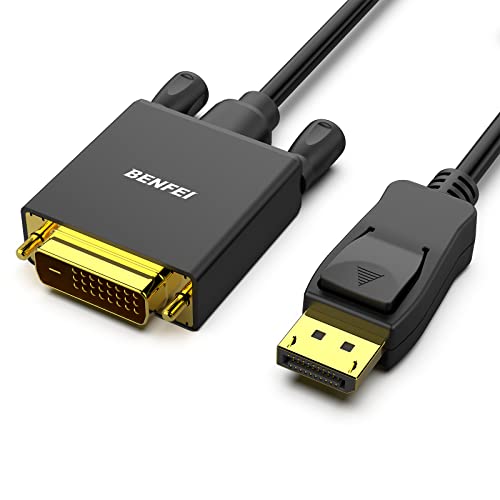
This is the only full cable in the guide, and it suits a fixed desk where the monitor sits an arm’s length from the tower. One end plugs into the DisplayPort socket, the other into the DVI-D socket on the monitor, and nothing else is needed — no dongle, no extra cable, no spare part to lose. The listing prints 1080p at 60 Hz, gold-plated connectors, and a 1.8-meter run, and it names the direction plainly: DisplayPort to DVI only. It is a passive cable, so the source port must be dual-mode, and its length is fixed at 6 feet, generous on a desk, short across a room.
Specs
- 6 feet (1.8 meters) cable length
- DisplayPort male to DVI-D male
- 1080p at 60 Hz
- Uni-directional: DisplayPort to DVI only
- Gold-plated connectors
Best for: A fixed desk where the monitor sits across from the tower and no extra cable is wanted.
Watch out for: Confirm the 6-foot listing — BENFEI sells 3-foot and 10-foot versions under near-identical names, and the cable cannot carry audio.
StarTech.com DP2DVIS Active Adapter

This is the active pick, and it earns its place wherever a passive link fails. Its own conversion chip turns a DisplayPort signal into DVI, so it works on any DisplayPort output, dual-mode or not, including docking stations and graphics cards running three monitors at once. The listing prints 1920×1200, a 5.7-inch attached cable, a latching DisplayPort connector, a screw-locking DVI end, and EDID pass-through that keeps the monitor and the computer in agreement about resolution. It also carries AMD Eyefinity certification for multi-display workstations. For a second or third monitor on a busy card, this is the link that removes the guesswork about the port.
Specs
- Model DP2DVIS
- Active DisplayPort to DVI-D single-link converter
- Supports resolutions up to 1920×1200
- DisplayPort 1.2 (HBR2)
- EDID/DDC pass-through
- 5.7-inch (15 cm) attached cable
- Latching DisplayPort connector
- Screw-locking DVI connector
- AMD Eyefinity Certified
- Supports Apple Cinema Display HD
Best for: Multi-monitor setups, docking stations, and any DisplayPort output that is not dual-mode.
Watch out for: Confirm the DP2DVIS listing — StarTech sells a passive DP2DVI2 adapter under a near-identical name, and this active version is the one that works on non-dual-mode ports.
Amazon Basics DisplayPort to DVI Adapter
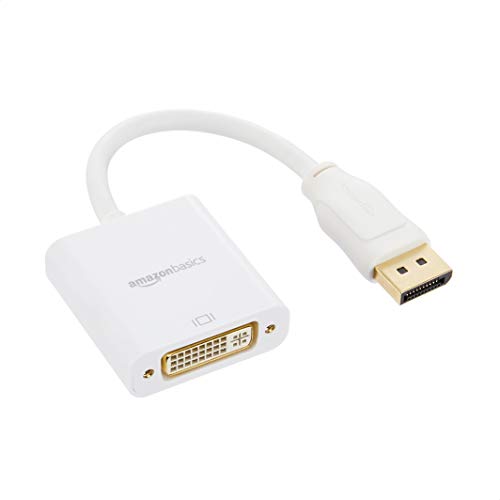
This white dongle is the plain low-cost link for one screen, and it does the job without extra features. The listing prints 1920×1200 and a weight of 1.44 ounces, so it fits in a drawer or a bag pocket between uses. It connects a DisplayPort computer to a monitor or projector with a DVI input, and like every link here it carries video only. It is a passive adapter, so the source port must be dual-mode, and a separate DVI cable is required. For a single monitor on a tight budget, it is the least complicated pick in this guide.
Specs
- Model HL-007254
- Supports video resolutions up to 1920×1200
- DisplayPort to DVI, male to female
- Item dimensions 3.5 x 1.57 x 0.51 inches
- Item weight 1.44 ounces
- Color white
- Package quantity 1
Best for: A single monitor on a tight budget where no extra features are needed.
Watch out for: Confirm the adapter listing, model HL-007254 — Amazon Basics sells a DisplayPort to DVI cable under a near-identical name, and this adapter needs a separate DVI cable.
Moread DisplayPort to DVI Adapter

This compact dongle adds two things the other dongles here do not print: a locking DisplayPort connector that holds the plug in place, and a 5-year warranty from the maker. The listing prints 1080p at 60 Hz and 1920×1200, gold-plated connectors, a molded strain relief, and a weight of 1.34 ounces. The DisplayPort end is male and the DVI-D end is female, so a standard DVI cable runs from the adapter to the monitor. It is a passive link, so the source port must be dual-mode. For a monitor that gets bumped or a desk where cables get tugged, the latch is the feature that matters.
Specs
- Model DP2DVI-A-B
- DisplayPort male to DVI-D female
- Maximum resolution 1080p Full HD (1920×1080 at 60 Hz)
- Gold-plated DisplayPort connector
- DisplayPort locking connector with latches and release button
- Molded strain relief
- CE, FCC certified
- 5-year warranty
- Item weight 1.34 ounces
Best for: A desk where cables get tugged and the connection must stay put.
Watch out for: Confirm the DP2DVI-A-B listing — Moread sells DisplayPort to HDMI and VGA adapters under near-identical names, and a separate DVI cable is required.
Which One Fits Your Situation
Reviving a Spare Office Monitor
Pick the Cable Matters dongle when a DVI cable already runs to the monitor and the desk is small. The passive link costs little, the latch holds the plug, and the 4-inch tail keeps the connection close to the tower. Check first that the graphics card port is dual-mode, since a passive link on a plain port shows nothing. If the cable is missing, the BENFEI 6-foot cable covers the same job in one piece.
Running Two or Three Monitors
Pick the StarTech active adapter when the plan involves more than one DVI monitor, or when the port type is unknown. Its chip converts the signal on its own, so it works on docking stations and on cards running several displays at once, and the Eyefinity certification fits multi-display workstations. A passive link may work for the first monitor and fail on the second, so the active pick removes that gamble.
A Laptop With One DisplayPort
Pick the Amazon Basics dongle or the Moread dongle when a laptop has a single DisplayPort and a DVI monitor waits on the desk. Both are compact, both need a separate DVI cable, and both print 1080p or better. The Moread latch suits a laptop that moves between rooms, while the Amazon Basics body suits a bag pocket. Either way, confirm the laptop port is dual-mode before ordering, since a passive link needs it.
A Monitor Across the Room
Pick the BENFEI 6-foot cable when the monitor or projector sits away from the computer. A dongle plus a short DVI cable can cover the same distance, but the single cable removes one connection and one part to lose. Measure the run along the wall before ordering, since 6 feet is generous on a desk and short across a large room. For a projector mounted high, a longer DVI cable after a dongle may still be the better route.
Common Mistakes
- Buying a DVI-to-DisplayPort converter for a DisplayPort computer — the direction is printed on the listing, and the two products look alike.
- Assuming a single-link adapter will show 2560×1600 — the link caps the picture at 1920×1200 or 1080p, whatever the monitor can show.
- Using a passive adapter on a port that is not dual-mode — the screen stays dark, and the fix is an active adapter, not a different cable.
- Expecting sound from the monitor speakers through DVI — DVI carries video only, so a separate audio cable is needed.
- Ordering a dongle and forgetting the DVI cable — three of the five picks here need a separate DVI cable to reach the monitor.
Frequently Asked Questions
Can I use a DisplayPort to DVI adapter in reverse, to connect a DVI computer to a DisplayPort monitor?
No. Every link in this guide moves video one way only, from a DisplayPort source to a DVI display. A DVI source feeding a DisplayPort monitor needs an active converter built for that direction, which is a different product with its own chip. Plugging any of these five in backwards shows nothing, so check which end of the chain carries the DisplayPort socket before ordering.
Will a DisplayPort to DVI adapter carry sound to my monitor speakers?
No. DVI is a video-only connection, so no adapter in this guide carries audio, whatever the listing pictures suggest. Run a separate audio cable from the computer to the speakers or the monitor’s audio input, or use speakers plugged straight into the computer. If sound through one cable matters, an HDMI monitor is the better match, since HDMI carries audio with the picture.
What is the difference between a passive and an active DisplayPort to DVI adapter?
A passive adapter passes the DVI signal that a dual-mode DisplayPort port already produces, so it needs a DP++ port and costs little. An active adapter carries its own conversion chip, so it works on any DisplayPort output, including docking stations and multi-monitor setups. The StarTech DP2DVIS here is the only active pick; the other four are passive.
Can a DisplayPort to DVI adapter show 1440p or 4K?
No, not through a single-link DVI connection. Single-link DVI tops out at 1920×1200, so a monitor that can show more will still show only 1080p or 1920×1200 through these links. Higher resolutions need a dual-link DVI-D connection with an adapter built for it, and none of the five picks here prints a dual-link figure. Buy the link whose printed resolution matches the monitor.
More from Amazon
Programs that pair well with the guide above. Offers and eligibility are set by Amazon and may change.
A free business account with business pricing and bulk-buying tools for work, shop or home office.
Create a business accountFree shipping on eligible items, Prime Video and more. Eligible new members can start with a free trial.
Start a Prime free trialAudiobooks and podcasts to listen to on the go. Eligible new members can start with a free trial.
Try Audible freeAd-free music streaming. Eligible new subscribers can start with a free trial.
Try Music Unlimited freeAs an Amazon Associate we earn from qualifying purchases.


Write Your Review
No reviews yet. Be the first to share your experience!