

Key takeaways
- Compare the best server rail kits for Dell PowerEdge servers, universal sliding chassis and DIY rack builds, with depth, load and fit checks first.
A storage server that cannot slide out of the rack turns every drive swap into a full shutdown and a two-person lift. The right rail kit fixes that: sliding rails let a NAS or backup server glide forward for top-cover access, while fixed support rails and vertical rail pairs cover chassis that never shipped with rails at all. This guide compares five kits sold on Amazon, from a model-specific Dell PowerEdge sliding kit to universal ball-bearing rails and a DIY vertical rail pair, so you can match the kit to your chassis, rack depth and hole pattern before ordering.
As an Amazon Associate, we earn from qualifying purchases.
Quick answer
For Dell PowerEdge 2U servers, the BestParts sliding Ready Rail kit is the direct fit. For mixed-brand chassis, the 26-inch universal sliding rails and the RackChoice ball-bearing sets cover most 1U to 5U cases. Building a rack from scratch instead? The NavePoint 3U vertical rail pair supplies the uprights.
BestParts 2U Sliding Ready Rail Kit for Dell PowerEdge

The BestParts kit is the model-specific option in this roundup: a sliding Ready Rail style kit built for Dell PowerEdge 2U servers. The listing cross-references Dell part numbers H4X6X, PWN3 and XV104, with sub part numbers 24V27, 61KCY, WYMD5 and D20YT also named, and the kit itself carries model number 0PWN3. Compatibility covers a long run of PowerEdge generations, including the R520, R530, R540, R720, R720xd, R730, R730xd, R740, R740xd, R7415, R7425, R750, R7515 and R820. Construction is metal, the kit is sold new, and the package contains one sliding rail kit as pictured in the listing. Because it follows the ReadyRails pattern, it mounts the way Dell intended for these chassis, with the server sliding forward for drive, fan and memory service instead of being lifted clear of the rack. That matters for storage duty, where a 2U PowerEdge often carries a full set of front drive bays and is far too heavy to perch on one pair of hands. If your rack holds one of the listed Dell models and the original rails were lost, damaged or never supplied, this is the lowest-risk pick here. Confirm your exact model and Dell part number against the listing before ordering, since Ready Rail variants differ between 1U and 2U chassis.
Universal 26-Inch Sliding Rails for Rackmount Chassis

This unbranded 26-inch set is the general-purpose sliding option for white-box and mixed-vendor storage builds. The rails use a ball-bearing slide and are listed for 1U through 4U rackmount chassis, with stated brand compatibility covering Norco, iStarUSA and Rosewill cases, the three names that dominate the home NAS and small-office storage market. The 26-inch length suits standard-depth racks and lets a chassis pull forward far enough to lift the top cover and reach internal drive cages, which is exactly the access pattern a multi-bay storage server needs. One explicit exception is named in the listing summary: the set is not compatible with the D-400L-7 chassis, so check your case model against the listing notes before buying. The listing does not state a weight capacity, and that figure is not stated here either; if your chassis is fully loaded with drives, weigh it and compare against the seller’s current listing details rather than guessing. Ball-bearing slides are the right mechanism for servers that get serviced in place, because the chassis rolls instead of scraping along a fixed ledge. For a Rosewill or Norco storage case that shipped without rails, this set is the straightforward way to make it rack-friendly without changing cases.
RackChoice 20-Inch Ball Bearing Sliding Rail

RackChoice’s 20-inch set targets shorter chassis and shallower racks. It is a universal-design ball-bearing sliding rail listed as supporting 2U, 3U, 4U and 5U chassis, so it covers the larger tower-style rackmount cases often repurposed as backup servers, where a 4U or 5U box holds a dozen or more drives. The shorter 20-inch rail length is easier to fit in compact racks and wall-depth cabinets where a 26-inch rail would bottom out, and the ball-bearing action keeps a heavy loaded chassis moving smoothly instead of binding halfway out. The trade-off is reach: a 20-inch rail pulls the chassis forward less than a 26-inch set, so deep cases may not clear the rack front completely for top-cover removal. The listing data captured for this set does not publish a weight capacity or a material specification, so treat both as not stated and check the current listing if your build is unusually heavy. Within those limits, this is a sensible pick for a mid-depth storage server in a shallow rack, or for a second backup box that only needs occasional slide-out access for drive swaps rather than full extension.
RackChoice 26-Inch Ball Bearing Sliding Rail

The 26-inch RackChoice set is the most complete universal kit in this guide. It includes two 26-inch ball-bearing rails plus a bracket assortment of four brackets with three holes and two brackets with four holes, which gives installers more ways to adapt the rails to different chassis side patterns. Maximum extension is 52 inches, so a supported chassis can pull well clear of the rack for unhurried work on drives, cabling and cooling. The set is listed for 2U, 3U, 4U and 5U chassis, matching the sizes most often used for high-bay-count storage builds. One limitation is stated plainly by the seller: the set does not support RackChoice hot-swap chassis models, so owners of those cases should choose a different kit. The extra brackets make this the better RackChoice option when the chassis is an unusual brand or an older case whose mounting holes do not line up with a single fixed bracket pattern. As with the 20-inch version, the captured listing data does not publish a weight capacity, so confirm the rating on the current listing against your loaded chassis weight. For a deep, heavy, mixed-brand storage server, this is the universal set to look at first.
NavePoint 3U Vertical Rack Rail Pair DIY Kit
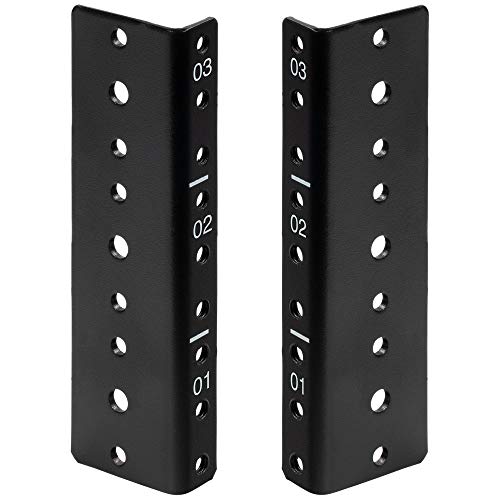
Every other kit in this guide mounts a server into an existing rack; the NavePoint kit is for people building the rack itself. It is a pair of 3U vertical rack rails sold as a DIY kit with mounting hardware included, finished in black, and it carries model number 400481733. Vertical rail pairs like these form the uprights of home-built rack frames, wall-mount conversions and custom enclosures, giving standard 19-inch equipment a proper set of mounting holes where a wooden frame or a repurposed cabinet has none. For a homelab storage build, that means a backup server, a switch and a patch panel can be racked neatly in a closet frame instead of stacked on shelves. The 3U height suits compact builds: a slim NAS, a network switch and one accessory, or a small test rig on a workbench. Because it is a component rather than a complete rack, the result depends on the frame you build around it, so anchor the rails square and level and into material that can carry the loaded weight. If your project is a DIY rack rather than a server that needs to slide, this pair is the piece that starts the build.
How to choose
Start with the chassis, not the rack. Model-specific kits like the BestParts set fit only the servers named in the listing, while universal sliding rails fit by size range and side-hole pattern, so measure your chassis height in rack units and check the stated compatibility list, including named exclusions. Next, measure the rack: rail length and mounting depth must suit the distance between the front and rear posts, and a 26-inch rail in a shallow cabinet will not seat. Match the hole pattern too, since square-hole, round-hole and threaded racks take different hardware. Decide whether you need sliding access at all; a backup server that gets a drive swap twice a year may be fine on fixed support, while a primary NAS benefits from ball-bearing slides. On safety, a CPSC-oriented check found no recall covering server rack rail kits as a class or any of the five kits in this guide, so no pick was excluded on recall grounds; even so, confirm the exact model against the CPSC database before a large purchase, and never extend a loaded server on rails that are not fully latched into both posts.
Who should skip
Skip model-specific kits if your server is not on the compatibility list; a Dell Ready Rail pattern does not transfer to other brands. Skip universal sliding rails if your chassis is one of the named exclusions, or if the listing does not publish a weight capacity and your loaded server is heavy, since an unverified rating is a poor match for a full drive complement. Skip the NavePoint vertical pair if you already own a finished rack, because it builds rack structure rather than mounting a server. Finally, skip sliding rails entirely for very shallow racks where the chassis cannot extend without striking a door or wall.
Frequently asked questions
Will a universal sliding rail kit fit my server chassis?
It depends on size and hole pattern rather than brand alone. The universal sets here are listed by chassis height, from 1U to 5U depending on the kit, and they attach to standard side mounting holes. Measure your chassis, check the kit’s stated range and read the exclusions in the listing, because specific models such as certain hot-swap and D-400L-7 cases are named as incompatible.
What rack depth do I need for 26-inch sliding rails?
The rails need enough front-to-rear post distance to seat at full length, plus clearance for the chassis to travel forward when extended. The RackChoice 26-inch set extends to 52 inches, so the space in front of the rack must be clear. Measure your post spacing and door clearance before ordering, because a deep rail in a shallow cabinet will not mount correctly.
Are sliding rails worth it for a home NAS?
For most home storage servers, yes. A loaded multi-bay NAS is heavy, and sliding rails let you pull it forward to swap a failed drive or clear dust without disconnecting every cable and lifting the whole chassis out. The benefit grows with drive count and server weight. A small two-bay unit in an open frame gains less, and fixed support rails may be enough there.
Can I build a small rack with vertical rail pairs?
Yes, that is exactly what the NavePoint 3U pair is for. Vertical rail pairs provide the standard mounting holes for 19-inch equipment inside a frame you build yourself, such as a closet rack or a workbench enclosure. Keep the frame rigid and anchored, mount the rails square and level, and stay within the load your frame material can carry, since the rails are only one part of the structure.
Final verdict
For a Dell PowerEdge 2U storage server, the BestParts sliding kit is the correct, model-matched choice. For mixed-brand chassis, the 26-inch universal set is the simple default, while the RackChoice 20-inch and 26-inch ball-bearing sets cover shallow racks and bracket-heavy installs respectively. Builders constructing their own rack should start with the NavePoint vertical rail pair. Measure chassis, depth and hole pattern first, and every kit here has a clear job it does well.
Product and ASIN Reference
| Product | ASIN |
|---|---|
| BestParts 2U Sliding Ready Rail Kit for Dell PowerEdge (0PWN3) | B089YMZSR2 |
| Universal 26-Inch Sliding Rails for Rackmount Chassis | B01M8KKZCP |
| RackChoice 20-Inch Ball Bearing Sliding Rail | B0DJPC7V3F |
| RackChoice 26-Inch Ball Bearing Sliding Rail | B0F9VP73CG |
| NavePoint 3U Vertical Rack Rail Pair DIY Kit | B07NKR4GM6 |
More from Amazon
Programs that pair well with the guide above. Offers and eligibility are set by Amazon and may change.
A free business account with business pricing and bulk-buying tools for work, shop or home office.
Create a business accountFree shipping on eligible items, Prime Video and more. Eligible new members can start with a free trial.
Start a Prime free trialAudiobooks and podcasts to listen to on the go. Eligible new members can start with a free trial.
Try Audible freeAd-free music streaming. Eligible new subscribers can start with a free trial.
Try Music Unlimited freeAs an Amazon Associate we earn from qualifying purchases.




Write Your Review
No reviews yet. Be the first to share your experience!