

Key takeaways
- Find the best NAS for home surveillance cameras, with Synology, QNAP and TerraMaster models compared on camera support, storage, RAID and remote viewing.
A home camera system only works when the recordings survive the moment they matter most. A camera with a memory card can be stolen, damaged, or overwritten in days, while a cloud plan keeps charging every month and puts footage outside your control. A network attached storage box solves both problems by recording every camera to drives you own, in your own home, around the clock. The real decision is not which brand looks best on paper, but how many cameras you run, how long you need to keep footage, and how much work you want the box to do on its own.
This guide is for homeowners adding two to eight cameras to a house, renters who want local recording without a monthly fee, and small households that also want file backup and photo storage from the same box. Every model below was chosen from names and specifications on Amazon listings, with attention to camera software, drive bays, networking, and the kind of surveillance workload each unit handles comfortably.
Quick Picks
As an Amazon Associate we earn from qualifying purchases.
| Product | Best for | Key spec from title |
|---|---|---|
| Synology DiskStation DS423+ | First-time camera setups with four cameras or fewer | 4-bay NAS with Surveillance Station and 2 free camera licenses |
| Synology DiskStation DS923+ | Growing systems that may add cameras and drives later | 4-bay NAS expandable to 9 bays with Ryzen R1600 processor |
| QNAP TS-264-8G | Two-camera homes that want fast networking on a compact box | 2-bay NAS with dual 2.5GbE ports and 8 GB memory |
| TerraMaster F4-423 | Budget four-bay recording with room for large drives | 4-bay NAS with dual 2.5GbE ports and up to 80 TB raw capacity |
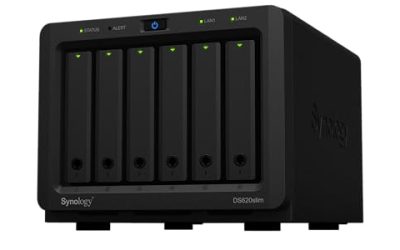
| Synology DiskStation DS1522+ | Larger homes running many cameras plus family file storage | 5-bay NAS expandable to 15 bays with 8 GB ECC memory |
How to Choose
Camera Software and License Count
The software matters more than the hardware badge, because it decides how many cameras you can add and what you pay for each one. Synology Surveillance Station and QNAP QVR Pro both record, search, and play back footage, but they handle licenses differently, so check how many cameras are included before you buy. Synology includes two camera licenses with its software, and extra cameras need additional licenses. QNAP bundles its surveillance software with a different license model, so read the listing carefully. Also confirm your camera brand appears on the compatibility list, since an unsupported camera may record only a basic stream or refuse to connect at all.
Drive Bays, Capacity, and RAID
Surveillance footage eats storage faster than almost any other home workload, because several cameras write video at the same time, day and night. Two bays suit a pair of cameras with a mirrored pair of drives, while four or five bays give you room for RAID 5, which keeps recording after one drive fails. Check the maximum single-drive size the box accepts, and plan retention in weeks rather than days. A four-bay box filled with surveillance-rated drives holds far more history than a two-bay box, and it also lets you add a drive later instead of replacing the whole unit when your camera count grows.
Continuous Writing and Drive Choice
Ordinary desktop drives are not built for a workload that never stops writing, and they can wear out early under constant camera streams. Surveillance-rated or NAS-rated drives are designed for always-on operation, vibration from neighbouring drives, and long sequential writes. Buy drives from the NAS maker’s compatibility list, because an unlisted drive may be rejected or run without the firmware optimisations the box expects. Also remember that most NAS enclosures ship diskless, so budget for drives separately and install them before the first camera connects.
Networking, Remote Viewing, and Power
A surveillance NAS sits between your cameras and your phone, so its network ports decide whether playback stutters. Dual 1GbE ports handle a handful of cameras, while dual 2.5GbE ports give extra headroom for higher-resolution streams and simultaneous remote viewing. Check that the companion mobile app supports live view, motion alerts, and timeline scrubbing, because that is how you will actually use the system. Finally, place the box on an uninterruptible power supply where possible, so a short outage does not corrupt recordings or leave a gap in your footage.
The 5 Best Options
Synology DiskStation DS423+

The DS423+ fits homeowners who want a straightforward first surveillance NAS without learning enterprise storage. Its four bays hold enough capacity for several cameras at comfortable retention, and DiskStation Manager makes camera setup, motion detection, and remote viewing feel like using an ordinary app rather than a server. The Celeron processor handles recording and playback for a small camera count, while the two M.2 slots let you add SSD cache if file access slows down later. It also doubles as family file storage, photo backup, and a media server, so one box covers several jobs at once.
Specs
- 4 drive bays for 3.5-inch SATA HDDs or 2.5-inch SATA SSDs, drives not included
- Intel Celeron J4125 quad-core processor, 2.0 GHz base and up to 2.7 GHz burst
- 2 GB DDR4 memory, expandable to 6 GB
- 2 M.2 NVMe slots for SSD cache or storage pools
- 2 1GbE RJ-45 LAN ports and 2 USB 3.2 Gen 1 ports
- DiskStation Manager operating system with Surveillance Station
- 2 free IP camera licenses included with Surveillance Station
Best for: A household setting up its first four cameras with local recording and phone playback.
Watch out for: The two included camera licenses cover only two cameras, so confirm the cost and availability of extra licenses before adding a third or fourth camera.
Synology DiskStation DS923+

The DS923+ suits buyers who expect their camera system to grow, because it starts as a four-bay box and expands to nine bays with an expansion unit. Its Ryzen processor and error-correcting memory handle more simultaneous camera streams than the smaller Plus models, and the PCIe slot accepts a 10GbE network card for faster transfers when the household network catches up. Two M.2 slots support SSD caching or extra storage pools, which helps when the same box also backs up computers and stores photos. This is the pick for a home that wants surveillance today and headroom for more cameras, more drives, and more users tomorrow.
Specs
- 4 drive bays for 3.5-inch SATA HDDs or 2.5-inch SATA SSDs, drives not included
- AMD Ryzen R1600 dual-core processor, up to 3.1 GHz
- 4 GB DDR4 ECC memory, expandable to 32 GB
- Expandable to 9 drive bays with a DX517 expansion unit
- 2 M.2 NVMe slots for SSD cache or storage pools
- PCIe slot for an optional 10GbE network upgrade card
- 2 1GbE RJ-45 LAN ports and DiskStation Manager with Surveillance Station
Best for: A growing camera system that may reach six or more cameras and needs room to expand.
Watch out for: The expansion unit and the 10GbE card are sold separately, so check that they fit your budget and your network before counting on them.
QNAP TS-264-8G

The TS-264-8G fits a smaller home that wants strong networking without a large four-bay box. Its two bays suit a mirrored pair of drives for two or three cameras, and the dual 2.5GbE ports move high-resolution streams with room to spare. Eight gigabytes of memory comes installed, which is generous for a two-bay unit and helps when the box runs surveillance software alongside file sharing and backups. Two M.2 PCIe slots add SSD caching, and the QTS operating system includes QVR Pro for camera recording, live view, and alerts. It is a compact, capable choice for a front-door and backyard setup.
Specs
- 2 drive bays for 3.5-inch SATA HDDs or 2.5-inch SATA SSDs, drives not included
- Intel Celeron N5095 quad-core processor, burst up to 2.9 GHz
- 8 GB DDR4 SODIMM memory
- 2 M.2 PCIe slots for SSD caching
- Dual 2.5GbE network ports with 2.5G, 1G, and 100M connectivity
- QTS operating system with QVR Pro surveillance software
- USB 3.2 Gen 2 ports for external drives and backup
Best for: A two- or three-camera home that wants fast networking and generous memory in a compact box.
Watch out for: Two bays limit you to mirrored storage, so plan drive sizes for the retention you need, because adding capacity later means replacing a drive rather than adding one.
TerraMaster F4-423
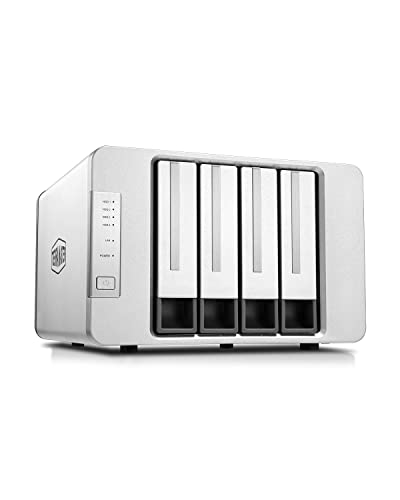
The F4-423 fits buyers who want four bays and strong hardware without paying for a premium brand badge. Its quad-core Celeron processor and dual 2.5GbE ports handle several camera streams, while the four bays support RAID configurations that keep footage available if a drive fails. Memory expands well beyond the installed amount, and dual M.2 slots accept NVMe drives for caching. The aluminium chassis runs quietly enough for a living-room shelf or a home office, and the TOS operating system includes surveillance apps for recording and remote viewing. For a budget-minded four-camera setup, it offers a lot of hardware for the size of the box.
Specs
- 4 drive bays for 3.5-inch SATA HDDs or 2.5-inch SATA SSDs, drives not included
- Intel Celeron N5105 quad-core processor, burst up to 2.9 GHz
- 4 GB DDR4 memory, expandable to 32 GB
- Dual 2.5GbE network ports with link aggregation up to 5 Gbps
- 2 M.2 NVMe slots for SSD cache
- Up to 80 TB total raw storage capacity
- TOS 6 operating system with surveillance applications and 4K video decoding
Best for: A four-camera home that wants four-bay RAID protection and fast networking on a tighter budget.
Watch out for: Confirm your camera models work with the TerraMaster surveillance app before buying, since compatibility lists vary more across brands than with the larger NAS makers.
Synology DiskStation DS1522+
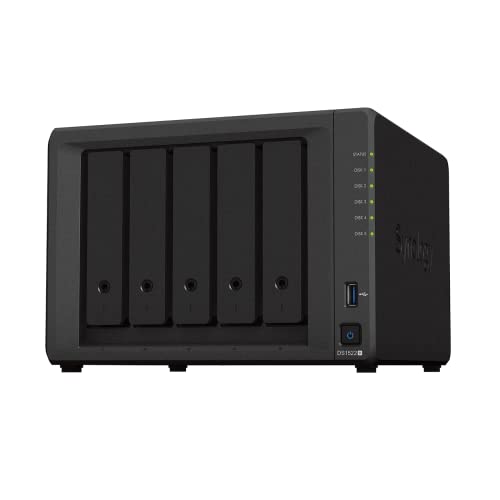
The DS1522+ fits larger homes that run many cameras and still want the same box to store family files, photos, and backups. Five bays give room for RAID 5 or RAID 6 with comfortable retention, and the box expands to fifteen bays with two expansion units, which is far beyond what most homes will ever need. Eight gigabytes of error-correcting memory comes installed, four 1GbE ports support link aggregation and failover, and an optional 10GbE module keeps transfers fast as camera counts climb. Surveillance Station manages recording, motion alerts, and playback from one dashboard, while the rest of DiskStation Manager handles the household’s other storage jobs.
Specs
- 5 drive bays for 3.5-inch SATA HDDs or 2.5-inch SATA SSDs, drives not included
- AMD Ryzen R1600 dual-core processor, 2.6 GHz base and up to 3.1 GHz boost
- 8 GB DDR4 ECC memory, expandable to 32 GB
- Expandable to 15 drive bays with 2 DX517 expansion units
- 2 M.2 2280 NVMe slots for SSD cache or storage pools
- 4 1GbE RJ-45 LAN ports with link aggregation and failover support
- Optional E10G22-T1-Mini 10GbE network upgrade module
- DiskStation Manager operating system with Surveillance Station
Best for: A larger home running many cameras alongside family backups, photos, and shared files.
Watch out for: Five bays and expansion headroom only help if you buy surveillance-rated drives from the compatibility list, so check drive support before ordering.
Which One Fits Your Situation
You Have Two Cameras and Want a Simple Start
Pick the QNAP TS-264-8G. Two bays in a mirrored setup protect your footage if one drive fails, and the dual 2.5GbE ports and installed memory handle a pair of high-resolution streams without strain. It stays compact and quiet, and QVR Pro covers recording, alerts, and phone viewing. Choose the Synology DS423+ instead if you expect a third or fourth camera within a year, since its extra bays make that growth far easier.
You Plan to Grow Past Four Cameras
Pick the Synology DS923+. It starts with four bays and expands to nine, its Ryzen processor and error-correcting memory cope with more simultaneous streams, and the PCIe slot leaves a 10GbE upgrade open. The DS1522+ is the stronger choice only if you also need five bays from day one and expect the system to keep growing for years, because its expansion ceiling is much higher.
You Want Four Bays Without the Premium Brand Cost
Pick the TerraMaster F4-423. It gives you four bays, RAID protection, dual 2.5GbE networking, and generous memory expansion at a lower hardware cost than the equivalent Synology four-bay models. Check camera compatibility first, and spend the saving on surveillance-rated drives, which matter more for recording reliability than the badge on the enclosure.
You Need One Box for Cameras, Backups, and Family Files
Pick the Synology DS1522+. Its five bays hold camera footage plus computer backups and photo libraries without forcing you to choose between them, and error-correcting memory adds resilience for a box that runs all day. If your household is smaller and your camera count stays under four, the DS423+ covers the same mix of jobs in a smaller and simpler package.
Common Mistakes
- Buying a diskless NAS and forgetting to order drives, then discovering the camera system cannot record anything on arrival day.
- Choosing ordinary desktop drives instead of surveillance-rated or NAS-rated drives, which wear out faster under constant writing.
- Counting camera licenses after buying the box, and learning that only two cameras are included when four are already mounted.
- Filling a two-bay box with small drives, then realising that longer retention means replacing drives instead of adding one.
- Skipping the compatibility list and finding that a camera records only a low-resolution stream, or will not connect at all.
Frequently Asked Questions
How many cameras can a home NAS record at once?
Most home NAS models handle two to eight cameras comfortably, depending on resolution, frame rate, and processor power. A two-bay unit suits two or three cameras, while a four- or five-bay model copes with more streams and longer retention. Check the software’s supported channel count and license total before mounting cameras, because the limit is usually set by software and licenses rather than drive bays.
Do I need surveillance-rated hard drives for a NAS?
Surveillance-rated or NAS-rated drives are strongly recommended, because camera recording writes data continuously, day and night, without the idle breaks that desktop drives expect. These drives are built for always-on operation, vibration from neighbouring drives, and long sequential writes. Using ordinary desktop drives can shorten drive life and cause dropped frames, so choose drives from the NAS maker’s compatibility list.
Can I watch my cameras remotely from a NAS?
Yes, the companion apps from Synology, QNAP, and TerraMaster support live viewing, playback, and motion alerts on a phone. You sign in through the maker’s remote-access service or your own network setup, then open the camera timeline from anywhere. Keep the NAS firmware updated, use a strong password with two-factor authentication, and avoid exposing the box directly to the internet without the maker’s secure remote-access option.
Does a NAS replace a cloud camera subscription?
A NAS replaces cloud storage for recording, because footage stays on your own drives and there is no monthly fee for keeping it. You still need the camera maker’s app or the NAS surveillance software to view footage, and some camera features may need their own account. The trade-off is responsibility: you manage drive health, backups, and retention yourself, instead of paying a cloud provider to do it for you.
More from Amazon
Programs that pair well with the guide above. Offers and eligibility are set by Amazon and may change.
A free business account with business pricing and bulk-buying tools for work, shop or home office.
Create a business accountFree shipping on eligible items, Prime Video and more. Eligible new members can start with a free trial.
Start a Prime free trialAudiobooks and podcasts to listen to on the go. Eligible new members can start with a free trial.
Try Audible freeAd-free music streaming. Eligible new subscribers can start with a free trial.
Try Music Unlimited freeAs an Amazon Associate we earn from qualifying purchases.



Write Your Review
No reviews yet. Be the first to share your experience!