

Key takeaways
- Compare the five NVMe HATs that matter for Raspberry Pi 5: official, bottom-mount and full-length 2280 boards, ranked by fit, speed and setup effort.
A Raspberry Pi 5 boots from a microSD card out of the box, and that card is the slowest part of the whole machine. Databases crawl, containers take ages to load, and every write wears the card a little more. A PCIe NVMe HAT moves the operating system onto an M.2 SSD, and the difference is immediate: apps open without the long pause, and the drive survives years of writes that would kill a card. The hard part is the board, because a dozen look alike while differing in SSD length, mounting, and setup.
This guide is for Pi 5 owners who want a reliable boot drive or a small home server, and for makers who need the GPIO header free for another add-on. The five boards below come from Amazon listings and maker specifications: the official M.2 HAT+, the Geekworm X1001, the Pimoroni NVMe Base, the Waveshare PCIe TO M.2, and the GeeekPi N04. Each one is currently sold on Amazon US.
Quick Picks
As an Amazon Associate we earn from qualifying purchases.
| Product | Best for | Key spec from title |
|---|---|---|
| Raspberry Pi M.2 HAT+ | The simplest official setup | 2230/2242, HAT+ EEPROM, up to 3A |
| Geekworm X1001 | A cheap full-length 2280 boot drive | 2230–2280, top mount, Hailo-ready |
| Pimoroni NVMe Base | Keeping the GPIO header free | 2230–2280, bottom mount, up to 800 MB/s |
| Waveshare PCIe TO M.2 | A tidy compact board with auto-detection | 2230/2242, HAT+ EEPROM, fan vent |
| GeeekPi N04 | A 2280 SSD that stays inside the footprint | 2230–2280, top mount, vent slots |
How to Choose
SSD length decides the shortlist
The four digits in an M.2 size describe width and length in millimetres, and they decide which boards you can even consider. The official M.2 HAT+ and the Waveshare PCIe TO M.2 take 2230 and 2242 drives only, so a common desktop 2280 SSD will not mount on them at all. The Geekworm X1001, the Pimoroni NVMe Base, and the GeeekPi N04 take every length up to 2280. Short drives cost more per gigabyte and are harder to find, so if you already own a 2280 drive, or you want the cheapest drive on the shelf, cross the two compact boards off your list before anything else.
Top mount or bottom mount
A top board sits on the GPIO header, usually on a stacking header, with the official Active Cooler underneath and the SSD on top. The ribbon cable stays short, but the GPIO header is taken, so another HAT only fits through a pass-through on the NVMe board. A bottom board screws underneath the Pi, which leaves the top side, the GPIO header, and the cooler free for a display, a camera, or another add-on. The trade-off is a longer ribbon cable that bends around the board edge, and the card reader can be hard to reach on some bottom boards. Pick the mounting position by what else the Pi has to carry.
Automatic detection or manual setup
Boards that follow the HAT+ standard carry an EEPROM that the Pi reads at boot, and the firmware enables the PCIe interface on its own. The official M.2 HAT+ and the Waveshare PCIe TO M.2 both have one, so they boot from the SSD with the least fiddling. Boards without an EEPROM, such as the Geekworm X1001, the Pimoroni NVMe Base, and the GeeekPi N04, need two manual lines: dtparam=pciex1 in config.txt to switch the interface on, and PCIE_PROBE=1 in the bootloader configuration before the Pi will boot from the drive. It is a one-time job, but buyers who want plug-and-play should weigh it.
Gen 2 speed, Gen 3 speed, and power
Out of the box the Pi 5 runs its single PCIe lane at Gen 2, around 450 MB/s usable, which is already several times faster than a microSD card. Adding dtparam=pciex1_gen=3 to config.txt lifts most single-slot boards to 750–900 MB/s, but Raspberry Pi does not officially support Gen 3 and warns the link might be unstable. Power matters as much as speed: boards fed only through the ribbon cable give the SSD at most 5 watts, and a power-hungry drive can drop out under load. The official 27 W supply, or another 5 V 5 A supply, is the safe baseline for any of these boards.
The 5 Best Options
Raspberry Pi M.2 HAT+

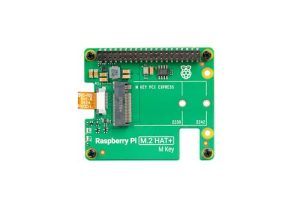
The official board is the reference every other HAT is measured against, and it is the right pick when you want the least fuss. It follows the HAT+ specification, carries an EEPROM so the Pi detects it on its own, and supplies up to 3 amps to the SSD through the GPIO header as well as the ribbon cable. Raspberry Pi guarantees production until at least 2032, so spares and documentation will be around for years. The only real limit is size: it takes 2230 and 2242 drives only, which cost more per gigabyte than the 2280 drives most people already own.
Specs
- PCIe 2.0 x1 through the 16-pin FPC connector
- M.2 M-key slot for 2230 and 2242 NVMe SSDs
- Up to 3A supplied to the connected M.2 device
- HAT+ EEPROM for automatic detection by Pi firmware
- 16 mm stacking header, Active Cooler fits underneath
- Transfer speeds up to 500 MB/s per Raspberry Pi
Best for: A first NVMe boot drive with the least setup.
Watch out for: A second US listing for the same board shows the brand field as “Generic” — confirm the listing names the official Raspberry Pi board before ordering. 2280 SSDs do not fit; confirm a 2230 or 2242 drive.
Geekworm X1001

The X1001 has been the default third-party pick for two years because it does the simple thing well: it takes every SSD length from 2230 to 2280 on a cheap top-mount board, and the official Active Cooler still fits underneath. A 2280 drive overhangs the edge of the Pi, which most third-party cases allow, and Geekworm also rates the board for a Hailo AI accelerator in M.2 format instead of an SSD. There is no EEPROM, so you enable the PCIe interface yourself in config.txt, and you add the bootloader line before the Pi will boot from the drive.
Specs
- PCIe x1 through a 16-pin 0.5 mm pitch connector
- M.2 Key-M 67P slot for single 2230/2242/2260/2280 NVMe SSD
- Top mount, compatible with Raspberry Pi 5 2 GB, 4 GB, 8 GB and 16 GB
- Active Cooler fits underneath the board
- 30 mm PCIe FFC cable, spacers and screws included
- Rated by Geekworm for Hailo M.2 accelerators as well as SSDs
Best for: The cheapest path to a full-size 2280 boot drive.
Watch out for: No EEPROM, so dtparam=pciex1 and PCIE_PROBE=1 are both required. A 2280 SSD overhangs the Pi edge, so confirm your case allows the overhang.
Pimoroni NVMe Base

The NVMe Base is the best thought-out bottom board in this guide, and it is the pick for anyone who needs the GPIO header for something else. It screws underneath the Pi 5, so the top side, the header, and the cooler stay free for a display or another HAT, and its supplied cable has two 90-degree bends so the card reader stays reachable. It takes every SSD length up to 2280 and runs at Gen 3 with the config line added. The trade-off is the same as every bottom board: the drive sits under the Pi, so most cases need modification or a case designed around it.
Specs
- PCIe x1 supporting Gen 2 and Gen 3
- M.2 M-key slot for NVMe 2230, 2242, 2260 and 2280
- Bottom mount, board dimensions 85 x 56 mm, 30 g
- Data transfer rate up to 800 MB/s per the listing
- PCIe Pipe flat flex cable with two 90-degree bends
- Standoffs, SSD mounting hardware and rubber feet included
Best for: A 2280 boot drive with the GPIO header left free.
Watch out for: The US listing carries its own ASIN, different from the UK listing — confirm the US listing names the Pimoroni NVMe Base, model PIM699. No EEPROM, so manual PCIe setup is required.
Waveshare PCIe TO M.2 HAT+

Waveshare’s compact board is the tidy alternative to the official HAT+: it takes the same 2230 and 2242 drives, carries a HAT+ EEPROM for automatic detection, and adds a power monitoring chip, status LEDs, and a cutout in the board so the Active Cooler’s fan can breathe. A header extender in the kit lets the board sit above a fan or an active heatsink, and the GPIO pins pass through the board so other add-ons still stack on top. It is a small board with a lot packed in, which is exactly what a compact build needs.
Specs
- PCIe Gen 2 and Gen 3 support, 16-pin PCIe FPC connector
- M.2 M-key slot for 2230 and 2242 NVMe SSDs
- HAT+ EEPROM for automatic detection
- Onboard power monitoring chip and status LEDs
- Cooling fan vent cutout for the Active Cooler
- 40-pin GPIO pass-through header, header extender included
Best for: A compact build that still wants automatic detection.
Watch out for: One design flaw is documented by CNX Software — the 2230 screw mount can interfere with double-sided 2242 SSDs that have chips on both faces. Confirm a single-sided drive or check the mount before ordering.
GeeekPi N04

The N04 is the board for a 2280 SSD in a case that cannot take an overhang. Instead of letting the drive stick out past the Pi like the X1001 does, it places the slot right at the board edge and keeps the whole 2280 drive inside the Pi footprint, with vent slots cut under the SSD for airflow. It takes every length from 2230 to 2280, works at Gen 3 with the config line, and ships with a custom CNC SSD mount screw. It has no EEPROM, so the same two manual config lines as the X1001 apply.
Specs
- PCIe to M.2 NVMe adapter for Raspberry Pi 5
- M.2 M-key slot for NVMe 2230, 2242, 2260 and 2280
- Top mount, SSD stays within the Pi footprint
- Vent slots under the SSD for airflow
- Custom CNC SSD mount screw included, no soldering required
- Gen 3 capable with the config line added
Best for: A full-length 2280 SSD in a tight case.
Watch out for: No EEPROM, so dtparam=pciex1 and PCIE_PROBE=1 are both required. GeeekPi uses the “HAT+” label loosely — what matters is the board has no EEPROM, so do not expect automatic detection.
Which One Fits Your Situation
You want the simplest official setup
Take the Raspberry Pi M.2 HAT+. The EEPROM means the Pi enables PCIe on its own, the 3-amp supply covers thirsty drives, and the board will still be in production for years. Buy a 2230 or 2242 drive with it, since a 2280 drive will not mount, and pair it with the official Active Cooler for a quiet, cool boot drive.
You want the cheapest 2280 boot drive
Take the Geekworm X1001. It is the lowest-cost board here that takes a full-size 2280 SSD, the Active Cooler fits underneath, and Geekworm documents it well. Accept the two manual config lines and check that your case allows the drive to overhang the Pi edge. If the case cannot take the overhang, the GeeekPi N04 is the same idea in a tighter footprint.
You need the GPIO header free
Take the Pimoroni NVMe Base. It mounts underneath the Pi, so the header, the top side, and the cooler stay free for a display, a camera, or another add-on, and it still takes every SSD length up to 2280. The pre-bent cable keeps the card reader reachable, which is the detail most bottom boards get wrong.
You want a compact board with auto-detection
Take the Waveshare PCIe TO M.2. It matches the official HAT+ on size and automatic detection, then adds a power monitoring chip, status LEDs, and a fan vent for the Active Cooler. Just buy a single-sided 2242 drive, because the 2230 screw mount can foul a double-sided module, so check the drive layout before mounting it.
Common Mistakes
- Buying an M.2 SATA SSD: these boards take NVMe drives only, and a SATA module will not be detected at all.
- Buying a 2280 SSD for the official M.2 HAT+ or the Waveshare board: both take 2230 and 2242 only.
- Skipping the config lines on boards without an EEPROM: without
dtparam=pciex1the Pi never sees the drive, and withoutPCIE_PROBE=1it will not boot from it. - Running the Pi on a weak power supply: use the official 27 W supply or another 5 V 5 A supply, or a hungry SSD can drop out under load.
- Ordering a Pineberry Pi HatDrive from a stale listing: the company has shut down and the boards are no longer listed, so any listing still showing one deserves a hard look.
Frequently Asked Questions
Does a 2280 SSD fit the official M.2 HAT+?
No. The official M.2 HAT+ only has mounting points for 2230 and 2242 drives, and the Compact model only takes 2230. An 80 mm SSD needs a board that explicitly lists 2280, such as the Geekworm X1001, the Pimoroni NVMe Base, or the GeeekPi N04. Short drives cost more per gigabyte, so budget for that if you pick the official board.
Does PCIe Gen 3 work on every board?
On most single-slot boards, yes, after adding dtparam=pciex1_gen=3 to config.txt — expect 750 to 900 MB/s depending on the SSD. Raspberry Pi does not officially support Gen 3 and warns the link might be unstable, so remove the line if the drive drops out. Dual-slot boards with a PCIe switch always stay at Gen 2, because the switch cannot do more.
Can I use an NVMe HAT and another HAT at the same time?
Yes, if the NVMe board sits underneath the Pi, like the Pimoroni NVMe Base, or has a stackable GPIO header, like the official M.2 HAT+ and the Waveshare board. A second PCIe device such as the AI HAT+ does not work in parallel, because the Pi 5 has only one PCIe lane to share.
Which HAT fits the official Raspberry Pi 5 case?
With the lid closed and the fan running, only the M.2 HAT+ Compact with a 2230 SSD fits without modification. The Geekworm X1003 fits with a 2242 SSD once you remove the fan layer from the lid and use the Active Cooler, but it has no standalone Amazon US listing, so buy it from Geekworm directly rather than hunting for a marketplace copy.
More from Amazon
Programs that pair well with the guide above. Offers and eligibility are set by Amazon and may change.
A free business account with business pricing and bulk-buying tools for work, shop or home office.
Create a business accountFree shipping on eligible items, Prime Video and more. Eligible new members can start with a free trial.
Start a Prime free trialAudiobooks and podcasts to listen to on the go. Eligible new members can start with a free trial.
Try Audible freeAd-free music streaming. Eligible new subscribers can start with a free trial.
Try Music Unlimited freeAs an Amazon Associate we earn from qualifying purchases.

Write Your Review
No reviews yet. Be the first to share your experience!