

Key takeaways
- Find the 1 best DVD-R discs for data archiving in November 2026. Learn how to choose DVD-R media, avoid common burning mistakes, and store discs safely.
The real decision when buying blank DVD-R discs is not which brand looks familiar on the shelf. It is whether the discs you burn today will still open cleanly in five or ten years, whether they work with the drive already sitting on your desk, and whether a 50-disc spindle matches the amount of material you actually need to archive. A disc that burns fast but degrades early, or a format your player cannot read, turns a careful backup into wasted effort.
This guide is for home archivists copying family video to disc, small offices keeping offline copies of records, photographers storing finished shoots away from a hard drive, and anyone replacing a stack of ageing discs with fresh media. It picks one product from the name and specifications shown on its Amazon product page, then explains how to choose, burn, label, and store DVD-R discs so the copies you make remain usable.
Quick Picks
As an Amazon Associate we earn from qualifying purchases
| Product | Best for | Key spec from title |
|---|---|---|
| Verbatim DVD-R 4.7GB 16X Recordable Discs with AZO Dye, 50 Pack | Archiving video and data at home on a spindle of write-once discs | 4.7GB capacity, up to 16X write speed, AZO dye |
How to Choose
Match the disc format to your drive and your player
DVD-R is a write-once format, so the first check is always compatibility. Confirm that your burner lists DVD-R among the formats it writes, and that the player or computer you will use for playback reads DVD-R discs. Many drives accept both DVD-R and DVD+R, but some older players and recorders favour one format, and a disc burned in the wrong format may not load at all. Check the drive tray, the manual, or the drive specifications before ordering a spindle. If you share discs with family or a workplace, confirm that their equipment reads the same format too, because a disc that works perfectly at home is useless if the intended viewer cannot open it.
Choose capacity around the job, not the largest number
A DVD-R disc holds 4.7GB, which the Amazon listing describes as two hours of video, and that capacity shapes every archiving decision. A single home movie, a wedding video, or a system backup that fits on one disc is simple to label, file, and find later. Larger collections need to be split across discs, so plan the split before burning: group photos by year, video by event, and documents by project. Splitting by a clear rule keeps each disc self-contained and avoids hunting through five discs for one file. If most of your jobs are smaller than a full disc, you will still use the same media, but you should accept that some space on each disc will go unused.
Understand write speed and why slower can be steadier
The Verbatim discs in this guide are listed at up to 16X, with compatibility for writers running from 1X to 16X, and a full disc can be completed in approximately five minutes at the faster end. Faster burning saves time on a large batch, but speed is a ceiling rather than a target you must always reach. Your drive, your burning software, and the condition of the source files all influence the speed that works reliably on a given day. When a burn matters, choose a moderate speed in your software, close other heavy programs, and let the burn finish without interruption. A steady, uninterrupted burn is worth more than shaving a minute off a disc you intend to keep.
Look at the dye, the pack size, and the storage
The recording layer is where a DVD-R disc succeeds or fails over time, and this product uses what Verbatim calls Advanced AZO recording dye, described on Amazon as providing read and write performance, reliability, and archival life. You cannot judge dye quality by looking at a disc, so rely on the stated dye type and the manufacturer name rather than the colour of the disc surface. Pack size matters too: a 50-disc spindle suits regular archiving, while an occasional user may take a long time to work through it. Spindle storage keeps discs stacked and protected from dust, but once the spindle is open, handle discs by the edges and return them to the spindle or a case promptly.
The 1 Best Option
Verbatim DVD-R 4.7GB 16X Recordable Discs with AZO Dye, 50 Pack
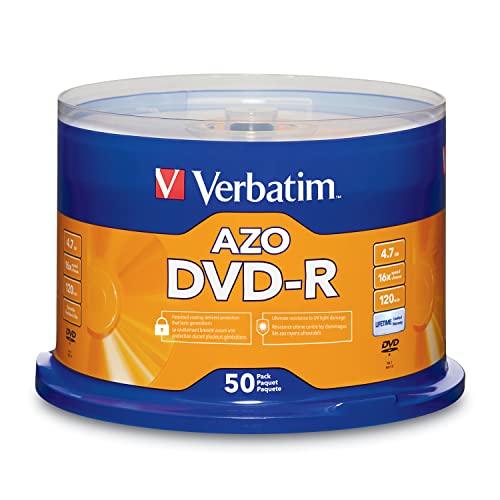
This 50-pack suits readers who burn in batches and want one dependable spindle instead of mixed brands. Each disc holds 4.7GB or two hours of video, so a family archive, a set of finished photo shoots, or a series of document backups can be organised disc by disc. The AZO dye layer matters most for archiving, because the listing presents it as the source of the disc’s read and write performance and archival life. Compatible with 1X to 16X writers, it fits older burners as well as faster modern drives, and the spindle keeps unused discs clean and stacked until needed.
Specs
- Brand: Verbatim
- Format: DVD-R, write-once recordable media
- Capacity per disc: 4.7GB, or 2 hours / 120 minutes of video
- Write speed: up to 16X, compatible with 1X to 16X DVD-R writers
- Recording dye: Advanced AZO recording dye
- Pack: 50 discs on a spindle
- Colour: Silver
- Manufacturer: Verbatim Americas, LLC
- Model / part number: 95101
- UPC: 023942951018
- Item weight: 1.9 pounds
- Full-disc burn time: approximately 5 minutes, as stated on Amazon
Best for: Home archivists and small offices burning batches of video, photos, and documents onto write-once discs for offline storage.
Watch out for: Confirm your burner and your playback equipment both support DVD-R before ordering, and remember that these discs cannot be erased or rewritten once burned.
Which One Fits Your Situation
You are copying family video to disc for safekeeping
Choose the Verbatim 50-pack and burn one event per disc, labelling each disc with the event name and date as soon as the burn finishes. The 4.7GB capacity covers a typical two-hour recording, and the write-once format means nobody can accidentally overwrite a family memory later. Keep a second copy of the most important events on a separate disc stored in a different place, because two copies in two locations protect against damage to a single disc and against loss.
You run a small office and need offline copies of records
Choose the Verbatim 50-pack for routine offline backups of finished records, invoices, and project files that no longer change. Burn at a moderate speed, verify each disc after burning, and file discs in labelled cases in date order so any record can be found without opening every disc. The spindle format keeps the remaining blank discs clean between backup sessions and keeps dust away from the recording surface, which matters when backups happen weekly rather than daily.
You are a photographer clearing finished shoots off a hard drive
Choose the Verbatim 50-pack and organise each shoot onto its own disc or set of discs, with a printed index of folder names tucked into the case. The 4.7GB capacity suits finished JPEG collections and smaller edited sets, though very large raw-photo shoots will need several discs. Because the discs are write-once, finalise the selection before burning so you are not left wishing you had included one more folder or one more edited image.
You only burn discs occasionally and want a simple supply
Choose the Verbatim 50-pack if you burn enough to work through a spindle, but be honest about your pace before ordering. Occasional burners should store the open spindle upright in a cool, dry place, handle discs by the edges, and use the oldest blank discs first. If you burn only a few discs a year, the same product still works, but protecting the unused discs from dust and sunlight matters more than it does for a fast-moving batch.
Common Mistakes
- Buying DVD+R or rewritable media when your player or recorder only accepts DVD-R, then discovering the burned disc will not load.
- Burning at the fastest speed available for an important archive instead of choosing a moderate, steady speed and letting the burn finish undisturbed.
- Labelling discs with a hard-tipped pen or a sticky label that can unbalance the disc or damage the surface, rather than using a soft marker made for discs and writing only on the labelled top side.
- Storing burned discs loose in a drawer, in sunlight, or in a hot car, where scratches, heat, and light can shorten the life of the recording layer.
- Keeping only one copy of irreplaceable video or documents on a single disc, with no second copy stored somewhere else in a separate building or with a trusted family member.
Frequently Asked Questions
How much can one DVD-R disc hold?
One disc in this guide holds 4.7GB, which Amazon describes as two hours of video. The amount of material that fits depends on file sizes and video compression: a two-hour video fits comfortably, while large photo collections or document archives fill the disc according to their total size. Check the size of your files before burning so you can split a large job across discs by a clear rule.
Can I rewrite a DVD-R disc after burning it?
No. DVD-R is a write-once format, so once a disc has been burned and finalised, its contents cannot be erased or overwritten. You can add files in a later session only if the disc was left open for multi-session burning and your software supports it, but the space already used stays used. Plan the contents before you burn, and keep a second copy of anything irreplaceable.
Will these discs work in any DVD burner?
They work in DVD-R writers rated from 1X to 16X, according to the Amazon listing, but you should still confirm that your drive lists DVD-R as a supported format. Most modern computer burners accept DVD-R, while some older standalone recorders and players are pickier. If you are unsure, check the drive manual or specifications, and burn one disc first to confirm playback on the equipment that will read it.
How should I store burned DVD-R discs?
Store burned discs upright in cases or on the spindle, in a cool, dry place away from direct sunlight and heat and away from damp basements. Handle discs by the edges or the centre hole, avoid touching the shiny recording surface, and label them with a soft disc marker. Keeping a second copy in a different location adds protection against damage, damp, or loss affecting every disc stored together.
More from Amazon
Programs that pair well with the guide above. Offers and eligibility are set by Amazon and may change.
A free business account with business pricing and bulk-buying tools for work, shop or home office.
Create a business accountFree shipping on eligible items, Prime Video and more. Eligible new members can start with a free trial.
Start a Prime free trialAudiobooks and podcasts to listen to on the go. Eligible new members can start with a free trial.
Try Audible freeAd-free music streaming. Eligible new subscribers can start with a free trial.
Try Music Unlimited freeAs an Amazon Associate we earn from qualifying purchases.


Write Your Review
No reviews yet. Be the first to share your experience!