

Key takeaways
- Compare the 5 best microSD cards for Android phones: A2 app performance, 512GB and 1TB picks, UHS-I speeds, and how to size a card to your phone.
An Android phone fills up quietly. One month it holds every photo and game you own, the next it warns you there is no room for a system update or a new video. A microSD card is the cheapest fix, but the choice is not just about capacity. A slow card makes apps lag, a card without the right app-performance rating stutters when games load, and a card larger than your phone supports simply never shows up. Picking well means matching the card to how you actually use the phone.
This guide is for Android phone owners who want more room without buying a new handset: people who shoot long videos, carry big game libraries, or keep offline maps and music for travel. Every card below was checked against its Amazon listing record for capacity, read and write speeds, and app-performance class, and every one carries an A2 rating, which is the part that matters most for running apps from a card.
Quick Picks
As an Amazon Associate we earn from qualifying purchases.
| Product | Best for | Key spec from title |
|---|---|---|
| Samsung PRO Plus 1TB | Biggest capacity with flagship speeds | 1TB, 180MB/s read, A2 |
| Samsung EVO Select 512GB | Best value for a mid-range phone | 512GB, 130MB/s read, A2 |
| SanDisk Extreme 256GB | Fastest card for 4K video on a phone | 256GB, 190MB/s read, A2 |
| Kingston Canvas Go Plus 1TB | Biggest capacity at the highest read speed | 1TB, 200MB/s read, A2 |
| Lexar PLAY Blue 512GB | Solid all-rounder for games and media | 512GB, 160MB/s read, A2 |
How to Choose
App Performance Class: A1 or A2
A card’s app-performance class decides how quickly apps stored on it open and respond. A1 cards deliver at least 1,500 random reads per second and 500 random writes. A2 cards raise that to 4,000 random reads and 2,000 random writes, which is why every card in this guide carries an A2 rating. The difference shows up when a game loads a new level or a camera app saves a burst of photos. A card with only a high sequential speed can still feel slow with apps, because apps read many small files rather than one long stream. If you plan to move apps to the card at all, treat A2 as a requirement, not a bonus.
Capacity and Your Phone’s Limit
Capacity is the simplest choice and the easiest to get wrong. A 512GB card holds roughly a decade of photos for most people, while 1TB suits anyone who records long 4K clips or keeps a large offline media library. Before buying, check the maximum card size your phone maker lists, because some older phones stop at 512GB and a 1TB card in such a slot may not be recognised at all. Newer flagship phones usually accept 1TB and beyond. Buying more room than your phone can use wastes money, while buying too little means you will be swapping cards or deleting files within a year. Match the card to the phone, not to the biggest number on the shelf.
UHS-I Speeds and What They Mean in a Phone
Every card in this guide is UHS-I, and that is the right call for a phone. Android phones use UHS-I slots, so a UHS-II card’s extra row of contacts has nothing to talk to and its higher speed never appears. What matters instead is the card’s printed read and write speeds within UHS-I. Read speed decides how fast files copy off the card and how quickly a game or gallery opens. Write speed decides how fast the camera saves video. A card rated at 200MB/s read and 160MB/s write moves files noticeably faster than one rated at 100MB/s, but only when the phone’s slot can keep up. Treat the printed numbers as ceilings, not guarantees.
Adopted Storage or Portable Storage
Android lets you use a card in two ways, and the choice changes everything about how the card behaves. As portable storage, the card holds photos, videos, music, and files, and you can pull it out and read it in another phone or a laptop. As adopted storage, the phone formats the card as part of its own internal memory, encrypts it, and lets apps live on it, but the card then works only in that phone and a factory reset wipes it. Not every phone offers adopted storage — several makers removed the option from their software. Decide which mode you need before buying, because adopted storage rewards a fast A2 card while portable storage mainly rewards capacity.
The 5 Best Options
Samsung PRO Plus 1TB

This is the flagship pick for a phone you plan to keep for years. With 1TB of room and read speeds up to 180MB/s, it holds a huge photo library, hours of 4K video, and a full set of games without asking you to delete anything. The A2 rating keeps apps stored on the card responsive, and the write speed of up to 130MB/s keeps the camera from stalling during long clips. It ships with a full-size SD adapter, so moving files to a laptop is simple. Samsung backs the card with a 10-year warranty.
Specs
- 1TB microSDXC capacity
- Up to 180MB/s read, up to 130MB/s write
- UHS-I, Class 10, U3, V30, A2
- Full-size SD adapter included
- Model MB-MD1T0SA/AM; first available July 2024
- 10-year limited warranty
Best for: A phone you keep for years with a huge photo and game library.
Watch out for: Samsung’s newer T7 and T9 microSD lines are now the current generation, so PRO Plus stock may thin out — confirm a live offer on this exact listing before ordering. Also, Samsung’s own datasheet gives the 1TB card lower durability figures than the rest of the line (24 hours of water protection instead of 72), so treat the headline protection claims with care.
Samsung EVO Select 512GB
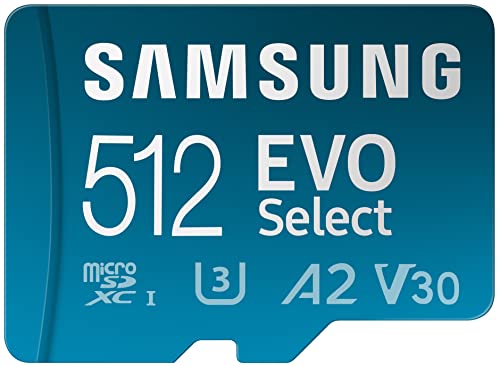
The value pick in this guide, and the one most Android owners should buy. Its 512GB of room covers years of photos, offline playlists, and a healthy game library, while the A2 rating keeps apps stored on the card quick to open. Read speeds reach up to 130MB/s, which is plenty for moving photos and video to a laptop. It includes a full-size SD adapter in the box. The only thing to watch is the generation: Samsung sells the EVO Select 512GB in more than one speed generation under the same name, so check the listing shows this 130MB/s version and its model number before you order.
Specs
- 512GB microSDXC capacity
- Up to 130MB/s read
- UHS-I, Class 10, U3, V30, A2
- Full-size SD adapter included
- Model MB-ME512KA/AM
Best for: Everyday Android owners who want the best value per gigabyte.
Watch out for: This listing is the 130MB/s generation; Samsung also sells a newer 160MB/s generation of the same 512GB card under a separate listing, so confirm the model number MB-ME512KA/AM in the selector.
SanDisk Extreme 256GB

The speed pick for anyone who records a lot of video on their phone. Its read speed of up to 190MB/s and write speed of up to 130MB/s move big 4K clips off the card quickly, and the A2 rating (4,000 random read operations per second, 2,000 writes) keeps games and apps stored on it responsive. SanDisk’s QuickFlow technology is what pushes the read speed past the usual UHS-I ceiling on compatible devices. The card is shockproof, temperature-proof, waterproof, and X-ray-proof, and it comes with a full-size SD adapter.
Specs
- 256GB microSDXC capacity
- Up to 190MB/s read, up to 130MB/s write
- UHS-I, Class 10, U3, V30, A2 (4,000 read IOPS, 2,000 write IOPS)
- SanDisk QuickFlow Technology
- Shockproof, temperature-proof, waterproof, X-ray-proof
- Full-size SD adapter included
- Model SDSQXAV-256G-GN6MA; first available June 2022
Best for: Shooting and moving 4K video on your phone.
Watch out for: SanDisk sells the Extreme in several generations — an older 160MB/s version and a newer 245MB/s refresh share the name, so confirm this listing is the 190MB/s SDSQXAV model before ordering.
Kingston Canvas Go Plus 1TB

The fastest card in this guide and the roomiest one, too. Its 1TB capacity swallows a lifetime of photos and video, while a read speed of up to 200MB/s and write speed of up to 160MB/s make it the quickest option here for copying files and saving long clips. The A2 rating keeps apps on the card responsive. Kingston aims this line at mobile gaming and adventure use, which fits a phone that travels. One caution: Kingston sells this card in two generations, and the older Gen3 version reads at up to 170MB/s, so confirm the listing is the Gen4 model before ordering.
Specs
- 1TB microSDXC capacity
- Up to 200MB/s read, up to 160MB/s write (256GB-1TB)
- UHS-I, Class 10, U3, V30, A2
- Model SDCG4/1TB
Best for: The biggest library at the highest read speed.
Watch out for: Confirm whether this listing bundles the full-size SD adapter, as some Gen4 listings sell the card alone; and confirm the model number SDCG4, since the older SDCG3 generation reads at up to 170MB/s.
Lexar PLAY Blue 512GB

The all-rounder for a phone that does a bit of everything. Its 512GB of room holds games, photos, and offline video with space to spare, and a read speed of up to 160MB/s keeps transfers quick. The A2 rating means games stored on the card load faster than they would from an A1 card, which matters for larger titles. Lexar positions the PLAY line for gaming devices and phones, and this Blue version is the current generation of that line. It is a sensible middle ground: faster than a budget card, roomier than the 256GB options, and without the cost of a 1TB flagship.
Specs
- 512GB microSDXC capacity
- Up to 160MB/s read
- UHS-I, Class 10, U3, V30, A2
- Model LMSPLBL512G-BNNNU
Best for: Games and media on a phone that does a bit of everything.
Watch out for: Lexar sells three PLAY lines — the original PLAY, this PLAY Blue, and the PLAY PRO, which is a microSD Express card with much higher speeds that needs an Express-compatible host. Confirm the listing is the PLAY Blue model LMSPLBL512G-BNNNU, not the Express version.
Which One Fits Your Situation
You keep a phone for years and hate deleting files
Pick the Samsung PRO Plus 1TB. Its 1TB of room and 180MB/s read speed mean you will not run out of space or patience, and the 10-year warranty matches a long ownership horizon. The Kingston Canvas Go Plus 1TB is the alternative if you want the fastest read speed in the guide, but the PRO Plus pairs big capacity with the strongest warranty of the five.
You run games and apps from the card
Pick the SanDisk Extreme 256GB if your library fits, or the Lexar PLAY Blue 512GB if it does not. Both carry A2 ratings with 4,000 random read operations per second, which is what keeps games loading quickly. The Extreme adds the fastest write speed of the smaller cards, while the PLAY Blue doubles the room for a bigger game collection.
You shoot long 4K clips on your phone
Pick the Kingston Canvas Go Plus 1TB. Its write speed of up to 160MB/s is the highest here, so long clips save without stalling, and the 1TB capacity holds hours of footage. The SanDisk Extreme 256GB is the cheaper alternative for shorter shoots, with a 130MB/s write speed and the same V30 rating for sustained video.
You want the most room for the least money
Pick the Samsung EVO Select 512GB. It is the value pick in this guide: 512GB of A2-rated room at the lowest cost per gigabyte of the five. The Lexar PLAY Blue 512GB is the step up if you want a faster read speed, but for photos, music, and offline video, the EVO Select covers the job.
Common Mistakes
- Buying a UHS-II card for a phone with a UHS-I slot — the extra speed never appears, so the premium is wasted.
- Picking a card larger than the phone’s maximum supported size — check the phone maker’s limit first, because an oversize card may never show up.
- Choosing an A1 card to run apps from — A1 delivers far fewer random operations per second than A2, so games and apps load slowly.
- Treating a card formatted as adopted storage like a portable one — adopted storage encrypts the card to one phone, and moving it elsewhere wipes it.
- Buying from an unfamiliar seller to save a little — counterfeit cards are common, so check the seller name on the listing and confirm the brand’s storefront.
Frequently Asked Questions
Can I move apps to a microSD card on any Android phone?
Not on every phone. Android supports moving apps to a card only when the phone offers adopted storage or the app itself allows it, and several makers have removed adopted storage from their software. Check your phone’s storage settings before buying: if there is no option to format the card as internal storage, the card can hold media and files, but apps must stay on the phone itself.
Will a UHS-II card be faster in my phone?
No. Android phones use UHS-I slots, so a UHS-II card’s second row of contacts has nothing to connect to and its higher speed never shows up. You would pay more for performance the phone cannot use. A fast UHS-I card with an A2 rating is the better buy for a phone, and every card in this guide is UHS-I for that reason.
Does a bigger card slow my phone down?
Capacity alone does not slow a phone down. What matters is the card’s speed class and how full it gets. A 1TB card with an A2 rating and fast sequential speeds performs just like a smaller card of the same line. Problems come from a slow card filled to the brim, because the phone has little free space left to write new files efficiently.
Can I move the card to a new phone?
Only if you used it as portable storage. A card formatted as portable storage moves between phones and laptops freely. A card formatted as adopted storage is encrypted to the original phone, so putting it in a new phone wipes it. Copy your photos and files off the card before switching phones, and check which mode the card uses in the phone’s storage settings first.
More from Amazon
Programs that pair well with the guide above. Offers and eligibility are set by Amazon and may change.
A free business account with business pricing and bulk-buying tools for work, shop or home office.
Create a business accountFree shipping on eligible items, Prime Video and more. Eligible new members can start with a free trial.
Start a Prime free trialAudiobooks and podcasts to listen to on the go. Eligible new members can start with a free trial.
Try Audible freeAd-free music streaming. Eligible new subscribers can start with a free trial.
Try Music Unlimited freeAs an Amazon Associate we earn from qualifying purchases.

Write Your Review
No reviews yet. Be the first to share your experience!