

Key takeaways
- Compare five 12TB external hard drives from WD and Seagate, from the plug-and-play Elements Desktop to the dual-drive My Book Duo, with backup notes.
Twelve terabytes is the capacity where an external drive stops being a scratch disk and becomes the main archive: a full photo library, years of video footage and several complete machine backups on a single unit. Every drive at this size is a mains-powered 3.5-inch desktop model, so the real differences are the software and security layer, whether the enclosure holds one disk or a mirrored pair, and what recovery help is bundled if the drive ever fails. This guide compares five current 12TB models and explains how to confirm that the drive which arrives is genuinely new.
As an Amazon Associate, we earn from qualifying purchases.
Quick answer
For most desks, the WD Elements Desktop 12TB is the straightforward pick: one big drive, USB 3.0, no software layer to manage. The Seagate Expansion 12TB adds bundled Rescue data recovery services, the WD My Book 12TB adds password protection and backup software, and the My Book Duo adds a mirrored RAID option.
WD 12TB Elements Desktop External Hard Drive (WDBWLG0120HBK-NESN)

The Elements Desktop is Western Digital’s plain bulk-storage line, and the 12TB model follows the same recipe as the rest of the range. As listed, it is a 3.5-inch desktop enclosure holding a single 12TB mechanical drive, connected by USB 3.0 and powered by an external adapter, sold for plug-and-play storage with nothing to install before the first copy. It arrives preformatted in NTFS for Windows, needs a reformat for Mac use, and carries a two-year limited warranty. There is no password protection, no hardware encryption and no bundled backup software, so it pairs with whatever backup tool your operating system already provides.
That simplicity is the point. The Elements suits a single large backup target or a media archive that has outgrown portable drives, and the absence of a software layer means one less thing to break during a restore. Two cautions apply. First, WD does not publish which internal drive model sits inside, and the fitted disk has changed over the product’s life, so judge it as an enclosure rather than as a known bare drive. Second, offers on this listing frequently come from marketplace sellers rather than Amazon itself, so confirm the seller, the new condition and the full warranty term before ordering.
Seagate Expansion 12TB External Hard Drive (STKP12000400)
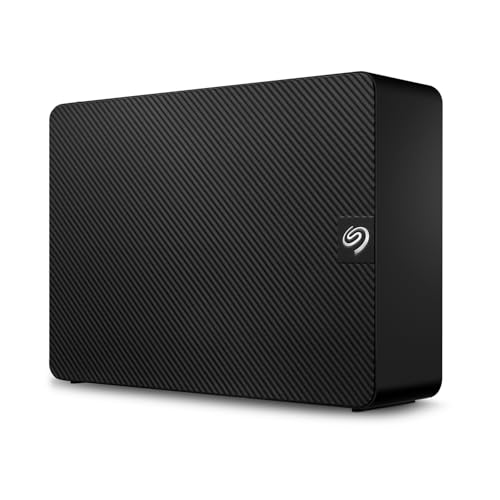
Seagate’s Expansion desktop line is the direct rival to the Elements, and the 12TB STKP12000400 matches it on the basics: a single 3.5-inch mechanical drive in a mains-powered enclosure, a USB 3.0 connection and drag-and-drop setup with no software required before the first files move. The listing includes an 18-inch USB 3.0 cable and an 18W power adapter in the box, and the drive is recognised automatically by Windows; Mac users reformat it for Time Machine use. The unit weighs 1,176 grams, light for a full-size desktop enclosure, which makes it easy to move between desks.
What separates the Expansion from the WD pair is the bundled Rescue Data Recovery Services named in the listing title. If the drive fails within the service term, Seagate attempts recovery of the data in its own labs, which is a meaningful safety net for an archive disk that holds the only copy of anything. The trade-offs are the short included USB cable, which limits placement to near the computer, and the absence of password protection or bundled backup scheduling software. Buyers who want automated backups will pair it with their operating system’s tool or a third-party utility, while buyers who value the recovery cover will accept those gaps.
WD 12TB My Book Desktop External Hard Drive (WDBBGB0120HBK-NESN)

The My Book is WD’s step up from the Elements, aimed at buyers who want the drive itself to handle security and scheduling. The 12TB model, WDBBGB0120HBK-NESN, is a single-drive 3.5-inch desktop enclosure on USB 3.0, and the listing names its two additions directly: password protection and auto backup software. The password protection locks the drive against unauthorised access, and the bundled backup software handles scheduled, automatic backups on Windows, so the archive stays current without manual copying sessions.
That makes the My Book the natural pick for a primary backup drive holding documents, photos and financial records that should not sit readable on an open disk. It works with both PC and Mac systems, though Mac users reformat the drive and lose the Windows-oriented software bundle in the process. The costs of the extra layer are real: the security software adds setup steps before the first backup, and a forgotten password means the locked data stays locked, since the protection is designed to resist exactly the kind of access a locked-out owner would attempt. Keep the password recorded somewhere separate from the drive. Buyers who only need bulk space for media files will not use either feature and can save the complexity by choosing the Elements instead.
WD 12TB My Book Duo Desktop RAID External Hard Drive (WDBFBE0120JBK-NESN)

The My Book Duo is the only dual-drive enclosure in this group. The 12TB WDBFBE0120JBK-NESN holds two desktop drives inside one case and is sold as a RAID device: it can be configured as one large striped volume for full capacity, as a mirrored pair that keeps a live copy of everything on the second disk, or as two separate drives. The connection is USB 3.1 Gen 1, with USB 3.0 compatibility, and the enclosure is listed as RAID-ready out of the box.
Mirroring is the reason to choose it. An archive mirrored inside the Duo survives the failure of one of its two disks without a restore from elsewhere, which no single-drive model here can offer. The honest limits matter just as much: RAID is not a backup, because deletion, corruption and ransomware reach both copies at once, and the Duo still needs an off-site or cloud copy behind it for real protection. The enclosure also costs more per usable terabyte in mirrored mode, since half the raw capacity goes to the mirror. Buyers who already keep a second copy elsewhere gain little from the Duo and will move files faster with a simpler single-drive model; buyers consolidating their only archive onto one desk unit gain genuine resilience from it.
WD_BLACK 12TB D10 Game Drive for Xbox (WDBA5E0120HBK-NESN)

The WD_BLACK D10 is the performance outlier in this group: a 12TB desktop drive built for game libraries rather than file archives. As listed, its drive spins at 7,200 RPM with active cooling, and WD rates transfer speeds up to 250 MB/s, well above the figures quoted for the general-purpose drives above. The enclosure connects over USB 3.2 Gen 1 with a USB Type-A to Micro-B cable, is powered by an included AC adapter, and adds two 7.5W USB Type-A charging ports on the case for controllers and accessories. It measures 7.68 by 4.92 by 1.73 inches and weighs 2.16 pounds.
WD markets it for Xbox first: the listing states storage for up to 300 games based on a 36GB average, includes a one-month Xbox Game Pass Ultimate membership, and supports storing and playing Xbox One games while archiving Xbox Series X|S titles. It also works as a fast general-purpose drive on a PC, which is how backup-focused buyers should read it. The three-year limited warranty is the longest in this group. The compromises are the gaming premium in its positioning, fan-cooled hardware that is not the quietest option here, and console-first formatting that PC or Mac users will wipe on first setup anyway.
How to choose
Start with the copy strategy. A single-drive model is a backup target or an archive, and it only protects data that also exists somewhere else; a mirrored enclosure like the My Book Duo adds resilience against one disk failure but still is not a backup by itself. Next, the software layer. Password protection and scheduled backup software, as on the My Book, suit a primary backup drive holding personal records. A bare drive like the Elements or Expansion suits media archives and second copies, where the operating system’s tools do the scheduling. Then check the bundled recovery cover: the Seagate’s Rescue services are worth weighing if the drive will hold anything irreplaceable. Finally, buy carefully. Large desktop drives are a known channel for returned or stripped units sold as new, so order from Amazon itself or an authorised seller, check the drive’s power-on hours with a SMART utility when it arrives, and register the warranty while the return window is open.
Who should skip
Skip this capacity entirely if a 4TB or 8TB drive covers your library, since the smaller desktop models cost less and run quieter. Skip the My Book Duo if you already keep an off-site copy, because the mirror then duplicates protection you own. Skip the WD_BLACK D10 if the drive will live in a bedroom or a quiet studio and never touch a console. And skip every drive here if you need portable storage: all five are mains-powered desktop units that belong on a desk, not in a laptop bag.
FAQ
Is 12TB overkill for a home backup drive?
For most households, no. A full-system backup with several restore points, a photo library in RAW format and a folder of phone videos commonly grows past 4TB within a few years. A 12TB drive leaves room for that growth and for keeping multiple backup generations, which is what makes restoring an older, uncorrupted copy possible after a problem is noticed late.
Can I use a 12TB external drive with both Windows and Mac?
Yes, with a formatting decision first. The WD drives here arrive formatted for Windows, and reformatting erases them, so set the file system before loading data. Formatting in exFAT gives read and write access on both systems for large files. Mac users who want Time Machine support need Apple’s own format instead, which gives up Windows access on that drive.
Does a mirrored RAID drive replace a backup?
No. Mirroring protects against one physical disk failing, and nothing else. Accidental deletion, file corruption, theft and malware all reach the mirror at the same moment they reach the original. A backup is a separate copy on a separate device, ideally in a separate place. The My Book Duo reduces one risk; it does not remove the need for that second copy.
Why do these drives need a power adapter?
The 3.5-inch desktop drives inside these enclosures draw more power than a USB port supplies, so each model runs from a mains adapter and cannot be bus-powered like a small portable drive. That also means they stay on the desk: they are backup and archive targets for a fixed workstation, not drives to carry between locations.
Final verdict
The WD Elements Desktop 12TB is the default recommendation: simple, capacious and free of software friction. Choose the Seagate Expansion 12TB instead if the bundled Rescue recovery services matter more than backup software, and the WD My Book 12TB if password protection and automatic scheduling are the point of the purchase. The My Book Duo earns its place when the archive has no second home and mirroring is the protection available. The WD_BLACK D10 is the specialist pick, fastest here and built for game libraries, with the longest warranty in the group.
Product and ASIN Reference
| Product | ASIN |
|---|---|
| WD 12TB Elements Desktop External Hard Drive (WDBWLG0120HBK-NESN) | B07X4V2M3B |
| Seagate Expansion 12TB External Hard Drive (STKP12000400) | B093BSR3H4 |
| WD 12TB My Book Desktop External Hard Drive (WDBBGB0120HBK-NESN) | B07X3RBTQT |
| WD 12TB My Book Duo Desktop RAID External Hard Drive (WDBFBE0120JBK-NESN) | B074R59TLB |
| WD_BLACK 12TB D10 Game Drive for Xbox (WDBA5E0120HBK-NESN) | B07XV8JN31 |
More from Amazon
Programs that pair well with the guide above. Offers and eligibility are set by Amazon and may change.
A free business account with business pricing and bulk-buying tools for work, shop or home office.
Create a business accountFree shipping on eligible items, Prime Video and more. Eligible new members can start with a free trial.
Start a Prime free trialAudiobooks and podcasts to listen to on the go. Eligible new members can start with a free trial.
Try Audible freeAd-free music streaming. Eligible new subscribers can start with a free trial.
Try Music Unlimited freeAs an Amazon Associate we earn from qualifying purchases.

Write Your Review
No reviews yet. Be the first to share your experience!