

Key takeaways
- Compare five cable modems for NAS and home office networks, from DOCSIS 3.0 models to DOCSIS 3.1 picks with 2.5 gigabit ports and activation checks.
A cable modem is the front door of every backup that leaves the building. Remote access to a NAS, replication to a second location, and cloud backup uploads all pass through it, usually overnight and unattended, so a modem that drops sync or runs out of channel capacity quietly breaks backup windows. Owning the modem instead of renting the provider gateway also separates the wide-area link from the router, so Wi-Fi upgrades never disturb the connection your storage depends on. The five modems below cover the main cable tiers, with channel counts, Ethernet ports, and provider compatibility compared.
As an Amazon Associate, we earn from qualifying purchases.
Quick answer
For most home networks, the Netgear CM500 covers the common mid-range cable tiers and feeds any router or NAS setup behind it. The ARRIS SURFboard SB6183 matches it with a detailed signal status page. Gigabit plans call for DOCSIS 3.1: the Netgear CM1000, the dual-port ARRIS SB8200, or the Motorola MB8611 with its 2.5 gigabit port.
Netgear CM500 Cable Modem
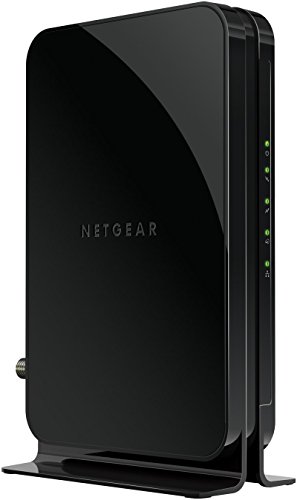
The CM500 is the sensible starting point for a storage-focused home network. It is a DOCSIS 3.0 modem bonding 16 downstream and 4 upstream channels, a combination suited to cable internet tiers up to roughly 300 megabits per second, which covers the entry and mid-level plans sold by Xfinity, Spectrum and Cox, the three providers Netgear lists it as certified for. That upstream channel count matters more than the headline download figure for backup work, since offsite replication and cloud uploads are limited by the upload side of the connection. The CM500 is a modem only, with a single gigabit Ethernet port on the back, so it hands the connection to whatever router, firewall, or switch already runs the local network and leaves NAS addressing and port forwarding entirely under your control. The compact vertical chassis vents heat passively and carries clear status lights on the front, which makes it easy to tell at a glance whether a failed overnight job was a line problem or a local one. Setup follows the standard pattern of coax, Ethernet, then activation through the provider. Households already paying for gigabit tiers should skip ahead to the DOCSIS 3.1 models below.
ARRIS SURFboard SB6183 Cable Modem

The SB6183 comes from ARRIS, maker of the SURFboard line that cable technicians have installed for years, and it remains a dependable DOCSIS 3.0 choice for always-on networks. It bonds 16 downstream and 4 upstream channels, suiting internet plans up to the mid hundreds of megabits, and it is approved for use with Xfinity, Spectrum and Cox services. Its most useful feature for a storage household is the browser-based status page, which shows channel signal levels in detail; when an overnight replication job fails, those figures help separate a degrading coax line from a problem inside the home. The front panel reports power, downstream, upstream and online status as separate lights, giving the same distinction in seconds without opening a browser. Like the CM500 it is a modem only with one gigabit Ethernet port, so an existing router keeps control of the LAN and the NAS keeps its established address and forwarding rules. The compact white chassis runs cool on a shelf and asks nothing after activation. Choose the SB6183 when the plan sits in the common speed bands and diagnostic visibility matters as much as raw throughput.
Netgear CM1000 Cable Modem

The CM1000 is the step into DOCSIS 3.1, the newer standard that gigabit cable plans require. It combines DOCSIS 3.1 channels with 32 downstream and 8 upstream DOCSIS 3.0 channels, so it runs at full speed on gigabit tiers from Xfinity, Spectrum and Cox while staying compatible with slower plans if the household downgrades later. The doubled upstream channel count over the DOCSIS 3.0 models is the specification backup users feel most: large initial uploads and nightly incremental jobs share the upload path with more headroom. It is again a modem-only design with a single gigabit Ethernet port, ready to feed a mesh system, a firewall, or the switch a NAS already hangs off, and it supports IPv6 alongside the channel bonding features providers use to manage congested neighbourhoods. Netgear builds the CM1000 in a sturdy vertical chassis with front status lighting and a power switch, a small convenience many modems omit and one that makes a clean restart simpler than pulling a power brick. If the current plan is already in gigabit territory, or an upgrade looks likely during the modem’s service life, the CM1000 is the economical way to buy DOCSIS 3.1 once.
ARRIS SURFboard SB8200 Cable Modem
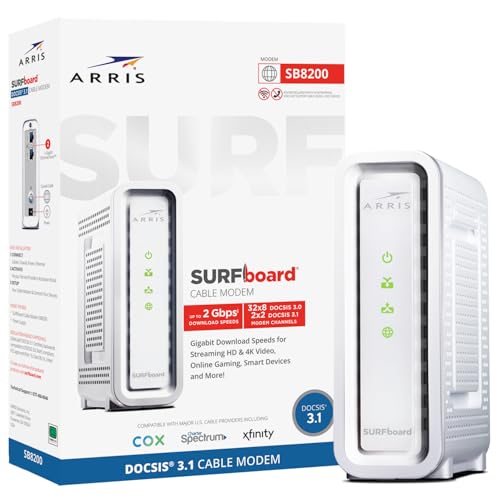
The SB8200 is the flagship of the SURFboard line and the pick for demanding home networks. It is a DOCSIS 3.1 modem with 32 downstream and 8 upstream DOCSIS 3.0 channel support, approved for gigabit-class plans on Xfinity, Spectrum and Cox. The detail that sets it apart sits on the back panel: two gigabit Ethernet ports. Most homes use one, but the second supports link aggregation with a compatible router, feeding speeds beyond what a single gigabit port allows, and it can serve certain dual-network arrangements where the storage network and the household network meet the modem separately. The status page gives detailed signal readings and event logging, which advanced users and support technicians appreciate when chasing intermittent line faults that only appear during long transfers. Inside, generous memory and a capable chipset keep the unit responsive when streams, calls and backup jobs compete for bandwidth at once. Physically it is a compact, well-vented unit with clear front indicators. Buyers who expect to keep a modem through several plan changes, or who run a home office where a dropped connection is expensive, will find the SB8200 the most future-ready ARRIS option here.
Motorola MB8611 Cable Modem
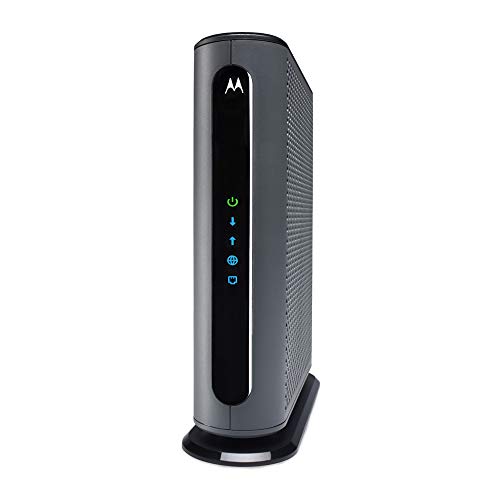
The MB8611, from Motorola’s licensed home networking line, is a DOCSIS 3.1 modem built for gigabit and multi-gig households. Its standout feature is a 2.5 gigabit Ethernet port, which removes the single-gigabit ceiling found on most modems: pair it with a router or switch that has a matching fast port and the link between modem and local network stops being the limit as providers push plans past one gigabit. For a NAS that also serves as the household media and backup hub, that headroom keeps wide-area speed and local speed from constraining each other. The MB8611 supports 32 downstream and 8 upstream DOCSIS 3.0 channels alongside DOCSIS 3.1, and it is certified for Xfinity, Spectrum and Cox gigabit services. Motorola includes a quick-start guide that walks through provider activation clearly, and the modem’s status interface reports signal levels per channel for troubleshooting dropped connections. The design is a plain, well-ventilated black tower that disappears into a networking shelf. Like every model here it is a modem only, so a separate router is required. For the fastest cable tiers, the MB8611 is the most forward-looking pick in this group.
How to choose
Match the modem to the provider first: confirm the model appears on the provider’s approved list for the exact plan, because an unlisted modem cannot be activated. Then match the standard to the speed tier, remembering that backup and replication traffic lives on the upstream channels, so channel counts matter beyond the advertised download tier. DOCSIS 3.0 models with 16 downstream and 4 upstream channels suit plans up to the mid hundreds of megabits, while gigabit plans need DOCSIS 3.1. Check the Ethernet port next: a single gigabit port caps the local handoff, a 2.5 gigabit port removes that ceiling, and dual ports enable link aggregation on routers that support it. Every modem here is a modem only, so an existing router or firewall stays in charge of the LAN. Before ordering any model, confirm the exact unit against the CPSC recall database as a routine safety step, and keep the MAC address label and receipt handy for activation.
Who should skip
Skip this category entirely if the connection is fibre, DSL, or fixed wireless, because a cable modem can only terminate a coaxial cable network. Skip buying if the provider bundles phone service that requires its own gateway, or if the gateway is included in the plan with no separate rental line to eliminate. Households planning to move within the year may prefer to keep renting rather than buy hardware for a short stay. And anyone whose storage sits entirely on local drives with no remote access, replication, or cloud backup should simply choose on household internet needs instead.
Frequently asked questions
Will any of these modems work with my provider?
They are built for the three largest cable providers, Xfinity, Spectrum and Cox, and each model appears on those providers’ approved lists for suitable speed tiers. Smaller regional cable companies often support the same hardware, but activation is refused for unlisted models, so check the provider’s own approved modem list for your plan before ordering.
What is the difference between DOCSIS 3.0 and DOCSIS 3.1?
DOCSIS 3.1 is the newer cable standard and is required for gigabit-tier plans, using additional spectrum and more efficient modulation. DOCSIS 3.0 modems remain fine for plans up to the mid hundreds of megabits. Providers are steadily moving capacity to 3.1, so a 3.1 modem is the longer-lived purchase even when the current plan is slower.
Do I still need a router with one of these modems?
Yes. Every modem in this roundup is a modem only: it converts the cable signal into a single Ethernet connection and provides no Wi-Fi and no local routing. Connect it to the router, firewall, or mesh system that already runs the network. That separation is deliberate, since it lets the Wi-Fi side change later without touching the modem or the NAS configuration behind it.
How does activation work after buying a modem?
Connect the coax cable and power, attach the router, then open the provider’s app or activation page from a connected device, or call the provider and read out the modem’s MAC address from its label. Activation usually completes in minutes. Return the rented gateway promptly afterwards and keep the return receipt, so the rental charge stops cleanly and the old hardware is documented as returned.
Final verdict
The Netgear CM500 is the right buy for the most common speed tiers, and the ARRIS SB6183 matches it while adding a status page that makes line faults easier to diagnose. Gigabit households should choose between the Netgear CM1000 for straightforward DOCSIS 3.1, the ARRIS SB8200 for its dual ports and aggregation support, and the Motorola MB8611 for its 2.5 gigabit port. Any of the five gives a NAS a stable, owned front door to the internet; the correct choice is the one matched to the provider and the tier.
Product and ASIN Reference
| Product | ASIN |
|---|---|
| Netgear CM500 Cable Modem | B06XH46MWW |
| ARRIS SURFboard SB6183 Cable Modem | B00MA5U1FW |
| Netgear CM1000 Cable Modem | B01I5TJGSE |
| ARRIS SURFboard SB8200 Cable Modem | B07DY16W2Z |
| Motorola MB8611 Cable Modem | B08DDFKXKC |
More from Amazon
Programs that pair well with the guide above. Offers and eligibility are set by Amazon and may change.
A free business account with business pricing and bulk-buying tools for work, shop or home office.
Create a business accountFree shipping on eligible items, Prime Video and more. Eligible new members can start with a free trial.
Start a Prime free trialAudiobooks and podcasts to listen to on the go. Eligible new members can start with a free trial.
Try Audible freeAd-free music streaming. Eligible new subscribers can start with a free trial.
Try Music Unlimited freeAs an Amazon Associate we earn from qualifying purchases.



Write Your Review
No reviews yet. Be the first to share your experience!