

Key takeaways
- The best portable NAS picks for travel, field work and small desks, comparing one-bay, two-bay and palm-sized models on specs, RAID and backup safety.
A portable NAS is a network drive small and light enough to move between a desk, a hotel room and a job site, yet still able to back up laptops and phones automatically and share files with a small team. The five picks below favor compact one-bay and two-bay designs, plus one palm-sized all-flash unit, and each was chosen with data safety in mind.
As an Amazon Associate, we earn from qualifying purchases.
Quick answer
For most travelers, the Synology DS124 is the portable NAS to buy: one bay, full DSM software and a footprint that fits a carry-on side pocket. Need mirrored drives in a small box, pick the TerraMaster F2-210. The palm-sized Synology DS620slim suits SSD-heavy field kits, while the WD My Cloud Home 4TB is the simplest plug-in option.
Synology DS620slim

The DS620slim is the closest thing here to a travel NAS built for professionals. Six bays hold 2.5-inch SATA hard drives or SSDs up to 15 mm thick, so a field kit can carry several terabytes of flash in a chassis smaller than most paperback novels. An Intel Celeron J3355 dual-core processor running at 2.0 GHz, with burst speeds up to 2.5 GHz, drives Synology DSM, and the 2 GB of DDR3L memory expands to 6 GB for heavier app loads. Two Gigabit Ethernet ports support link aggregation and failover, and USB 3.2 Gen 1 ports handle fast one-touch copies from cards and drives at a shoot or site visit.
Because the bays take SSDs, the unit tolerates being moved while powered down far better than a 3.5-inch tower, and it runs quietly enough for a hotel desk. RAID options across six bays include mirrored and parity layouts, so a single failed drive does not end a trip’s work. Buyers should budget for the drives separately, since the enclosure ships diskless, and note that 2.5-inch hard drives top out at lower capacities than desktop drives. For photographers, video crews and consultants who want real redundancy in a bag-friendly box, this is the strongest pick.
Synology DS124

The DS124 trims the portable NAS idea down to a single bay and a very small tower. It accepts one 3.5-inch SATA drive, sold separately, and runs the same DSM software as Synology’s larger models, including Synology Drive for file sync, Photos for phone backup and Snapshot Replication for point-in-time copies. The processor is a Realtek RTD1619B quad-core chip at 1.7 GHz, paired with 1 GB of DDR4 memory that is not expandable. One Gigabit Ethernet port and two USB 3.2 Gen 1 ports cover networking and external backup duties.
At well under a kilogram, the DS124 disappears into a backpack and sips power, which suits long stays in rentals, dorms and site offices. The honest limit is redundancy: one bay means one copy on the device, so the USB ports matter. Pair it with an external drive on a scheduled Hyper Backup job and the setup stays genuinely safe. The modest processor also rules out heavy transcoding and big virtualization plans, which the maker does not claim for it. As a first NAS, a travel backup hub or a quiet always-on sync box for one person, the DS124 covers the essentials with the least bulk in this roundup.
QNAP TS-133

QNAP’s TS-133 answers the DS124 with a slightly stronger brain in the same one-bay travel format. An ARM Cortex-A55 quad-core processor at 1.8 GHz and 2 GB of onboard DDR4 memory, twice the memory of the Synology above, run QTS with snapshot support, a feature entry-level buyers often miss until a file is encrypted or deleted by mistake. The single bay takes a 3.5-inch SATA hard drive or a 2.5-inch SSD with an adapter, sold separately, and 4 GB of flash memory with dual boot protection guards the operating system itself. Networking is one Gigabit Ethernet port, joined by one USB 3.2 Gen 1 port and two USB 2.0 ports.
Remote access runs through myQNAPcloud Link, which avoids router port forwarding and matters on hotel and rental networks where you do not control the router. The trade-offs mirror the DS124: no internal redundancy, and the ARM chip is aimed at backup, sync and media serving rather than containers and virtual machines. QNAP’s app catalog is broad, though new users face a busier interface than DSM. For a traveler who wants snapshots and a little more memory headroom in the smallest QNAP chassis, the TS-133 is the natural pick.
TerraMaster F2-210
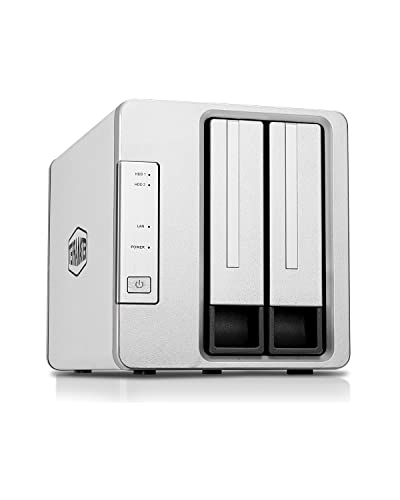
The F2-210 is the value route to mirrored storage that still travels well. Two bays accept 3.5-inch or 2.5-inch SATA drives and can run as RAID 1, so one drive can fail on the road without losing the only copy of a project. A Realtek RTD1296 quad-core processor at 1.4 GHz with 1 GB of memory runs TerraMaster’s TOS software, covering backup, remote access and media streaming. TerraMaster quotes read and write speeds up to 124 MB/s in a RAID 0 test setup, and the single Gigabit Ethernet port is the real ceiling for daily transfers. Two USB 3.0 ports allow scheduled backups to an external drive.
The enclosure is larger than the one-bay picks and needs its own power brick, so it suits a checked bag, a vehicle kit or a semi-permanent second desk more than a carry-on. The 1 GB of memory is not expandable and keeps multitasking modest, and TOS, while much improved, still trails DSM and QTS in polish and third-party apps. None of that changes the core appeal: this is the lowest-effort way in the group to keep two mirrored drives in a compact, quiet box that one person can relocate in minutes.
WD My Cloud Home 4TB
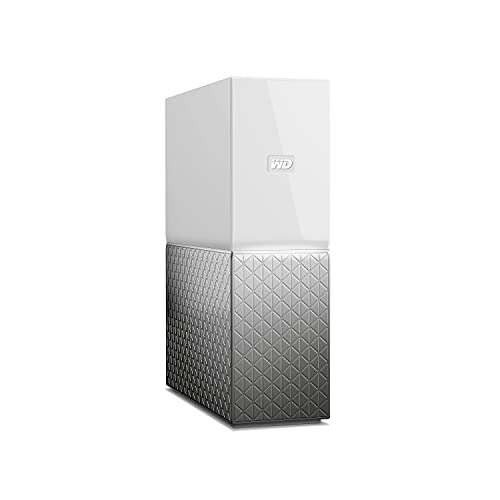
The My Cloud Home takes the opposite approach to the diskless picks: a 4 TB hard drive is already inside, setup runs from a phone app, and there is almost nothing to configure. The book-sized enclosure connects over one Gigabit Ethernet port, and a single USB 3.0 port imports photos and files from flash drives and external disks. Phones back up automatically through the app, and files are reachable remotely through WD’s cloud service. WD does not state the processor or memory for this model, a fair signal that it is an appliance rather than a small server.
Two cautions matter for this site’s readers. First, a single non-removable drive means no redundancy and no easy drive swap when it fails. Second, the stored data is tied to the enclosure’s electronics, so a dead unit can turn a simple recovery into a specialist job, and remote access depends on WD’s service staying online; WD’s April 2023 network breach took its cloud services down for days. Treat this box as a convenient sync target, keep another copy of anything important elsewhere, and it earns its place as the simplest portable option here.
How to choose
Start with redundancy. A one-bay portable NAS is a backup target, never a sole copy: schedule an external drive or cloud job so the data survives the unit being lost, stolen or dropped. Two mirrored bays, as in the F2-210, protect against a drive failure but not against losing the bag. Next, match the media to the mission. SSDs, including the 2.5-inch drives the DS620slim takes, shrug off travel knocks that can kill a spinning disk, while a single large 3.5-inch drive wins on capacity per trip. Check power before you pack: every pick here runs from its own mains adapter, none is powered over USB-C, and a small travel UPS or inverter is the safe answer for vehicles and unstable site power.
Security deserves the same care as hardware. Ransomware campaigns such as Qlocker and DeadBolt hit internet-exposed QNAP units in 2021 and 2022, and Synology patched a serious DSM flaw, CVE-2024-10441, in 2024 after it was demonstrated in competition. Neither history disqualifies a brand; both say the same thing. Update the firmware before a trip, turn off services you do not use, prefer the vendor’s relay or a VPN over open port forwarding, and keep snapshots enabled so a bad day is an inconvenience rather than a recovery bill.
Who should skip
Skip this category if your storage never leaves one room: a standard two-bay or four-bay desktop NAS offers more capacity, faster networking and better value once portability stops mattering. Skip it, too, if you only need to move files you are actively editing; a pocket USB4 SSD is smaller, faster and cheaper for that job. Anyone hoping to run several virtual machines, transcode 4K video for a household or serve a busy office should look at larger Intel-based models instead, because every processor here is chosen for efficiency, not muscle. Finally, if the plan is one drive holding the only copy of irreplaceable work, no portable NAS fixes that; buy the backup drive first.
FAQ
Can a portable NAS work without an internet connection?
Yes. On a local network or a direct cable connection, file sharing, backups and media streaming keep working with no internet at all. Only remote access, cloud sync and update checks need the internet. A small travel router can create the local network in a hotel room when the venue Wi-Fi keeps devices isolated from each other.
Is RAID worth it in a NAS this small?
RAID 1 mirroring, offered by the two-bay and six-bay picks, keeps you working when one drive fails mid-trip, which is when replacement drives are hardest to source. It does not protect against theft, deletion or ransomware, so it complements an external or cloud backup rather than replacing one. For a single-bay unit, the scheduled USB backup job is the equivalent safeguard.
Can I run one of these from a power bank or a car?
Not directly. All five picks use their own mains power adapters, and none accepts USB-C power, so a power bank with a pure sine wave AC outlet or a small inverter is required away from wall sockets. Check the adapter’s wattage on its label before pairing, and shut the NAS down cleanly before moving it to protect the drives.
Which drives should I install for travel use?
Choose 2.5-inch SSDs where the budget allows, since flash storage has no moving parts and tolerates vibration and knocks far better than spinning disks. In 3.5-inch bays, pick NAS-rated CMR drives from the maker’s compatibility list, format with a snapshot-capable file system where offered, and run a full surface scan before trusting a drive with the only copy of new work.
Final verdict
The Synology DS124 is the default portable NAS for most readers: full DSM software, tiny footprint and honest limits, provided an external backup job is part of the setup. The DS620slim is the upgrade for SSD-based field kits that need real RAID in a palm-sized chassis, and the QNAP TS-133 matches the DS124 with snapshots and double the memory. The TerraMaster F2-210 delivers mirrored drives for the least fuss per bay, while the WD My Cloud Home 4TB suits buyers who value app-simple setup over flexibility, with the recovery caveats above kept firmly in mind.
Product and ASIN Reference
| Product | ASIN |
|---|---|
| Synology DS620slim 6-Bay 2.5-Inch NAS (Diskless) | B07V6CC4M2 |
| Synology DS124 1-Bay NAS (Diskless) | B0BYJ165RS |
| QNAP TS-133 1-Bay NAS (Diskless) | B09VK79GTZ |
| TerraMaster F2-210 2-Bay NAS (Diskless) | B07PWDTBJ6 |
| WD My Cloud Home 4TB Personal Cloud | B076CTK55W |
More from Amazon
Programs that pair well with the guide above. Offers and eligibility are set by Amazon and may change.
A free business account with business pricing and bulk-buying tools for work, shop or home office.
Create a business accountFree shipping on eligible items, Prime Video and more. Eligible new members can start with a free trial.
Start a Prime free trialAudiobooks and podcasts to listen to on the go. Eligible new members can start with a free trial.
Try Audible freeAd-free music streaming. Eligible new subscribers can start with a free trial.
Try Music Unlimited freeAs an Amazon Associate we earn from qualifying purchases.



Write Your Review
No reviews yet. Be the first to share your experience!