

Key takeaways
- Learn how cmr and smr hard drives differ, why SMR write speeds fall on long transfers, and how to check a model's recording type before buying.
- Top Pick: Western Digital Red Plus 4TB (WD40EFPX)
- Runner-up: Seagate IronWolf 4TB (ST4000VN006)
- Also consider: Toshiba X300 10TB (HDWR11AXZSTA)
Two hard drives can carry the same capacity, the same 3.5-inch shell, and the same SATA connector, yet behave very differently once you start pushing large amounts of data onto them. The hidden reason is the recording technology used on the platters. Conventional Magnetic Recording, shortened to CMR, is the traditional method. Shingled Magnetic Recording, or SMR, overlaps data tracks to squeeze more capacity out of the same platters, and trades away sustained write performance to get it.
The problem for buyers is that recording technology rarely appears on the box, and two models in the same product family can use different methods. This guide explains how CMR and SMR actually work, why SMR drives slow down during long writes, which jobs each type suits, and how to confirm the recording type of an exact model before you buy. Five verified CMR drives are then used as worked examples across NAS, desktop, and surveillance classes.
As an Amazon Associate, we earn from qualifying purchases.
Quick answer
Choose CMR for any drive that will be rewritten often, rebuilt in a RAID array, or worked hard for long stretches, because its write speed stays steady. SMR is acceptable for cold storage, media archives, and backup targets that are written once and mostly read. Always confirm the exact model number on the manufacturer’s spec sheet before buying.
How to choose
Recording technology is a permanent hardware property. It cannot be changed by firmware, formatting, or settings, so the only decision point is the purchase itself. The subsections below cover how each method writes data, why one of them slows down, where each belongs, and how to verify a specific drive.
What CMR recording does
A CMR drive writes each data track side by side with a small guard space between tracks, much like lanes on a road. Because no track overlaps its neighbor, the write head can rewrite any single track without touching the data beside it. Writes behave predictably at any fill level, and the drive sustains long transfers at a steady rate from the first gigabyte to the last. This consistency is why CMR remains the default for NAS, performance desktop, surveillance, and enterprise drives.
What SMR recording does differently
An SMR drive writes tracks so that each new track partly overlaps the previous one, like shingles on a roof. Overlapping tracks are narrower, so more of them fit on a platter and capacity rises without adding platters. Reading is unaffected, because the read element is narrower than the write element. Writing is where the cost lands: rewriting one track would corrupt the overlapped track behind it, so the drive must read an entire band of tracks into memory, modify the data, and rewrite the whole band. Bands are large, often hundreds of megabytes, which makes sustained rewriting far more expensive on SMR than on CMR.
Why SMR write speeds fall during long writes
Most consumer SMR drives are drive-managed, meaning the drive hides the shingling behind a media cache. Incoming writes first land in a CMR region or a reserved cache area at full speed, and the drive reorganizes that data into shingled bands later, during idle moments. A short copy finishes before the cache fills, so the drive feels fast. A long copy, a huge backup, or a RAID rebuild never gives the drive idle time. Once the cache is exhausted, every new write forces band rewrites in real time, and throughput can collapse to a fraction of its starting rate. In a RAID array the effect is worse: a drive busy rewriting bands can respond so slowly that the controller marks it failed.
Match the technology to the job
CMR is the safe choice for NAS and RAID storage, home servers, desktops that handle frequent downloads and game installs, surveillance recorders writing around the clock, and any drive that will be re-synced or rebuilt. SMR has one legitimate strength: capacity per platter, which makes it cheap bulk storage. It suits a backup target written in scheduled bursts with idle time between jobs, a media archive filled once and then mostly read, or a cold storage drive holding files that rarely change. The mistake is not buying SMR; it is buying SMR unknowingly for a rewriting workload.
Where SMR shows up most often
SMR is common in 2.5-inch portable drives, in budget desktop lines, and in some mid-capacity 3.5-inch models. Well-known examples include many WD Blue desktop models, most Seagate BarraCuda desktop models, the base WD Red line sold for small NAS units, and several Toshiba P300 models. External USB drives frequently contain SMR drives inside, whatever the enclosure branding suggests. Large helium-filled NAS and enterprise drives are generally CMR. Capacity alone does not settle the question, though, which is why the model check below matters.
How to check a model before you buy
Start with the exact model number, not the product family name, because families mix technologies. Search the manufacturer’s site for that model’s datasheet and look for a recording technology field: WD, Seagate, and Toshiba all publish it for current drives, and WD maintains a list identifying each of its models as CMR or SMR. Retail listings are less reliable, so treat the spec sheet as the authority. If a listing hides the model number, or the datasheet never states the recording type, pick a model that documents it. RAID buyers should also confirm every drive in the array uses the same recording technology.
The 2020 disclosure controversy, briefly
In April 2020, testing by storage publications showed that certain WD Red NAS drives used drive-managed SMR even though they were marketed for RAID use, and undisclosed SMR models were also identified in Seagate BarraCuda and Toshiba P300 desktop lines. The fallout pushed all three makers to publish recording technology openly. WD renamed its CMR NAS line Red Plus, released a full list of which of its drives use each technology, and later settled a class action lawsuit in the United States over the Red drives. The lasting lesson is simple: the information is now published, but only for shoppers who check the exact model.
Western Digital Red Plus 4TB (WD40EFPX)

The Red Plus line exists because of the controversy described above: it is WD’s clearly labeled CMR NAS range, and the 4TB model WD40EFPX shows how the check should work. WD’s specifications for this model state the recording technology as CMR outright. The drive spins at 5,400 RPM with a 256 MB cache, carries NASware firmware tuned for always-on operation, and is rated for one to eight bay NAS systems. It demonstrates the first rule of this guide: a NAS drive whose maker prints CMR on the spec sheet, next to the exact model number, needs no guesswork.
Seagate IronWolf 4TB (ST4000VN006)
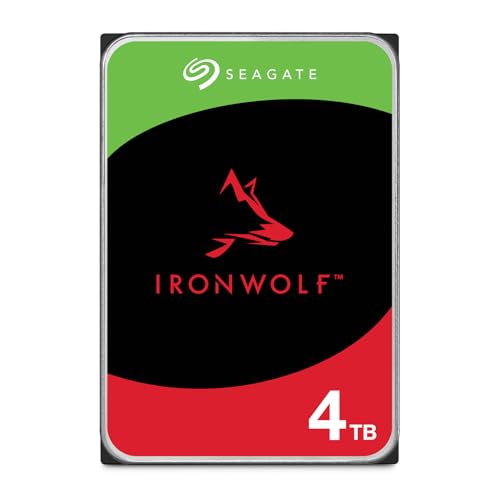
Seagate takes the same open approach with IronWolf. Its official IronWolf datasheet states that all IronWolf drives use CMR, and the specification table lists the 4TB ST4000VN006 as a CMR model. The drive runs at 5,400 RPM on a SATA 6 Gb/s interface, uses AgileArray firmware for multi-bay RAID environments, supports IronWolf Health Management on compatible NAS systems, and includes Rescue data recovery services. This is the second pattern to look for: a family-wide CMR statement in the datasheet plus the exact model named in the table.
Toshiba X300 10TB (HDWR11AXZSTA)

Desktop performance drives follow the same rule. The Toshiba X300 is built for gaming PCs, creative workstations, and high-end desktops, spinning at 7,200 RPM with a 256 MB cache, and Toshiba’s product materials state that the X300 line is powered by CMR recording technology. The 10TB HDWR11AXZSTA is a useful example because Toshiba’s own comparison charts list recording technology as CMR across the X300 range. A performance desktop drive absorbing game installs, project files, and constant patching is exactly the workload where SMR band rewrites hurt most, so a documented CMR line like this one is the correct template.
WD Black 4TB (WD4005FZBX)

The WD Black 4TB shows why the check must be done by model number rather than by family reputation. WD’s published drive lists identify the WD4005FZBX specifically as a CMR model, and it is a 7,200 RPM performance drive with a 256 MB cache, StableTrac technology, and a five-year warranty aimed at gamers and workstation users. Other WD desktop families mix CMR and SMR models under one name, so quoting the full model number when you search is not pedantry. It is the difference between verifying the drive and guessing at it.
WD Purple 4TB (WD43PURZ)

Surveillance storage is a continuous-write workload, which makes it a natural CMR application. WD’s specifications page for the 4TB Purple drive, model WD43PURZ, lists its recording technology as CMR. The drive is rated for a 180 TB per year workload, supports up to 64 HD cameras, and uses AllFrame technology to reduce frame loss in recorders running around the clock. A recorder writing video nonstop would expose SMR band rewriting within the first day of footage rotation, so this class shows why the recording technology matters more than capacity alone.
Who should skip
Skip the CMR premium if the drive will hold a media library, photo archive, or scheduled backup that is written occasionally and read often; a documented SMR drive handles that work well and usually offers more capacity for the money. Skip the entire debate if you are buying an SSD, since neither recording method applies to flash storage. Everyone else, and especially anyone building or expanding a RAID array, should treat an undocumented recording type as a reason to choose a different model. Finally, skip any listing that refuses to name an exact model number: verification is impossible without one.
Frequently Asked Questions
Can an SMR drive be used in a NAS at all?
Yes, for light duty. A single SMR drive or a small mirrored pair holding media and documents will usually work, because home NAS traffic is bursty and leaves idle time for the drive to reorganize its bands. The problems appear during array rebuilds and long sustained writes, so a NAS storing critical data deserves CMR drives throughout.
Does SMR affect read speeds or gaming load times?
Reading is essentially unaffected, because the read element is narrower than the written track and no band rewriting is involved. Games stored on an SMR drive load normally. The penalty shows up when data is written: installs, patches, and long copies that exhaust the media cache.
How can a drive already owned be checked?
Find the full model number on the drive label or in your operating system’s device information, then look that exact model up on the manufacturer’s published CMR and SMR lists or its datasheet. Capacity and product family alone cannot answer the question, because both technologies appear inside most families.
Is SMR ever the better choice?
It can be, when the priority is low cost for bulk capacity and the workload is write-once, read-many. Archive drives, backup targets with idle time between jobs, and media servers are fair uses. SMR is only a bad purchase when it is bought unknowingly for a rewriting workload, which is exactly what the model check in this guide prevents.
Final verdict
CMR and SMR are not good and bad technologies; they are different tools with a documentation problem the industry has now largely fixed. Choose CMR for NAS, RAID, surveillance, and any drive that rewrites data constantly, and accept SMR only knowingly, for cold storage and archives. Whatever you buy, verify the exact model number against the manufacturer’s published recording technology, the way the five examples above can be verified. That single check prevents the slow rebuilds and collapsing write speeds that started the controversy.
More from Amazon
Programs that pair well with the guide above. Offers and eligibility are set by Amazon and may change.
A free business account with business pricing and bulk-buying tools for work, shop or home office.
Create a business accountFree shipping on eligible items, Prime Video and more. Eligible new members can start with a free trial.
Start a Prime free trialAudiobooks and podcasts to listen to on the go. Eligible new members can start with a free trial.
Try Audible freeAd-free music streaming. Eligible new subscribers can start with a free trial.
Try Music Unlimited freeAs an Amazon Associate we earn from qualifying purchases.







Write Your Review
No reviews yet. Be the first to share your experience!