

Key takeaways
- The best portable SSDs for iPhone shooting and backup: five fast USB-C drives for ProRes recording, Apple Log video and quick photo library offloads.
- Top Pick: Samsung T9 Portable SSD (1TB)
- Runner-up: Samsung T7 Shield Portable SSD (1TB)
- Also consider: SanDisk Extreme Portable SSD (1TB)
Every iPhone since the iPhone 15 has a USB-C port, and that small change turned the phone into a far more serious camera. Pro models can record ProRes and Apple Log video directly to an external drive, which matters because a few minutes of that footage can swallow tens of gigabytes. Any USB-C iPhone can also dump a full photo library to a pocket drive in minutes, with no cloud upload, no subscription, and no laptop in between.
The catch is that an iPhone is not a computer port with a screen. Base models move data far more slowly than Pro models, no iPhone supports the fastest USB mode some drives advertise, and a drive that loses its connection mid-recording takes the clip with it. The five drives below are all bus-powered, pocket-sized, and happy to run off a single short USB-C cable. They differ in sustained write speed, ruggedness, and size.
As an Amazon Associate, we earn from qualifying purchases.
Quick answer
For most iPhone owners, the Samsung T7 Shield is the pick: its 1,050 MB/s speed matches what an iPhone Pro can actually use, and its rubber armor shrugs off drops and rain. If you also edit on a computer and want the fastest transfers there, step up to the Samsung T9. On a tighter budget, the Kingston XS1000 covers everyday photo offloads in the smallest body here.
Samsung T9 Portable SSD (1TB)

The T9 is the fastest drive in this roundup on paper, rated at up to 2,000 MB/s over USB 3.2 Gen 2×2. An iPhone cannot use that mode, so on a Pro model it runs at the phone’s 10 Gb/s ceiling, roughly half its headline speed. What you still get is the strongest sustained writing here: the T9 holds high speeds through long, continuous transfers, which is exactly what a lengthy ProRes take demands.
The aluminum body has a rubberized frame, drop resistance rated to three meters, and a credit-card footprint that disappears into a camera bag. Samsung also includes 256-bit AES hardware encryption and desktop software for health checks and firmware updates. If the drive will split its time with a Mac or PC, the T9 earns its keep there, where its full speed is available. Used only with an iPhone, the cheaper drives below match it.
Samsung T7 Shield Portable SSD (1TB)
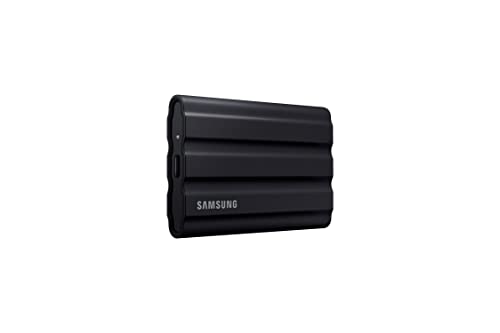
The T7 Shield reads at up to 1,050 MB/s and writes at up to 1,000 MB/s, which lines up almost exactly with the 10 Gb/s port on Pro iPhones. In practice that means you give up nothing on the phone compared with faster-rated drives, and its sustained speeds are comfortably above what ProRes recording at any frame rate requires.
What sets it apart is the build. A rubber armor shell wraps the aluminum core, the drive carries an IP65 rating against dust and water jets, and it is rated to survive drops of up to three meters. The textured grip also helps when the drive dangles from a phone rig or sits on a wet rock during a location shoot. Password protection with AES 256-bit hardware encryption is built in. It is a little larger than the slimmest drives here, but for anyone who shoots outdoors or simply drops things, it is the most sensible balance of speed, toughness, and capacity in this group.
SanDisk Extreme Portable SSD (1TB)
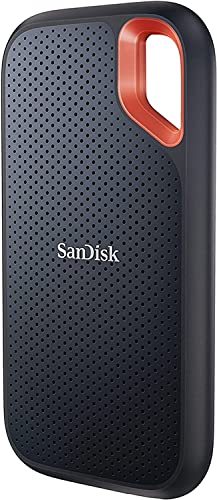
SanDisk’s Extreme line has been the default travel drive for photographers for years, and the current model reads at up to 1,050 MB/s and writes at up to 1,000 MB/s over USB-C. That is full speed for a Pro iPhone and far beyond what a base model can feed it. Its flat, rounded body slides easily into a jeans pocket or the sleeve of a camera case, and the integrated carabiner loop lets you clip it to a bag strap or a cage so it cannot wander off mid-shoot.
The shell carries an IP65 rating and drop protection rated to three meters, and SanDisk backs the drive with a five-year warranty, the longest coverage in this roundup alongside the Kingston. Password protection with 256-bit AES hardware encryption is available through SanDisk’s software for anyone storing client work or personal archives. It lacks the T7 Shield’s rubber armor, but as a general-purpose drive splitting time between an iPhone, a laptop, and a checked bag, it is hard to fault.
Crucial X9 Pro Portable SSD (1TB)
The X9 Pro is the drive for people who hate carrying drives. It is barely larger than a credit card, weighs about 32 grams, and still manages read and write speeds of up to 1,050 MB/s, with an anodized aluminum unibody, a lanyard loop in one corner, and IP55 splash and dust resistance. Plugged into an iPhone, it adds almost no bulk, which makes it the easiest of the five to leave attached while shooting stills or short clips around town.
Crucial rates it for drops of up to two meters, and the metal shell does a decent job of shedding heat during long photo library offloads. There is no hardware encryption, so security-minded buyers should look at the Samsung or SanDisk picks instead. For everyone else, the appeal is simple: this is the smallest route to a terabyte of fast storage that an iPhone can power on its own.
Kingston XS1000 External SSD (1TB)

The XS1000 is the smallest and lightest drive here at under 29 grams, closer in size to a chunky flash drive than a traditional portable SSD. It reads at up to 1,050 MB/s and writes at up to 1,000 MB/s, and Kingston includes both a USB-C cable and a USB-A adapter in the box, which is genuinely useful if your other computer still has older ports. Kingston lists iOS and iPadOS support directly, and the drive is backed by a five-year warranty.
The trade-offs are durability and sustained pace. The part-metal, part-plastic shell has no water or dust resistance rating, and the tiny body has less room to shed heat on very long transfers than the bigger drives. Neither matters much for the job this drive is built for: living in a pocket or travel pouch as a backup target for photos, documents, and short video clips. For base-model iPhone owners, whose ports cap transfer speeds anyway, paying for a bigger, faster drive buys nothing, which makes the XS1000 the value pick of the group.
How to choose
Start with your iPhone’s port, not the drive’s box. The iPhone 15, 16, and 17 base models have USB 2 ports that top out at 480 Mb/s, so every drive here will transfer at a small fraction of its rated speed. Pro models have USB 3 ports running at 10 Gb/s, which is where the 1,000 MB/s class of drives makes sense. No iPhone supports USB 3.2 Gen 2×2, so a 2,000 MB/s drive like the T9 runs at half speed on the phone and only stretches its legs on a computer.
For ProRes, sustained writes beat peak speeds. ProRes and Apple Log files run to several gigabytes per minute, and Apple requires a drive that can sustain at least 220 MB/s of writing for the highest ProRes frame rates on recent Pro models. All five drives clear that bar, but larger metal-bodied drives hold their pace longer on marathon takes, while the tiniest drives may ease off as they warm up.
Format the drive before the shoot. Direct recording and the Files app work best with exFAT, which also allows files larger than 4 GB, something a single ProRes clip will exceed quickly. A drive that arrives formatted as NTFS will appear read-only on the phone. You can erase and format a connected drive from the Files app; just remember that formatting wipes everything on it.
Mind the cable and the connection. Use the short USB-C cable supplied with the drive. Long or charge-only cables cause slow speeds and dropouts, a thick phone case can stop some cable ends seating fully, and if the cable pulls out during recording, the clip is lost. A terabyte is the practical minimum for video work; frequent shooters should look at the 2 TB versions of these same drives.
Who should skip
Owners of iPhone 14 and earlier models should skip this category entirely. The Lightning port needs adapters that break direct ProRes recording and throttle transfers, so a computer or cloud backup remains the better route. Anyone expecting an automatic, set-and-forget backup should also pass: iOS does not back up to a USB drive in the background, and every offload is a manual trip through the Files app or the Photos share sheet. Finally, casual photographers with a base-model iPhone and plenty of free internal storage gain little here, because the phone’s slow port means a pocket drive is a convenience rather than a speed upgrade.
Frequently Asked Questions
Can I record video straight to one of these drives?
On Pro models, yes. iPhone 15 Pro and later Pro models can record ProRes and Apple Log video directly to a connected USB-C drive, and the highest frame rates actually require external storage. Ordinary video modes record to internal storage first, after which you can move clips to the drive through the Files app. Base models cannot record directly to a drive at all.
Why does a 2,000 MB/s drive only reach about half that on my iPhone?
Because no iPhone supports USB 3.2 Gen 2×2, the 20 Gb/s mode those speeds depend on. A Pro iPhone’s port tops out at 10 Gb/s, so the drive negotiates the fastest mode both ends share. The same drive connected to a computer with a Gen 2×2 port can reach its full rated speed, which is why dual-purpose buyers may still find the premium worthwhile.
What format does the drive need to be?
exFAT is the safe choice. It works with direct ProRes recording, shows up in the Files app for reading and writing, and supports the very large files video creates. FAT32 cannot hold a file over 4 GB, and NTFS is read-only on an iPhone. If your drive arrives in either of those formats, back up its contents and reformat it before relying on it.
How much space does ProRes footage actually use?
Plan on several gigabytes per minute. Depending on resolution, frame rate, and whether you shoot standard ProRes or the lighter ProRes LT, a single minute of 4K footage can run from roughly two gigabytes to well over ten. A one-hour shoot can therefore consume a large share of a 1 TB drive, which is why video-first buyers should treat 1 TB as the floor and 2 TB as the comfortable option.
Final verdict
The Samsung T7 Shield is the drive most iPhone owners should buy: it matches the Pro models’ port speed, survives the drops and weather that location shooting involves, and asks for nothing more than the cable in the box. Step up to the Samsung T9 if the same drive will also serve a computer, where its extra speed is real. The SanDisk Extreme remains a fine all-rounder with the handiest clip-on design, the Crucial X9 Pro is the one to carry every day, and the Kingston XS1000 is the smallest, simplest backup for everyone whose iPhone port is the bottleneck anyway.
More from Amazon
Programs that pair well with the guide above. Offers and eligibility are set by Amazon and may change.
A free business account with business pricing and bulk-buying tools for work, shop or home office.
Create a business accountFree shipping on eligible items, Prime Video and more. Eligible new members can start with a free trial.
Start a Prime free trialAudiobooks and podcasts to listen to on the go. Eligible new members can start with a free trial.
Try Audible freeAd-free music streaming. Eligible new subscribers can start with a free trial.
Try Music Unlimited freeAs an Amazon Associate we earn from qualifying purchases.





Write Your Review
No reviews yet. Be the first to share your experience!