

Key takeaways
- Compare the best external hard drives for PS4 and PS4 Pro, from 2TB to 5TB, with the console setup rules explained and guidance on choosing the right size.
- Top Pick: WD Black P10 Game Drive 5TB
- Runner-up: Seagate Portable 2TB
- Also consider: WD My Passport 5TB
The internal drive in a PS4 fills up faster than most owners expect. Launch models shipped with 500GB, later consoles and the PS4 Pro came with 1TB, and a single modern game install can take 50GB to well over 100GB once updates and downloadable content are added. Deleting a game every time a new one arrives means long downloads all over again, which is why an external drive is the simplest upgrade a PS4 owner can make.
The PS4 handles USB storage better than its successor does. A PS5 can only archive its own games on a USB drive, but a PS4 or PS4 Pro installs games onto an external drive and plays them directly from it, with load times close to the internal drive. Every pick below is a bus-powered portable that meets Sony’s requirements, from an officially licensed 2TB model to 5TB drives that hold an entire collection.
As an Amazon Associate, we earn from qualifying purchases.
Quick answer
For most PS4 and PS4 Pro owners, the Seagate Game Drive for PlayStation 2TB is the safest buy. It is officially licensed, built for console use, and large enough for a typical library. If your collection is bigger, the WD Black P10 Game Drive 5TB adds room for years of installs while staying just as simple to set up.
Seagate Game Drive for PlayStation 2TB
The Seagate Game Drive for PlayStation (model STLV2000101) is the only drive in this roundup designed specifically for Sony’s consoles. It is officially licensed, carries firmware tuned for PlayStation hardware, and wears a blue LED light bar that matches the look of the PS4 era. Capacity is 2TB, which suits a library of a few dozen games depending on their size.
Setup is as close to foolproof as extended storage gets. Connect the drive to a USB port on the console with the included cable, format it from the Devices menu, and the PS4 treats it as install space straight away. The enclosure is slim and light, runs entirely from USB power, and needs no adapter.
Because it is a console-first product, there are no bundled backup utilities or encryption extras to ignore. What you get instead is a drive that Sony’s licensing program has signed off on, which removes the guesswork for owners who do not want to compare spec sheets. Players who know they need more than 2TB should look further down this list, but as a first external drive this is the low-risk choice.
WD Black P10 Game Drive 5TB

The WD Black P10 Game Drive is Western Digital’s purpose-built gaming portable, and the 5TB version is the capacity pick here. It uses a 2.5-inch hard drive in a tougher, textured enclosure with a metal top plate, and it is rated for transfer speeds up to 140MB/s, which is brisk for a spinning drive and keeps big installs moving at a sensible pace.
Five terabytes is serious room. Even with large games averaging well above 50GB each, a 5TB P10 can hold a whole back catalog plus everything currently in rotation, so the delete-and-redownload cycle ends. It connects over USB 3.2 Gen 1 with the included cable and draws all its power from the console, so it works the same on a base PS4, a PS4 Slim, or a PS4 Pro.
The P10 line is also sold in smaller capacities, but the 5TB model makes the most sense as a long-term library drive, since the PS4 accepts only one extended storage device at a time. Buying big once beats swapping drives later. Note that after formatting the drive becomes a dedicated PlayStation volume, a point covered in the buying advice below.
Seagate Portable 2TB
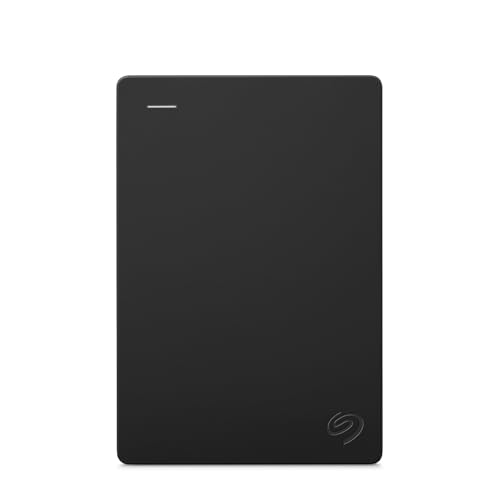
The Seagate Portable 2TB (model STGX2000400) is the straightforward value option. It is a plain, slim USB 3.0 hard drive with no gaming branding, no lights, and no setup software. Plug it into the PS4, let the console format it, and it behaves exactly like the licensed drive above, just in a plainer shell.
That simplicity is the appeal. The Portable line has been a staple backup drive for years, it is bus-powered, and it disappears into an entertainment center. The Amazon listing also includes a year of Seagate’s Rescue data recovery services, a thoughtful extra if the drive later rotates into PC backup duty, though the console format has to be removed before a computer can use it again.
At 2TB it matches the licensed Game Drive on capacity, so the choice between them comes down to taste: console styling and licensing on one side, an understated all-purpose drive on the other. Day-to-day gaming performance on the console is effectively the same either way.
WD My Passport 5TB

The WD My Passport 5TB is the mainstream alternative to the P10 for owners who want maximum capacity in the smallest box. My Passport drives are among the slimmest 5TB portables available, with a clean two-tone design that looks at home next to a console, and the USB 3.2 Gen 1 connection is all a PS4 needs.
On a computer, this drive offers password protection and backup software. It is worth knowing that none of that applies once a PS4 is involved. The console erases and reformats the drive in its own format during setup, so those extras disappear and the drive becomes a pure game library. Buy it for its size, capacity, and portability rather than its software bundle.
In practice, the My Passport and the P10 deliver the same experience on a PS4: quiet operation, single-cable power, and room for a large collection. The P10 has the gamer styling and a slightly faster rated transfer speed, while the My Passport is the more discreet design. Availability on the day often settles the decision.
Toshiba Canvio Basics 2TB

The Toshiba Canvio Basics 2TB (model HDTB520 XK3AA) takes the no-frills approach furthest. There is no bundled software, no encryption, and nothing to install. The matte black enclosure resists fingerprints, the drive is ready to use out of the box, and the whole package is aimed at people who want storage without a learning curve.
For PS4 use that minimalism is a genuine plus. The console ignores bundled utilities anyway, so a drive that skips them loses nothing. The Canvio Basics connects over USB 3.2 Gen 1, runs from USB power alone, and its compact shell suits a second console in another room or a travel setup where the drive rides in a bag.
Capacity tops out at 2TB in this configuration, plenty for a focused library of current favorites rather than an archive of everything. Owners building an ever-growing collection should step up to a 5TB drive. For everyone else, the Canvio Basics is a tidy, honest drive that does the one job a PS4 asks of it.
How to choose
Start with the console rules
Sony’s requirements are strict, and a drive that breaks them will not work no matter how good it looks on paper. The drive must connect over USB 3.0 or faster, it must hold at least 250GB and no more than 8TB, and it has to plug directly into the console, because USB hubs are not supported for extended storage. The PS4 also works with only one extended storage drive at a time, so capacity planning matters more than it does on a PC.
During setup, the console formats the drive in its own format. Anything already stored on it is erased, and a computer cannot read it afterward without reformatting. Treat the drive as a permanent part of the console from that moment on.
Pick a capacity for your library
A 2TB drive suits most players. It roughly triples the space of a 1TB PS4 Pro and holds a healthy rotation of large games alongside smaller indie titles. A 4TB or 5TB drive is better for households sharing one console, or players who keep big annual sports and shooter franchises installed year-round. Because only one drive can serve as extended storage, buying a size up is cheaper than replacing a full drive later.
Hard drive or SSD
An external SSD works with the PS4 and can trim some loading screens, but the console’s hardware limits how much of that speed is usable, and SSD capacity costs far more room per drive. For pure game storage, a portable hard drive is the sensible default, and the savings buy capacity instead.
Portable or desktop drive
Every pick in this guide is a 2.5-inch portable that runs from the USB cable alone, which keeps the setup clean. Larger 3.5-inch desktop drives reach the full 8TB the PS4 allows, but they need their own power adapter and a permanent spot near the console.
Set it up and handle it safely
Formatting takes a minute through Settings, then Devices, then USB Storage Devices. After that, set the external drive as the application install location so new games land there automatically. When you need to unplug it, use the Quick Menu option to stop using extended storage first; pulling the cable mid-session can corrupt data. Keep the drive flat, ventilated, and somewhere it will not be knocked while the platters are spinning.
Who should skip
Skip this upgrade if you mainly play on a PS5. These drives can store PS4 games for a PS5 and play them, but PS5 games cannot be played from USB storage at all, so PS5 owners chasing space should look at internal expansion instead. Also skip it if your PS4 library is small enough that the internal drive never fills, since there is nothing to gain.
Skip any individual drive here if you need to share files between a console and a computer on the same disk, because the PS4 format locks the drive to the console. And skip bargain no-name drives, USB 2.0 models, and anything under 250GB: the console will refuse them or leave you short on space within months.
Frequently Asked Questions
Can I play games directly from an external drive on PS4?
Yes. Once a drive is formatted as extended storage, the PS4 installs games to it and runs them from it, just as it does with the internal drive. That is the key difference from the PS5, where USB drives can only store PS5 games rather than play them.
Can I connect two external drives to my PS4 at once?
Only one drive can act as extended storage at a time. You can attach a second, separately formatted drive for media files, screenshots, and video clips, but game installs live on a single extended storage device, so it pays to choose a generous capacity from the start.
Will a PS4-formatted drive still work with my PC?
Not without reformatting. The console’s format is not readable by Windows or macOS, so moving the drive back to computer duty means erasing it completely. Plan for the drive to stay with the console.
Can I move my external drive between a PS4 and a PS4 Pro?
Yes. Sign in with the same PlayStation Network account, connect the drive, and your installed games are available on either console. It is a handy way to carry a library between rooms without downloading everything again.
Final verdict
For a first external drive, the Seagate Game Drive for PlayStation 2TB is the easiest recommendation: licensed, simple, and sized for a typical library. Players with big collections should go straight to 5TB, where the WD Black P10 Game Drive is the gamer-focused pick and the WD My Passport 5TB is the discreet alternative. The Seagate Portable 2TB and Toshiba Canvio Basics 2TB are plain, dependable 2TB options. Respect the console rules, format once, and enjoy never deleting a favorite again.
More from Amazon
Programs that pair well with the guide above. Offers and eligibility are set by Amazon and may change.
A free business account with business pricing and bulk-buying tools for work, shop or home office.
Create a business accountFree shipping on eligible items, Prime Video and more. Eligible new members can start with a free trial.
Start a Prime free trialAudiobooks and podcasts to listen to on the go. Eligible new members can start with a free trial.
Try Audible freeAd-free music streaming. Eligible new subscribers can start with a free trial.
Try Music Unlimited freeAs an Amazon Associate we earn from qualifying purchases.




Write Your Review
No reviews yet. Be the first to share your experience!