

Key takeaways
- The best portable SSDs for Android phones: five fast USB-C drives for photo backups, 4K video offloads, and extra storage on the go, compared.
- Top Pick: Samsung T7 Portable SSD 1TB
- Runner-up: Samsung T9 Portable SSD 1TB
- Also consider: SanDisk Extreme Portable SSD 1TB
Modern Android phones capture photos and video at a scale that fills internal storage fast. A single afternoon of 4K recording or a burst of high-resolution portraits can leave a phone warning about space at the worst moment. Deleting memories to make room is a poor answer when a pocket-sized drive can hold them instead.
A portable SSD connected over USB-C turns an Android phone into a much larger device. With the right cable and a phone that supports USB On-The-Go, a full camera roll can be backed up before a trip, a shoot, or a long flight. This guide covers five portable SSDs that pair well with Android phones, from compact everyday drives to rugged models built for the outdoors.
As an Amazon Associate, we earn from qualifying purchases.
Quick answer
For most Android owners, the Samsung T7 1TB is the safest all-round pick: fast enough for 4K video, small enough for a pocket, and widely compatible with USB-C phones. Creators chasing the fastest transfers should look at the Samsung T9, while the SanDisk Extreme suits outdoor use. The Crucial X9 Pro and WD My Passport SSD complete the list with rugged builds and password protection.
Samsung T7 Portable SSD 1TB

The Samsung T7 is the default recommendation for a reason. It is compact, light, and fast enough that moving a large video file feels quick. The drive uses NVMe storage behind a USB 3.2 Gen 2 interface, which matches the USB-C port on most modern Android phones, so the connection needs no adapter.
In practice, the T7 works as a straightforward extension of phone storage. Connect it with a USB-C to USB-C cable, open the phone file manager, and the drive appears as external storage. Photos and videos can be copied off the phone or played back directly from the drive, and the exFAT format works with Android without extra steps.
- Capacity: 1TB, with 500GB and 2TB versions available
- Interface: USB 3.2 Gen 2, up to 10Gbps
- Read speed: up to 1,050MB/s
- Write speed: up to 1,000MB/s
- File system: exFAT
- Warranty: three-year limited warranty
The T7 also supports password protection through Samsung software, adding security for personal photos and documents. For Android users who want one drive that simply works, this is the easiest starting point.
Samsung T9 Portable SSD 1TB

The Samsung T9 is the faster sibling of the T7, built for people who move very large files on a regular basis. Its headline speed is roughly double that of the T7, thanks to a USB 3.2 Gen 2×2 interface that runs at up to 20Gbps. That full speed needs a matching Gen 2×2 port, which few phones have, but the drive still performs at the top of what a standard USB-C phone port can deliver.
For Android video creators, the T9 makes sense when the workflow involves long 4K clips or frequent transfers between a phone and a computer. A full day of shooting can be offloaded quickly, and the drive can hold a working library for editing on a laptop later.
- Capacity: 1TB, with 2TB and 4TB versions available
- Interface: USB 3.2 Gen 2×2, up to 20Gbps
- Read speed: up to 2,000MB/s
- Write speed: up to 2,000MB/s
- File system: exFAT
- Warranty: five-year limited warranty
Use the included USB-C to USB-C cable for Android phones. It also supports AES 256-bit hardware encryption with password protection, useful for client work or sensitive personal files.
SanDisk Extreme Portable SSD 1TB
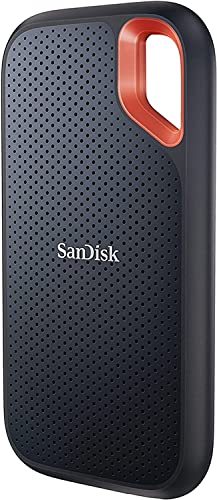
The SanDisk Extreme is the drive for Android owners who spend time outside. It carries an IP65 rating for water and dust resistance, drop protection up to three meters, and a carabiner loop that clips to a bag strap or belt loop.
Performance matches the Samsung T7, with read speeds up to 1,050MB/s and write speeds up to 1,000MB/s over USB 3.2 Gen 2. The rubberized bumper gives it a secure grip in wet or cold conditions, and Android phones recognize it immediately over USB-C. The exFAT format means large video files transfer without the file-size limits of older formats.
- Capacity: 1TB, with 500GB, 2TB, and 4TB versions available
- Interface: USB 3.2 Gen 2, up to 10Gbps
- Read speed: up to 1,050MB/s
- Write speed: up to 1,000MB/s
- Protection: IP65 water and dust resistance, up to 3m drop protection
- Warranty: five-year limited warranty
SanDisk provides a companion app for managing the drive, and current models ship with updated firmware. For a backup drive that lives in a backpack or jacket pocket, the Extreme is hard to beat.
Crucial X9 Pro Portable SSD 1TB
The Crucial X9 Pro is a compact aluminum drive that balances speed, durability, and a low profile. Roughly the size of a matchbox, it is easy to carry alongside a phone every day, yet it delivers read and write speeds up to 1,050MB/s over USB 3.2 Gen 2.
Crucial lists Android compatibility directly, and the drive works with the standard file manager on most Android phones once connected over USB-C. The anodized aluminum body resists scratches, while an IP55 rating protects against dust and water jets. Drop resistance up to two meters and a lanyard hole add confidence for everyday carry.
- Capacity: 1TB, with 2TB and 4TB versions available
- Interface: USB 3.2 Gen 2, up to 10Gbps
- Read speed: up to 1,050MB/s
- Write speed: up to 1,050MB/s
- Protection: IP55 water and dust resistance, up to 2m drop protection
- Warranty: five-year limited warranty
The X9 Pro is a strong fit for Android owners who want a drive that disappears into a pocket and is always there when storage runs low. It ships preformatted in exFAT, ready to use with Android phones straight out of the box.
WD My Passport SSD 1TB

The WD My Passport SSD stands out in this group for security. It includes 256-bit AES hardware encryption with password protection, so files stay locked even if the drive itself is lost. For Android owners who back up personal photos, work documents, or financial records, that protection is a genuine advantage.
Speed is in line with the other drives here, with reads up to 1,050MB/s and writes up to 1,000MB/s over USB 3.2 Gen 2. The slim metal design fits easily in a pocket or small bag, and drop resistance up to 6.5 feet makes it durable enough for daily travel. A USB-C to USB-A adapter is included for older computers.
- Capacity: 1TB, with 500GB and 2TB versions available
- Interface: USB 3.2 Gen 2, up to 10Gbps
- Read speed: up to 1,050MB/s
- Write speed: up to 1,000MB/s
- Encryption: 256-bit AES hardware encryption with password protection
- Warranty: five-year limited warranty
Setting up the password requires WD software on a computer, after which the drive asks for the password whenever it is connected. Once configured, it is a secure pocket vault for phone backups.
How to choose
Start with the phone. Check whether it has a USB-C port and supports USB On-The-Go, which nearly every phone made in the last several years does. Then check the USB speed of the port: most phones support USB 3.2 Gen 1 or Gen 2, so a drive rated at 1,050MB/s will run near its full speed, while a 2,000MB/s drive will be limited by the phone port.
Capacity is the next decision. A 1TB drive suits most people, holding tens of thousands of photos or many hours of 4K video. Anyone shooting video professionally or backing up several devices should consider 2TB, while 500GB works for lighter use.
Ruggedness matters for outdoor use. An IP55 or IP65 rating, drop protection, and a rubber bumper all help a drive survive a backpack, a beach, or a trail. For desk and travel use, a slim metal drive is enough. Finally, think about security: if the drive will hold personal or work files, hardware encryption with password protection is worth having, and the WD My Passport SSD is the strongest option here on that front.
Who should skip
A portable SSD is not the right purchase for everyone. Android owners who mainly use cloud storage with a fast, reliable connection may never need a physical drive, since photos and videos sync automatically in the background. The same applies to people whose phones still have plenty of free space and who rarely record long videos.
Owners of older Android phones with a micro-USB port should also pause. These drives connect over USB-C, and adapting micro-USB to USB-C for storage is unreliable. In that case, upgrading the phone or using a wireless backup method makes more sense. Anyone who only moves a handful of photos at a time can use a USB flash drive instead, which is cheaper and smaller, even though it is slower.
Finally, a portable SSD is not a replacement for a proper backup plan. Keep important files in more than one place, since a single drive can be lost or damaged.
FAQ
Do all Android phones work with portable SSDs?
Most Android phones with a USB-C port support external storage through USB On-The-Go. Connect the drive with a USB-C to USB-C cable and open the phone file manager to confirm the drive appears. A small number of older or budget phones may limit power delivery or file access, so checking the phone manual before buying is wise.
What file format should the SSD use with Android?
The exFAT file system is the best choice for Android phones. It supports very large files, which matters for 4K video, and Android reads and writes it natively. All five drives in this guide ship preformatted in exFAT, so no reformatting is needed before first use.
Can I record video directly to a portable SSD from my phone?
Some Android phones support recording video directly to external storage, while others only allow it through third-party camera apps. Check the camera settings on the specific phone model. Even when direct recording is not supported, moving finished clips to the SSD takes only a short time.
Will a 2,000MB/s SSD be faster on my phone than a 1,050MB/s SSD?
It depends on the phone USB port. Most Android phones have USB 3.2 Gen 1 or Gen 2 ports, which cap transfers below 2,000MB/s, so the faster drive will not show its full speed on the phone. The extra speed still helps when the same drive is later connected to a computer with a faster port.
Final verdict
The best portable SSD for an Android phone depends on how the drive will be used, but the Samsung T7 1TB fits the most people. It is fast, compact, widely compatible, and simple to use with any USB-C phone. Android owners who want maximum speed should step up to the Samsung T9, while outdoor users will get more from the rugged SanDisk Extreme.
The Crucial X9 Pro is the most pocketable option in the group, and the WD My Passport SSD is the right choice for anyone who values hardware encryption. Whichever drive is chosen, the habit matters more than the hardware: regular backups keep a phone fast, free up space, and protect photos and videos that cannot be retaken.
More from Amazon
Programs that pair well with the guide above. Offers and eligibility are set by Amazon and may change.
A free business account with business pricing and bulk-buying tools for work, shop or home office.
Create a business accountFree shipping on eligible items, Prime Video and more. Eligible new members can start with a free trial.
Start a Prime free trialAudiobooks and podcasts to listen to on the go. Eligible new members can start with a free trial.
Try Audible freeAd-free music streaming. Eligible new subscribers can start with a free trial.
Try Music Unlimited freeAs an Amazon Associate we earn from qualifying purchases.




Write Your Review
No reviews yet. Be the first to share your experience!