

Key takeaways
- Compare the best SSDs for NAS caching for Synology and QNAP systems, with endurance ratings, NVMe speeds, and compatibility guidance to speed up your NAS.
A NAS cache drive does a very different job from the SSD in a laptop. It sits in a box that runs around the clock, absorbing small random reads and writes from several people, and it gets rewritten far more often than a drive that mostly holds files. Pick the wrong one and the cache wears out early, throttles under sustained load, or simply never gets recognised by the NAS operating system. Pick the right one and folders open faster, thumbnails appear without delay, and virtual machines stop stuttering.
This guide is for Synology and QNAP owners adding a read cache or a read-write cache, for small offices running shared folders and backups, and for home users whose photo libraries and media collections have grown past the point where hard drives alone feel slow. Every drive below was chosen from names and specifications on Amazon listings, with endurance and interface details checked against the manufacturer’s own specification sheets.
Quick Picks
As an Amazon Associate we earn from qualifying purchases.
| Product | Best for | Key spec from title |
|---|---|---|
| WD Red SN700 1TB | Dedicated NAS caching in Synology or QNAP bays | 2,000 TBW endurance, PCIe Gen3 x4 |
| Synology SNV3400 800GB | Guaranteed compatibility with Synology NAS | 800GB, M.2 2280, PCIe 3.0 x4 |
| Samsung 990 PRO 1TB with Heatsink | Maximum speed in a Gen4 M.2 cache slot | 7,450 MB/s sequential read |
| Samsung 970 EVO Plus 1TB | Budget Gen3 cache for older NAS models | 3,500 MB/s sequential read, 600 TBW |
| WD Black SN850X 1TB | High-speed read-write cache for heavy workloads | 7,300 MB/s sequential read, PCIe Gen4 |
How to Choose
Match the Interface to Your NAS Slots
Before anything else, check whether your NAS has M.2 NVMe slots, M.2 SATA slots, or only 2.5-inch SATA bays. A Gen4 NVMe drive will not fit a SATA-only M.2 slot, and a SATA drive cannot use an NVMe slot, so the form factor decides the shortlist before speed or endurance does. Synology models such as the DS923+ and DS1522+ take M.2 2280 NVMe drives for cache, while older two-bay units often need a 2.5-inch SATA drive in a regular bay. Open the manufacturer’s compatibility list for your exact model and confirm the slot type, the supported lengths, and whether the slot can be used for cache at all.
Endurance Matters More Than Peak Speed
Cache drives are rewritten constantly, so the terabytes written rating is the number that decides how long the drive lasts in this role. A consumer drive rated at 600 TBW can burn through its endurance budget in a couple of years under a busy read-write cache, while a NAS-rated drive at 2,000 TBW handles the same workload with far more headroom. Look for the TBW figure on the specification sheet and divide it by the amount of data your household or office writes each day. If the result is under three years, step up to a higher-endurance model or a larger capacity, since bigger drives usually carry higher TBW ratings.
Read Cache or Read-Write Cache
A read-only cache is the safer starting point, because it never holds the only copy of your data and a drive failure costs nothing but speed. It suits photo libraries, media streaming, and shared documents that are read far more often than they change. A read-write cache speeds up writes as well, which helps virtual machines and databases, but it should always run as a mirrored pair so one drive failure cannot lose data that has not reached the hard drives yet. If your NAS has only one free M.2 slot, choose read-only caching and spend the money on a larger drive instead.
Heat, Power Loss Protection, and Firmware
M.2 slots inside a compact NAS have little airflow, and a drive that runs hot will throttle exactly when the cache is working hardest. Drives with a heatsink help in open slots, but check the clearance first, because a tall heatsink may not fit under the NAS cover. Power loss protection matters for read-write cache, since it guards data sitting in the drive’s volatile cache when the power drops. Finally, confirm the drive appears on the NAS maker’s compatibility list, because some vendors limit cache creation to listed drives and will refuse to build a cache volume with anything else.
The 5 Best Options
WD Red SN700 1TB

The WD Red SN700 1TB is the most obvious cache drive on this list because Western Digital built it for exactly this job. Its 2,000 TBW endurance rating is roughly three times what a typical consumer 1TB NVMe drive offers, and the dedicated DRAM cache keeps random performance steady during the small, scattered reads and writes that a shared NAS generates all day. It fits the M.2 2280 NVMe slots found in most modern Synology and QNAP units, and it is listed on both vendors’ compatibility pages. For a home or small-office NAS that needs a dependable read-write cache, this is the drive to start with.
Specs
- Capacity: 1TB
- Form factor: M.2 2280
- Interface: PCIe Gen3 x4 NVMe
- Sequential read: up to 3,430 MB/s
- Sequential write: up to 3,000 MB/s
- Random read: up to 515,000 IOPS
- Random write: up to 560,000 IOPS
- Endurance: 2,000 TBW
- Warranty: 5-year limited warranty
- Model number: WDS100T1R0C
Best for: A mirrored read-write cache in a Synology or QNAP NAS that runs around the clock.
Watch out for: It uses PCIe Gen3, so it will not match the peak speeds of Gen4 drives; confirm your NAS lists this exact model before ordering.
Synology SNV3400 800GB

The Synology SNV3400 800GB is the safe choice for anyone who wants zero compatibility arguments with their DiskStation. Synology designs this drive around its own DSM caching software, and it sits on the official compatibility list for models that accept M.2 NVMe cache drives, so setup means slotting it in and letting DSM build it. Its endurance rating is generous for 800GB, and its sustained figures are measured under enterprise workloads rather than burst conditions, which matches how a cache actually behaves. Capacity is smaller than the other drives here, but for a home NAS read cache it covers the working set of a photo library or document share.
Specs
- Capacity: 800GB
- Form factor: M.2 2280
- Interface: NVMe PCIe 3.0 x4
- Sequential read: up to 3,000 MB/s
- Sequential write: up to 1,000 MB/s
- Random read: up to 400,000 IOPS
- Random write: up to 70,000 IOPS
- Endurance: 1,022 TBW
- Warranty: 5-year limited warranty
- Model number: SNV3400-800G
Best for: Synology owners who want a first-party cache drive with guaranteed DSM compatibility.
Watch out for: The 800GB capacity holds only part of a very large media library, so check your hot data size before choosing this over a 1TB drive.
Samsung 990 PRO 1TB with Heatsink
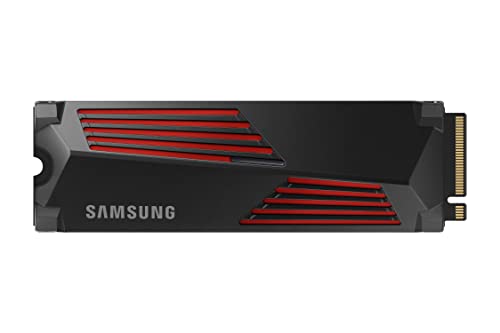
The Samsung 990 PRO 1TB with Heatsink is the fastest drive in this guide, and the included heatsink is a genuine advantage inside a warm NAS chassis. Its Gen4 interface reaches sequential reads far beyond what hard drives can feed it, which means the cache itself never becomes the bottleneck, even when several users pull files at once. Its controller and V-NAND are tuned for sustained performance rather than short bursts, and the 600 TBW endurance rating is solid for a read cache, where writes are far lighter than in a read-write setup. It suits newer NAS models with Gen4-capable M.2 slots, where it can use its full speed.
Specs
- Capacity: 1TB
- Form factor: M.2 2280 with heatsink
- Interface: PCIe 4.0 x4, NVMe 2.0
- Sequential read: up to 7,450 MB/s
- Sequential write: up to 6,900 MB/s
- Endurance: 600 TBW
- Warranty: 5-year limited warranty
- Model number: MZ-V9P1T0CW
Best for: A high-speed read cache in a newer NAS with Gen4 M.2 slots and good airflow.
Watch out for: The heatsink adds height, so measure the clearance in your NAS M.2 slot before buying, and check the compatibility list first.
Samsung 970 EVO Plus 1TB

The Samsung 970 EVO Plus 1TB is the budget pick for older NAS models that only have Gen3 M.2 slots. It is a proven drive, and its 3,500 MB/s read speed is more than enough for a cache, since the hard drive array behind it is far slower. The 600 TBW endurance rating is modest compared with NAS-specific drives, so it fits a read-only cache better than a write-heavy one, but for a home NAS that mostly serves photos, documents, and media, that is usually the right configuration anyway. Its low power draw and modest heat output are also welcome in a small two-bay enclosure with limited cooling.
Specs
- Capacity: 1TB
- Form factor: M.2 2280
- Interface: PCIe Gen 3.0 x4 NVMe
- Sequential read: up to 3,500 MB/s
- Sequential write: up to 3,300 MB/s
- Endurance: 600 TBW
- Warranty: 5-year limited warranty
- Model number: MZ-V7S1T0B/AM
- Cache memory: 1GB LPDDR4
Best for: A low-cost read cache in an older Gen3 NAS, or a second cache drive in a larger unit.
Watch out for: Its endurance is lower than NAS-rated drives, so use it for read-only caching rather than a write-heavy workload.
WD Black SN850X 1TB

The WD Black SN850X 1TB brings Gen4 speed and strong sustained write performance to a NAS cache, which suits demanding read-write setups such as virtual machines or a shared editing folder. Its controller holds up well under long, continuous transfers instead of fading after the first few seconds, and the drive’s 600 TBW endurance rating is backed by a five-year warranty. Because it is a popular consumer drive, it is widely stocked and easy to replace, which matters when a cache pair needs a matching spare. Confirm your NAS supports Gen4 speeds in its M.2 slots, since some units negotiate Gen4 drives down to Gen3.
Specs
- Capacity: 1TB
- Form factor: M.2 2280
- Interface: PCIe Gen4 x4 NVMe
- Sequential read: up to 7,300 MB/s
- Sequential write: up to 6,300 MB/s
- Endurance: 600 TBW
- Warranty: 5-year limited warranty
- Model number: WDS100T2X0E
Best for: A fast read-write cache for virtual machines, databases, or shared video editing on a Gen4-capable NAS.
Watch out for: It runs warm under sustained load, so pair it with a NAS that has decent airflow over the M.2 slots.
Which One Fits Your Situation
You Run a Small Office With Shared Folders
Choose the WD Red SN700 1TB, ideally as a mirrored pair for read-write caching. Its 2,000 TBW endurance is built for the constant small writes that several people saving documents and syncing files create, and its DRAM cache keeps response times steady when the office is busy. The SN700 also appears on the compatibility lists of the major NAS makers, so you are unlikely to hit a setup surprise.
You Own a Synology and Want Zero Guesswork
Choose the Synology SNV3400 800GB. It is made for DSM, it is on the official compatibility list, and its endurance and sustained performance are measured the way a cache actually works. The 800GB capacity suits a read cache for a home or small-office library, and setup takes minutes because DSM recognises the drive immediately.
Your NAS Has Gen4 Slots and You Want Maximum Speed
Choose the Samsung 990 PRO 1TB with Heatsink or the WD Black SN850X 1TB. The 990 PRO suits a read cache where its heatsink keeps temperatures in check, while the SN850X suits a read-write cache for virtual machines or editing work. Check that your NAS actually runs its M.2 slots at Gen4 speeds, or the extra bandwidth goes unused.
You Are Upgrading an Older NAS on a Tight Budget
Choose the Samsung 970 EVO Plus 1TB and configure it as a read-only cache. It costs less than the NAS-specific drives, its Gen3 speeds match older M.2 slots, and its 1TB capacity covers the hot data of most home libraries. Keep it in read-only mode so its 600 TBW endurance rating lasts for years rather than months.
Common Mistakes
- Buying a Gen4 NVMe drive for a NAS that only has SATA M.2 slots, where it physically cannot work.
- Using a single drive for a read-write cache, so one failure can lose data that has not reached the hard drives.
- Choosing a drive by peak sequential speed instead of endurance, then wearing it out in a write-heavy cache.
- Ignoring the NAS maker’s compatibility list and discovering the drive cannot be used for caching at all.
- Forgetting that a cache only helps with frequently accessed data, so a huge cold archive will not feel any faster.
Frequently Asked Questions
Do I need one SSD or two for NAS caching?
One drive is enough for a read-only cache, since losing it costs nothing but speed. A read-write cache should always use two identical drives in a mirrored pair, because the cache holds data that has not yet been written to the hard drives. If your NAS has only one M.2 slot, stick with read-only caching.
Will any NVMe SSD work as a NAS cache?
No. The drive must match the slot type, so an NVMe drive will not work in a SATA M.2 slot, and some NAS vendors only allow caching with drives on their compatibility list. Always check your exact NAS model’s list before ordering, and confirm whether the slot supports cache, storage pools, or both.
How big should a NAS cache drive be?
A cache only needs to hold your frequently accessed data, not your whole library. For most home users, 500GB to 1TB covers photos, documents, and recently used media. Larger working sets, such as a video editing folder or a virtual machine store, benefit from 1TB or 2TB. Check your NAS dashboard for hot data size if it reports one.
Does a cache SSD make my NAS faster for everything?
No. Caching speeds up repeated reads of the same files, such as thumbnails, metadata, and shared documents, and a read-write cache also speeds up small writes. Large single transfers, like copying a movie collection, are limited by the hard drives and the network, so they will not get much faster. The benefit shows most in everyday browsing and multi-user use.
More from Amazon
Programs that pair well with the guide above. Offers and eligibility are set by Amazon and may change.
A free business account with business pricing and bulk-buying tools for work, shop or home office.
Create a business accountFree shipping on eligible items, Prime Video and more. Eligible new members can start with a free trial.
Start a Prime free trialAudiobooks and podcasts to listen to on the go. Eligible new members can start with a free trial.
Try Audible freeAd-free music streaming. Eligible new subscribers can start with a free trial.
Try Music Unlimited freeAs an Amazon Associate we earn from qualifying purchases.
Write Your Review
No reviews yet. Be the first to share your experience!