

Our Short List of 3

- Best for: Short tidy runs between a laptop and a monitor on the same desk.
- Length: 3.3 ft (listing also offers 6.6 ft and 10 ft)
- Up to 8K@60Hz, 4K@240Hz, 2K@360Hz
- DisplayPort 1.4
- Gold-plated plugs
- Best for: Everyday 4K office monitors where 60Hz is the target.
- Length: 6 ft
- Up to 4K@60Hz
- DisplayPort 1.2 Alt Mode
- Aluminum housing

- Best for: A fixed desk setup that wants a braided 6-foot cable for daily 4K use.
- Length: 6 ft
- Up to 4K@60Hz and 2K@165Hz
- Nylon braided jacket
- Plug and play, no driver needed
All 3 Picks at a Glance
| Product | Specs | Action |
|---|---|---|
| Warrky USB-C to DisplayPort 1.4 Cable (3.3 ft) |
| Check price on Amazon |
| Amazon Basics Aluminum USB-C to DisplayPort Cable (6 ft) |
| Check price on Amazon |
| LENTION USB-C to DisplayPort Cable (6 ft) |
| Check price on Amazon |
Key takeaways
- Five USB-C to DisplayPort cables for 4K and 8K monitors: DP 1.4 and DP 2.1 speeds, locking latches, lengths, and the Alt Mode check before you buy.
A laptop with only USB-C ports and a monitor with only a DisplayPort input leaves one clear job for a single cable: carry the video signal from the laptop to the screen without a dongle in the middle. The choice looks simple until the monitor shows no signal, the refresh rate caps at 60Hz on a 144Hz panel, or the cable turns out to run in the wrong direction. Resolution, DisplayPort version, and the USB-C port itself all decide whether the picture appears at full quality.
This guide is for office workers connecting a 4K monitor to a laptop, gamers driving a high-refresh display from a Thunderbolt port, and anyone replacing a dongle with one direct cable. The five cables below were chosen from names and specs on Amazon listings: two Cable Matters cables at different DisplayPort tiers, a short Warrky run, a plain Amazon Basics cable, and a braided LENTION cable.
Quick Picks
As an Amazon Associate we earn from qualifying purchases.
| Product | Best for | Key spec from title |
|---|---|---|
| Cable Matters Unidirectional USB-C to DisplayPort 1.4 Cable (3.3 ft) | High-refresh gaming monitors | 8K@60Hz / 4K@240Hz |
| Cable Matters VESA Certified USB-C to DisplayPort 2.1 Cable (3.3 ft) | Future-proof DP 2.1 setups | 40 Gbps, 8K@120Hz |
| Warrky USB-C to DisplayPort 1.4 Cable (3.3 ft) | Short tidy desk runs | 8K@60Hz, gold-plated plugs |
| Amazon Basics Aluminum USB-C to DisplayPort Cable (6 ft) | Everyday 4K office monitors | 4K@60Hz, 6-foot length |
| LENTION USB-C to DisplayPort Cable (6 ft) | Braided cable for a fixed desk | 4K@60Hz, 2K@165Hz |
How to Choose
Match the DisplayPort Version to Your Monitor
DisplayPort 1.2 carries 21.6 Gbps (HBR2), which covers 4K at 60Hz and 1440p at 144Hz without strain. DisplayPort 1.4 raises the ceiling to 32.4 Gbps (HBR3) and adds Display Stream Compression, which is what makes 4K at 144Hz and 8K at 60Hz possible. DisplayPort 2.1 goes further with UHBR10 at 40 Gbps and UHBR13.5 at 54 Gbps. A cable can only pass what both the source and the monitor support, so a DP 2.1 cable on a DP 1.4 laptop behaves like a DP 1.4 cable. Check the monitor manual for its DisplayPort version, then buy the cable tier that matches it instead of guessing from the box art.
Confirm DP Alt Mode on the USB-C Port
Not every USB-C port carries video. A port must support DisplayPort Alt Mode, which lets the USB-C connector output a DisplayPort signal, or the cable has nothing to carry. Thunderbolt 3, 4, and 5 ports support it, and most USB-C ports on recent laptops do, but charging-only and data-only ports do not. Check the laptop spec sheet for “DisplayPort Alt Mode” or a small DisplayPort icon beside the port, and check the phone or tablet the same way. If the port lacks Alt Mode, no cable in this guide will produce a picture, and the fix is a dock or a different output, not a better cable.
Pick the Length for the Desk, Not the Drawer
Passive cables hold their full rated speed up to about 2 metres, and the 3.3-foot cables in this guide sit comfortably inside that range. Longer runs lose signal margin, so a 10-foot passive cable may drop to a lower refresh rate or flicker at 8K even when a 3.3-foot cable of the same line holds it. Measure the route from laptop to monitor before buying: a cable draped across a desk needs 6 feet, while a laptop sitting beside its monitor needs only 3.3 feet. Longer runs that must hold 8K need an active cable with a signal chip, which costs more and draws a little power from the port.
Direction, Latches, and VESA Certification
Almost every USB-C to DisplayPort cable is unidirectional: it carries video from a USB-C source to a DisplayPort monitor and nothing in reverse. That means it cannot drive a portable monitor with a USB-C input, and it cannot connect a DisplayPort computer to a USB-C display. Locking DisplayPort latches are worth having on a cable that stays plugged in, since a bumped desk can loosen a plain plug; press the latch to release it before pulling. VESA certification means the cable passed the association’s own tests for its claimed speed, which matters more than brand for a cable whose whole job is bandwidth.
The 5 Best Options
Cable Matters Unidirectional USB-C to DisplayPort 1.4 Cable (3.3 ft)
This is the cable for a high-refresh monitor on a laptop that already supports DP 1.4 with HBR3 and DSC. The short 3.3-foot run keeps the signal clean at the top modes, the locking DisplayPort latches hold the connection through desk bumps, and Multi-Stream Transport lets a daisy-chain setup run a second monitor from the first. Gamers get 4K at 240Hz and office users get 8K at 60Hz from the same cable, provided the laptop and monitor both support those modes.
Specs
- Length: 3.3 ft
- Up to 8K@60Hz or 4K@240Hz with DP 1.4 HBR3 and Display Stream Compression
- Locking DisplayPort latches
- Multi-Stream Transport (MST) for daisy-chaining monitors
- Up to 7.1-channel surround sound audio
- Low-profile USB-C connector
- Thunderbolt 3, 4, and 5 compatible
- Unidirectional: USB-C source to DisplayPort monitor only
Best for: High-refresh gaming monitors and 8K displays on a DP 1.4 laptop.
Watch out for: Confirm the 3.3-foot length at checkout — the same 201036 line also sells 6-foot and 9.8-foot versions; press the locking latch to release the DisplayPort end before unplugging.
ASIN: B01J6DWK6I
Cable Matters VESA Certified USB-C to DisplayPort 2.1 Cable (3.3 ft)
This cable is the forward-looking pick for a desk built around a DisplayPort 2.1 monitor. Its 40 Gbps DP40 link carries 8K at 120Hz and 4K at 480Hz, which no DP 1.4 cable can match, and the VESA Certified label means the cable passed the association’s tests at that speed rather than merely claiming it. On a current DP 1.4 laptop it falls back to 1.4 speeds, so it buys headroom for the next machine rather than speed today.
Specs
- Length: 3.3 ft
- 40 Gbps, DP40 (UHBR10)
- Up to 8K@120Hz or 4K@480Hz
- VESA Certified
- Unidirectional: USB-C source to DisplayPort monitor only
- No power delivery
Best for: Future-proof setups with a DisplayPort 2.1 monitor and a next-generation laptop.
Watch out for: DP 2.1 modes need a DP 2.1 source and monitor — on a DP 1.4 laptop it runs at 1.4 speeds; it carries no power, so the laptop still needs its own charger.
ASIN: B0DFB96CWH
Warrky USB-C to DisplayPort 1.4 Cable (3.3 ft)
- Best for: Short tidy runs between a laptop and a monitor on the same desk.
- Length: 3.3 ft (listing also offers 6.6 ft and 10 ft)
- Up to 8K@60Hz, 4K@240Hz, 2K@360Hz
- DisplayPort 1.4
- Gold-plated plugs
Short tidy runs between a laptop and a monitor on the same desk.
Confirm the 3.3-foot length is selected at checkout — the same listing offers 6.6-foot and 10-foot versions; one roundup table prints a 4 Gbps bandwidth figure that contradicts the 8K claim, so plan on HBR3-class bandwidth for DP 1.4 rather than that figure.
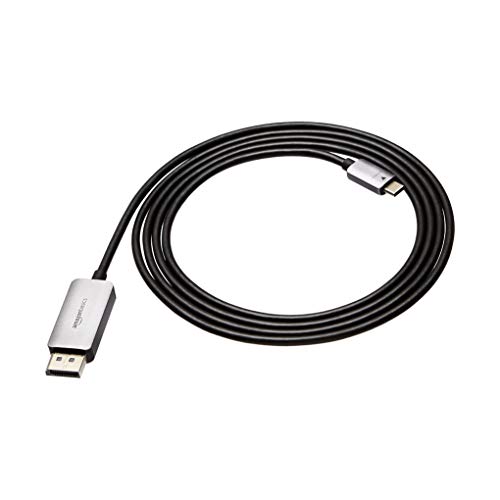
This is the short-run pick for a laptop that sits beside its monitor. The 3.3-foot length keeps the desk tidy with no coil of spare cable, gold-plated plugs resist corrosion at the contacts, and the metal case and nylon braided jacket survive being plugged and unplugged more often than a fixed desk cable. It covers the same 8K at 60Hz and 4K at 240Hz modes as the Cable Matters 1.4 cable, so the choice between them comes down to length, jacket, and plug build rather than resolution.
Amazon Basics Aluminum USB-C to DisplayPort Cable (6 ft)
- Best for: Everyday 4K office monitors where 60Hz is the target.
- Length: 6 ft
- Up to 4K@60Hz
- DisplayPort 1.2 Alt Mode
- Aluminum housing
Everyday 4K office monitors where 60Hz is the target.
Confirm the 6-foot length at checkout — the listing family also sells a 3-foot version; one roundup notes the bullets describe a space-grey finish while the spec table lists black, so treat the color with care.
This is the plain cable for a standard 4K office monitor. It does one job at one resolution, 4K at 60Hz over DP 1.2 Alt Mode, with an aluminum housing and plug-and-play use that needs no driver. The 6-foot length reaches from a laptop on the desk to a monitor on a riser or a desktop PC on the floor without an extension. It will not drive a high-refresh gaming panel at full speed, and it does not pretend to.
LENTION USB-C to DisplayPort Cable (6 ft)
- Best for: A fixed desk setup that wants a braided 6-foot cable for daily 4K use.
- Length: 6 ft
- Up to 4K@60Hz and 2K@165Hz
- Nylon braided jacket
- Plug and play, no driver needed
A fixed desk setup that wants a braided 6-foot cable for daily 4K use.
The title calls it a “Cable Adapter” but it is a full-length cable, not a dongle; confirm the gray 6-foot listing, since silver and rose gold versions sell under separate listings.
This is the braided cable for a fixed desk where the cable gets flexed, routed, and plugged in daily. The nylon braided jacket resists fraying better than a smooth PVC jacket, the 6-foot length suits a monitor on an arm or a riser, and it covers 4K at 60Hz for office work plus 2K at 165Hz for lighter gaming. It carries no power and works in one direction only, like every other cable in this guide.
Which One Fits Your Situation
A 4K Office Monitor on a Laptop
Pick the Amazon Basics 6-foot cable. A standard 4K office monitor runs at 60Hz, which DP 1.2 covers with room to spare, and the 6-foot length reaches a monitor on a riser without an extension. The aluminum housing holds up to daily plugging, and there is no reason to pay for 8K modes a 60Hz office panel cannot show.
A High-Refresh Gaming Monitor
Pick the Cable Matters 1.4 cable in 3.3 feet. Its HBR3 link with DSC carries 4K at 240Hz and 8K at 60Hz, the locking latches keep the connection secure during long sessions, and MST lets a second monitor daisy-chain from the first. The short run holds the full rate with the most margin.
A Setup Built for DisplayPort 2.1
Pick the Cable Matters 2.1 cable. Its 40 Gbps DP40 link is the only pick here that carries 8K at 120Hz, and the VESA Certified label backs the claimed speed with the association’s own tests. It runs at DP 1.4 speeds on a current laptop, so buy it for the monitor and machine you plan to own next, not for speed today.
A Laptop Beside Its Monitor
Pick the Warrky 3.3-foot cable. The short length leaves no coil on the desk, the gold-plated plugs and metal case handle frequent unplugging, and it still covers 8K at 60Hz and 4K at 240Hz for a high-refresh panel. Confirm the 3.3-foot length is selected, since the same listing offers longer versions.
Common Mistakes
- Buying a cable for a USB-C port that lacks DisplayPort Alt Mode — check the laptop spec sheet before ordering, since no cable can add video to a charging-only port.
- Plugging the cable in backward or expecting it to drive a portable USB-C monitor — these cables run one way, from USB-C source to DisplayPort monitor.
- Expecting 4K at 144Hz from a DP 1.2 cable — 21.6 Gbps covers 4K at 60Hz, and higher refresh rates need DP 1.4 HBR3 with DSC.
- Running a long passive cable at full rate — beyond about 2 metres, signal margin falls and 8K modes may flicker or drop, so measure the route and use an active cable for long runs.
- Expecting the cable to charge the laptop — USB-C to DisplayPort cables carry video only, so the laptop still needs its own charger while connected.
Frequently Asked Questions
Will a USB-C to DisplayPort cable work with any USB-C port?
No. The port must support DisplayPort Alt Mode to output video, and Thunderbolt 3, 4, and 5 ports do. Charging-only and data-only USB-C ports carry no video signal, so check the laptop spec sheet for Alt Mode or a DisplayPort icon beside the port before buying. If the port lacks it, the fix is a dock or a different output, not a different cable.
Can I use the cable in reverse, from a DisplayPort computer to a USB-C monitor?
No, not with the cables in this guide. They are unidirectional and carry video only from a USB-C source to a DisplayPort monitor. A DisplayPort computer feeding a USB-C monitor needs a bidirectional cable or a converter that is labeled for that direction, and a portable USB-C monitor needs a USB-C video input, not DisplayPort.
Do I need a DP 1.4 cable for a 4K 60Hz monitor?
No. DisplayPort 1.2 at 21.6 Gbps already covers 4K at 60Hz, so the Amazon Basics or LENTION cable is enough for a standard office panel. Buy DP 1.4 when the monitor runs 4K above 60Hz, 1440p above 144Hz, or 8K, and buy DP 2.1 only when both the source and the monitor support it.
Why does my monitor show no signal with a new cable?
Begin with the USB-C port: confirm it supports DisplayPort Alt Mode and connect the cable directly, since some hubs and docks block video. Then check the monitor input is set to DisplayPort, press the locking latch fully home, and update the graphics driver and Thunderbolt firmware. If the picture appears at a lower resolution, the cable or port may be falling back to DP 1.2 speeds.
More from Amazon
Programs that pair well with the guide above. Offers and eligibility are set by Amazon and may change.
A free business account with business pricing and bulk-buying tools for work, shop or home office.
Create a business accountFree shipping on eligible items, Prime Video and more. Eligible new members can start with a free trial.
Start a Prime free trialAudiobooks and podcasts to listen to on the go. Eligible new members can start with a free trial.
Try Audible freeAd-free music streaming. Eligible new subscribers can start with a free trial.
Try Music Unlimited freeAs an Amazon Associate we earn from qualifying purchases.




Write Your Review
No reviews yet. Be the first to share your experience!