

Key takeaways
- Upgrade your Synology or QNAP NAS with the right memory: ECC SODIMMs, DDR3L for older units, and UDIMMs for rackmount models, matched to real specs.
A NAS that once felt fast can turn sluggish once Docker containers, virtual machines, surveillance recording, and file indexing all run at the same time. Adding memory is the cheapest fix for that slowdown, yet it is also the easiest upgrade to get wrong. A module that looks right on paper may not fit the slot, may use the wrong error-correction type, or may simply refuse to boot in your box. The choice is not about buying the fastest stick on the shelf; it is about matching the exact form factor, generation, and correction type your NAS expects.
This guide is for Synology DiskStation and RackStation owners who want more headroom, for owners of older DDR3-based units keeping a trusted box in service, for rackmount users who need full-size DIMMs, and for budget buyers weighing official Synology modules against third-party kits. Every pick below comes from a real Amazon listing, with its capacity, speed, form factor, and compatibility taken from the listing itself.
Quick Picks
As an Amazon Associate we earn from qualifying purchases.
| Product | Best for | Key spec from title |
|---|---|---|
| Synology D4ECSO-2666-16G | Official ECC upgrade for Plus-series Synology | 16GB DDR4-2666 ECC SODIMM |
| OWC 32GB Kit for Synology | Doubling memory for Docker and virtual machines | 32GB DDR4-2666 ECC SODIMM kit |
| A-Tech 32GB Kit for Synology | Same 32GB upgrade at a third-party price | 32GB DDR4-2666 ECC SODIMM kit |
| Timetec 4GB DDR3L for Older Synology | Keeping a DDR3-era Synology running | 4GB DDR3L-1600 non-ECC SODIMM |
| Synology D4EC-2666-16G UDIMM | Rackmount Synology units with full-size slots | 16GB DDR4-2666 ECC UDIMM |
How to Choose
Match the Form Factor Before Anything Else
A NAS memory slot accepts one physical shape, and no amount of wishing changes that. Most DiskStation models take a 260-pin SODIMM, the short laptop-style stick, while rackmount units such as the RS series take a full-size UDIMM. Registered RDIMMs belong to a different class again and do not belong in a SODIMM or UDIMM slot. Open your NAS, look at the slot, and confirm the module type in the official hardware spec sheet before ordering. A UDIMM will not fit a SODIMM slot, and a SODIMM will not seat in a UDIMM slot, so this single check prevents the most common failed upgrade.
ECC or Non-ECC: Follow the NAS, Not the Stick
Error-correcting memory catches single-bit flips before they can corrupt data, which matters when a NAS runs around the clock. Many Synology Plus and xs models are built for ECC modules, while value and J-series units expect non-ECC memory. Mixing ECC and non-ECC modules in one box is a bad idea: most systems either refuse to boot or silently drop to non-ECC mode, losing the protection you paid for. Check the official memory page for your exact model, then buy the correction type it names. If your model does not support the ECC feature at all, an ECC stick still fits but the feature simply stays off.
Generation and Speed: DDR3, DDR3L, and DDR4 Do Not Mix
Memory generations are physically keyed differently, so a DDR4 stick cannot sit in a DDR3 slot and a DDR3 stick cannot sit in a DDR4 slot. Older Synology units from the 2015 to 2017 era run DDR3 or DDR3L at 1600MHz, while current Plus models run DDR4 at 2666MHz. DDR3L is the low-voltage variant at 1.35V and is the safe choice for those older boxes. Speed matters less than most buyers assume: a 3200MHz module in a 2666MHz system simply runs at 2666MHz, so paying extra for speed your NAS cannot use buys nothing. Match the generation first, then the speed your model lists.
Capacity Planning and the Official Limit
Every NAS model has an official maximum memory figure, and Synology publishes one for each box. Exceeding that figure is sometimes possible — enthusiasts run 20GB in a DS920+ whose official limit is 8GB — but Synology warns that using non-official memory, or going past the stated limit, can leave them unable to provide support for the unit. Plan capacity around your workload instead of buying the biggest kit available: 8GB covers file serving and light apps, 16GB suits Docker and surveillance, and 32GB fits virtual machines and heavy indexing. Buy the kit size your workload needs, not the largest number on the page.
The 5 Best Options
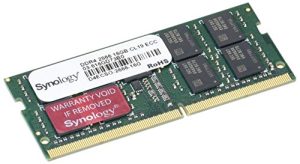
Synology D4ECSO-2666-16G

The official Synology module is the safest single-stick upgrade for a Plus-series DiskStation. It is the exact part Synology lists for models such as the DS1821+, DS1621+, DS2419+, and DS1819+, so there is no guessing about compatibility, and it carries the 5-year warranty Synology prints on its own memory spec sheet. One 16GB stick is enough to calm a NAS that stutters when containers and indexing collide, and it leaves the second slot free for a later matching stick. Official memory costs more than third-party kits, yet for owners who want support to stay intact, that premium buys peace of mind.
Specs
- 16GB DDR4-2666 ECC unbuffered SODIMM
- 260-pin SO-DIMM form factor
- Model D4ECSO-2666-16G, UPC 846504003679
- 5-year warranty per Synology spec sheet
- Applied models include DS1821+, DS1621+, DS1621xs+, DS2419+, DS1819+, DS3018xs, DS1618+, DVA3221, RS1221+, RS1221RP+, FS1018
Best for: Plus-series Synology owners who want the official module and full support coverage.
Watch out for: the RS820+ and RS820RP+ do not support the ECC feature, so the correction function stays off in those two models even with this stick installed.
OWC 32GB Kit for Synology

OWC builds its 32GB kit as two matched 16GB modules, which is the right shape for a NAS with two slots running Docker, virtual machines, or a surveillance station with many cameras. The listing names the exact Synology models it fits, from the DS1522+ and DS923+ through the DS3622xs+ and the DVA camera recorders, so compatibility checking is a matter of finding your model on that list. Both modules are dual-rank 2Rx8, a detail that matters because Synology boxes are known to be fussy about single-rank sticks in unofficial upgrades. The kit gives a NAS the headroom to run several services at once without swapping to disk.
Specs
- 32GB kit, two 16GB DDR4 2666MHz PC4-21300 modules
- CL19 latency, 2Rx8 dual rank, ECC unbuffered SODIMM
- 1.2V operation, 260-pin SO-DIMM
- Model OWC2C6D42R8032P
- Compatible with DS1522+, DS1618+, DS1621+, DS1621xs+, DS1819+, DS1821+, DS2419+, DS2419+II, DS2422+, DS3018xs, DS3617xs, DS3617xsII, DS3622xs+, DVA3219, DVA3221, FS1018, RS1221+, RS1221RP+, RS822+, RS822RP+
Best for: Owners running Docker, virtual machines, or many cameras who need 32GB in one matched pair.
Watch out for: Synology warns that non-official memory can leave them unable to provide support, so keep the original modules in case a support case ever needs the box returned to stock memory.
A-Tech 32GB Kit for Synology

A-Tech sells the same shape of upgrade as OWC — two 16GB DDR4-2666 ECC SODIMMs totalling 32GB — aimed squarely at Synology DiskStation, RackStation, FlashStation, and NVR DVA owners. The listing positions the kit as a direct replacement for the Synology D4ECSO-2666-16G and D4ES01-16G modules, which makes it a straightforward swap for anyone whose NAS already runs one official 16GB stick. Both modules are dual-rank 2Rx8 at 1.2V, matching the electrical profile Synology expects from its own memory. With two brands offering the identical kit size and spec, the choice between them comes down to availability and the seller standing behind the listing.
Specs
- 32GB kit, two 16GB DDR4 2666MHz PC4-21300 modules
- ECC SODIMM, 2Rx8 dual rank, 1.2V operation
- Series AT16G2D4S2666ND8N12V
- Replacement for Synology D4ECSO-2666-16G and D4ES01-16G
- Built for Synology DiskStation, RackStation, FlashStation, and NVR DVA servers
Best for: Owners who want the 32GB upgrade from a third-party brand at a lower outlay than the official module.
Watch out for: this kit and the OWC kit above are the same capacity and spec from two brands, so do not buy both expecting a difference in performance; pick one and keep the other as a spare source.
Timetec 4GB DDR3L for Older Synology

Older Synology units from the 2015 to 2017 era still do useful work, and this Timetec stick is built for exactly those boxes. It is a 4GB DDR3L module running at 1600MHz, the low-voltage generation those models expect, and the listing names the compatible units plainly: DS2015xs, DS2415+, DS1817, DS1815+, DS1515+, RS2416+, RS2416RP+, RS815+, and RS815RP+. The module replaces the original Synology RAM1600DDR3-4G part, so an owner refreshing an ageing box can swap it in without rethinking the whole machine. For a NAS that only serves files and runs a few light packages, 4GB is enough to keep it responsive.
Specs
- 4GB DDR3L 1600MHz PC3L-12800 SODIMM
- 1.35V, non-ECC, unbuffered, 204-pin
- CL11 latency, single rank 1Rx8, 512×8 layout
- Replacement for Synology RAM1600DDR3-4G
- Lifetime warranty from Timetec
- Compatible with DS2015xs, DS2415+, DS1817, DS1815+, DS1515+, RS2416+/RS2416RP+, RS815+/RS815RP+
Best for: Owners of DDR3-era Synology units who need a direct replacement stick for a box still in daily service.
Watch out for: the listing’s detail fields print conflicting figures in places, showing 16GB and 2666MHz in some fields, so trust the title and the bullet text — 4GB at 1600MHz — and confirm the 4GB size in the selector before ordering.
Synology D4EC-2666-16G UDIMM

Rackmount Synology units do not take laptop-style SODIMMs, and this official UDIMM is the matching part for them. It is a 16GB DDR4-2666 ECC unbuffered DIMM, the full-size module that fits the SA, UC, and RS rackmount lines, including the SA3400D, SA3200D, UC3400, UC3200, RS4021xs+, RS3621xs+, RS2421+, and RS1619xs+. Like the SODIMM official module, it carries a 5-year warranty on Synology’s own spec sheet. The part number differs from the SODIMM version by one letter — D4EC instead of D4ECSO — and that single letter is the whole difference between a module that fits and one that does not.
Specs
- 16GB DDR4-2666 ECC unbuffered DIMM
- Full-size UDIMM form factor
- Model D4EC-2666-16G, EAN 4711174723751
- 5-year warranty per Synology spec sheet
- Applied models include SA3400D, SA3200D, UC3400, UC3200, RS4021xs+, RS3621xs+, RS3621RPxs, RS2821RP+, RS2421RP+, RS2421+, RS1619xs+, RS3618xs, RS2818RP+, RS2418RP+, RS2418+, RS4017xs+, RS3617xs+, RS3617RPxs
Best for: Rackmount Synology owners whose units take full-size UDIMMs rather than SODIMMs.
Watch out for: the D4EC UDIMM and the D4ECSO SODIMM share nearly identical names and specs, so confirm the listing shows the UDIMM full-size module; on the RS4017xs+, Synology notes the unit must run DSM 6.2.2-24922-6 or newer.
Which One Fits Your Situation
Running Docker or Virtual Machines on a Plus-Series Synology
Pick the OWC 32GB kit or the A-Tech 32GB kit. Both give a Plus-series box two matched 16GB ECC modules, which is the capacity where containers and virtual machines stop fighting for memory. The official Synology 16GB SODIMM is safer if support coverage matters more than capacity, but one 16GB stick will feel tight once a virtual machine and a few containers share the box. Choose one kit, not both, since they are the same spec from two brands.
Keeping an Older DDR3 Synology in Service
Pick the Timetec 4GB DDR3L stick. It is the only pick here built for the 2015 to 2017 generation, and it replaces the original Synology RAM1600DDR3-4G part directly. Do not buy a DDR4 module for these boxes: the notch position differs, the voltage differs, and the stick will not seat. Confirm your model appears on the compatibility list, since a few units from that era shipped with soldered memory and cannot be upgraded at all.
Upgrading a Rackmount Synology
Pick the Synology D4EC-2666-16G UDIMM. Rackmount SA, UC, and RS units take full-size DIMMs, and this is the official module Synology lists for them. The SODIMM picks in this guide will not fit a rackmount slot, no matter how similar the part numbers look. Check the applied-models list against your unit, and note the DSM version requirement on the RS4017xs+ before ordering.
Stretching a Tight Budget Without Losing Stability
Pick the A-Tech 32GB kit if your NAS needs capacity, or the Timetec stick if your box is an older DDR3 unit. Third-party memory costs less than the official Synology modules, and both kits here match the official spec on speed, voltage, and rank. Keep the original modules in a drawer: if a support case ever arises, returning the box to its stock memory removes the one argument Synology can raise about unofficial parts.
Common Mistakes
- Buying a SODIMM for a rackmount NAS that takes UDIMMs, or the reverse — the part numbers differ by one letter and the sticks do not interchange.
- Mixing ECC and non-ECC modules in the same NAS, which can stop the box booting or silently disable error correction.
- Ordering DDR4 memory for a DDR3-era unit, or DDR3 for a DDR4 unit — the generations are keyed differently and will not seat.
- Ignoring the official maximum memory figure and then discovering that support will not cover a box running past its stated limit.
- Assuming every NAS can be upgraded — many units ship with soldered memory, so confirm your model has an open slot before buying anything.
Frequently Asked Questions
Can I mix ECC and non-ECC memory in a NAS?
No, do not mix them. A NAS that expects ECC memory should run ECC modules in every slot, and a NAS built for non-ECC memory should run non-ECC modules. Mixing the two can stop the unit booting, and in some systems the box boots but quietly runs without error correction. Buy the correction type your model’s official memory page names, and keep all installed modules the same type.
Will a faster module run at full speed in my NAS?
No. A NAS runs memory at the speed its own hardware supports, so a 3200MHz module in a 2666MHz system simply runs at 2666MHz. The faster stick still works, but the extra speed buys nothing. Match the speed your model lists, and spend the difference on capacity instead, since more memory helps a busy NAS far more than a higher MHz figure.
Does adding RAM void my Synology warranty?
Adding memory does not by itself void the warranty, but Synology warns that non-official memory, or memory past the official maximum, can leave them unable to provide support for the unit. Keep the original modules: if a problem ever needs a support case, swapping the stock memory back in removes the question entirely. Official Synology modules avoid the issue altogether.
Can I use laptop RAM in my NAS?
Sometimes, but only if the laptop module matches your NAS on every point: SODIMM form factor, the right DDR generation, the right speed, and the right correction type. Many laptop sticks are non-ECC, while Plus-series Synology units expect ECC, and single-rank laptop modules can be fussy in Synology boxes. A NAS-specific kit, such as the OWC or A-Tech picks here, is already matched on those points.
More from Amazon
Programs that pair well with the guide above. Offers and eligibility are set by Amazon and may change.
A free business account with business pricing and bulk-buying tools for work, shop or home office.
Create a business accountFree shipping on eligible items, Prime Video and more. Eligible new members can start with a free trial.
Start a Prime free trialAudiobooks and podcasts to listen to on the go. Eligible new members can start with a free trial.
Try Audible freeAd-free music streaming. Eligible new subscribers can start with a free trial.
Try Music Unlimited freeAs an Amazon Associate we earn from qualifying purchases.
Write Your Review
No reviews yet. Be the first to share your experience!