

Our Short List of 3

- Best for: A busy 2-bay or 4-bay home NAS with several users.
- Capacity: 8 TB
- Form factor: 3.5 inch
- Interface: SATA 6 Gb/s
- Spindle speed: 7,200 RPM
- Best for: A budget-minded always-on NAS that still needs 7,200 RPM speed.
- Capacity: 8 TB
- Form factor: 3.5 inch
- Interface: SATA 6 Gb/s
- Spindle speed: 7,200 RPM
- Best for: A Synology NAS where you want a fully verified drive.
- Capacity: 8 TB
- Form factor: 3.5 inch
- Interface: SATA 6 Gb/s
- Spindle speed: 7,200 RPM
All 3 Picks at a Glance
| Product | Specs | Action |
|---|---|---|
| Seagate IronWolf 8TB (ST8000VN004) |
| Check price on Amazon |
| Toshiba N300 8TB (HDWN180XZSTA) |
| Check price on Amazon |
| Synology HAT3320-8T |
| Check price on Amazon |
Key takeaways
- Compare the 8TB NAS hard drives that suit home and small-office storage, from quiet low-power models to fast Pro drives built for multi-bay RAID arrays.
Eight terabytes per drive is the point where a home NAS stops feeling cramped. Two of these drives in a mirrored pair hold a large photo library, years of documents, and a media collection with room to spare, while four of them in a RAID 5 array give you a serious home server. The real decision is not capacity, which is fixed at 8TB here, but which trade-off you want to live with: a quiet, cool drive that spins slower and sips power, or a faster 7,200 RPM drive that rebuilds a RAID array sooner and makes more noise doing it.
This guide is for home users building their first two-bay or four-bay NAS, photographers who need a reliable place for raw files, and small offices that want always-on shared storage without a server room. Every drive below was chosen from its name and specifications on its Amazon listing, so the models, capacities, and ratings here match what you will actually find for sale.
Quick Picks
As an Amazon Associate we earn from qualifying purchases.
| Product | Best for | Key spec from title |
|---|---|---|
| WD Red Plus 8TB (WD80EFPX) | A quiet NAS in the living room | 5,640 RPM, 256 MB cache, CMR |
| Seagate IronWolf 8TB (ST8000VN004) | A 2-bay or 4-bay home NAS | 7,200 RPM, 256 MB cache, CMR |
| Toshiba N300 8TB (HDWN180XZSTA) | A budget-minded always-on NAS | 7,200 RPM, 128 MB cache, CMR |
| Seagate IronWolf Pro 8TB (ST8000NT001) | A business NAS under heavy load | 7,200 RPM, 550 TB per year workload |
| Synology HAT3320-8T | A Synology NAS with verified drives | 7,200 RPM, 256 MB cache, CMR |
How to Choose
CMR or SMR Recording
Recording technology decides how a drive behaves when a RAID array rebuilds, and that is where the wrong choice hurts most. CMR writes each track side by side, so sustained writes stay fast and rebuilds finish in a predictable time. SMR overlaps tracks to squeeze in more capacity, which forces the drive to rewrite neighbouring tracks and slows large writes to a crawl. Most 8TB NAS drives are CMR, but some desktop and surveillance drives in this size are not, so check the exact model number on the listing before you buy. If the listing does not state CMR, treat that as a warning sign and pick a drive that does.
Spindle Speed, Noise, and Heat
A 5,400 RPM drive and a 7,200 RPM drive feel different in the same room. The slower drive runs cooler, draws less power, and hums quietly enough to sit on a shelf in a living room or bedroom. The faster drive moves data sooner, which matters when several people stream video at once or when a RAID array is rebuilding after a disk swap. Heat matters too, because a warm drive in a closed cabinet ages faster than a cool one. If the NAS lives beside a television, favour the quieter drive; if it lives in a closet or office, the faster drive is the better trade.
Workload Rating and Warranty
Every NAS drive carries a workload rating measured in terabytes written per year, and it is a useful guide to how hard the drive is built to work. Home-focused drives are usually rated at 180 TB per year with a three-year warranty, which covers nightly backups, media streaming, and photo storage with a wide margin. Pro drives are rated at 550 TB per year with a five-year warranty, which suits a NAS that several people use all day or that runs virtual machines. Matching the rating to your real use keeps you from paying for durability you will never need, or from wearing out a light-duty drive early.
Bay Count and Compatibility
NAS makers publish a compatibility list for each enclosure, and an 8TB drive that works in one box is not automatically ideal in another. Some two-bay units only need drives rated for up to eight bays, while larger enclosures with sixteen or twenty-four bays need drives with vibration sensors that hold steady when many disks spin together. Mixing drive brands and models in one array is possible, but a rebuild is smoother when the drives share the same capacity and similar speeds. Before ordering, check the enclosure maker’s list for your exact model and confirm the drive is listed for the bay count you own.
The 5 Best Options
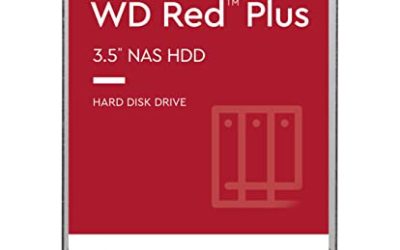
WD Red Plus 8TB (WD80EFPX)
The WD Red Plus is the calm choice for a home NAS that sits where people live. Its lower spindle speed keeps noise and heat down, which matters when the enclosure shares a room with a desk or a television, and its CMR recording keeps RAID rebuilds predictable instead of dragging on for days. With a 180 TB per year workload rating and a three-year warranty, it covers nightly backups, media libraries, and photo archives without strain. It is the drive to pick when quiet operation matters more than squeezing out the last bit of transfer speed.
Specs
- Capacity: 8 TB
- Form factor: 3.5 inch
- Interface: SATA 6 Gb/s
- Spindle speed: 5,640 RPM class
- Recording technology: CMR
- Cache: 256 MB
- Workload rating: 180 TB per year
- Warranty: 3-year limited warranty
- Designed for NAS systems with up to 8 bays
Best for: A quiet home NAS in a living room or bedroom.
Watch out for: WD sells three different 8TB Red Plus models, so confirm the model number WD80EFPX on the listing before ordering.
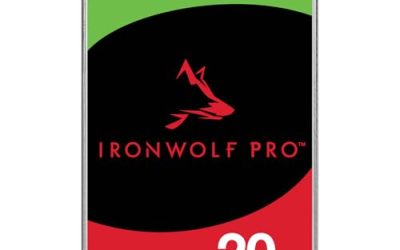
Seagate IronWolf 8TB (ST8000VN004)
- Best for: A busy 2-bay or 4-bay home NAS with several users.
- Capacity: 8 TB
- Form factor: 3.5 inch
- Interface: SATA 6 Gb/s
- Spindle speed: 7,200 RPM
A busy 2-bay or 4-bay home NAS with several users.
The faster spindle speed makes it louder than a 5,400 RPM drive, so keep it out of a bedroom if light sleepers are nearby.
The IronWolf is the all-round pick for a home NAS that does more than sit idle. Its 7,200 RPM spindle speed moves large files sooner than the slower Red Plus, which shows up when several family members stream video at the same time or when you copy a fresh batch of photos to the array. AgileArray firmware and rotational vibration sensors keep it steady in multi-bay enclosures, and IronWolf Health Management works with compatible NAS systems to flag early warning signs. For a two-bay or four-bay box that sees daily use, this is a strong default.
Watch out for: The faster spindle speed makes it louder than a 5,400 RPM drive, so keep it out of a bedroom if light sleepers are nearby.
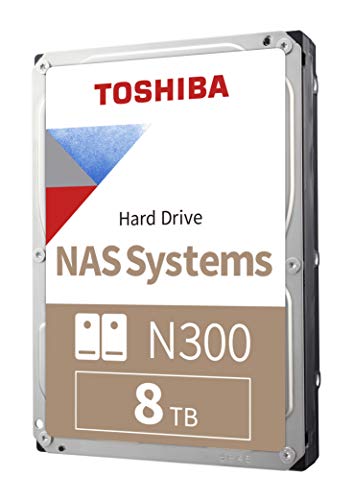
Toshiba N300 8TB (HDWN180XZSTA)
- Best for: A budget-minded always-on NAS that still needs 7,200 RPM speed.
- Capacity: 8 TB
- Form factor: 3.5 inch
- Interface: SATA 6 Gb/s
- Spindle speed: 7,200 RPM
A budget-minded always-on NAS that still needs 7,200 RPM speed.
The 128 MB cache is half the size of the IronWolf’s, so heavy multi-user writes may feel slower; check the cache figure on the listing.
The Toshiba N300 gives you the same 7,200 RPM speed as the IronWolf at a price that often sits below the bigger brands. It is built for 24/7 operation with rotational vibration sensors, so it holds up in a multi-bay enclosure that runs all day, and its 128 MB cache is enough for the sequential reads and writes a media library produces. The three-year warranty and 180 TB per year workload rating match the home NAS class. It suits buyers who want a fast, always-on drive and are happy to spend less on brand recognition.
Watch out for: The 128 MB cache is half the size of the IronWolf’s, so heavy multi-user writes may feel slower; check the cache figure on the listing.
Seagate IronWolf Pro 8TB (ST8000NT001)
The IronWolf Pro is the drive for a NAS that works like a small business server. Its workload rating jumps to 550 TB per year, the warranty stretches to five years, and rotational vibration sensors keep it stable in enclosures with many bays. It also includes Rescue Data Recovery Services, which is a real safety net when a drive holds the only copy of a project. For a home user it is more drive than needed, but for a small office, a video editing team, or a NAS that runs virtual machines, the extra durability is the point.
Specs
- Capacity: 8 TB
- Form factor: 3.5 inch
- Interface: SATA 6 Gb/s
- Spindle speed: 7,200 RPM
- Recording technology: CMR
- Cache: 256 MB
- Workload rating: 550 TB per year
- Warranty: 5-year limited warranty
- Mean time between failures: 2,000,000 hours
- Features: Rotational vibration sensors, Rescue Data Recovery Services
Best for: A business NAS under heavy, multi-user load.
Watch out for: Pro drives draw more power and run warmer than home-class drives, so confirm your enclosure has enough airflow before ordering.
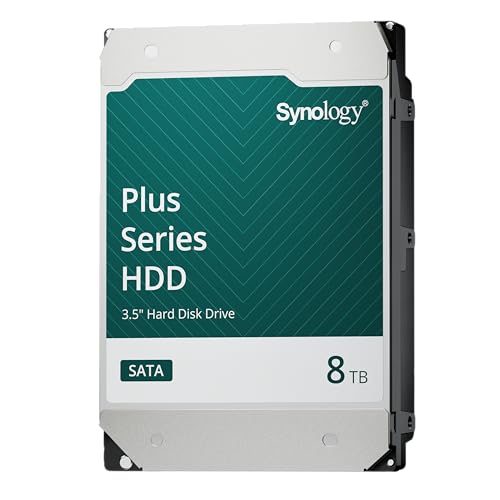
Synology HAT3320-8T
- Best for: A Synology NAS where you want a fully verified drive.
- Capacity: 8 TB
- Form factor: 3.5 inch
- Interface: SATA 6 Gb/s
- Spindle speed: 7,200 RPM
A Synology NAS where you want a fully verified drive.
The HAT3320-8T is a newer model than the older HAT3310-8T, so check the exact model number and confirm it is listed for your DiskStation.
The Synology HAT3320-8T is the simplest choice if you own a Synology NAS and want a drive that is fully verified for it. Synology designs this Plus Series drive for its own enclosures, so the firmware, health reporting, and compatibility checks line up without guesswork. On newer DiskStation models it also avoids the unverified-drive warnings that third-party disks can trigger. The specifications are otherwise familiar for this class: 7,200 RPM, CMR recording, a 256 MB cache, and a three-year warranty. You pay a premium for the Synology badge, and in return you get certainty.
Watch out for: The HAT3320-8T is a newer model than the older HAT3310-8T, so check the exact model number and confirm it is listed for your DiskStation.
Which One Fits Your Situation
A Quiet NAS in the Living Room
Pick the WD Red Plus 8TB (WD80EFPX). Its 5,640 RPM spindle speed is the quietest in this roundup, and it runs cooler than the 7,200 RPM drives, which matters when the enclosure sits on open shelving. The CMR recording keeps rebuilds predictable, and the 180 TB per year workload rating is more than enough for media streaming and nightly backups.
A 2-Bay NAS for Family Photos and Backups
Pick the Seagate IronWolf 8TB (ST8000VN004). The faster spindle speed shortens the time a large photo import takes, and the drive is built for the constant small writes a backup job produces. In a mirrored pair it gives you 8TB of protected storage, which covers most family libraries with room to grow.
A Small Office NAS That Runs All Day
Pick the Seagate IronWolf Pro 8TB (ST8000NT001). The 550 TB per year workload rating and five-year warranty are built for several people reading and writing at once, and the included Rescue Data Recovery Services add a layer of protection that a home-class drive does not offer.
A Synology NAS You Want Fully Verified
Pick the Synology HAT3320-8T. It is designed for Synology enclosures, so compatibility and health reporting work without warnings on newer DiskStation models. If your budget is tight, the WD Red Plus or the IronWolf are the usual alternatives, but they may show as unverified on the newest Synology boxes.
Common Mistakes
- Buying an SMR drive for a RAID array, then finding rebuilds take far longer than expected.
- Mixing 8TB drives with smaller drives in the same array and losing the extra capacity.
- Choosing a 7,200 RPM drive for a bedroom NAS and then being kept awake by the hum.
- Skipping the enclosure maker’s compatibility list and discovering the drive is not listed for your model.
- Ordering the wrong model number, such as a different Red Plus revision, and getting different speed or cache than planned.
Frequently Asked Questions
Is 8TB enough for a home NAS?
For most homes, yes. Two 8TB drives in a mirrored pair give you 8TB of protected storage, which holds a large photo library, years of documents, and a media collection. Four 8TB drives in RAID 5 give you about 24TB of usable space, which covers a serious home server for years.
Do I need CMR or SMR for a NAS?
Choose CMR for any RAID array. CMR writes tracks side by side, so large writes and rebuilds stay fast and predictable. SMR overlaps tracks to save space, which slows sustained writes and can stretch a rebuild to an uncomfortable length.
Can I mix different brands of 8TB drives in one NAS?
Yes, as long as every drive is the same capacity and uses CMR recording. Mixing brands works, but a rebuild is smoother when the drives share similar speeds, so avoid pairing a 5,400 RPM drive with a 7,200 RPM drive if you can.
How many bays does an 8TB NAS drive support?
It depends on the drive. Home-class drives such as the Red Plus, IronWolf, and N300 are built for enclosures with up to eight bays. Pro drives add stronger vibration handling for larger enclosures, so check the drive’s bay rating against your enclosure before buying.
More from Amazon
Programs that pair well with the guide above. Offers and eligibility are set by Amazon and may change.
A free business account with business pricing and bulk-buying tools for work, shop or home office.
Create a business accountFree shipping on eligible items, Prime Video and more. Eligible new members can start with a free trial.
Start a Prime free trialAudiobooks and podcasts to listen to on the go. Eligible new members can start with a free trial.
Try Audible freeAd-free music streaming. Eligible new subscribers can start with a free trial.
Try Music Unlimited freeAs an Amazon Associate we earn from qualifying purchases.


Write Your Review
No reviews yet. Be the first to share your experience!