

Our Short List of 3

- Best for: Mid-range pick for a mainstream home NAS that runs around the clock.
- Capacity: 10TB
- Model: WD100EFGX
- Recording: CMR
- Spindle speed: 7200 RPM
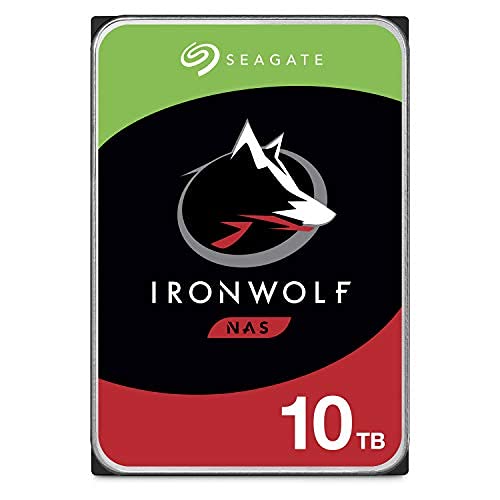
- Best for: Budget pick for a first RAID array in a home NAS.
- Capacity: 10TB
- Model: ST10000VNZ004
- Recording: CMR
- Spindle speed: 7200 RPM

- Best for: Premium pick for a fast multi-user NAS that serves several people at once.
- Capacity: 10TB
- Model: WD102KFBX
- Recording: CMR
- Spindle speed: 7200 RPM
All 5 Picks at a Glance
| Product | Specs | Action |
|---|---|---|
| WD Red Plus 10TB |
| Check price on Amazon |
| Seagate IronWolf 10TB |
| Check price on Amazon |
| WD Red Pro 10TB |
| Check price on Amazon |
 Seagate IronWolf Pro 10TB |
| Check price on Amazon |
 Toshiba N300 Pro 10TB |
| Check price on Amazon |
Key takeaways
- The 5 best 10TB NAS hard drives for RAID: WD Red Plus, WD Red Pro, Seagate IronWolf, IronWolf Pro, and Toshiba N300 Pro for home and business use.
Ten terabytes is the capacity where a home NAS stops being a backup box and starts being the household media library, photo archive, and file server, so the drive you choose has to survive years of spinning with neighbors vibrating beside it. A desktop hard drive with the same capacity and connector will work for a while, then slow down during rebuilds, drop out of the array, or wear out early, because it was never designed for always-on multi-drive duty. The five drives below are all 10TB NAS-class models with conventional magnetic recording, picked from the specifications printed on their Amazon listings.
The buyers in mind here are home users setting up a two- or four-bay box, photographers and editors who need a RAID 5 array for a growing library, and small offices that want one shared target for backups. The five picks span the budget, mid-range, and premium tiers, and every one carries its exact model number, so matching a drive to an enclosure compatibility list takes seconds.
Quick Picks
As an Amazon Associate we earn from qualifying purchases
| Product | Best for | Key spec from title |
|---|---|---|
| WD Red Plus 10TB (WD100EFGX) | Mainstream home NAS duty | 7200 RPM, CMR, 512 MB cache |
| Seagate IronWolf 10TB (ST10000VNZ004) | Lowest-cost way into a RAID array | CMR, 7200 RPM, 256 MB cache |
| WD Red Pro 10TB (WD102KFBX) | Fast multi-user arrays | 7200 RPM, CMR, 256 MB cache |
| Seagate IronWolf Pro 10TB (ST10000NEZ008) | Business NAS with recovery cover | CMR, 256 MB cache, Frustration Free Packaging |
| Toshiba N300 Pro 10TB (HDWG71AXZSTB) | Large multi-bay business NAS | 7200 RPM, CMR, 512 MB cache, up to 24 bays |
How to Choose
Recording technology: CMR is the one that survives a rebuild
Start with the recording technology, because it decides whether a RAID rebuild finishes in hours or drags on for days. CMR lays tracks side by side, so rewriting one small block leaves the surrounding data untouched. SMR overlaps tracks to pack more storage onto each platter, which means a small change can force the drive to rewrite a whole band. Desktop drives and older entry-level NAS models often use SMR, and the plain WD Red line has SMR models at this capacity, so read the listing carefully and skip any drive that says SMR or stays silent about the technology.
Spindle speed, cache, and transfer rates
Every drive in this guide spins at 7200 RPM, so spindle speed does not separate them; the differences sit in cache size, sustained transfer rates, and firmware tuned for multi-drive enclosures. A 512 MB cache holds more queued writes than a 256 MB cache, which helps when several users save files at once, while sustained transfer rates decide how fast a rebuild or a large copy finishes. The Toshiba in this guide lists a higher sustained rate than the Seagate IronWolf, and that gap matters more in a busy array than any headline number. Compare the transfer rate and cache together, and treat a drive with a large cache but a slow sustained rate as a warning sign.
Workload rating, bay count, and warranty
A workload rating states how much data a drive is built to write in a year, and the gap between these five is wide: the mainstream models are rated for lighter annual use, while the Pro models carry higher ratings for business arrays that never rest. Bay count works the same way, since vibration grows with every added drive; the Toshiba N300 Pro is rated for enclosures with up to 24 bays, while the mainstream drives suit smaller boxes. Warranty length follows the same split, with three years on the mainstream models and five on the Pro models. Match all three numbers to your enclosure and your usage, not just to the capacity.
The variant trap: match the exact model number
NAS drive families reuse names across models that look identical, and the listing you open is not always the drive you expect. Seagate sells several IronWolf 10TB listings with nearly the same title, distinguished only by a model suffix, while Toshiba sells a standard N300 10TB and a N300 Pro 10TB that differ in workload rating and bay count. WD’s Red Plus and Red Pro 10TB drives share a capacity and a spin speed but differ in cache, warranty, and workload rating. Before ordering, match the model number on the listing against your enclosure’s compatibility list, and confirm the listing is for a new drive rather than a renewed one.
The 5 Best Options
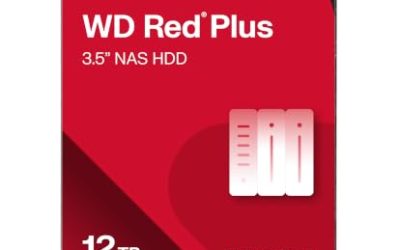
WD Red Plus 10TB
- Best for: Mid-range pick for a mainstream home NAS that runs around the clock.
- Capacity: 10TB
- Model: WD100EFGX
- Recording: CMR
- Spindle speed: 7200 RPM
Mid-range pick for a mainstream home NAS that runs around the clock.
Confirm the model number WD100EFGX; the older plain WD Red 10TB uses SMR and is a different drive.
The Red Plus is the mainstream drive in WD’s NAS range, and it is the sensible default for a home enclosure that runs around the clock. It spins at 7200 RPM with a 512 MB cache and CMR recording, so rebuilds and multi-user reads stay steady rather than stalling. WD rates the Red Plus line for enclosures with up to eight bays, which covers the two- and four-bay boxes most homes use. The three-year warranty is shorter than the Pro models, but for a home array that writes a moderate amount of data, this mid-range drive is the balanced choice.
Seagate IronWolf 10TB
- Best for: Budget pick for a first RAID array in a home NAS.
- Capacity: 10TB
- Model: ST10000VNZ004
- Recording: CMR
- Spindle speed: 7200 RPM
Budget pick for a first RAID array in a home NAS.
Several IronWolf 10TB listings share nearly identical names; confirm the model ST10000VNZ004 on the listing.
The IronWolf is the budget entry in this guide, and it earns that spot by keeping the NAS essentials while trimming the extras. It records with CMR, spins at 7200 RPM, and carries a 256 MB cache, with a sustained transfer rate of up to 210 MB/s that suits sequential media storage and backups. Seagate designs it for multi-user enclosures with up to eight bays, and the three-year limited warranty matches its home-NAS positioning. For a first RAID array on a tight budget, this is the drive that leaves room in the build for the enclosure itself.
WD Red Pro 10TB
- Best for: Premium pick for a fast multi-user NAS that serves several people at once.
- Capacity: 10TB
- Model: WD102KFBX
- Recording: CMR
- Spindle speed: 7200 RPM
Premium pick for a fast multi-user NAS that serves several people at once.
Do not confuse it with a renewed Red Pro listing or with the older WD101KFBX model.
The Red Pro is WD’s premium NAS drive, built for arrays that serve several people at once and rarely idle. It keeps the 7200 RPM spin speed and CMR recording of the Red Plus but pairs them with a longer five-year warranty and a higher workload rating for heavier multi-user duty. The 256 MB cache is smaller than the Red Plus, yet the Pro firmware and validation target larger enclosures and continuous operation. For a household or office where the NAS is always busy, this premium drive trades a little cache for durability and cover.
Seagate IronWolf Pro 10TB
- Best for: Premium pick for a business NAS with recovery cover included.
- Capacity: 10TB
- Model: ST10000NEZ008
- Recording: CMR
- Interface: SATA 6Gb/s
Premium pick for a business NAS with recovery cover included.
This is the Frustration Free Packaging version; the standard-box IronWolf Pro 10TB carries a different model number.
The IronWolf Pro is Seagate’s premium NAS drive, aimed at business enclosures where downtime costs real money. It spins at 7200 RPM with a 256 MB cache and CMR recording, and Seagate rates it for enclosures with up to 24 bays and a 300 TB per year workload, backed by a five-year warranty. The listing also includes Rescue Data Recovery Service, which covers recovery attempts if the drive fails mechanically. This Frustration Free Packaging version, model ST10000NEZ008, is the premium choice for a NAS that has to keep working through heavy multi-user days.
Toshiba N300 Pro 10TB
- Best for: Premium pick for a large multi-bay business NAS.
- Capacity: 10TB
- Model: HDWG71AXZSTB
- Recording: CMR
- Spindle speed: 7200 RPM
Premium pick for a large multi-bay business NAS.
The standard N300 10TB, model HDWG71AXZSTA, is a different drive with a lower workload rating; confirm the Pro model number.
The N300 Pro is Toshiba’s answer to the large business NAS, and it is the only drive here rated for enclosures with up to 24 bays. It spins at 7200 RPM with a 512 MB cache and CMR recording, and its Amazon title states a workload rating of up to 300 TB per year. Toshiba backs it with a five-year warranty and rates sustained transfers up to 281 MB/s, which keeps rebuilds moving in a busy array. For a growing office NAS that will add drives over time, this premium drive is the one built for the long haul.
Which One Fits Your Situation
Filling a two-bay home NAS for the first time
Start with the Seagate IronWolf 10TB, the budget pick, and spend the saving on the enclosure or a second drive for redundancy. If the NAS will also serve as the household media server, step up to the WD Red Plus 10TB for its larger 512 MB cache. Either way, buy two identical drives rather than mixing models, so a rebuild behaves predictably.
Running a media server the whole household uses
Choose the WD Red Plus 10TB for its balance of cache, spin speed, and warranty, or the WD Red Pro 10TB if several people stream and back up at the same time. Both spin at 7200 RPM with CMR recording, so rebuilds stay steady. The budget IronWolf still copes if the household mostly reads files, but pick a Pro drive when several people write heavily every day.
Stocking a business NAS with many bays
Pick the Toshiba N300 Pro 10TB, rated for enclosures with up to 24 bays and a 300 TB per year workload, or the Seagate IronWolf Pro 10TB, which carries the same bay rating and adds Rescue Data Recovery Service. Both are premium drives with five-year warranties, so choose between them on sustained transfer speed and the recovery cover. Buy all bays from the same model at once.
Replacing a failed drive in an existing array
Buy the exact model that already sits in the array, even if a newer variant looks identical, because mixing firmware and performance can slow a rebuild. Match the model number on the surviving drives, check the listing is for a new drive, and keep a spare on the shelf if the array holds data you cannot lose. A cold spare of the same model turns a failure into an afternoon job.
Common Mistakes
- Buying a desktop or SMR drive for a RAID array, then watching rebuilds stall or the drive drop out.
- Mixing different models, capacities, or firmware revisions in one array and expecting identical behavior.
- Ordering without checking the enclosure compatibility list, then finding the drive is not recognized.
- Choosing a renewed listing for a drive that needs a full warranty and a known power-on history.
- Skipping the model-number check and receiving a near-identical variant, such as the standard N300 instead of the N300 Pro.
Frequently Asked Questions
Are all five drives CMR?
Yes. Every drive in this guide records with conventional magnetic recording, as stated in its Amazon title. CMR matters in a RAID array because it rewrites small blocks without disturbing neighboring tracks, which keeps rebuilds steady. Avoid SMR drives for NAS use, and treat any listing that omits the recording technology as a reason to keep looking.
Can I mix different 10TB NAS drives in one array?
You can, but the array will run at the pace of its slowest member, and mismatched firmware can complicate rebuilds. A single model across all bays gives predictable behavior and simpler spares. If you must mix, keep the capacity, spin speed, and recording technology identical, and test the array with a rebuild before trusting it with data you cannot replace.
Do I need a Pro drive for a two-bay home NAS?
No. A two-bay home NAS rarely stresses a drive enough to justify a Pro model, so the WD Red Plus 10TB or the Seagate IronWolf 10TB is the better buy. Save the Pro drives for larger enclosures, multi-user households, or business arrays where several people read and write at once. Spend the difference on a second drive for redundancy instead.
How long will a NAS hard drive last in always-on use?
There is no fixed lifespan, since heat, vibration, and workload all shape how a drive ages. The mainstream drives here carry three-year warranties and the Pro models five years, which signals how long the maker expects them to run. Monitor drive health through your NAS, keep the enclosure cool and ventilated, and always keep a separate backup, since any single drive can fail without warning.
More from Amazon
Programs that pair well with the guide above. Offers and eligibility are set by Amazon and may change.
A free business account with business pricing and bulk-buying tools for work, shop or home office.
Create a business accountFree shipping on eligible items, Prime Video and more. Eligible new members can start with a free trial.
Start a Prime free trialAudiobooks and podcasts to listen to on the go. Eligible new members can start with a free trial.
Try Audible freeAd-free music streaming. Eligible new subscribers can start with a free trial.
Try Music Unlimited freeAs an Amazon Associate we earn from qualifying purchases.

Write Your Review
No reviews yet. Be the first to share your experience!