

Key takeaways
- Compare the best 24TB NAS hard drives for large arrays: WD Red Pro, Seagate IronWolf Pro and Toshiba N300 Pro, with CMR, workload and RAID specs.
At 24TB per drive, the NAS hard drive market narrows to a short list. Only three NAS drive families reach this capacity with the full pro treatment: Western Digital’s WD Red Pro, Seagate’s IronWolf Pro and Toshiba’s N300 Pro. All three are conventional magnetic recording (CMR) drives spinning at 7,200 RPM, rated for continuous operation and heavy annual workloads, and built for multi-bay enclosures rather than a desktop PC.


That short list makes the buying decision simpler, not easier. The three drives match each other on most headline numbers, so the real differences sit in the details: supported bay counts, bundled data recovery services, cache size, vibration handling and how each firmware behaves inside a RAID array. This guide lines the three drives up side by side so you can pick the one that fits your enclosure, your workload and your rebuild tolerance.
As an Amazon Associate, we earn from qualifying purchases.
Quick Picks
Our Short List of 3
- Best for: Large home and small-business arrays, especially where smaller WD Red or Red Pro drives are already in service
- Capacity 24TB; model WD240KFGX; 3.5-inch form factor; SATA 6 Gb/s interface; CMR recording; 7,200 RPM; 512 MB cache; workload rating 550 TB per year; rated for NAS systems up to 24 bays; designed for continuous 24×7 operation
- Best for: Very large enclosures, buyers who value bundled recovery cover, and arrays where per-drive health reporting in the NAS interface matters
- Capacity 24TB; model ST24000NT002; 3.5-inch form factor; SATA 6 Gb/s interface; CMR recording; helium-sealed design; 7,200 RPM; 512 MB cache; max sustained transfer rate 285 MB/s; workload rating 550 TB per year; MTBF 2.5 million hours; unlimited drive bay support; rotational vibration sensors; Rescue Data Recovery Services included

- Best for: Business NAS builds, Toshiba N300 replacements and upgrades, and buyers who want the largest cache in this capacity class
- Capacity 24TB; model HDWG82EXZSTB; 3.5-inch form factor; SATA 6 Gb/s interface; CMR recording; 7,200 RPM; 1.0 GB cache; workload rating up to 550 TB per year; supports up to 24 drive bays; built for continuous RAID NAS operation
All 3 Picks at a Glance
| Product | Specs | Action |
|---|---|---|
| WD Red Pro 24TB (WD240KFGX) |
| Check price on Amazon |
| Seagate IronWolf Pro 24TB (ST24000NT002) |
| Check price on Amazon |
| Toshiba N300 Pro 24TB (HDWG82EXZSTB) |
| Check price on Amazon |
How to Choose
Confirm CMR before anything else. At this capacity, every drive in this guide uses CMR, and that is not an accident. CMR drives keep consistent write behaviour during long RAID rebuilds, while shingled drives can slow dramatically when an array resyncs. A 24TB rebuild already takes many hours; the recording technology decides whether it takes a day or the better part of a week. If a listing at this size does not state CMR plainly, treat that silence as a warning.
Match the drive to your bay count. NAS drives carry a rated bay ceiling because vibration and heat behaviour change as enclosures fill up. The WD Red Pro and Toshiba N300 Pro are rated for systems up to 24 bays. The IronWolf Pro carries no bay ceiling at all. For a four or eight bay home unit, all three are comfortably inside their ratings. For a densely packed rackmount enclosure, the ceiling becomes a real specification worth checking against your chassis.
Read the workload rating, not just the capacity. Each drive here is rated at 550 TB of writes and reads per year, which is the enterprise tier of NAS endurance. That figure matters more than capacity for drives that will run surveillance recording, nightly backups for a whole office, or constant media serving. A drive rated well below this tier will usually work at first, then become the weak point of the array long before it fills up.
Plan rebuild time into the purchase. A failed 24TB drive in a single-parity array leaves you exposed for the entire rebuild, and rebuilds at this size are measured in days, not hours, under real workloads. Two habits follow from that: use dual parity (RAID 6 or RAIDZ2) once arrays get large, and keep a cold spare on the shelf. Buying one extra drive now is far cheaper than an emergency purchase during a degraded rebuild.
Check NAS compatibility lists. Synology, QNAP, Asustor and other NAS makers publish drive compatibility lists, and very large drives are sometimes added later than smaller models. Confirm the exact model number appears on your enclosure maker’s list before ordering a full set, especially for enterprise units that warn on unlisted drives.
Cache size is a minor factor. The Toshiba carries a 1.0 GB cache, double the 512 MB in the WD and Seagate drives. In a spinning-disk NAS, cache mainly smooths bursts; sustained throughput, workload rating and firmware behaviour matter more for day-to-day array performance. Treat cache as a tiebreaker, not a headline.
Best Options
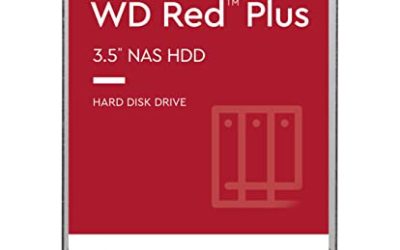
WD Red Pro 24TB (WD240KFGX)
- Best for: Large home and small-business arrays, especially where smaller WD Red or Red Pro drives are already in service
- Capacity 24TB; model WD240KFGX; 3.5-inch form factor; SATA 6 Gb/s interface; CMR recording; 7,200 RPM; 512 MB cache; workload rating 550 TB per year; rated for NAS systems up to 24 bays; designed for continuous 24×7 operation
Large home and small-business arrays, especially where smaller WD Red or Red Pro drives are already in service
The listing covers a wide capacity range, so confirm the capacity selector shows 24TB and the model number WD240KFGX before ordering; third-party sellers also list this drive, so check who is fulfilling the order
The WD Red Pro is the default recommendation for large NAS arrays, and the 24TB model follows the same formula as the rest of the line: CMR recording, a 7,200 RPM spindle, a 512 MB cache and WD’s NASware firmware, which tunes error recovery and vibration handling for multi-bay enclosures. It is rated for systems of up to 24 bays and a workload of 550 TB per year, which puts it firmly in the small-business and prosumer tier rather than the home-media tier.
For buyers already running WD Red drives in smaller capacities, this is the natural step up: the management behaviour, error recovery timing and RAID rebuild behaviour stay familiar as the array grows. WD also rates the drive for continuous operation, so it suits enclosures that never power down, from office file servers to home media archives that serve a household around the clock.
Watch out for: The listing covers a wide capacity range, so confirm the capacity selector shows 24TB and the model number WD240KFGX before ordering; third-party sellers also list this drive, so check who is fulfilling the order
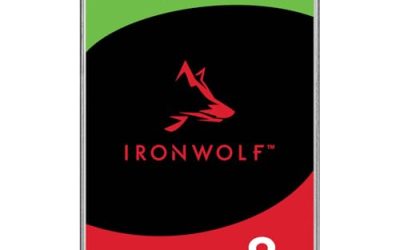
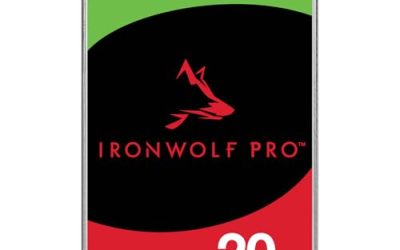
Seagate IronWolf Pro 24TB (ST24000NT002)
- Best for: Very large enclosures, buyers who value bundled recovery cover, and arrays where per-drive health reporting in the NAS interface matters
- Capacity 24TB; model ST24000NT002; 3.5-inch form factor; SATA 6 Gb/s interface; CMR recording; helium-sealed design; 7,200 RPM; 512 MB cache; max sustained transfer rate 285 MB/s; workload rating 550 TB per year; MTBF 2.5 million hours; unlimited drive bay support; rotational vibration sensors; Rescue Data Recovery Services included
Very large enclosures, buyers who value bundled recovery cover, and arrays where per-drive health reporting in the NAS interface matters
Seagate sells a second 24TB IronWolf Pro on a different platform under a similar name, so match the model number ST24000NT002 exactly; Rescue services availability varies by country, so confirm cover in your region
The IronWolf Pro matches the WD on the headline numbers — 24TB, CMR, 7,200 RPM, 512 MB cache, 550 TB per year workload — and then adds two things the others do not. First, Seagate rates it for an unlimited number of drive bays, which removes the ceiling question entirely for very large enclosures. Second, it includes Rescue Data Recovery Services, Seagate’s in-lab recovery cover, which gives a failed drive a professional recovery path for the data that was not yet backed up elsewhere.
Seagate also quotes a maximum sustained transfer rate of 285 MB/s for this model, the fastest figure published in this group, and the drive uses a helium-sealed design with rotational vibration sensors to keep performance steady when many drives spin in one chassis. Its IronWolf Health Management integration with major NAS operating systems adds drive-level health reporting inside the NAS interface itself, which is genuinely useful in a big array where spotting a weakening drive early is half the battle.
Watch out for: Seagate sells a second 24TB IronWolf Pro on a different platform under a similar name, so match the model number ST24000NT002 exactly; Rescue services availability varies by country, so confirm cover in your region
Toshiba N300 Pro 24TB (HDWG82EXZSTB)
- Best for: Business NAS builds, Toshiba N300 replacements and upgrades, and buyers who want the largest cache in this capacity class
- Capacity 24TB; model HDWG82EXZSTB; 3.5-inch form factor; SATA 6 Gb/s interface; CMR recording; 7,200 RPM; 1.0 GB cache; workload rating up to 550 TB per year; supports up to 24 drive bays; built for continuous RAID NAS operation
Business NAS builds, Toshiba N300 replacements and upgrades, and buyers who want the largest cache in this capacity class
Stock of the 24TB model moves in smaller volumes than the WD and Seagate equivalents, so availability can vary between sellers; confirm the model number HDWG82EXZSTB, since the standard N300 line uses different model codes
The N300 Pro is Toshiba’s business NAS line, and the 24TB model is its flagship capacity. It matches the group on the fundamentals — CMR, 7,200 RPM, SATA 6 Gb/s, a 550 TB per year workload rating and support for up to 24 drive bays — then doubles the cache to 1.0 GB, the largest buffer in this roundup. Toshiba positions the drive at medium and larger businesses running RAID environments that operate continuously, and it includes rotational vibration compensation for densely populated enclosures.
Toshiba is the quieter third option in the NAS drive market, which cuts both ways. The hardware specification is fully competitive with the WD and Seagate drives, and for buyers building a Toshiba-based array or replacing an existing N300 set, consistency argues for staying in the family. The trade-off is a smaller pool of NAS-maker compatibility entries and community reporting than the two bigger brands, so the compatibility check in the How to Choose section matters most with this drive.
Watch out for: Stock of the 24TB model moves in smaller volumes than the WD and Seagate equivalents, so availability can vary between sellers; confirm the model number HDWG82EXZSTB, since the standard N300 line uses different model codes
Which One Fits
Pick the WD Red Pro 24TB if you want the safest default for a large array, you already run WD drives, or your NAS maker’s compatibility list leads with WD models. It gives up nothing important to the other two.
Pick the Seagate IronWolf Pro 24TB if your enclosure has more bays than the other drives are rated for, if bundled data recovery services have real value for the data you store, or if you want the highest published sustained transfer rate in the group.
Pick the Toshiba N300 Pro 24TB if you are building or extending a Toshiba-based business array, or if the larger cache appeals for your burst-heavy workload and the model appears on your NAS maker’s compatibility list.
Whichever you choose, buy the full set from the same production family where possible, keep one cold spare, and use dual-parity RAID at this capacity. The drive brand matters less than those three habits.
Common Mistakes
Mixing a desktop drive into a NAS array. Desktop drives lack the error recovery timing and vibration tolerance of NAS drives. One desktop drive in a 24TB array can cause dropped drives and failed rebuilds even though its capacity matches.
Using single parity at 24TB. RAID 5 rebuilds at this capacity take a long time, and a second failure during that window loses the array. Dual parity is the sensible floor for drives this large.
Ignoring the compatibility list. A drive can be electrically perfect for a NAS and still trigger warnings or be refused by the enclosure’s firmware. Check the exact model number against the maker’s list before buying a full set.
Forgetting the spare. When a 24TB drive fails, sourcing a matching replacement takes days. A cold spare bought with the original set turns a failure into a same-day swap and a rebuild that begins immediately.
Assuming cache decides performance. Buyers sometimes pick the 1.0 GB cache drive expecting a faster array. In practice, sustained transfer behaviour, workload rating and RAID configuration shape performance far more than buffer size on spinning disks.
FAQ
Are all 24TB NAS drives CMR?
Yes, every 24TB NAS drive in this guide — WD Red Pro, Seagate IronWolf Pro and Toshiba N300 Pro — uses CMR recording, which is what you want for RAID arrays. CMR keeps write performance consistent during long rebuilds, and at this capacity class none of the major NAS lines use shingled recording.
How much usable space does a 24TB drive give in a NAS?
The operating system reports capacity in different units than the box, so a 24TB drive appears as roughly 21.8 TB of addressable space before any RAID overhead. Dual-parity RAID then sets aside the equivalent of two drives in the array for protection, which is the right trade at this size.
Can I mix 24TB drives from different brands in one array?
You can, and the array will run, but matching model and capacity across the set keeps rebuild behaviour and performance predictable. If you are expanding an existing array, matching the drives already in service is the cleaner path; if you are building fresh, buy one family throughout, plus a spare.
How long does a 24TB RAID rebuild take?
Under a working load, expect a rebuild to run well beyond a single day, and longer on a busy array. That exposure window is exactly why this guide recommends dual parity and a shelf spare: the rebuild will finish on its own schedule, and the array should stay protected while it does.
Final Verdict
At 24TB, the choice is refreshingly narrow. The WD Red Pro is the default pick for most large arrays, the Seagate IronWolf Pro adds unlimited bay support and bundled recovery services for the biggest enclosures, and the Toshiba N300 Pro matches them on fundamentals with the largest cache of the three. All three are CMR, rated at 550 TB per year and built for continuous duty. Decide by compatibility list, bay ceiling and the value you place on recovery cover — then spend the effort you saved on dual parity and a spare drive, which protect a 24TB array more than any brand choice will.
More from Amazon
Programs that pair well with the guide above. Offers and eligibility are set by Amazon and may change.
A free business account with business pricing and bulk-buying tools for work, shop or home office.
Create a business accountFree shipping on eligible items, Prime Video and more. Eligible new members can start with a free trial.
Start a Prime free trialAudiobooks and podcasts to listen to on the go. Eligible new members can start with a free trial.
Try Audible freeAd-free music streaming. Eligible new subscribers can start with a free trial.
Try Music Unlimited freeAs an Amazon Associate we earn from qualifying purchases.



Write Your Review
No reviews yet. Be the first to share your experience!