

Key takeaways
- Enterprise hard drives built for NAS arrays: five high-capacity CMR models with 18TB and 20TB options, 7200 RPM speed and RAID-ready reliability.
Filling a NAS with enterprise drives is a decision that stays with you for years. Once an array is built, every bay holds the same model, the same firmware behaviour and the same rebuild characteristics, so choosing the wrong drive means living with slow rebuilds, vibration trouble or a capacity ceiling that arrives sooner than expected. The real choice is not which drive is fastest on paper, but which one holds up inside a multi-bay enclosure that runs around the clock.

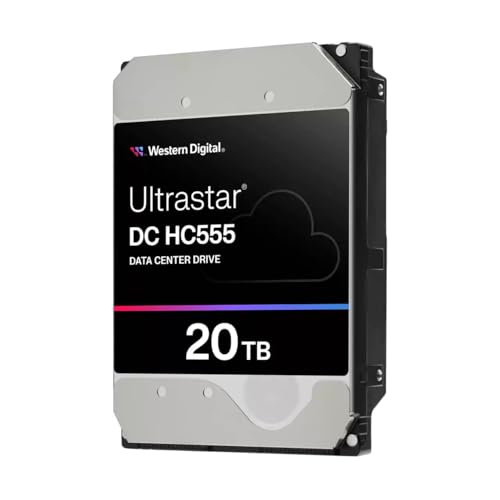
This guide is for home lab owners expanding a NAS, small businesses consolidating backups onto one array, and anyone replacing a set of smaller drives with fewer, larger ones. Every pick below was chosen from its Amazon listing by exact model number and listed specifications, with an emphasis on high-capacity CMR drives built for NAS and RAID use.
Quick Picks
As an Amazon Associate we earn from qualifying purchases.
| Product | Best for | Key spec from title |
|---|---|---|
| Seagate Exos X18 18TB | A first enterprise array in a home NAS | 18TB, SATA 6Gb/s, CMR |
| WD Ultrastar DC HC550 18TB | Deep cache and heavy multi-user access | 18TB, 512MB cache, CMR |
| Seagate Exos X20 20TB | Maximum capacity per bay at a familiar form factor | 20TB, SATA 6Gb/s, CMR |
| WD Ultrastar DC HC560 20TB | Large arrays that need the highest sustained transfer | 20TB, 512MB cache, CMR |
| Toshiba MG10 20TB | A third vendor in a mixed-vendor replacement plan | 20TB, SATA 6Gb/s, CMR |
How to Choose
Capacity per bay decides how far the array grows
Capacity is the first number to settle, because it fixes the ceiling of the whole enclosure. An 18TB drive in a four-bay NAS in a mirrored setup leaves far less usable space than the same drive in an eight-bay enclosure, and a 20TB drive adds roughly two terabytes per bay over an 18TB model. Count the bays you have, the redundancy level you plan to run, and the growth you expect over the next few years. If the array already holds smaller drives, check whether the enclosure supports mixing capacities, since many RAID levels limit the usable space of larger drives to the size of the smallest member. Buying the largest capacity the enclosure supports usually means fewer replacements later.
CMR recording keeps RAID rebuilds predictable
Recording technology matters more in a NAS than in a single desktop drive. Conventional magnetic recording, or CMR, writes each track independently, so a rebuild that rewrites a whole drive proceeds at a steady pace. Shingled magnetic recording overlaps tracks and can slow sustained writes dramatically when an array is rebuilding or resilvering, which stretches the window where a second failure would be dangerous. Every drive in this guide lists CMR on its Amazon page, and that is not a coincidence. Before buying any enterprise drive, confirm the listing states CMR or conventional recording, and treat a listing that stays silent on the subject as a reason to keep looking.
Workload rating and vibration tolerance separate enterprise from desktop drives
Enterprise drives carry a workload rating, expressed in terabytes written per year, and a mean time between failures figure that desktop drives do not match. The five drives here are listed for 550TB per year and a 2.5 million hour MTBF, which reflects bearings, actuators and firmware tuned for constant operation beside other spinning drives. Vibration is the hidden problem in multi-bay enclosures: each drive shakes its neighbours, and enterprise firmware includes sensors that compensate for it. A desktop drive in the same enclosure has no such protection, and its error rate climbs as bays fill up. Match the rating to the duty cycle, and do not put a desktop-class drive into an array that runs all day.
Interface, sector format and enclosure compatibility come before ordering
All five drives here use a SATA 6Gb/s interface in a 3.5-inch form factor, which fits most NAS enclosures, but the details still deserve a check. Some enterprise models are sold in both 512e and 4Kn sector formats, and the two variants carry different model numbers, so confirm the exact model number on the listing matches the one your enclosure supports. SAS variants of the same drive family exist and will not fit a SATA-only backplane. Check the enclosure maker’s compatibility list for the exact model, confirm the power supply can handle the spin-up current of a full set of 7200 RPM drives, and verify the drive height and mounting holes match the trays.
The 5 Best Options
Seagate Exos X18 18TB
The Exos X18 is the natural starting point for a first enterprise NAS build, because it pairs a large 18TB capacity with the kind of steady, documented behaviour that array owners want. Its 7200 RPM spindle and 256MB cache deliver sustained transfers up to 270 MB/s, which is enough to keep a multi-user home NAS responsive while a backup job runs in the background. Helium sealing keeps the platters stable, and the drive is listed for continuous operation with a 5-year limited warranty. For anyone moving from desktop-class drives to their first enterprise set, this is the least surprising way to make the jump.
Specs
- Capacity: 18TB
- Interface: SATA 6Gb/s
- Form factor: 3.5-inch
- Spindle speed: 7200 RPM
- Cache: 256MB
- Recording technology: CMR
- Sustained transfer rate: up to 270 MB/s
- Workload rating: 550TB per year
- MTBF: 2.5 million hours
- Warranty: 5-year limited warranty
Best for: A first enterprise array in a home or small-office NAS.
Watch out for: Confirm the model number ST18000NM000J on the listing, since other Exos X18 variants use different sector formats and SAS interfaces.
WD Ultrastar DC HC550 18TB
The Ultrastar DC HC550 earns its place with a 512MB cache, double the buffer of the Exos X18, which helps when several users read and write at once or when a NAS serves both file storage and a media library. Its 18TB capacity sits on a helium-sealed nine-disk platform with ePMR recording, a form of CMR that keeps write behaviour predictable during rebuilds. The drive carries the same 550TB per year workload rating and 2.5 million hour MTBF as the other enterprise picks here, and a 5-year limited warranty. It is a strong choice for an array that sees concurrent access rather than a single sequential stream.
Specs
- Capacity: 18TB
- Interface: SATA 6Gb/s
- Form factor: 3.5-inch
- Spindle speed: 7200 RPM
- Cache: 512MB
- Recording technology: CMR (ePMR)
- Workload rating: 550TB per year
- MTBF: 2.5 million hours
- Warranty: 5-year limited warranty
Best for: Multi-user NAS setups where several streams run at the same time.
Watch out for: Several listings exist for this model number in new, used and renewed condition, so check the condition field and the seller before ordering.
Seagate Exos X20 20TB
The Exos X20 takes the same proven enterprise platform as the X18 and stretches it to 20TB, which makes it the simplest way to add capacity without changing anything else about the build. It keeps the SATA 6Gb/s interface, 7200 RPM spindle and 256MB cache, and it is listed for the same 550TB per year workload and 2.5 million hour MTBF. In a four-bay array, choosing 20TB drives instead of 18TB models adds eight terabytes of raw capacity across the enclosure. That headroom matters most for media libraries and backup targets that grow every month and are awkward to expand later.
Specs
- Capacity: 20TB
- Interface: SATA 6Gb/s
- Form factor: 3.5-inch
- Spindle speed: 7200 RPM
- Cache: 256MB
- Recording technology: CMR
- Workload rating: 550TB per year
- MTBF: 2.5 million hours
- Warranty: 5-year limited warranty
Best for: Owners who want the most capacity per bay in a familiar Seagate enterprise platform.
Watch out for: A renewed listing for this model circulates under a different ASIN, so verify the listing is the new drive and not a recertified unit.
WD Ultrastar DC HC560 20TB
The Ultrastar DC HC560 is the highest-specification drive in this guide, combining 20TB of capacity with a 512MB cache and a sustained transfer rate up to 291 MB/s, the fastest of the five. Its OptiNAND technology pairs flash memory with the magnetic media to support the 20TB capacity on a nine-disk CMR platform, and the drive carries the same 550TB per year workload rating and 2.5 million hour MTBF as its 18TB sibling. For large arrays where rebuilds move terabytes of data and every hour of rebuild time counts, the extra transfer speed and cache are genuinely useful rather than decorative.
Specs
- Capacity: 20TB
- Interface: SATA 6Gb/s
- Form factor: 3.5-inch
- Spindle speed: 7200 RPM
- Cache: 512MB
- Recording technology: CMR
- Sustained transfer rate: up to 291 MB/s
- Workload rating: 550TB per year
- MTBF: 2.5 million hours
- Warranty: 5-year limited warranty
Best for: Large multi-bay arrays where rebuild speed and sustained throughput matter most.
Watch out for: This drive family is sold in several SATA variants with similar model numbers, so match the exact model number WUH722020CLE6L4 on the listing.
Toshiba MG10 20TB
The Toshiba MG10 rounds out the set as the third vendor in the group, which matters when an array owner wants a second source for future replacements or simply prefers Toshiba’s enterprise line. Its 20TB capacity uses a ten-disk helium-sealed design with CMR recording, a 7200 RPM spindle and a 512MB cache, and it lists a sustained transfer rate up to 268 MiB/s. The workload rating is 550TB per year with a 2.5 million hour MTBF and a 5-year limited warranty, matching the other enterprise drives here. It is a solid, unflashy pick for a NAS that needs capacity and endurance without a particular brand allegiance.
Specs
- Capacity: 20TB
- Interface: SATA 6Gb/s
- Form factor: 3.5-inch
- Spindle speed: 7200 RPM
- Cache: 512MB
- Recording technology: CMR
- Sustained transfer rate: up to 268 MiB/s
- Workload rating: 550TB per year
- MTBF: 2.5 million hours
- Warranty: 5-year limited warranty
Best for: Buyers who want a Toshiba enterprise drive as a second source alongside Seagate or WD models.
Watch out for: A Japanese-market listing for the same model number exists under a different ASIN, so confirm the listing is the US model before ordering.
Which One Fits Your Situation
Filling a four-bay home NAS for the first time
A four-bay enclosure leaves little room for growth, so capacity per drive matters more than in a larger box. The Seagate Exos X18 18TB is a sensible default here, with space for a mirrored or single-parity array and a workload rating for daily use. If the library is mostly media that only grows, the Exos X20 20TB adds headroom in the same bays. Either way, buy all four drives at once so the array starts with matched firmware and wear.
Building a large array for a small business
Larger enclosures reward the drives with the biggest caches and the fastest sustained transfers, because rebuilds and concurrent access scale with bay count. The WD Ultrastar DC HC560 20TB is the pick for this situation, with its 512MB cache and the highest sustained transfer rate in the group. Pair it with a hot spare so a failed drive starts rebuilding immediately, and keep the enclosure in a ventilated space since a full set of 7200 RPM drives generates real heat.
Replacing drives in an existing RAID
Replacing drives one at a time is the usual path to more capacity, but it only works when the new drive is at least as large as the one it replaces. The WD Ultrastar DC HC550 18TB suits an 18TB array being expanded, while the Toshiba MG10 20TB fits a 20TB array needing a second vendor. Replace one drive, let the rebuild finish completely, and only then move to the next, since rushing a second replacement leaves the array exposed.
Running a backup target around the clock
A backup target writes in long sequential streams and then sits idle, which is a different load from a file server with constant random access. The Seagate Exos X20 20TB fits this role well, with 20TB of space for retention and a workload rating built for continuous duty. Schedule backups for quiet hours so they do not compete with daytime access, and check the array health monthly so a failing drive is caught before the next backup window.
Common Mistakes
- Buying a desktop-class drive for a multi-bay NAS and discovering too late that it lacks vibration compensation and a workload rating for continuous use.
- Ordering an SMR drive for a RAID array and watching rebuilds slow to a crawl while the array stays exposed.
- Mixing capacities in a RAID level that limits every drive to the size of the smallest member, wasting the extra space on the larger drives.
- Picking a SAS variant of an enterprise drive for a SATA-only backplane and finding the connector does not fit.
- Skipping the burn-in check on arrival, so a drive with early faults only shows up months later when the array is already full.
Frequently Asked Questions
Can enterprise drives work in a home NAS?
Yes, provided the enclosure supports 3.5-inch SATA drives and lists the model as compatible. Enterprise drives are built for continuous operation in multi-drive enclosures, so they suit a home NAS that runs around the clock. Check the enclosure maker’s compatibility list for the exact model number before ordering, and confirm the power supply can handle the spin-up current of a full set of 7200 RPM drives.
Do all five drives in this guide use CMR?
Yes. Every drive listed here uses conventional magnetic recording, which writes each track independently and keeps RAID rebuilds predictable. That is the main reason they were chosen over other high-capacity models that use shingled recording. Always confirm the recording technology on the listing itself, since drive families can include both CMR and SMR models under similar names.
How many drives should I buy at once?
Buy the full set for the array in one order when possible, ideally from the same batch. Matched drives share firmware and wear characteristics, which keeps rebuild behaviour consistent. If the budget does not allow a full set, buy at least the drives needed for the initial RAID level plus one spare, and add matching drives later rather than mixing models.
What should I check when a drive arrives?
Inspect the packaging, record the serial number and model number, and run a full surface scan before adding the drive to an array. A scan of a 20TB drive takes many hours, but it catches early faults while a return is still simple. Check the SMART data for reallocated sectors and power-on hours, and do not install a drive that already shows wear.
More from Amazon
Programs that pair well with the guide above. Offers and eligibility are set by Amazon and may change.
A free business account with business pricing and bulk-buying tools for work, shop or home office.
Create a business accountFree shipping on eligible items, Prime Video and more. Eligible new members can start with a free trial.
Start a Prime free trialAudiobooks and podcasts to listen to on the go. Eligible new members can start with a free trial.
Try Audible freeAd-free music streaming. Eligible new subscribers can start with a free trial.
Try Music Unlimited freeAs an Amazon Associate we earn from qualifying purchases.



Write Your Review
No reviews yet. Be the first to share your experience!