

Key takeaways
- Highest measured sustained write in the independent comparison
- Rated stable across the whole card
- Strong build aimed at working professionals
The best V90 SD card for most people in 2026 is the Angelbird AV PRO SD MK2 V90 for sustained speed, with the Lexar Professional 2000x GOLD as the value alternative and the Sony Tough-G as the pick when durability matters most. All three guarantee 90 MB/s sustained writing, which is the Video Speed Class needed for 6K video, high-bitrate 4K intraframe recording and long RAW photo bursts.
A V90 card is overkill for casual 4K, but it is the right tool when your camera’s manual asks for it or when a stalled buffer costs you shots. This guide compares seven real V90 cards using manufacturer specifications and independent speed measurements, then shows how to match the card to your bitrate and how to protect the footage you record on it.
Our top picks


As an Amazon Associate we earn from qualifying purchases at no extra cost to you.
Quick comparison of the best V90 SD cards
| Pick | Best for | Rated read / write | Independent write measurement | Price tier |
|---|---|---|---|---|
| Angelbird AV PRO SD MK2 V90 | Best overall, steadiest speed | 300 / 280 MB/s | About 272 MB/s | Premium |
| Lexar Professional 2000x GOLD | Best value | 300 / 260 MB/s | About 241 MB/s | Mid-range |
| Sony Tough-G (SF-G series) | Best for durability | 300 / 299 MB/s | About 234 MB/s | Premium |
| ProGrade Digital V90 | Best for pro workflows | 300 / 250 MB/s | About 254 MB/s on 128GB | Premium |
| Kingston Canvas React Plus V90 | Fast and widely sold | 300 / 260 MB/s | About 274 MB/s | Mid-range to premium |
| SanDisk Extreme PRO V90 | Best known brand | Up to 300 MB/s read | Varies by capacity | Premium |
| Delkin Devices Black V90 | Best for rugged field use | Up to 300 MB/s read | Varies by capacity | Premium |
Measured write figures come from independent reviews and vary by sample, capacity and test setup. Use them to compare cards against each other, and use your camera’s bitrate to decide whether you need V90 at all.
What V90 means and why it matters
V90 is a Video Speed Class defined by the SD Association. It guarantees a minimum sustained write speed of 90 MB/s, regardless of how full the card is. Peak numbers printed on the package, such as 300 MB/s, describe best-case read bursts. The guarantee is the number that protects your recording from dropped frames.
V90 cards use the UHS-II interface with its second row of contacts, and they only deliver their full speed in a UHS-II camera slot and a UHS-II reader. In a UHS-I slot they still work but run at the slower bus speed. Check your camera’s specification before paying the V90 premium.
Best overall: Angelbird AV PRO SD MK2 V90
Angelbird’s AV PRO SD MK2 is rated at 300 MB/s read and 280 MB/s write, with capacities up to 512GB. The company’s Stable Stream approach aims to hold a steady write speed of 260 MB/s across the whole card, not only when it is empty. In the Have Camera Will Travel comparison it posted the fastest write of the group at about 272 MB/s and a read near 295 MB/s.
Who it suits: cinema and mirrorless shooters who record 6K, 8K proxies or high-bitrate intraframe clips and cannot accept a speed dip late in the card.
Pros:
- Highest measured sustained write in the independent comparison
- Rated stable across the whole card
- Strong build aimed at working professionals
Cons:
- Premium tier cost
- Maximum capacity is 512GB
Best value: Lexar Professional 2000x GOLD
The Lexar Professional 2000x GOLD reads at 300 MB/s and writes at 260 MB/s according to Lexar, and it is backward compatible with UHS-I devices. Independent measurements put its write near 241 MB/s and read near 278 MB/s. Lexar covers it with a limited lifetime warranty, and roundups often name it as the best V90 card for those who want V90 performance without the premium-brand cost.
Who it suits: enthusiast and semi-professional shooters who need V90 for their camera but do not need the stability extras of the premium lines.
Pros:
- Same V90 class for less money than the premium brands
- Backward compatible with UHS-I devices
- Limited lifetime warranty
Cons:
- Measured write is lower than the fastest cards
- Less specialized support than boutique professional brands
Best for durability: Sony Tough-G
Sony’s Tough-G, sold under SF-G model numbers, comes in capacities from 32GB to 256GB with up to 300 MB/s read and up to 299 MB/s write on the manufacturer’s sheet. Its main selling point is the one-piece molded housing. Sony says it resists bending far more than the SD standard requires, the card has no write-protect switch and no guide rib that can snap off, and it is rated waterproof and dustproof. Independent measurements show real writes closer to 234 MB/s, which is still well above V90.
Who it suits: wedding, sports and expedition shooters who handle cards in rough conditions and value physical robustness over the last few MB/s.
Pros:
- Exceptional physical durability for an SD card
- Waterproof and dustproof design
- Trusted brand with broad camera compatibility
Cons:
- Capacity tops out at 256GB
- Measured write speed is below the rated figure
- No write-protect switch
Best for pro workflows: ProGrade Digital V90
ProGrade Digital’s V90 card lists 300 MB/s read and 250 MB/s write on the 64GB model and carries a three-year warranty. The 128GB sample in the independent comparison wrote at about 254 MB/s with a read near 283 MB/s. ProGrade’s newer Iridium line is a different product: it reads at 300 MB/s, but write speed is rated 200 MB/s on 128GB and 275 MB/s on 256GB and larger, and reviewers praise its consistent sustained write for video.
Who it suits: photographers and videographers who want a brand built for working studios and who use ProGrade readers in their offload routine.
Pros:
- Measured write is close to its rating
- Three-year warranty
- Matching readers and software for an organized workflow
Cons:
- Premium tier cost
- Write speed varies between product lines, so read the exact model spec
Fast and widely sold: Kingston Canvas React Plus V90
The Canvas React Plus V90 is Kingston’s top SD card. In a 2026 independent roundup it measured about 274 MB/s write and 291 MB/s read against ratings of 260 and 300, which means it exceeded its own write rating. Kingston describes the card as shockproof, vibration proof, waterproof and X-ray proof.
Who it suits: buyers who want near top-of-class speed from a brand that is easy to find in stores and online.
Pros:
- Measured write above its rated figure in independent testing
- Good protection ratings
- Broad availability
Cons:
- Fewer professional support tools than boutique brands
- Results can vary by capacity
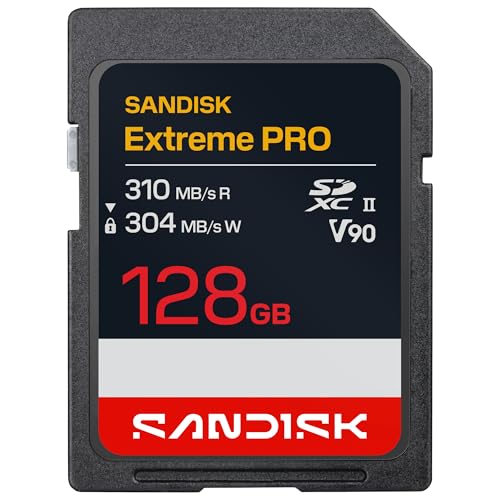
Best-known brand: SanDisk Extreme PRO V90
The SanDisk Extreme PRO UHS-II V90 card is the benchmark many roundups use as a comparison point. SanDisk rates the line up to 300 MB/s read, and the cards carry the V90 and U3 marks along with a ruggedized, waterproof design. Write speed depends on capacity, so check the sheet for the size you buy.
Who it suits: shooters who want a card that every retailer stocks and that every camera manufacturer has validated in its own testing.
Pros:
- Very wide compatibility and availability
- Rugged, waterproof construction
- Familiar brand with long field history
Cons:
- Premium tier cost
- Not always the fastest in independent write comparisons
Best for rugged field use: Delkin Devices Black V90
Delkin Devices builds its Black line for professional photographers and videographers, and the SD V90 UHS-II card is rated up to 300 MB/s read with the V90 and U3 marks. Delkin positions the card around durability and offers a lifetime-style limited warranty on the Black line, so check the current terms on the product page before buying.
Who it suits: professionals who shoot in harsh environments and prefer a specialist memory brand.
Pros:
- Built for professional use with V90 certification
- Specialist brand focused on memory cards
- Pairs with Delkin readers for offloading
Cons:
- Premium tier cost
- Fewer independent measurements available than for the larger brands
How to match a V90 card to your camera
Convert bitrate to megabytes per second by dividing megabits by eight. A camera writing 800 Mbps needs 100 MB/s sustained, which is already beyond V60. A camera writing 1,200 Mbps needs 150 MB/s, which is why 8K RAW and ProRes-style modes use CFexpress cards instead of SD.
| Use case | Bitrate | Required sustained write | Does V90 fit? |
|---|---|---|---|
| 4K 30 H.265 | 150 to 200 Mbps | 19 to 25 MB/s | Overkill, V30 is enough |
| 4K 60 All-Intra 10-bit | 600 Mbps | 75 MB/s | Yes, safe margin |
| 6K 30 intraframe | 800 to 1,000 Mbps | 100 to 125 MB/s | Yes, required |
| Long RAW photo bursts | Buffer clearing, not bitrate | As fast as possible | Yes, clears buffer faster |
| 8K RAW video | Above 1,500 Mbps | 190 MB/s and up | Usually no, use CFexpress |
Worked example: recording time on a 128GB card
A 128GB card has about 119GB of usable space. At 800 Mbps, the camera writes 100 MB/s, so 119,000 MB divided by 100 gives 1,190 seconds, about 20 minutes of footage. For a four-hour event at that bitrate you need around 12 such cards, which is the point where buying 256GB or 512GB cards and swapping less often starts to make sense.
Decision matrix
| Priority | Choose |
|---|---|
| Fastest sustained write | Angelbird AV PRO SD MK2 or Kingston Canvas React Plus V90 |
| Lowest cost for V90 | Lexar Professional 2000x GOLD |
| Rough conditions, drops, water | Sony Tough-G or Delkin Black |
| Studio workflow with matching readers | ProGrade Digital |
| Maximum compatibility and stock | SanDisk Extreme PRO |
V90 versus V60 and CFexpress
If your camera never records above about 500 Mbps, a V60 card gives you the same results for less money. V90 earns its price when the camera calls for it or when burst shooting benefits from a faster buffer clear. If your camera has a CFexpress Type B slot and you shoot 8K or RAW video, CFexpress is the correct card type, since SD tops out below the data rates those modes need.
Dual-slot cameras raise one more question. Many bodies pair an SD UHS-II slot with a CFexpress slot, and the SD slot becomes the backup. In that setup a V90 card makes sense as a secondary recording target, because it can keep pace with the primary card for stills and proxy video.
Card readers matter as much as the card
A V90 card paired with a slow reader wastes the purchase. The camera records at the card’s speed, but offloading depends on the reader, the cable and the computer port. A UHS-II reader on a USB 3.2 Gen 2 port can approach 300 MB/s, while a built-in laptop slot that supports only UHS-I caps the transfer near 90 to 100 MB/s. The difference is easy to calculate: moving a full 128GB card at 280 MB/s takes roughly 7.5 minutes, while the same card at 90 MB/s takes about 24 minutes.
For a shoot day with six cards, that gap is the difference between a short offload and an evening spent waiting. If you regularly work with V90 cards, a UHS-II reader is a smaller expense than the cards themselves and pays back every session. Choose a reader whose port matches your computer, such as USB-C for modern laptops, and avoid unpowered hubs that share bandwidth with other devices.
Temperature, warranty and lifespan
Fast cards run warm. High-bitrate recording keeps the controller busy, and heat is the usual reason a card slows down mid-clip or a camera shows an overheating warning. Keep the camera out of direct sun, remove cards that feel hot after a long take and let them cool before the next job. Operating temperature ranges also differ between brands, so check the specification if you shoot in freezing or very hot locations.
Warranty terms vary, from three years on some professional lines to a limited lifetime warranty on others. A warranty replaces the card, but it does not restore lost footage, so it should not replace a backup habit. Flash memory also has a finite write endurance, and heavy video shooters who fill cards daily should plan to retire cards after a few years of intensive use even if they still seem to work.
Protecting your footage
- Format in camera: a camera sets up the file structure it expects. A computer format can create compatibility problems and slower writes.
- Do not fill the card completely: leave about 10 percent free for long recordings.
- Eject before removal: always use the computer’s eject command before pulling the card from a reader.
- Rotate cards: avoid running one card for every job. Spreading wear across several cards lowers risk.
- Offload and verify: copy to two drives and verify file sizes before reformatting.
- Stop on errors: if the camera reports a card error, stop recording, power off and do not format. Writing more data lowers the chance of recovery.
When a card does fail, connect it to a computer through a reader and use recovery software that reads from the card without writing to it. For physically damaged or unreadable cards, a professional recovery lab is the safer route than repeated attempts at home.
Common mistakes when buying V90 cards
The most frequent mistake is buying on the headline read number. A card advertised at 300 MB/s read may write at a fraction of that, and writing is what your camera does. The second mistake is ignoring capacity differences, since the same product line can have different write ratings at 64GB, 128GB and 256GB. The third is buying V90 for a camera that cannot use it, which spends money on a feature the slot never delivers. Finally, many buyers skip a second card, so a single failure ends the day. Read the exact spec line for the capacity you want, confirm the camera slot is UHS-II, and buy two cards.
Spotting counterfeit cards
Fake high-capacity cards are a known problem in flash storage. A fake card reports a large size but silently overwrites data once the real capacity is full. To reduce risk, buy from authorized sellers, check the packaging for consistent printing and run a full-capacity validation tool before relying on a new card. Real V90 cards also keep a steady write speed when you copy a large file, while counterfeit cards often fall off sharply after a short time.
Frequently Asked Questions
Do I need a V90 card for 4K video?
Usually not. Most 4K modes use 100 to 400 Mbps, which V30 and V60 cards handle. You need V90 for higher-bitrate intraframe modes, 6K recording or when your camera manual specifies it.
Will a V90 card work in a UHS-I camera?
Yes, it works, but it runs at UHS-I speeds, so the V90 guarantee no longer applies. You pay for performance the camera cannot use, so a V30 card is a better value for a UHS-I-only body.
Are V90 cards faster than CFexpress?
No. CFexpress Type B cards reach sustained write speeds several times higher than the best SD cards, which is why they are used for 8K and RAW video. V90 is the top of the SD range.
Why is my V90 card slower than the label says?
The label shows a peak rate. Real speed depends on the reader, the port, the file size, the card’s capacity and how full it is. Use a UHS-II reader on a fast USB port, and compare against the manufacturer’s sustained write figure instead of the headline number.
Is a more expensive V90 card more reliable?
Not automatically. Premium cards often add tougher construction, better quality control and longer warranties, which lowers risk, but any card can fail. The reliable approach is to buy from a reputable maker, rotate cards and back up every shoot twice.
What capacity V90 card should I buy?
Choose the capacity that holds a full shoot at your bitrate with a margin, using the recording time calculation above. Mid-sized cards of 128GB and 256GB offer a good balance, and carrying two of them gives you redundancy that one large card cannot.


Write Your Review
No reviews yet. Be the first to share your experience!