

Key takeaways
- Five Wi-Fi 6E routers with a real 6 GHz band, compared on coverage, wired ports, mesh, and security, so you can pick the right one for your home.
A Wi-Fi 6E router adds one thing a Wi-Fi 6 router cannot offer: a 6 GHz band with room for fast, uncongested traffic. The catch is that only devices with Wi-Fi 6E radios can use that band, so the upgrade pays off only when your phones, laptops, and consoles already carry those radios. The other choice is shape. A single powerful router suits a flat or a small house, while a mesh system suits a home with dead zones across floors and thick walls.
This guide is for households with gigabit internet, for gamers and streamers who need low lag, and for families whose phones, laptops, and smart TVs crowd the same network. It also fits buyers moving from an old Wi-Fi 5 router who want the extra band without paying Wi-Fi 7 prices. Each pick below names the band layout, the combined speed figure, the wired ports, and the coverage claim exactly as printed on its Amazon listing.
Quick Picks
As an Amazon Associate we earn from qualifying purchases.
| Product | Best for | Key spec from title |
|---|---|---|
| TP-Link Archer AXE75 | A first 6 GHz router on a tight budget | AXE5400 tri-band with 6 GHz |
| ASUS RT-AXE7800 | A security-minded household | AXE7800 tri-band with 2.5G port |
| NETGEAR Nighthawk RAXE300 | A busy home with many devices | AXE7800 with 8 streams, 2,500 sq ft |
| TP-Link Deco XE75 (2-pack) | A large home that needs mesh | AXE5400 mesh covering 5,500 sq ft |
| Amazon eero Pro 6E | A simple mesh setup | AXE5400 mesh, 2,000 sq ft per node |
How to Choose
The 6 GHz Band Is the Whole Point
Wi-Fi 6E is Wi-Fi 6 plus a 6 GHz band, and that band is the reason to buy one of these routers. It carries far less traffic than the crowded 2.4 GHz and 5 GHz bands, so a Wi-Fi 6E phone or laptop gets a clearer lane. Before you buy, check that your devices carry Wi-Fi 6E radios, because older devices cannot see the 6 GHz band at all and will keep using 5 GHz. A router that prints no 6 GHz band is not a Wi-Fi 6E router, whatever the box says. Also know that 6 GHz reaches less far than 5 GHz, so thick walls and floors cut it down fast.
Read the Speed Figure as a Combined Number
AXE5400 and AXE7800 look like speeds, but they are combined figures that add up all three bands. No single device ever reaches 5,400 or 7,800 Mbps, because one device uses one band at a time. The per-band figures tell the real story: the ASUS RT-AXE7800 prints 574 Mbps on 2.4 GHz, 4,804 Mbps on 5 GHz, and 2,402 Mbps on 6 GHz. Compare those per-band numbers when you shop, and look for 160 MHz channels on the 5 GHz and 6 GHz bands, since wider channels carry more data. A router with a bigger combined figure is not automatically faster for the one device you care about most.
One Router or a Mesh System
A single router works when the home is small and the walls are thin, but a big house with two floors and a basement usually needs mesh. Mesh nodes talk to each other, and the link between them is the backhaul. A tri-band mesh system can use the 6 GHz band for backhaul, which keeps the 5 GHz band free for your devices, but only when the listing prints that detail. Coverage figures on listings are maker claims for open space, so treat 5,500 square feet as a best case, not a promise. Count the rooms between the router and the far bedroom, and add a node when the signal has to cross two floors.
Wired Ports and Security Suites
Wireless speed gets the attention, but the wired ports decide what your internet plan can actually deliver. A gigabit WAN port caps a wired connection at 1 Gbps, so a plan faster than that needs a 2.5 Gbps port. Count the LAN ports too, because a console, a desktop, and a network drive fill them fast. Security suites differ as well. ASUS bundles AiProtection Pro with no extra fee, while other makers put advanced controls behind a subscription, so check what stays free after the trial ends. VPN support matters when you work from home, and not every router in this class prints it.
The 5 Best Options
TP-Link Archer AXE75

The Archer AXE75 is the cheapest way into a real 6 GHz network, and it suits a flat or a small house where one router can cover every room. It is a tri-band AXE5400 router with a 6 GHz band, 160 MHz channels, and OneMesh support for adding a compatible extender later. Gamers get VPN support and WPA3 security, and the quad-core CPU keeps streams and downloads moving when several devices run at once. It fits a household with gigabit internet that wants the extra band without paying for a flagship or a mesh system.
Specs
- Tri-band Wi-Fi 6E (2.4 GHz, 5 GHz, 6 GHz)
- AXE5400 combined speed, up to 5,400 Mbps
- 160 MHz channels on the 5 GHz and 6 GHz bands
- OneMesh support for adding a compatible extender
- Quad-core CPU
- VPN support and WPA3 security
- Gigabit Ethernet ports
Best for: A first 6 GHz router for a small home on gigabit internet.
Watch out for: The WAN port is gigabit only, so a plan faster than 1 Gbps hits a wired ceiling; confirm the standalone router listing, because the Deco XE75 mesh system sells under a near-identical name.
ASUS RT-AXE7800

The RT-AXE7800 suits a household that wants strong security controls and room to grow. It is a tri-band AXE7800 router with a 6 GHz band, a 2.5 Gbps port for internet plans above a gigabit, and AiMesh support for adding another ASUS router later. AiProtection Pro, Safe Browsing, parental controls, and Instant Guard VPN come with the router, so the security suite costs nothing extra. It fits a family that runs many devices, works from home, and wants one router that can stretch into a mesh network over time.
Specs
- Tri-band Wi-Fi 6E (2.4 GHz, 5 GHz, 6 GHz)
- AXE7800 combined speed: 574 + 4,804 + 2,402 Mbps
- 1.7 GHz quad-core processor
- 2.5 Gbps WAN/LAN port, gigabit LAN ports, 1x USB 3.0
- AiMesh support
- AiProtection Pro, Safe Browsing, Instant Guard VPN, parental controls
- 256 MB Flash and 512 MB DDR4 RAM
- 9.49 x 8.27 x 2.44 in, 1,033 g
Best for: A security-minded household that wants a 2.5G port and mesh expansion.
Watch out for: Only one 2.5 Gbps port, so only one wired device gets multi-gig speed; AiMesh expansion needs another ASUS router.
NETGEAR Nighthawk RAXE300

The RAXE300 suits a busy home where dozens of devices fight for airtime. It is a tri-band AXE7800 router with eight streams, coverage for up to 2,500 square feet, and room for 40 devices, so phones, consoles, and smart TVs share the network without crowding each other. The winged frame holds six internal antennas, and the 2.5 Gbps port serves a wired console or desktop at full speed. It fits a household with gigabit internet, a gaming console, and a house full of connected gear.
Specs
- Tri-band Wi-Fi 6E (2.4 GHz, 5 GHz, 6 GHz)
- AXE7800 combined speed, up to 7.8 Gbps (600 + 4,800 + 2,400 Mbps)
- 8 streams, coverage up to 2,500 sq ft, 40 devices
- 1.7 GHz quad-core processor, 512 MB DDR4 RAM, 256 MB Flash
- 4x 1G and 1x 2.5G Ethernet ports
- NETGEAR Armor security and Smart Parental Controls
- 11.86 x 8.16 x 3.23 in folded, 2.23 lb
Best for: A busy home with many devices and a gaming console.
Watch out for: A Renewed listing circulates under a separate code, so confirm the new condition before ordering; check whether the Armor security suite needs a subscription after the trial ends.
TP-Link Deco XE75 (2-pack)
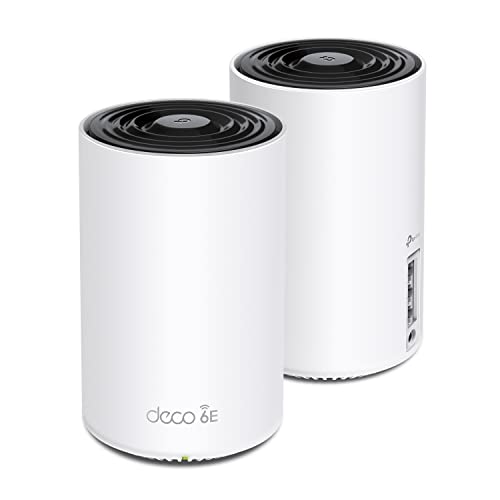
The Deco XE75 suits a large home where one router cannot reach every room. It is a tri-band AXE5400 mesh system with a 6 GHz band, and the two nodes cover up to 5,500 square feet together. The AI-driven mesh steers each device to the strongest node, so a phone keeps its connection while its owner walks from the living room to the far bedroom. It fits a two-floor house with dead zones, thick walls, or a garden office that sits far from the modem.
Specs
- Tri-band Wi-Fi 6E mesh (2.4 GHz, 5 GHz, 6 GHz)
- AXE5400 combined speed
- 2-pack covers up to 5,500 sq ft
- AI-driven mesh, replaces router and extender
- 6 GHz band
- Gigabit Ethernet ports
Best for: A large home that needs mesh coverage across floors.
Watch out for: The 2-pack and 3-pack sell under different ASINs, so confirm the 2-pack listing (the 3-pack covers up to 7,200 sq ft); the standard XE75 prints gigabit ports only, while the Pro version adds a 2.5G port.
Amazon eero Pro 6E (1-pack)

The eero Pro 6E suits a buyer who wants mesh without a setup project. It is a tri-band AXE5400 mesh node with a 6 GHz band, support for internet plans up to 2.5 Gbps, and coverage for up to 2,000 square feet per node. The built-in Zigbee hub links smart home gear without a separate hub, and the app walks through setup in minutes. It fits a household that wants a clean, quiet mesh system and plans to add nodes as the home grows.
Specs
- Tri-band Wi-Fi 6E mesh (2.4 GHz, 5 GHz, 6 GHz)
- AXE5400 combined speed
- Supports internet plans up to 2.5 Gbps
- Coverage up to 2,000 sq ft per node, 100+ devices
- Built-in Zigbee smart home hub
- 2.5 GbE port and 1 GbE port
Best for: A simple mesh setup with smart home gear built in.
Watch out for: Advanced features sit behind the eero Plus subscription, so check what stays free; management runs through the app, with no web interface; the 1-pack and 3-pack sell under different ASINs, so confirm the pack size.
Which One Fits Your Situation
You Have Gigabit Internet and Want the Cheapest Way In
Pick the TP-Link Archer AXE75. It brings a real 6 GHz band, 160 MHz channels, and VPN support to a small home for the lowest outlay in this guide. Its gigabit WAN port matches a 1 Gbps plan exactly, so nothing in the wired path goes to waste. Skip it when your plan runs faster than a gigabit or your house needs mesh.
Your House Has Dead Zones on Two Floors
Pick the TP-Link Deco XE75 2-pack when the far bedroom or the garden office drops off the network. Two nodes cover up to 5,500 square feet, and the 6 GHz band can carry the backhaul. Pick the eero Pro 6E instead when you want a simpler app and a Zigbee hub for smart home gear, and add nodes one at a time.
You Want Strong Security Without a Subscription
Pick the ASUS RT-AXE7800. AiProtection Pro, Safe Browsing, parental controls, and Instant Guard VPN come with the router, so the security suite costs nothing extra after the sale. The 2.5 Gbps port also serves a wired desktop or console at full speed. NETGEAR Armor and eero Plus both put advanced controls behind a subscription, so the ASUS is the honest pick here.
You Run a Busy Home With Dozens of Devices
Pick the NETGEAR Nighthawk RAXE300. Eight streams, room for 40 devices, and coverage for up to 2,500 square feet keep phones, consoles, and smart TVs moving at once. The 2.5 Gbps port serves a wired console at full speed, and the six internal antennas hold the signal across a big room. It is the pick when the network never gets a quiet hour.
Common Mistakes
- Buying a Wi-Fi 6E router when none of your devices carry Wi-Fi 6E radios, so the 6 GHz band sits empty.
- Reading AXE7800 as the speed one device gets, when it adds up all three bands.
- Buying a Wi-Fi 6 router or a Wi-Fi 7 router by mistake: check that the listing prints a 6 GHz band, because Wi-Fi 6E is a different product from Wi-Fi 6 and from Wi-Fi 7.
- Hiding the router behind a TV or inside a cabinet, where walls and shelves block the 6 GHz band first.
- Forgetting the modem: these routers need a separate modem or ONT, and the RAXE300 listing prints that requirement.
Frequently Asked Questions
Do I need Wi-Fi 6E devices to benefit from a Wi-Fi 6E router?
Not entirely. Older devices still use the 2.4 GHz and 5 GHz bands, and they gain from the lighter traffic once Wi-Fi 6E devices move to 6 GHz. The full benefit arrives only when your phones and laptops carry Wi-Fi 6E radios, so check the radios in your newest devices before you buy.
Is Wi-Fi 6E the same as Wi-Fi 7?
No. Wi-Fi 7 is a newer standard with wider channels and multi-link operation, and a Wi-Fi 7 router is a different product from a Wi-Fi 6E router. Wi-Fi 7 routers cost more, and they need Wi-Fi 7 devices to show their best. Wi-Fi 6E is the middle tier: a real 6 GHz band without the Wi-Fi 7 price.
Can I use a Wi-Fi 6E router without a modem?
No, in most homes. These routers hand out Wi-Fi, but the internet line still needs a modem or an ONT from your provider. The RAXE300 listing prints that a separate modem is required. Check what your provider installed before you order, so the router does not arrive before the modem does.
Does the 6 GHz band reach as far as 5 GHz?
No. The 6 GHz band carries more data, but it loses strength faster through walls and floors than 5 GHz does. Place the router high and central, in the open, so the signal has a clear path. In a large or two-floor home, a mesh system with nodes on each floor beats one powerful router.
More from Amazon
Programs that pair well with the guide above. Offers and eligibility are set by Amazon and may change.
A free business account with business pricing and bulk-buying tools for work, shop or home office.
Create a business accountFree shipping on eligible items, Prime Video and more. Eligible new members can start with a free trial.
Start a Prime free trialAudiobooks and podcasts to listen to on the go. Eligible new members can start with a free trial.
Try Audible freeAd-free music streaming. Eligible new subscribers can start with a free trial.
Try Music Unlimited freeAs an Amazon Associate we earn from qualifying purchases.

Write Your Review
No reviews yet. Be the first to share your experience!