

Key takeaways
- Five flash drives for iPad that plug into the Files app or the maker app, move photos and video without a cable, and fit USB-C or Lightning ports.
An iPad fills up quietly. One long video shoot, a few hundred photos from a trip, and a handful of large documents can push a 64GB iPad to the edge, and the usual fix is deleting files you still want. A flash drive made for iPad solves that without a cable or a cloud upload, but only when the connector matches your iPad. Lightning and USB-C are different products, and a drive with the wrong plug is a dead purchase.
This guide is for iPad owners who want to move photos and video off the tablet, carry documents between an iPad and a computer, or free up space before a trip. The five drives below were chosen from names and figures printed on their Amazon listings, covering both Lightning iPads and USB-C iPads, with capacities from 128GB to 256GB.
Quick Picks
As an Amazon Associate we earn from qualifying purchases.
| Product | Best for | Key spec |
|---|---|---|
| SanDisk Ultra Dual Drive Go USB-C 128GB | A USB-C iPad and a Windows laptop | 128GB, USB-C plus USB-A |
| SanDisk iXpand Flash Drive Go 128GB | A Lightning iPad that needs automatic backup | 128GB, Lightning plus USB-A |
| Samsung Type-C USB Flash Drive 256GB | 4K video files on an iPad Pro | 256GB, USB-C, up to 400MB/s read |
| SanDisk iXpand Flash Drive Luxe 128GB | One drive for a Lightning iPad and a USB-C iPad | 128GB, Lightning plus USB-C |
| SanDisk Ultra Dual Drive Luxe USB-C 128GB | A pocket drive that must survive a keyring | 128GB, USB-C plus USB-A, all-metal body |
How to Choose
Match the connector to your iPad
The first check is the port on your iPad, not the drive. Lightning iPads include the 9th-generation iPad and earlier base models, plus the iPad mini 5 and earlier. USB-C iPads include every iPad Pro, the iPad Air 4 and later, the iPad mini 6 and later, and the 10th-generation iPad. A Lightning drive does not fit a USB-C iPad, and a USB-C drive does not fit a Lightning iPad, so confirm the port on the exact iPad you own before ordering. Dual-connector drives cover both worlds when a household owns one of each.
Read speed is not write speed
A listing that prints one speed figure is usually printing read speed, which is the fast direction. Moving a 4GB video file onto the drive runs at write speed, which can be half the read figure or slower. The SanDisk Dual Drive Go prints up to 400MB/s read and 150MB/s write, while the Samsung Type-C drive prints up to 400MB/s read and no write figure in the records found. A drive that prints no write speed is a guess on how long a large transfer takes, so check the exact listing for both numbers.
Capacity against your photo and video library
Buy by total data, never by the word large alone. A 128GB drive holds roughly 30,000 photos or about 6 hours of 4K video at typical iPad bitrates, while a 256GB drive doubles that headroom. Count the photos and video already on your iPad, add what a trip will create, and buy the next size up when the numbers are close. A single flash drive is not a backup, so the 3-2-1 rule still applies: keep three copies, on two different kinds of media, with one copy away from home.
Format and the Files app
USB-C iPads running iPadOS 13 or later read a flash drive directly in the Files app, with no extra software needed. Lightning iPads need the maker app, such as the SanDisk Memory Zone app, because the Files app does not talk to a Lightning drive on its own. Format matters too: exFAT works on iPadOS, while NTFS reads but does not write well. A drive that prints no format detail is a guess, so format it exFAT before first use when the listing leaves the format unconfirmed.
The 5 Best Options
SanDisk Ultra Dual Drive Go USB-C 128GB

The Dual Drive Go is the plain choice for a USB-C iPad owner who also uses a Windows laptop or a Mac. One end is USB-C for the iPad, the other is USB-A for the computer, and the swivel design protects both connectors while the drive rides on a keyring. It plugs into the Files app with no extra software, moves photos and video at up to 400MB/s read, and comes in a 128GB size that covers a weekend of shooting. The plastic body keeps it light, though it will not survive the same abuse as an all-metal drive.
Specs
- Capacity: 128GB
- Connectors: USB-C and USB-A, reversible USB-C, swivel design
- Interface: USB 3.2 Gen 1
- Read speed: up to 400MB/s
- Write speed: 150MB/s
- Model: SDDDC3-128G-G46
- Warranty: 5-year limited manufacturer warranty
Best for: A USB-C iPad owner who moves files to a laptop every day.
Watch out for: Confirm the 400MB/s listing under model SDDDC3-128G-GAM46, since an older version of this drive prints 150MB/s read under a near-identical name.
ASIN: B07YYJRXQR
SanDisk iXpand Flash Drive Go 128GB

The iXpand Flash Drive Go is the Lightning answer for iPad owners whose tablet still has the older port. The Lightning end plugs into the iPad, the USB-A end plugs into a computer, and the SanDisk app backs up photos and video automatically when the drive is connected. It is small enough to live on a keyring, and the flexible Lightning connector works with most cases still on the iPad. It cannot plug into a USB-C iPad, so it belongs only in a Lightning household.
Specs
- Capacity: 128GB
- Connectors: Lightning and USB 3.0 Type-A
- Model: SDIX60N-128G-GN6NE
- App: SanDisk Memory Zone app for automatic photo and video backup
- Design: Full metal body with rotating cap, flexible Lightning connector
- Compatibility: iPad Air, iPad mini, iPad Pro with Lightning, iPad with Retina display
Best for: A Lightning iPad owner who wants photos backed up without thinking about it.
Watch out for: The iXpand Drive app is being retired and replaced by the SanDisk Memory Zone app, so confirm the current app before first use; the listing prints no read or write speed figure in the records found.
ASIN: B07VNGVKGF
Samsung Type-C USB Flash Drive 256GB
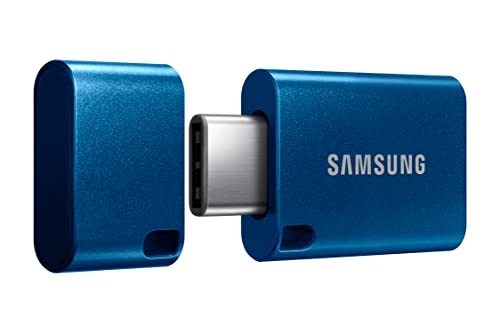
The Samsung Type-C drive is the capacity pick for iPad Pro owners who shoot 4K video and need room for it. At 256GB it holds roughly twice the footage of the 128GB drives here, reads at up to 400MB/s, and plugs straight into the Files app on any USB-C iPad. The tiny blue body is waterproof and barely sticks out of the port, so it stays plugged in during a shoot without snagging on a bag. It is USB-C only, with no USB-A end, so moving files to an older computer needs an adapter.
Specs
- Capacity: 256GB
- Connector: USB-C only
- Interface: USB 3.2 Gen 1
- Read speed: up to 400MB/s
- Model: MUF-256DA/AM
- Design: Waterproof, pocket-sized, blue finish
- Compatibility: USB-C tablets, phones, laptops, and cameras
Best for: An iPad Pro owner who shoots 4K video and needs the largest capacity here.
Watch out for: The listing prints no write speed figure, so a large video transfer may run slower than the 400MB/s read figure suggests; one retailer lists this model as discontinued, so confirm a current seller on the exact listing.
ASIN: B09WB2NL8W
SanDisk iXpand Flash Drive Luxe 128GB

The iXpand Flash Drive Luxe is the bridge drive for a household with one Lightning iPad and one USB-C iPad. One end is Lightning, the other is USB-C, and the all-metal body survives a keyring better than the plastic drives here. It moves files between an iPad, an iPad Pro, and a USB-C Mac without a cable, and the SanDisk app backs up photos and video while it is plugged in. Password protection keeps the contents private when the drive leaves the house.
Specs
- Capacity: 128GB
- Connectors: Lightning and USB-C
- Interface: USB 3.1 Gen 1
- Model: SDIX70N-128G-GN6NE
- Design: All-metal casing, 2-in-1 dual connector
- App: SanDisk Memory Zone app for automatic backup
- Security: Password protection
- Compatibility: iPad Pro, iPhone, USB-C Macs, USB-C Android phones
Best for: A household with one Lightning iPad and one USB-C iPad sharing a single drive.
Watch out for: Speed figures vary by capacity in the records found, with the 64GB listing printing 90MB/s read and write and the 256GB record printing 84MB/s read and 80MB/s write, so confirm the 128GB figure on the exact listing.
ASIN: B08JCX96NC
SanDisk Ultra Dual Drive Luxe USB-C 128GB

The Dual Drive Luxe is the tough version of the Dual Drive Go, built for a drive that lives on a keyring. The all-metal body shrugs off the knocks that crack a plastic shell, and the USB-C plus USB-A pairing covers a USB-C iPad and any computer with a USB port. It reads at up to 400MB/s and writes at 150MB/s, plugs into the Files app with no extra software, and carries the same 128GB as the Go. The metal body costs more than plastic, and it is heavier in a pocket, but it is the pick when durability matters more than weight.
Specs
- Capacity: 128GB
- Connectors: USB-C and USB-A
- Interface: USB 3.2 Gen 1
- Read speed: up to 400MB/s
- Write speed: 150MB/s
- Model: SDDDC4-128G-GAM46
- Design: All-metal casing, 1.75 x 0.48 x 0.34 in, 13.61 g
- Warranty: 5-year limited manufacturer warranty
Best for: A USB-C iPad owner who wants the toughest pocket drive in this guide.
Watch out for: Confirm the GAM46 listing under this ASIN, since the older SDDDC4-128G-G46 model sells under a different ASIN on some marketplaces.
ASIN: B0CLC71G5Y
Which One Fits Your Situation
You own a USB-C iPad and a Windows laptop
Pick the SanDisk Ultra Dual Drive Go. The USB-C end plugs into the iPad and the USB-A end plugs into the laptop, so files move without a cable or an adapter. It reads at up to 400MB/s, opens in the Files app, and the 128GB size covers a normal week of photos. Choose the Dual Drive Luxe instead when the drive will live on a keyring and take daily knocks.
You own a Lightning iPad and want automatic backup
Pick the SanDisk iXpand Flash Drive Go. Plug it in and the SanDisk app copies new photos and video on its own, which is the whole point when the iPad is nearly full and the owner does not want another chore. It only fits Lightning iPads, so a household that already owns a USB-C iPad should look at the Luxe instead.
You shoot 4K video on an iPad Pro
Pick the Samsung Type-C drive. The 256GB capacity holds roughly twice the footage of the 128GB drives here, and the 400MB/s read speed moves a finished clip to a computer quickly. It is USB-C only, so keep an adapter handy for an older computer, and confirm a current seller since one retailer lists this model as discontinued.
You share one drive between two iPads
Pick the SanDisk iXpand Flash Drive Luxe. Its Lightning end fits the older iPad and its USB-C end fits the newer one, so a single drive serves both tablets. The all-metal body survives being passed back and forth, and password protection keeps shared files private. Confirm the 128GB speed figure on the exact listing, since the printed figures vary by capacity.
Common Mistakes
- Buying a Lightning drive for a USB-C iPad, or a USB-C drive for a Lightning iPad, and discovering the plug does not fit.
- Reading one speed figure and assuming it applies in both directions, when write speed is often half the read figure.
- Buying 128GB when the photo library alone is already near 100GB, leaving no room for the next trip.
- Treating a single flash drive as a backup, when the 3-2-1 rule calls for three copies on two kinds of media.
- Skipping the format check, then finding the drive will not write on iPadOS because it arrived formatted NTFS.
Frequently Asked Questions
Do I need an app to use a flash drive on my iPad?
A USB-C iPad running iPadOS 13 or later reads a flash drive directly in the Files app, with no extra software. A Lightning iPad needs the maker app, such as the SanDisk Memory Zone app, because the Files app does not talk to a Lightning drive on its own. Check the iPadOS version on your iPad before buying, since an older version may need the app even on USB-C.
Will a USB-C flash drive work on a Lightning iPad?
No. A USB-C plug does not fit a Lightning port, and no adapter in this guide changes that. A Lightning iPad needs a Lightning drive or a dual-connector drive such as the iXpand Flash Drive Luxe, which carries both plugs. Confirm the port on the exact iPad you own before ordering, since the iPad lineup mixes both ports across generations.
Why does a large video file take so long to copy onto the drive?
Copying onto the drive runs at write speed, which is usually slower than read speed. The SanDisk Dual Drive Go prints up to 400MB/s read but only 150MB/s write, so a 4GB video takes far longer to write than to read back. A drive that prints no write speed is a guess on transfer time, so check both figures on the exact listing.
Can I use a flash drive as my only backup for iPad photos?
No. A flash drive is one copy, and a single copy is not a backup. Follow the 3-2-1 rule: keep three copies of important photos, on two different kinds of media, with one copy away from home. Use the flash drive to free up space on the iPad, then copy the same files to a computer or an external hard drive as well.
More from Amazon
Programs that pair well with the guide above. Offers and eligibility are set by Amazon and may change.
A free business account with business pricing and bulk-buying tools for work, shop or home office.
Create a business accountFree shipping on eligible items, Prime Video and more. Eligible new members can start with a free trial.
Start a Prime free trialAudiobooks and podcasts to listen to on the go. Eligible new members can start with a free trial.
Try Audible freeAd-free music streaming. Eligible new subscribers can start with a free trial.
Try Music Unlimited freeAs an Amazon Associate we earn from qualifying purchases.
Write Your Review
No reviews yet. Be the first to share your experience!