

Key takeaways
- The best external hard drives for TV recording, compared: five USB and desktop drives for DVR duty, ranked by capacity, power and reliability.
A television with a USB recording port turns an ordinary external hard drive into a personal video recorder. Plug the drive into the back of the TV, format it through the on-screen menu, and the set can pause live broadcasts and record a series while you are out. The trick is choosing a drive that suits the way a television actually records, because a TV is a very different host from a laptop.
Televisions record in long, steady streams, often for hours at a time, and many sets only power the USB port while they are switched on. That makes the drive’s power source and capacity far more important than raw transfer speed. The five drives below were chosen specifically for TV recording duty.
As an Amazon Associate, we earn from qualifying purchases.
Quick answer
The WD Elements Portable 2TB is the best all-round drive for TV recording, because it draws power from the TV’s USB port, needs no separate adapter, and holds roughly 200 hours of HD recordings. If your household records heavily, step up to the 5TB Elements instead. For a recorder that stays plugged in all day, the WD My Book 8TB desktop drive is the strongest choice.
WD Elements Portable 2TB

Specs
- 2TB capacity; USB 3.0 interface; bus powered, no external adapter; plug-and-play, no software required; compatible with PC, Mac, PlayStation 4 and Xbox; compact 2.5-inch enclosure.
The WD Elements Portable 2TB is the most straightforward drive for TV recording, and that simplicity is exactly why it leads this guide. It takes all of its power from the television’s USB port, so there is no extra adapter to find a socket for behind the TV stand. You connect one cable, let the television format the drive, and recording starts working from the on-screen guide.
Capacity is the other reason this drive earns the top spot. At 2TB it holds roughly 200 hours of HD recordings, which is enough for a full season of several series plus a shelf of films. If your household records one or two programmes a day, you will go months between clean-outs. Its USB 3.0 connection also moves recordings fast enough that skipping through a recorded programme feels responsive.
One practical note applies to nearly every television: most sets format a recording drive in their own file system, and once formatted for a TV, the drive generally cannot be read by a computer until it is reformatted. Treat this drive as a dedicated recorder rather than a shared backup drive. Also confirm that your television supplies enough power through its USB port, since a small number of older sets have a low-power recording port with specific requirements.
WD Elements Portable 5TB
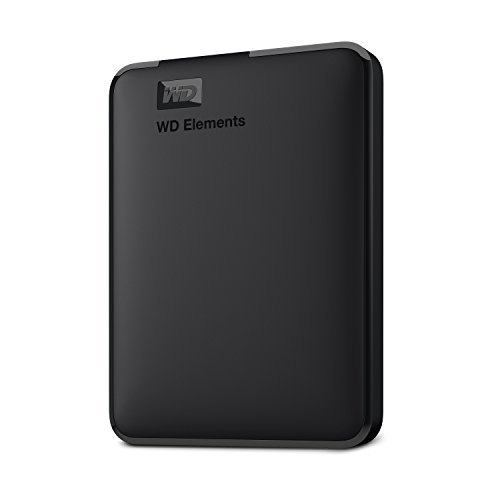
Specs
- 5TB capacity; USB 3.2 Gen 1 interface, backwards compatible with USB 3.0; bus powered, no external adapter; plug-and-play for PC and Mac; compact 2.5-inch enclosure.
The WD Elements Portable 5TB is the same idea as the 2TB model with far more room, and it is the pick for households that record heavily. At roughly 500 hours of HD recording capacity, it absorbs a whole season of sport, nightly news, and several drama series without forcing a regular clear-out. If two or three people in the house each record their own shows, this is the capacity that stops the arguments about whose programmes get deleted to make space.
Because it is bus powered, it keeps the same single-cable setup as its smaller sibling, and most modern sets accept a 5TB recording drive without complaint. A small number of older televisions cap the recording drive size they will format, sometimes at 2TB, so the TV manual is worth a quick check if your set is several years old. The 5TB model also suits a household that records in the highest quality the broadcaster offers, since higher bit-rate recordings fill a drive faster.
If you record every day, buy the capacity once rather than managing a smaller drive every week.
LaCie Rugged USB-C 4TB

Specs
- 4TB capacity; USB-C interface, USB 3.0 compatible; bus powered; drop, shock, dust and rain resistant enclosure; orange protective bumper; for Mac and PC.
The LaCie Rugged USB-C 4TB is the drive for a recording setup that gets knocked around. Its thick orange bumper and sealed enclosure protect it against drops, dust and splashes. A recorder drive often sits on an open shelf where it can be bumped by a vacuum cleaner, a pet, or a child reaching for a game console, and the Rugged is built to survive exactly that kind of everyday accident.
Inside the protective shell is a standard 2.5-inch hard drive with a USB-C connection, so it works with televisions that have a USB-C recording port as well as older sets through a USB-C to USB-A cable. At 4TB it holds roughly 400 hours of HD recordings, which puts it between the two Elements models on capacity and ahead of both on toughness. The drive is bus powered, so it needs no adapter.
There is one trade-off to understand. The rugged casing adds bulk and weight compared with a slim portable drive, so it is less suited to a setup where the drive must hang from the back of a wall-mounted television. For a recorder that sits on a shelf and stays there, though, the extra protection is cheap insurance. If your television is in a busy family room, this is the drive that keeps working after the move.
Seagate Expansion Portable 1TB

Specs
- 1TB capacity; USB 3.0 interface; bus powered, no external adapter; plug-and-play; compatible with PC, Mac, PlayStation 4 and TV; lightweight 2.5-inch enclosure.
The Seagate Expansion Portable 1TB is the budget pick, and it is the right choice when recording needs are modest. At roughly 100 hours of HD recording capacity, it covers a weekly series, a few films, and the occasional sporting event, as long as you are willing to delete watched programmes rather than hoard them. For a second television in a bedroom, or a household that records only a handful of shows a week, 1TB is genuinely enough.
Its strength is simplicity. The drive is bus powered, it formats through the television menu like any other recording drive, and it is small and light enough to tuck behind the set. Seagate’s Expansion line is one of the longest-running portable drive families, and the 1TB model keeps the cost of a dedicated TV recorder low. If you are buying your first recording drive and are not sure how much you will record, this is the low-risk way to find out.
The limitation is obvious: capacity. A household that records daily will fill 1TB within a few weeks, and the television will start deleting the oldest recordings to make room. That is manageable if you watch and delete promptly, but frustrating if you like to keep a library. Buy this drive when recording is occasional. If you already know you record every day, the 2TB or 5TB Elements models above are the better spend.
WD My Book 8TB

Specs
- 8TB capacity; USB 3.0 interface; external power adapter included; desktop enclosure; password protection and auto backup software included; for PC and Mac.
The WD My Book 8TB is the desktop-powered pick, and it is the strongest choice for a recorder that never moves. Unlike the portable drives above, it has its own power adapter, so it does not depend on the television’s USB port for power. A television that cuts USB power in standby will not interrupt the drive, and a desktop drive is designed to sit powered on for long stretches, which matches a household where the television records through the day.
At 8TB it holds roughly 800 hours of HD recordings, which is enough for a serious archive: whole series kept from first episode to last, a film library, and months of sport without ever thinking about space. The My Book is also the drive to choose when the household records in the highest quality available, since the extra capacity absorbs the higher bit rates without complaint.
The trade-off is that it needs a power socket and a permanent spot on the shelf. It is not a drive you move between rooms, and it is overkill for a bedroom television that records a couple of shows a week. For the main living-room set, though, where the recorder runs all day and the library keeps growing, the My Book is the pick that ends the capacity question entirely.
How to choose
Start with the television, not the drive. Check the TV manual for its USB recording rules: which USB port supports recording, the maximum drive size it will format, and whether the port supplies enough power for a bus-powered drive. A few older sets only accept drives up to 2TB. Five minutes with the manual prevents the most common disappointment, which is a drive the television refuses to use.
Next, match capacity to how much you record. A rough rule is about 100 hours of HD recording per terabyte, so count the weekly hours your household records and multiply by how long you want to keep them. One hundred hours a week of recordings needs at least 2TB to hold a month, and a household that keeps whole series will want 5TB or more. Buy the capacity once rather than managing a small drive every weekend.
Then decide on power. A bus-powered portable drive is the neatest option for most televisions, since it needs only one cable. A desktop-powered drive is better when the television cuts USB power in standby, or when the recorder must stay ready around the clock. If the drive will sit in a busy room, a rugged enclosure is worth the extra bulk. Finally, remember that a drive formatted for TV recording generally cannot be read by a computer, so keep computer backups on a separate drive.
Who should skip
Skip a dedicated TV recording drive entirely if your television has no USB recording port. Many smart TVs can play media from a USB drive but cannot record to one, and no external drive will add that feature. Check for a port labelled for recording or a recording option in the TV menu before you spend anything.
Also skip the larger drives if you record only occasionally. A 5TB or 8TB drive is wasted on a household that records two shows a week. The 1TB Seagate covers light use comfortably. On the other hand, skip the 1TB drive if you record daily or keep whole series, because you will be deleting programmes constantly. Finally, skip a portable drive if your television is wall-mounted with no shelf, since a hanging drive puts strain on the USB port; a desktop drive on a nearby stand is the safer arrangement.
Frequently Asked Questions
How many hours of TV can a 1TB external hard drive record?
Roughly 100 hours of HD recordings per terabyte is a useful rule of thumb, so a 1TB drive holds around 100 hours of HD. Standard-definition recordings take less space and stretch further, while the highest-quality HD broadcasts fill a drive faster.
Can I use the same external hard drive for TV recording and computer backup?
Not at the same time. A television formats the drive in its own file system for recording, and a computer generally cannot read that format until the drive is reformatted, which erases the recordings. Keep one drive for the television and a separate drive for computer backups.
Does a TV recording drive need its own power adapter?
Most televisions power a portable drive through the USB port, so no adapter is needed. Desktop drives like the WD My Book have their own adapter and stay powered independently, which suits a recorder that must be ready at all hours. Check whether your TV cuts USB power in standby before deciding.
Why does my TV not recognise my external hard drive?
The most common reasons are a drive larger than the TV’s supported size, a USB port that does not support recording, or a drive that needs formatting through the TV menu first. Try the port marked for recording, format the drive from the TV settings, and check the manual for any size limit.
Final verdict
For most households, the WD Elements Portable 2TB is the best external hard drive for TV recording. It is bus powered, simple to set up, and holds enough recordings for months of normal viewing. Heavy recorders should take the 5TB Elements for the extra headroom, and a busy family room will appreciate the LaCie Rugged’s protection. The Seagate Expansion 1TB is the sensible budget start for light recording, while the WD My Book 8TB is the pick for a main television that records all day and keeps a large library. Confirm the TV’s recording requirements first, and whichever drive you choose will quietly do its job for years.
Product and ASIN Reference
| Product | ASIN |
|---|---|
| WD Elements Portable 2TB | B06W55K9N6 |
| WD Elements Portable 5TB | B07X41PWTY |
| LaCie Rugged USB-C 4TB | B01MSSJ32J |
| Seagate Expansion Portable 1TB | B00TKFEEAS |
| WD My Book 8TB | B01LQQHLGC |
More from Amazon
Programs that pair well with the guide above. Offers and eligibility are set by Amazon and may change.
A free business account with business pricing and bulk-buying tools for work, shop or home office.
Create a business accountFree shipping on eligible items, Prime Video and more. Eligible new members can start with a free trial.
Start a Prime free trialAudiobooks and podcasts to listen to on the go. Eligible new members can start with a free trial.
Try Audible freeAd-free music streaming. Eligible new subscribers can start with a free trial.
Try Music Unlimited freeAs an Amazon Associate we earn from qualifying purchases.

Write Your Review
No reviews yet. Be the first to share your experience!